Next.js: DeprecationWarning: Tapable.plugin is deprecated. Use new API on `.hooks` instead
Bug report
Describe the bug
I recently eject react-scripts and install nextjs to use it with React and when I run npm run dev I see the Tapable.plugin is deprecated webpack bug.
I don't know if is a create-react-app bug or a nextjs bug.
Screenshots
If applicable, add screenshots to help explain your problem.
System information
- OS:
Linux debian 3.16.0-6-amd64 #1 SMP Debian 3.16.57-2 (2018-07-14) x86_64 GNU/Linux - Browser:
none - Version of Next:
7.0.0
- Webpack version: 4.20.2
Additional context
> next

(node:535) DeprecationWarning: Tapable.plugin is deprecated. Use new API on `.hooks` instead
[hardsource:e5a00840] Using 1 MB of disk space.
WebpackOptionsValidationError: Invalid configuration object. Webpack has been initialised using a configuration object that does not match the API schema.
 - configuration has an unknown property 'mode'. These properties are valid:
   object { amd?, bail?, cache?, context?, dependencies?, devServer?, devtool?, entry, externals?, loader?, module?, name?, node?, output?, parallelism?, performance?, plugins?, profile?, recordsInputPath?, recordsOutputPath?, recordsPath?, resolve?, resolveLoader?, stats?, target?, watch?, watchOptions? }
   For typos: please correct them.
   For loader options: webpack 2 no longer allows custom properties in configuration.
     Loaders should be updated to allow passing options via loader options in module.rules.
     Until loaders are updated one can use the LoaderOptionsPlugin to pass these options to the loader:
     plugins: [
       new webpack.LoaderOptionsPlugin({
         // test: /\.xxx$/, // may apply this only for some modules
         options: {
           mode: ...
         }
       })
     ]
    at webpack (/home/paneladm/projects/website/node_modules/webpack/lib/webpack.js:19:9)
    at /home/paneladm/projects/website/node_modules/autodll-webpack-plugin/lib/plugin.js:145:40
    at /home/paneladm/projects/website/node_modules/autodll-webpack-plugin/lib/createCompileIfNeeded.js:50:7
    at new Promise (<anonymous>)
    at /home/paneladm/projects/website/node_modules/autodll-webpack-plugin/lib/createCompileIfNeeded.js:49:12
    at <anonymous>
[hardsource:e5a00840] Tracking node dependencies with: package-lock.json, yarn.lock.
[hardsource:e5a00840] Reading from cache e5a00840...
✔ success server compiled in 167ms
paneladm@debian:~/projects/website$
 francisrod01
All 15 comments
Next.js doesn't use the old .plugin method, maybe you have some custom webpack plugin in next.config.js that is only compatible with webpack 3.
 timneutkens
on 27 Sep 2018
timneutkens
on 27 Sep 2018
@timneutkens I install next.js yesterday, so if I had old plugin method, it's in next.js libraries, not my project.
- I don't have a
next.config.jsfile.
francisrod01
on 27 Sep 2018
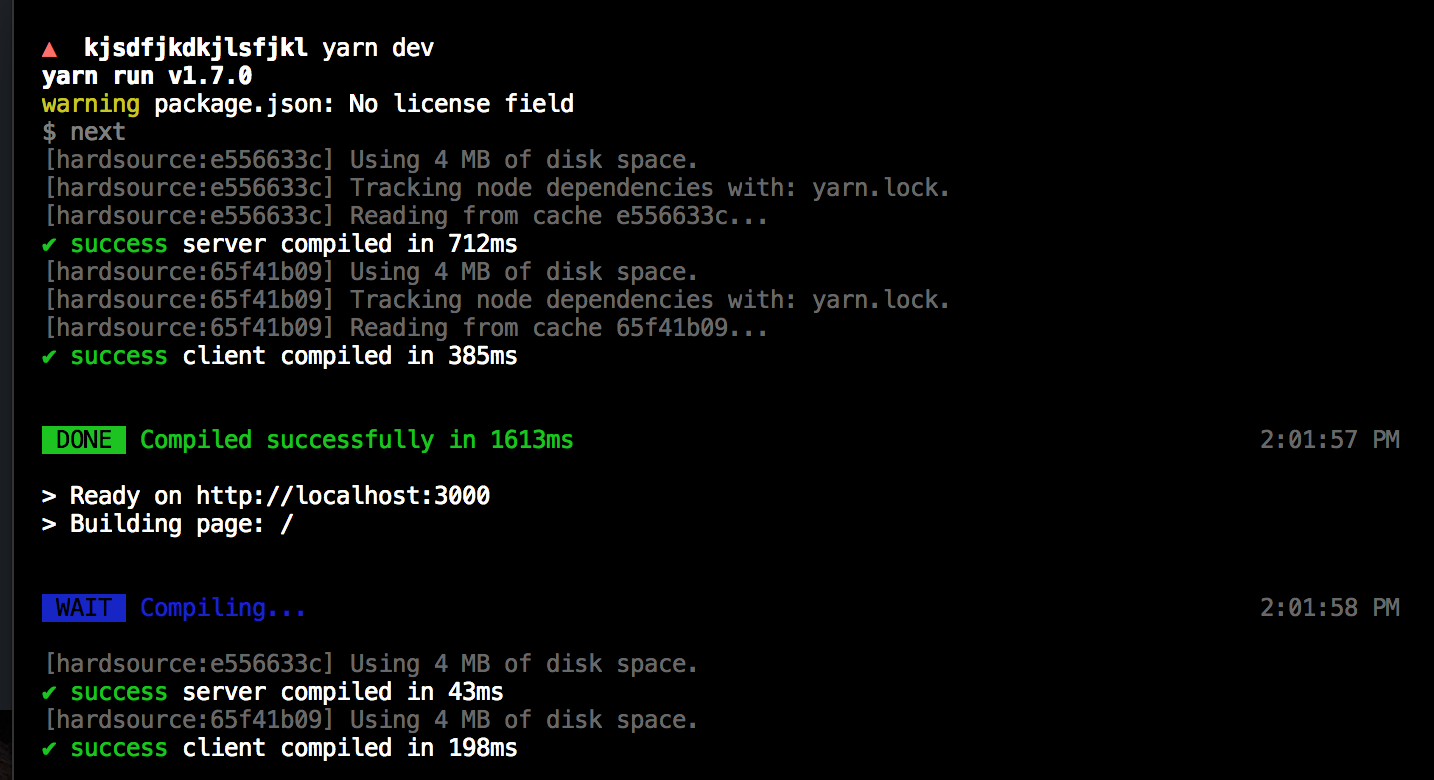
As you can see there are no warnings.
timneutkens
on 27 Sep 2018
I have next.config.js
// next.config.js
const withPreact = require('@zeit/next-preact')
module.exports = withPreact()
from https://github.com/zeit/next-plugins/tree/master/packages/next-preact
@timneutkens how do i fix it?
 Stas-Buzunko
on 27 Sep 2018
Stas-Buzunko
on 27 Sep 2018
next-preact doesn't implement any plugins, it just implements the webpack alias option.
timneutkens
on 27 Sep 2018
@timneutkens but that's all i have
i had fully working preact project
added next.js / zeit/next-preact / next.config.js / server.js / pages folder
and now i get this error when i run next
Stas-Buzunko
on 27 Sep 2018
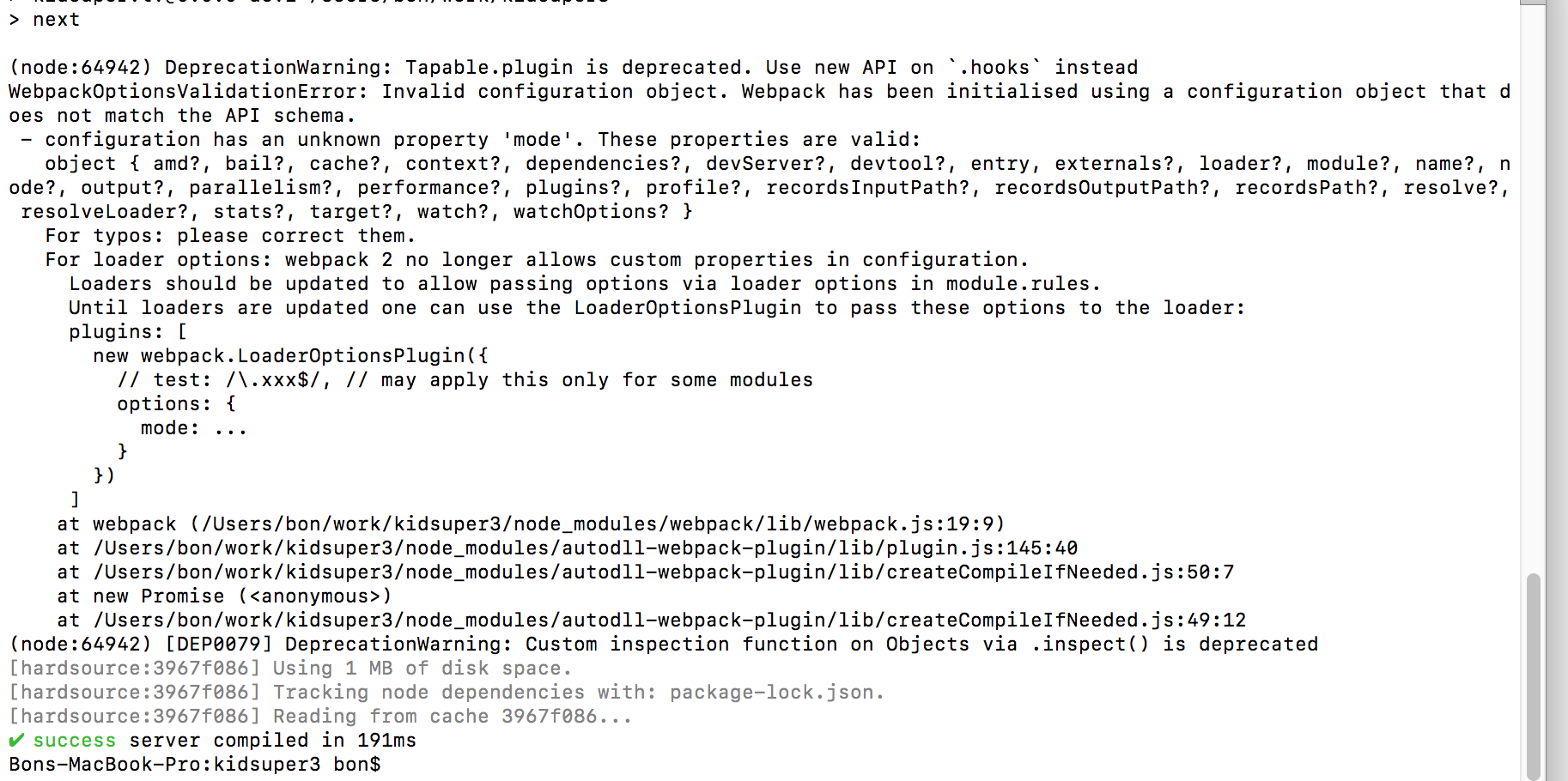
Stas-Buzunko
on 27 Sep 2018
here is my server.js as shown in next-preact docs
// server.js
require('@zeit/next-preact/alias')()
const { createServer } = require('http')
const next = require('next')


const app = next({ dev: process.env.NODE_ENV !== 'production' })
const port = process.env.PORT || 3000
const handle = app.getRequestHandler()

app.prepare()
.then(() => {
  createServer(handle)
  .listen(port, () => {
    console.log(`> Ready on http://localhost:${port}`)
  })
})
I've even deleted server.js and next.config.js and still get this error
Stas-Buzunko
on 27 Sep 2018
fixed by deleting node_modules and package-lock and reinstalling modules
Stas-Buzunko
on 27 Sep 2018
It actually sounds a lot like you had webpack 3 installed for some reason, as it says mode is not a property on the config.
timneutkens
on 27 Sep 2018
@timneutkens and what version of webpack is needed in fact? Reinstalling packages doesn't work 4 me.
In fact I have webpack v3.11.0 and looks like I can't upgrade it now due to some project dependencies.
I see now, it works fine with 4.20.2
 egemon
on 2 Oct 2018
egemon
on 2 Oct 2018
You shouldn't be installing webpack in a Next.js project, as it's a dependency of Next.js.
timneutkens
on 2 Oct 2018
Correction: After upgrading to 7.0.1 from 6.1.1 the @zeit/next-css that did not update to the latest build 1.0.1 which caused the issue. Maybe add step/note to upgrade docs or try and fix if possible.
 mtannerfors
on 4 Oct 2018
mtannerfors
on 4 Oct 2018
The above from @mtannerfors caught me too. Thanks!
 mrobinson537
on 24 Nov 2018
mrobinson537
on 24 Nov 2018
Related issues
 jesselee34
·
3Comments
jesselee34
·
3Comments
 knipferrc
·
3Comments
knipferrc
·
3Comments
 YarivGilad
·
3Comments
YarivGilad
·
3Comments
 olifante
·
3Comments
olifante
·
3Comments
 irrigator
·
3Comments
irrigator
·
3Comments
Most helpful comment
You shouldn't be installing webpack in a Next.js project, as it's a dependency of Next.js.