Next-auth: Prisma Adapter: Unknown arg `user` in data.user for type SessionCreateInput
Describe the bug
Got PrismaClientValidationError when I click the login link in the email.
To Reproduce
- version:
3.0.0-beta.20 - provider: Email
- adapter: Prisma
- database: postgres
- sql schemas: https://next-auth-docs-git-v3.iaincollins.vercel.app/schemas/postgres
Screenshots or error logs
[next-auth][error][callback_email_error] PrismaClientValidationError:
Invalid `prisma[Session].create()` invocation in
/{APP_ROOT}/node_modules/next-auth/dist/adapters/prisma/index.js:294:36

  290   dateExpires.setTime(dateExpires.getTime() + sessionMaxAge);
  291   expires = dateExpires.toISOString();
  292 }
  293
→ 294 return prisma[Session].create({
        data: {
          expires: '2020-08-24T07:24:07.532Z',
          user: {
          ~~~~
            connect: {
              id: 1
            }
          },
      +   userId: Int,
      +   sessionToken: String,
      +   accessToken: String,
      ?   createdAt?: DateTime,
      ?   updatedAt?: DateTime
        }
      })

Unknown arg `user` in data.user for type SessionCreateInput. Did you mean `userId`?
Argument userId for data.userId is missing.
Argument sessionToken for data.sessionToken is missing.
Argument accessToken for data.accessToken is missing.

Note: Lines with + are required, lines with ? are optional.
Additional context
dist and src looks different.
3.0.0-beta.20 dist:
/node_modules/next-auth/dist/adapters/prisma/index.js L294-L303:
            return prisma[Session].create({
              data: {
                expires,
                [User]: {
                  connect: {
                    id: user.id
                  }
                }
              }
            });
Documentation feedback
Documentation refers to searching through online documentation, code comments and issue history. The example project refers to next-auth-example.
- [x] Found the documentation helpful
- [x] Found documentation but was incomplete
- [ ] Could not find relevant documentation
- [ ] Found the example project helpful
- [ ] Did not find the example project helpful
 firede
All 6 comments
@firede Thanks for a great bug report! I really appreciate it when they are this good.
Yikes! It looks like that last beta build was screwy!
I've just fixed that by rebuilding and releasing a new update, if you update to 3.0.0-beta.21 the issue should be resolved!
Not sure why/how this happened. The release process for beta builds isn't automated yet (something we should look at) and somehow the dist dir had a stale version of this file, which should never happen as the built step is triggered pre-publish. o.O
 iaincollins
on 25 Jul 2020
iaincollins
on 25 Jul 2020
Let me know if you have any problems with it!
iaincollins
on 25 Jul 2020
Thanks, it works! 👍

...but email_verified field is empty, not sure if it is a bug or by design.
firede
on 25 Jul 2020
Thanks for the feedback!
RE: email_verified - it's by design, I think we need to document that somewhere!
The email_verified is only updated when a user verifies by signing in with email (if the email provider is configured), when they do it records the timestamp of when it was verified. You can also use this column if you have your own email verification system. Currently there is no way to trigger a 'verify your address' messages, so it is only populated when singing in via email.
Some providers (e.g. Google) do return a a similar value, but it varies a lot between providers so we don't use OAuth provider provided details for this.
iaincollins
on 25 Jul 2020
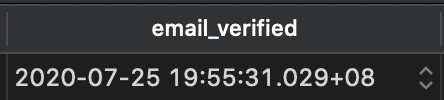
When I using email provider, input email address, click the Sign in link in the email, email_verified is NULL, but actually the email has been verified 🤔
Now it's ran to:
When I sign out and sign in again, email_verified updated:
firede
on 25 Jul 2020
Thanks for the report! I've published a quick hotfix that should address this (3.0.0-beta.22).
I haven't had time to test it, but will do later.
iaincollins
on 25 Jul 2020
Related issues
 bscaspar
·
3Comments
bscaspar
·
3Comments
 jimmiejackson414
·
3Comments
iaincollins
·
3Comments
jimmiejackson414
·
3Comments
iaincollins
·
3Comments
 MelMacaluso
·
3Comments
MelMacaluso
·
3Comments
 benoror
·
3Comments
benoror
·
3Comments