Next-auth: Using custom provider (Microsoft/MS Graph) - Error: Missing or invalid provider account
Great library and docs!
I've been trying to add a custom provider (https://docs.microsoft.com/en-us/graph/auth-v2-user) and have been successful to the point of acquiring a auth code and profile information. However, after the logging in, I get this error:
[next-auth][error][OAUTH_CALLBACK_HANDLER_ERROR] [ Error: Missing or invalid provider account]
My [...nextauth].js config is
site: process.env.SITE || 'http://localhost:3000',
providers: [
{
id: 'msal',
name: 'xxx',
type: 'oauth',
version: '2.0',
scope: 'https://graph.microsoft.com/user.read',
params: { grant_type: 'authorization_code' },
accessTokenUrl: 'https://login.microsoftonline.com/xxx/oauth2/v2.0/token',
requestTokenUrl: 'https://login.microsoftonline.com/xxx/oauth2/v2.0/authorize',
authorizationUrl: 'https://login.microsoftonline.com/xxx/oauth2/v2.0/authorize?response_type=code',
profileUrl: 'https://graph.microsoft.com/oidc/userinfo',
profile: (profile) => {
console.log(profile)
return {
id: profile.id,
name: profile.name,
email: profile.email,
image: profile.picture
}
},
clientId: process.env.MS_CLIENT_ID,
clientSecret: process.env.MS_CLIENT_SECRET
}
],
The console.log that is there returns successfully.
Am I missing anything? or is there anywhere else I'd need to add provider information?
I've had a look at the other providers that are built-in and couldn't see any additional config.
Appreciate any direction :)
- [X] Found the documentation helpful
- [ ] Found documentation but was incomplete
- [ ] Could not find relevant documentation
- [X] Found the example project helpful
- [ ] Did not find the example project helpful
 ronaldh46
All 22 comments
Hi @ronaldh46 this actually looks like a well configured provider!
I would check the provider callback URL is configured correctly. The id property of the provider is used for them.
e.g. I would expect it to be http://localhost:3000/api/auth/callback/msal in this case.
The endpoint http://localhost:3000/api/auth/providers should list all configured providers with callback URLs.
Let me know if that doesn't help!
 iaincollins
on 14 Jul 2020
iaincollins
on 14 Jul 2020
Thanks for quick reply!
Yes, it is configured correctly. I can confirm it says:
"callbackUrl": "http://localhost:3000/api/auth/callback/msal"
The full error is:
[next-auth][error][OAUTH_CALLBACK_HANDLER_ERROR] [ Error: Missing or invalid provider account
at .../node_modules/next-auth/dist/server/lib/callback-handler.js:32:1
at Generator.next (
at asyncGeneratorStep (/...node_modules/next-auth/dist/server/lib/callback-handler.js:20:103)
at _next (.../node_modules/next-auth/dist/server/lib/callback-handler.js:22:194)
at .../node_modules/next-auth/dist/server/lib/callback-handler.js:22:364
at new Promise (
at .../node_modules/next-auth/dist/server/lib/callback-handler.js:22:97
at .../node_modules/next-auth/dist/server/lib/callback-handler.js:185:17
at .../node_modules/next-auth/dist/server/routes/callback.js:91:54
at Generator.next (
at asyncGeneratorStep (.../node_modules/next-auth/dist/server/routes/callback.js:26:103)
at _next (.../node_modules/next-auth/dist/server/routes/callback.js:28:194)
at process._tickCallback (internal/process/next_tick.js:68:7) ]
Do I need add anything to the options to handle the callback?
(as a side note, for anyone using this with MS, I had a compact token error - due having additional claims in the token - roles/groups, got me one step closer!)
ronaldh46
on 14 Jul 2020
I've also been fighting through this. I'm using Azure B2C and not MSAL but this may be a similar problem - check your console.log(profile) token properties actually line up with what you're trying to extract.
For instance, you may need to access profile.oid instead of profile.id, there may not be a profile.email property at all, etc...
I had this same issue, and removing/fixing the incorrect properties resolved it.
 BenjaminWFox-Lumedic
on 16 Jul 2020
BenjaminWFox-Lumedic
on 16 Jul 2020
@BenjaminWFox-Lumedic Thanks! That worked!
It successfully signs in and checking the callbacks, returns the correct profile info and token. It successfully authenticates and redirects.
However...when I try to use useSession or 'getSession' (accessing 'http://localhost:3000/api/auth/session), it continues to return
{
"user": {
"name": null,
"email": null,
"image": null
},
"expires": "2020-08-15T02:40:48.226Z"
}`
Did you encounter this as well?
ronaldh46
on 16 Jul 2020
Thank you both! Sounds like we have some work to do here on the error handling, in both cases.
I'll see what we can do there. It shouldn't be null without some sort of warning.
If you are not already, using the debug: true option should hopefully that should shed some light on what is going on.
I'll see if we can add some more debug statements around the sign in flow to make it easier to debug creating new providers.
iaincollins
on 16 Jul 2020
@ronaldh46 Nice! Thanks for posting your original question too, your note on the console.log pointed me in the right direction.
Regarding your profile object, those are null because (I'm assuming) they aren't mapped in the next-auth profile method. They also may not be returned at all by MSAL depending on how your App Registration/Graph calls are set up.
I can't provide implementation specifics because my scenario is a little different (Azure B2C vs MSAL), but from the link you provided, in order to populate those fields you'll have to map the information you receive from the graph API. And note that you can return properties mapped however you like, which from their sample payload might look something like this:
profile: (profile) => {
console.log(profile)
return {
id: profile.id,
fName: profile.givenName,
lName: profile.surname,
email: profile. userPrincipalName,
name: `${profile.givenName} ${profile.surname}`,
}
},
@ronaldh46 One other note since I just discovered something else I did wrong - if you have the jwt set in callbacks and _are not returning + resolving the token_ your session details will be undefined.
callbacks: {
jwt: async (token) => {
console.log('CALLBACK: jwt', token)
return Promise.resolve(token)
},
},
@BenjaminWFox-Lumedic Thank you for spotting these!
This is great feedback for things we should probably spot internally and generate helpful warnings as I think the callbacks are confusing and don't have great examples of how to use them yet.
(Of course, they are clear in my head as I wrote them that way, but it's hard to try and work out how other folks perceive them and to also think about how else it would work that might be more accessible, I appreciate the whole approach might seem bananas to someone else.)
iaincollins
on 17 Jul 2020
@iaincollins If it makes you feel better the documentation of the callbacks is not bad at all. More examples/use cases are always rad of course, but you probably have more than enough other things to work on!
The real problem was that I didn't scroll the page and stopped reading after the first note to actually know how the requirements, so not realizing a return/resolution was required 🤦♂️ so was just console.logging to see the passed arguemnt values.
callbacks: {
signin: async (profile, account, metadata) => { },
redirect: async (url, baseUrl) => { },
session: async (session, token) => { },
jwt: async (token, oAuthProfile) => { }
}
@BenjaminWFox-Lumedic Thanks, that's a good spot! I will fix that across the docs.
I use both async and Promise.resolve() even though both are not required in the examples just to really spell out that the function is fine with promises and you can do async things in them - like connect to a database - in case it's not obvious.
I'm very much of the view that the examples should be as clear as possible and not including the returns in that example is confusing!
iaincollins
on 17 Jul 2020
Thanks for all the advice guys!
It is something specific with this particular provider (MS OAuth) which I am still trying to figure out...
The setup works perfectly with others, like Spotify etc - this is a great library!
With debug turned on, I get exactly the same OAUTH_CALLBACK_RESPONSE object from either provider after sign in (obvs with each provider's values to those keys).
@BenjaminWFox-Lumedic I had been mapping/resolving the profile which works perfectly.
profile: (profile) => {
return {
id: profile.id,
name: profile.displayName,
email: profile.mail,
image: 'https://graph.microsoft.com/v1.0/me/photo/$value'
}
}
The only thing that I noticed that was different between the two came when I was testing the JWT callback.
On login, the Spotify provider would return both the token and profile, then just the token in quick succession when the page is redirected to the app (profile undefined as expected - as per the docs), but MS provider would return both the token and profile once, and no subsequent token on redirection.
I figure this is probably the cause...but haven't been able to figure out where it is failing (all the debugs look right to me).
If you had any ideas let me know - I will keep at it and let you know if I find something!
ronaldh46
on 20 Jul 2020
@iaincollins
This is great! I ran across this issue today creating a custom provider
{
profile: { name: ' ', email: null, image: undefined },
account: {
provider: 'bluebutton-gov',
type: 'oauth',
id: undefined,
refreshToken: 'ajnvY6SlNJn2VRGrdh3QhJfrZ6JME1',
accessToken: 'w6ehZzsroOwSuxWp1TTBxS1K6Af5',
accessTokenExpires: null
},
OAuthProfile: {
sub: '-20140000004807',
name: ' ',
given_name: '',
family_name: '',
email: '',
iat: '2019-12-26T21:39:15.894Z',
patient: '-20140000004807'
}
}
I used the sub instead of profile.id;
@ronaldh46
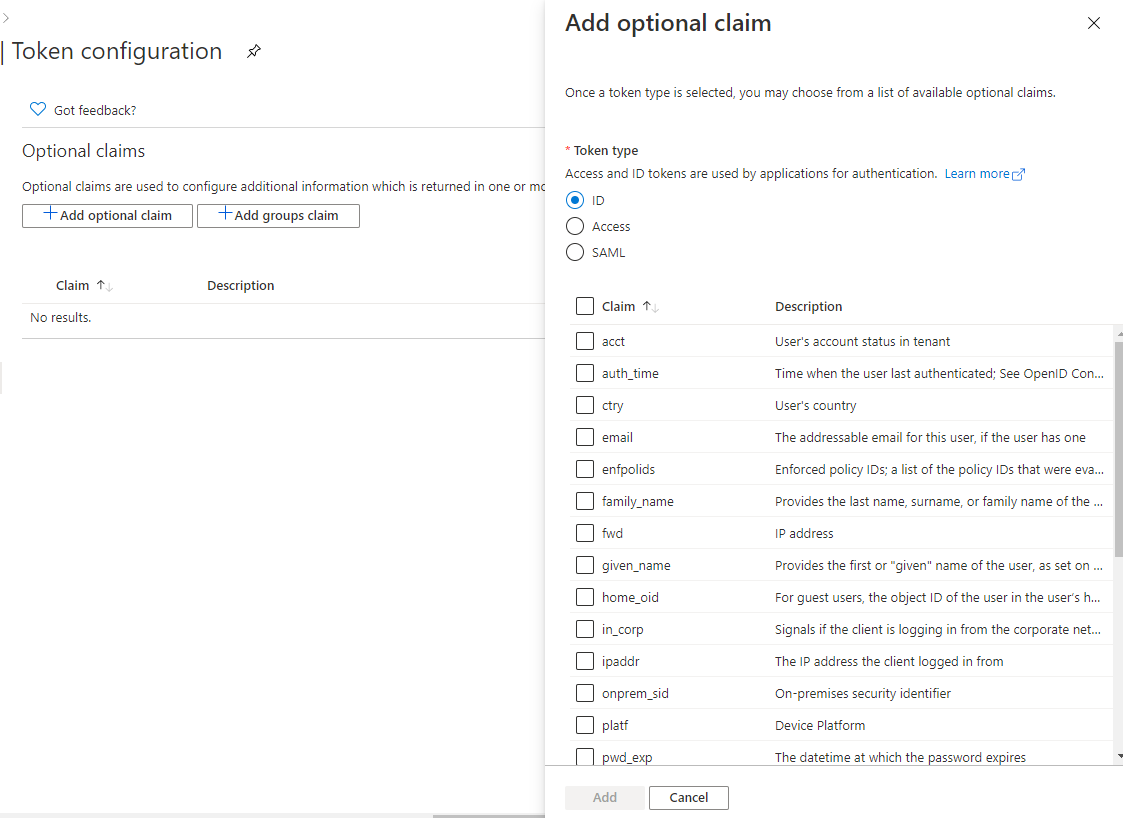
I actually wanted to create a graph provider the one thing I would look at as well: (Check the token configuration )
AzureAD -> App registrations-> (Your App) -> Token configuration
 geraldnolan
on 31 Jul 2020
geraldnolan
on 31 Jul 2020
Thanks for the help guys! :)
Just updated to the latest 3.1 version and looks like it's working!
ronaldh46
on 7 Aug 2020
@ronaldh46 I'm facing the same problem as you described in the first post! How did you manage to fix it?
(as a side note, for anyone using this with MS, I had a compact token error - due having additional claims in the token - roles/groups, got me one step closer!)
What is the compact token error and how did you fix it? Just wondering because this might be an error i have duplicated as well, although I'm not sure
My [...nextauth.js] file is:
const options = {
providers: [
{
id: 'azure',
name: 'Azure AD',
type: 'oauth',
version: '2.0',
debug: true,
scope: 'https://graph.microsoft.com/.default',
params: {
grant_type: 'authorization_code',
},
accessTokenUrl: 'https://login.microsoftonline.com/tenant/oauth2/v2.0/token',
authorizationUrl: 'https://login.microsoftonline.com/tenant/oauth2/v2.0/authorize?response_type=code',
profileUrl: 'https://graph.microsoft.com/oidc/userinfo',
profile: (profile) => {
console.log(profile)
console.log(profile['id'])
return {
name: profile['id'],
email: profile['email'],
}
},
clientId: process.env.OAUTH_APP_ID,
clientSecret: process.env.OAUTH_APP_PASSWORD,
state: false,
},
]
}
export default (req, res) => NextAuth(req, res, options)
I dont have any custom token configurations set up on AD
 yjaju
on 17 Oct 2020
yjaju
on 17 Oct 2020
@yjaju The compact token error I got looked like it was due to having additional claims on the token. In Azure App Registrations, under Token Configuration, I had added additional Optional Claims. When I removed those, that particular error went away.
Is your console.log(profile) returning anything?
ronaldh46
on 18 Oct 2020
@ronaldh46 thanks for the insights!
My console.log(profile) returns an object like:
{
sub: 'sub_value',
name: 'Test User',
family_name: 'User',
given_name: 'Test',
picture: 'https://graph.microsoft.com/v1.0/me/photo/$value',
email: '[email protected]'
}
Just checked -- I don't have any optional or group claims configured under token configurations
My http://localhost:3000/api/auth/providers returns:
{"azure":{"id":"azure","name":"Azure AD","type":"oauth","signinUrl":"http://localhost:3000/api/auth/signin/azure","callbackUrl":"http://localhost:3000/api/auth/callback/azure"}}
My http://localhost:3000/api/auth/session returns:
{}
Attached my error trace in the console below (The error is the same that you faced, but the stack is a little different) :
[next-auth][error][oauth_callback_handler_error] Error: Missing or invalid provider account
at C:\Users\yashv\OneDrive\Desktop\webdev\zastra\node_modulesnext-auth\dist\server\lib\callback-handler.js:32:15
at Generator.next (
at asyncGeneratorStep (C:\Users\yashv\OneDrive\Desktop\webdev\zastra\node_modulesnext-auth\dist\server\lib\callback-handler.js:20:103)
at _next (C:\Users\yashv\OneDrive\Desktop\webdev\zastra\node_modulesnext-auth\dist\server\lib\callback-handler.js:22:194)
at C:\Users\yashv\OneDrive\Desktop\webdev\zastra\node_modulesnext-auth\dist\server\lib\callback-handler.js:22:364
at new Promise (
at C:\Users\yashv\OneDrive\Desktop\webdev\zastra\node_modulesnext-auth\dist\server\lib\callback-handler.js:22:97
at C:\Users\yashv\OneDrive\Desktop\webdev\zastra\node_modulesnext-auth\dist\server\lib\callback-handler.js:185:17
at C:\Users\yashv\OneDrive\Desktop\webdev\zastra\node_modulesnext-auth\dist\server\routes\callback.js:108:54
at Generator.next (
at asyncGeneratorStep (C:\Users\yashv\OneDrive\Desktop\webdev\zastra\node_modulesnext-auth\dist\server\routes\callback.js:26:103)
at _next (C:\Users\yashv\OneDrive\Desktop\webdev\zastra\node_modulesnext-auth\dist\server\routes\callback.js:28:194)
at processTicksAndRejections (internal/process/task_queues.js:97:5)
https://next-auth.js.org/errors#oauth_callback_handler_error
yjaju
on 18 Oct 2020
@yjaju It looks like you're getting that error because that object that is being returned is missing an id key?
ronaldh46
on 18 Oct 2020
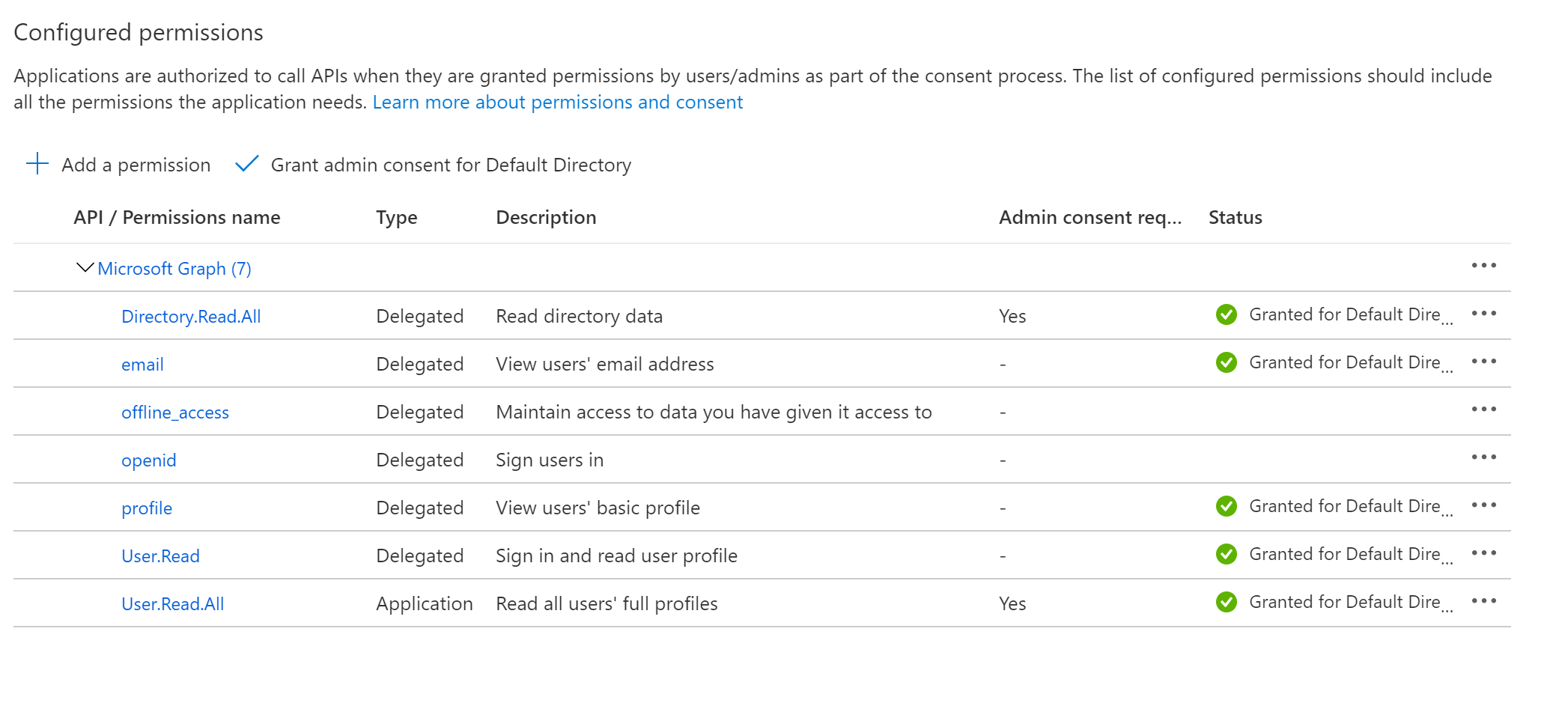
@ronaldh46 Ah, I see! How do I ensure the object returns an id key?
The scope I've specified is 'https://graph.microsoft.com/.default', and the API Permissions are:
Update:
Fixed the issue by changing profileUrl to https://graph.microsoft.com/v1.0/me/
yjaju
on 18 Oct 2020
Thanks everyone for the helpful thread. My successful implementation is:
In [...nextauth.js] file:
import NextAuth from 'next-auth';

const options = {
  providers: [
    {
      id: 'msal',
      name: 'Microsoft Login',
      type: 'oauth',
      version: '2.0',
      scope: 'https://graph.microsoft.com/user.read',
      params: { grant_type: 'authorization_code' },
      accessTokenUrl: process.env.MSAL_TOKEN_ACCESS,
      requestTokenUrl: process.env.MSAL_TOKEN_REQUEST,
      authorizationUrl: process.env.MSAL_TOKEN_AUTHORIZE,
      profileUrl: 'https://graph.microsoft.com/v1.0/me/',
      profile: profile => {
        console.log(profile);
        return {
          id: profile.id,
          name: profile.displayName,
          last_name: profile.surname,
          first_name: profile.givenName,
          email: profile.mail,
        };
      },
      clientId: process.env.APPLICATION_ID,
      clientSecret: process.env.AUTH_SECRET,
    },
  ],
};

export default (req, res) => NextAuth(req, res, options);
Then be sure to add the proper redirect URIs into the App Registration on the Active Directory:
http:// localhost:3000/api/auth/signin/msal
http:// localhost:3000/api/auth/callback/msal
Thanks for putting together this awesome pkg.
 BrendyRyan
on 27 Oct 2020
BrendyRyan
on 27 Oct 2020
@iaincollins This provider is working. I think it can be added to the lib. Just sayin'
 italodeandra
on 12 Nov 2020
italodeandra
on 12 Nov 2020
Has anyone had any luck extracting user roles from the response here? I have roles assigned but cannot seem to get them.
BrendyRyan
on 29 Nov 2020
@BrendyRyan I ended up using callbacks and decoding the jwt to get the roles. This way it first adds it to the token and then to the session so it is accessible on frontend. (I also needed accesstoken so it is done same way)
callbacks: {
     session: async (session: any, user: any) => {
       session.accessToken = user.accessToken;
       session.roles = user.roles;
       session.upn = user.upn
       return Promise.resolve(session)
     },
    jwt: async (token, user, account, profile, isNewUser) => {
        const isSignIn = (user) ? true : false
        if (isSignIn) {
            token.accessToken = account.accessToken;

            const decoded: any = jwt_decode(token.accessToken)
            token.roles = decoded.roles
            token.upn = decoded.upn
        }

        return Promise.resolve(token)
    }
  }
 tesharp
on 21 Dec 2020
tesharp
on 21 Dec 2020
Related issues
iaincollins
·
3Comments
iaincollins
·
3Comments
 loonskai
·
3Comments
loonskai
·
3Comments
 dmi3y
·
3Comments
dmi3y
·
3Comments
 ryanditjia
·
3Comments
ryanditjia
·
3Comments
Most helpful comment
Thanks everyone for the helpful thread. My successful implementation is:
In
[...nextauth.js]file:Then be sure to add the proper redirect URIs into the App Registration on the Active Directory:
http:// localhost:3000/api/auth/signin/msal
http:// localhost:3000/api/auth/callback/msal
Thanks for putting together this awesome pkg.