Next-auth: Not getting a `refresh_token` back from Google provider
Describe the bug
When using just Google as a provider, I am not getting a refresh_token back. This means when I come to use the Google Sheets API, I give it the access_token, but that then expires after 1 hour.
I have read around all the issues and noticed that for Google a refresh token is only available on first login (https://github.com/iaincollins/next-auth/issues/269), but I have tried the following but it is still returning null:
- Removing permissions from https://myaccount.google.com/permissions, and then re-trying the login
- Adding
access_type: 'offline'to theparamsobject - Adding
prompt: 'consent'to theparamsobject
Apologies if I have missed something, this was my last resort opening an issue, I promise.
Any help truly appreciated. Thank you.
Versions tried:
2.2.03.0.0-beta.15
To Reproduce
- Here are my next-auth options:
const options = {
  site: process.env.URL,
  providers: [
    Providers.Google({
      clientId: process.env.GOOGLE_ID,
      clientSecret: process.env.GOOGLE_SECRET,
      params: {
        prompt: 'consent',
        access_type: 'offline',
        grant_type: 'authorization_code'
      },
      scope: 'https://www.googleapis.com/auth/userinfo.profile https://www.googleapis.com/auth/userinfo.email https://www.googleapis.com/auth/spreadsheets.readonly'
    })
  ],
  database: process.env.DATABASE_URL,
  secret: process.env.NEXT_AUTH_SECRET,
  session: { jwt: true },
  debug: false,
  callbacks: {
    signin: async (profile, account, metadata) => {
      console.log('Profile: ', profile)
      console.log('Account: ', account)
      console.log('Meta: ', metadata)
    },
    session: async (session, token) => {
      const newSession = session

      newSession.user = token.user
      newSession.accessToken = token.account.accessToken

      return Promise.resolve(newSession)
    }
  }
}
Here is my _app.tsx:
export default ({ Component, pageProps }) => {
  return (
    <AppLayout>
      <Provider
        options={{
          clientMaxAge: 0,
          refreshInterval: 0
        }}
        session={pageProps.session}>
        <Component {...pageProps} />
      </Provider>
    </AppLayout>
  )
}
Expected behavior
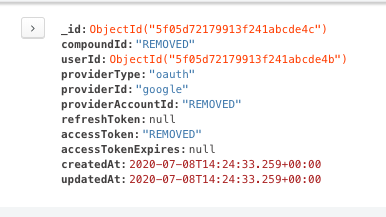
When authenticating with Google, I get a refresh_token value back.
Screenshots or error logs
Screenshot of Mongo showing no refreshToken value:
Additional context
I want to be able to use the refresh_token to rotate my access_token so that I can continually access the Google Sheets API. Here's how I'm using that incase that's helpful:
import { google } from 'googleapis'

const sheets = google.sheets('v4')

const sheet = await sheets.spreadsheets.values.get({
  spreadsheetId,
  range: sheetId,
  access_token: accessToken
})
 tomsansome
>All comments
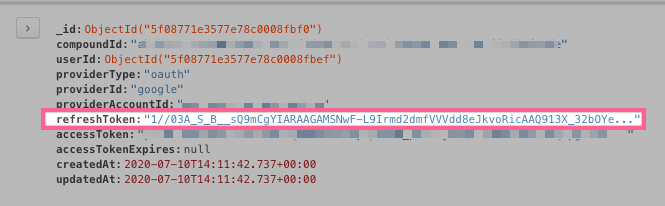
After quite a lot of messing around, I ended up using the authorizationUrl with the params directly appended to the URL (not using the params option), and also using a different accessTokenUrl from the Google docs.
My next-auth options ended up looking like this:
const options = {
  site: process.env.URL,
  providers: [
    Providers.Google({
      clientId: process.env.GOOGLE_ID,
      clientSecret: process.env.GOOGLE_SECRET,
      scope: 'https://www.googleapis.com/auth/userinfo.profile https://www.googleapis.com/auth/userinfo.email https://www.googleapis.com/auth/spreadsheets.readonly',
      authorizationUrl: 'https://accounts.google.com/o/oauth2/v2/auth?prompt=consent&access_type=offline&response_type=code',
      accessTokenUrl: 'https://oauth2.googleapis.com/token'
    })
  ],
  database: process.env.DATABASE_URL,
  secret: process.env.NEXT_AUTH_SECRET,
  debug: false
  }
}
This has now given me a refresh_token from Google
🥳
tomsansome
on 10 Jul 2020
Related issues
 iaincollins
·
3Comments
iaincollins
·
3Comments
 ryanbahan
·
3Comments
ryanbahan
·
3Comments
 MelMacaluso
·
3Comments
MelMacaluso
·
3Comments
 bscaspar
·
3Comments
bscaspar
·
3Comments
 ghoshnirmalya
·
3Comments
ghoshnirmalya
·
3Comments
Most helpful comment
After quite a lot of messing around, I ended up using the
authorizationUrlwith the params directly appended to the URL (not using theparamsoption), and also using a differentaccessTokenUrlfrom the Google docs.My next-auth options ended up looking like this:
This has now given me a
refresh_tokenfrom Google🥳