Next-auth: GitHub user.email can be null
Describe the bug
GitHub user.email field does not always contains the email. It has the email, if the user decided to share the email to public.
So, session.user.email can be null in most of the cases.
To Reproduce
- Create a simple app to with the GitHub provider
- Disable sharing your GitHub email to public
- If you try to login then
session.user.emailwill be null
Expected behavior
We should expose the email in session.user
Additional context
In order to get the email, we need to add user.email scope to GitHub. We need to fetch emails using an API endpoint.
I read the GitHub provider file and I'm not sure we can apply login in the profile creating function.
What's the best way to implement the above logic?
 arunoda
All 7 comments
This is not an error it is mentioned in the documentation.
GitHub allows the user not to expose their email address to OAuth services if they have relevant privacy settings are enabled.
You can modify the scope property on any provider - though we are already requesting it implicitly via the user property (see GitHub OAuth docs for details on scope options) so in this case will not make any difference.
 iaincollins
on 1 Jul 2020
iaincollins
on 1 Jul 2020
@iaincollins this is certainly is a bug.
Let me clarify why?
- We normally use an email to create a user account of refer a user. (Let me know, if that's not the case)
- Due to this issue, this is introduce bugs when someone want to use this in a real app
GitHub allows the user not to expose their email address to OAuth services if they have relevant privacy settings are enabled.
This is not true. With the user scope, they do not expose the email.
But with user.email it does.
It's about using the correct scope and user will decide to give the email or not.
arunoda
on 1 Jul 2020
@arunoda The GitHub documentation I linked to above disagrees.
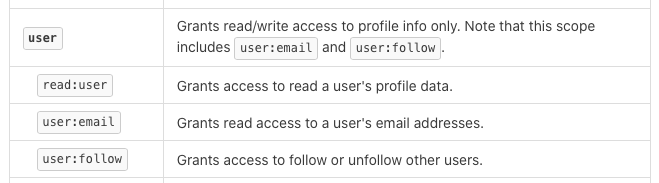
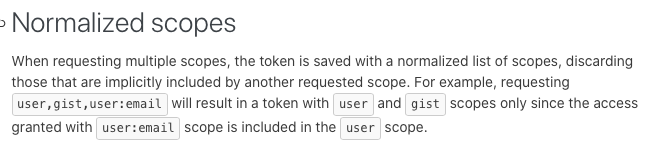
To clarify, you are not guaranteed to get an email address with all OAuth providers.
If you want to require one, you can use a custom signin() callback to enforce this.
iaincollins
on 1 Jul 2020
@arunoda the default user scope is sufficient as @iaincollins pointed out. You need to request the user's emails in a custom signin callback as they are never included in the metadata returned by github:
  callbacks: {
    signin: async (profile, account, metadata) => {
      // https://developer.github.com/v3/users/emails/#list-email-addresses-for-the-authenticated-user
      const res = await fetch('https://api.github.com/user/emails', {
        headers: {
          'Authorization': `token ${account.accessToken}`
        }
      })
      const emails = await res.json()
      if (!emails || emails.length === 0) {
        return
      }
      // Sort by primary email - the user may have several emails, but only one of them will be primary
      const sortedEmails = emails.sort((a, b) => b.primary - a.primary)
      profile.email = sortedEmails[0].email
    },
  },
Since fetch runs on the server, you have to use a Node.js implementation, for example node-fetch.
Hope this helps
 aslakhellesoy
on 16 Jul 2020
aslakhellesoy
on 16 Jul 2020
Thanks @aslakhellesoy this callbacks is what I was looking for.
arunoda
on 23 Jul 2020
@aslakhellesoy can you please with the full example
import NextAuth from 'next-auth'
import Providers from 'next-auth/providers'


const options = {
    providers: [
        Providers.Google({
            clientId: process.env.FRONT_GOOGLE_CLIENT_ID,
            clientSecret: process.env.FRONT_GOOGLE_CLIENT_SECRET
        }),
        Providers.GitHub({
            clientId: process.env.FRONT_GITHUB_CLIENT_ID,
            clientSecret: process.env.FRONT_GITHUB_CLIENT_SECRET
        }),
    ],
    database: process.env.FRONT_DB_URL,

    secret: process.env.FRONT_SESSION_SECRET,

    session: {
        jwt: true,
    },

    jwt: {

        secret: process.env.FRONT_JWT_SECRET,

    },

    pages: {
    },

    callbacks: {
        signin: async (profile, account, metadata) => {
            console.info('we are here to see the callback\nP\nP');
            console.log(profile, 'is the profile');
            console.log(account, 'is the account');
            console.log(metadata, 'is the metadata');
            const res = await fetch('https://api.github.com/user/emails', {
                headers: {
                    'Authorization': `token ${account.accessToken}`
                }
            })
            const emails = await res.json()
            if (!emails || emails.length === 0) {
                return
            }
            const sortedEmails = emails.sort((a, b) => b.primary - a.primary)
            profile.email = sortedEmails[0].email
        },
    },

    events: {},

    debug: process.env.NODE_ENV === 'development',
}

export default (req, res) => NextAuth(req, res, options)
I tried to use this code but nothing happenend.
Can you please explain me what to do?
Where should I put your code?
 uinstinct
on 2 Oct 2020
uinstinct
on 2 Oct 2020
I have fixed it:
It should be* (Note the cases of signIn)
callbacks:{
  signIn
}
_instead of_
callbacks:{
  signin
Related issues
 benoror
·
3Comments
benoror
·
3Comments
 bscaspar
·
3Comments
bscaspar
·
3Comments
 alex-cory
·
3Comments
iaincollins
·
3Comments
alex-cory
·
3Comments
iaincollins
·
3Comments
 ghoshnirmalya
·
3Comments
ghoshnirmalya
·
3Comments
Most helpful comment
@arunoda the default
userscope is sufficient as @iaincollins pointed out. You need to request the user's emails in a customsignincallback as they are never included in the metadata returned by github:Since
fetchruns on the server, you have to use a Node.js implementation, for examplenode-fetch.Hope this helps