Could you please add:
to packages/nexrender-types/job.js
        switch (asset.type) {
            case 'image':
            case 'audio':
            case 'video':
// case json:
            case 'json':
And or explain how to build nexrender-cli
I've tried downloading the source-code and run npm install
but than it becomes complicated
Lifecycle scripts included in nexrender:
  start
    npm run bootstrap
  publish
    lerna publish
  test
    lerna bootstrap && node test.js
Not sure how to proceed..
I did saw the reply on this:
https://github.com/inlife/nexrender/issues/130
But isn't as simple just to add the above switch case?
 Marcuzzz
All 4 comments
Hey there @Marcuzzz
I added new asset type static in the latest version 1.14.0, please check it out and tell me what you think
 inlife
on 29 Apr 2020
inlife
on 29 Apr 2020
Cool works, thx a lot!!!
Marcuzzz
on 29 Apr 2020
For future people watching this issue, I've found a pretty nice hack !
The static asset data type is pretty cool ! However, it does not seem to import the JSON file into the actual After Effect project, but rather just copy it into the Nexrender project folder.
I have a project where I have a lot of text contained into a JSON file to replace in my rendered videos, and would prefer to replace the single JSON footage file in the AE project _(and because all my text layers are linked to this footage in my template, replacing all the text)_, rather than creating a lot of data assets elements for each text in the nexrender json task.
I've found that importing the JSON file as an image type file, actually replaces the JSON footage in the AE project and all its contents _(which is super, duper great as it changes all the text with only one asset type)_ !
{
          type: 'data',
          layerName: 'NOM',
          property: 'Source Text',
          expression: 'Test',
        },
The only issue with this has to do with the way After Effect supports this. Even if aerender should be headless, AE warns by this message that the JSON file has changed, and the render would not continue unless you click on "OK". Which is pretty dumb as it would be an incredible workflow.
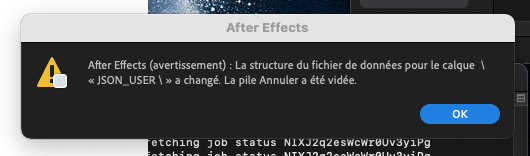
An issue request is already here to have the availability to hide this message.
Please, pleaaaaaase do not change this behaviour in nexrender (even if this is a little strange to consider a JSON file as an image asset type).
 phileastv
on 22 Dec 2020
phileastv
on 22 Dec 2020
Please, pleaaaaaase do not change this behaviour in nexrender (even if this is a little strange to consider a JSON file as an image asset type).
Haha, sure thing, we will try to keep this bug as a feature, no problemo! :D
P.S. I will think about adding a JSON asset type that would work more like an image type in the future.
inlife
on 10 Jan 2021
Related issues
 ujukauboi
·
4Comments
ujukauboi
·
4Comments
 pdkn
·
5Comments
pdkn
·
5Comments
 JamesBotterill
·
4Comments
JamesBotterill
·
4Comments
 bluematter
·
5Comments
bluematter
·
5Comments
 whatneuron
·
3Comments
whatneuron
·
3Comments
Most helpful comment
For future people watching this issue, I've found a pretty nice hack !
The static asset data type is pretty cool ! However, it does not seem to import the JSON file into the actual After Effect project, but rather just copy it into the Nexrender project folder.
I have a project where I have a lot of text contained into a JSON file to replace in my rendered videos, and would prefer to replace the single JSON footage file in the AE project _(and because all my text layers are linked to this footage in my template, replacing all the text)_, rather than creating a lot of data assets elements for each text in the nexrender json task.
I've found that importing the JSON file as an
imagetype file, actually replaces the JSON footage in the AE project and all its contents _(which is super, duper great as it changes all the text with only one asset type)_ !The only issue with this has to do with the way After Effect supports this. Even if aerender should be headless, AE warns by this message that the JSON file has changed, and the render would not continue unless you click on "OK". Which is pretty dumb as it would be an incredible workflow.
An issue request is already here to have the availability to hide this message.
Please, pleaaaaaase do not change this behaviour in nexrender (even if this is a little strange to consider a JSON file as an image asset type).