Nexrender: Error: Couldn't find a result file
I am getting this error when rendering. Any idea of the origin?
I am on the newest version of both globally installed cli and node modules.
[qDuniGSE9KlcUlTEe09Gs] rendering job...
[qDuniGSE9KlcUlTEe09Gs] rendering took ~12.336 sec.
[qDuniGSE9KlcUlTEe09Gs] writing aerender job log to: /Users/finnfrotscher/code/cofenster/api.renderer/tmp/aerender-qDuniGSE9KlcUlTEe09Gs.log
[qDuniGSE9KlcUlTEe09Gs] dumping aerender log:
Running Script: /Users/finnfrotscher/code/cofenster/api.renderer/tmp/qDuniGSE9KlcUlTEe09Gs/nexrender-qDuniGSE9KlcUlTEe09Gs-script.jsx
WARNING:After Effects warning: timeSpanStart of -0,87 seconds will cause render to have frames outside of range defined by comp displayStartTime (0,87) and end of comp duration (26,63). Render will succeed, but may have blank frames.
aerender version 17.0.5x16
PROGRESS: Launching After Effects...
PROGRESS: ...After Effects successfully launched


[ERROR]

{}
lifecycle error Error: Couldn't find a result file
    at ChildProcess.<anonymous> (/Users/finnfrotscher/code/cofenster/api.renderer/node_modules/@nexrender/core/src/tasks/render.js:137:31)
    at ChildProcess.emit (events.js:223:5)
    at maybeClose (internal/child_process.js:1021:16)
    at Process.ChildProcess._handle.onexit (internal/child_process.js:283:5)
tick 13:28:47
 FinnFrotscher
All 25 comments
i added this snipped to core/tasks/render.js
  instance.on('close', (code) => {
      settings.logger.log(`[${job.uid}] ${code}`)
ae finishes with code 0.
[Nk2ywSqwKfcDcvrz7n7i-] rendering job...
[Nk2ywSqwKfcDcvrz7n7i-] spawning aerender process: /Applications/Adobe After Effects 2020/aerender -project /Users/finnfrotscher/code/cofenster/api.renderer/tmp/Nk2ywSqwKfcDcvrz7n7i-/template.aet -comp main -output /Users/finnfrotscher/code/cofenster/api.renderer/tmp/Nk2ywSqwKfcDcvrz7n7i-/result.mov -s 0 -r /Users/finnfrotscher/code/cofenster/api.renderer/tmp/Nk2ywSqwKfcDcvrz7n7i-/nexrender-Nk2ywSqwKfcDcvrz7n7i--script.jsx
[Nk2ywSqwKfcDcvrz7n7i-] 0
but
-output /Users/finnfrotscher/code/cofenster/api.renderer/tmp/Nk2ywSqwKfcDcvrz7n7i-/result.mov
is empty
FinnFrotscher
on 25 Mar 2020
$ cat run.sh

#!/bin/bash
/Applications/Adobe\ After\ Effects\ 2020/aerender \
    -project /Users/finnfrotscher/code/cofenster/api.renderer/tmp/cUpuOGWAJ9WFoeZb8PivP/template.aet \
    -comp main \
    -output /Users/finnfrotscher/code/cofenster/api.renderer/tmp/cUpuOGWAJ9WFoeZb8PivP/result.mov \
    -s 0 \
    -r /Users/finnfrotscher/code/cofenster/api.renderer/tmp/cUpuOGWAJ9WFoeZb8PivP/nexrender-cUpuOGWAJ9WFoeZb8PivP-script.jsx

$sudo bash run.sh

aerender version 17.0.5x16
PROGRESS: Launching After Effects...
PROGRESS: ...After Effects successfully launched
Running Script: /Users/finnfrotscher/code/cofenster/api.renderer/tmp/cUpuOGWAJ9WFoeZb8PivP/nexrender-cUpuOGWAJ9WFoeZb8PivP-script.jsx

$
It just stops.
FinnFrotscher
on 25 Mar 2020
Seems like aerender doesn't like something that goes inside of the aep project.
And it renders just fine if you use GUI for that, correct?
 inlife
on 26 Mar 2020
inlife
on 26 Mar 2020
I opened the template and ran the script from the vscode devtools. no issues. I have not tried actually rendering the project from the gui. will do an report back.
FinnFrotscher
on 26 Mar 2020
I had a similar error message. It appears that in my AE project, the default Output Module codec was actually missing. I changed the default OM template and everything worked fine. Maybe that can help someone having the same error
 phlexib
on 1 Apr 2020
phlexib
on 1 Apr 2020
yes. i solved it the same way.
side question. is it possible to render directly to mp4 on mac & ae2020?
FinnFrotscher
on 2 Apr 2020
Unfortunately aerender does not support direct render to mp4 since AE CC 2015, iirc.
inlife
on 2 Apr 2020
this problem came up again and I do have the default output codec.
could you share your setup and how you build it? maybe it will lead to a fix.
FinnFrotscher
on 6 May 2020
hey @FinnFrotscher
is the question directed to me? if so, could you please explain in more details what do you mean
inlife
on 6 May 2020
hi,
the question is both for you and @phlexib, or anyone who has the answer :)
my issue is the following:
- i am running the renderer on a template.aet.
- during startup, after effects throws an error:
aerender version 17.0.6x35
PROGRESS: Launching After Effects...
PROGRESS: ...After Effects successfully launched

[ERROR]

"Couldn't find a result file"
i do have the apple pro res codec installed. i both checked the installed software registry, i have rendered with this setup in the past in ae headless mode and since the issue came up, i tested the rendering using the interface and it worked. therefore codec is not the issue.
i tried the template with and without a render job in the queue, as seen in the screenshot. both yield the same error.
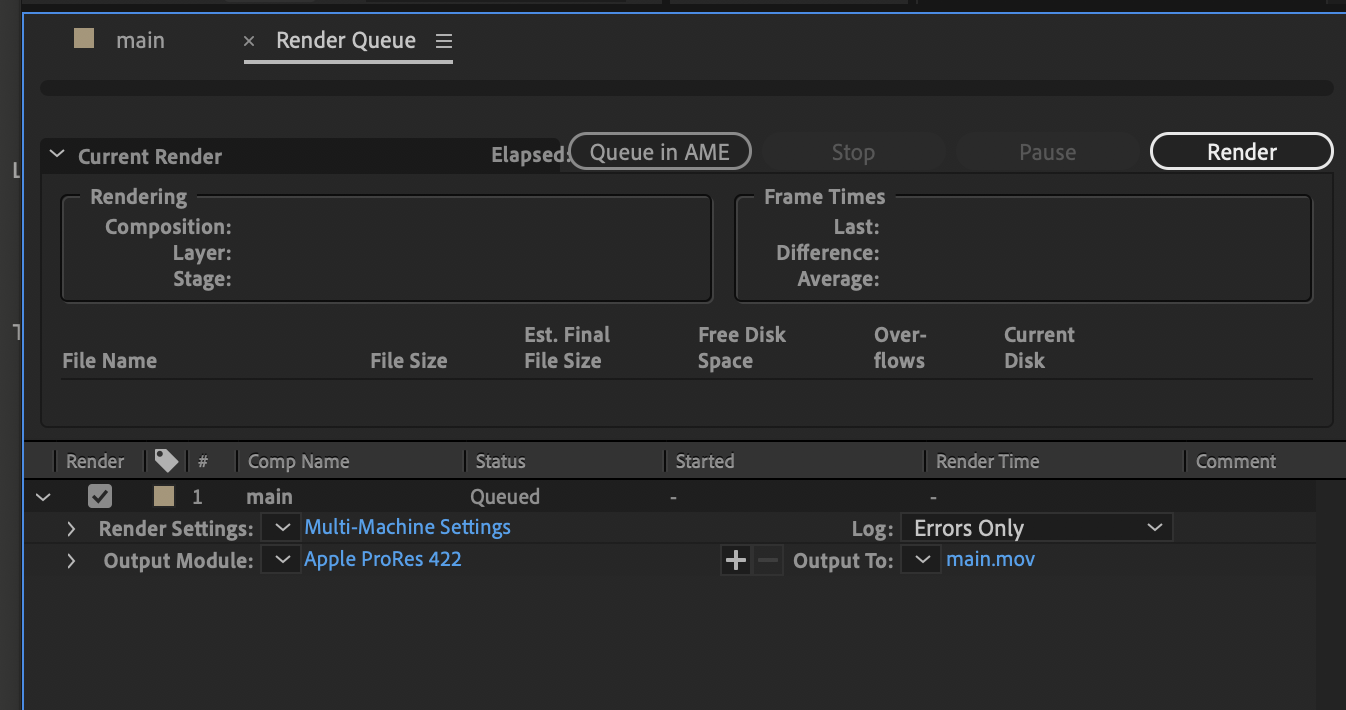
FinnFrotscher
on 6 May 2020
I am getting this warning when rendering using the interface. maybe its a clue.
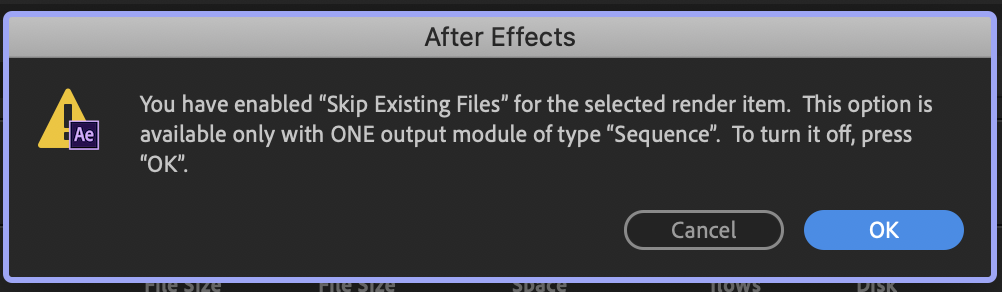
after clicking ok, it renders w/o problem
FinnFrotscher
on 6 May 2020
I am getting the same "existing files" message when rendering from command line and its the last message before stdend.
⟩cat run.sh                                                                                                  ...o9g7X53hDR2eT0oW2
#!/bin/bash

/Applications/Adobe\ After\ Effects\ 2020/aerender \
    -project /Users/finnfrotscher/code/cofenster/api.renderer/tmp/Kx9mo9g7X53hDR2eT0oW2/template.aet \
    -comp main \
    -output /Users/finnfrotscher/code/cofenster/api.renderer/tmp/Kx9mo9g7X53hDR2eT0oW2/result.mov \
    -s 0 \
    -r /Users/finnfrotscher/code/cofenster/api.renderer/tmp/Kx9mo9g7X53hDR2eT0oW2/nexrender-Kx9mo9g7X53hDR2eT0oW2-script.jsx


⟩bash run.sh                                                                                                 ...o9g7X53hDR2eT0oW2
aerender version 17.0.6x35
PROGRESS: Launching After Effects...
PROGRESS: ...After Effects successfully launched
Running Script: /Users/finnfrotscher/code/cofenster/api.renderer/tmp/Kx9mo9g7X53hDR2eT0oW2/nexrender-Kx9mo9g7X53hDR2eT0oW2-script.jsx
WARNING:After Effects warning: Skip Existing Files is available only with ONE output module of type Sequence.
Skip existing files is off:

FinnFrotscher
on 6 May 2020
I'm getting the same error.
> job rendering failed
Error: Couldn't find a result file
at ChildProcess.<anonymous> (C:\snapshot\nexrender\packages\nexrender-cli\node_modules\@nexrender\core\src\tasks\render.js)
at ChildProcess.emit (events.js:210:5)
at maybeClose (internal/child_process.js:1021:16)
at Process.ChildProcess._handle.onexit (internal/child_process.js:283:5)
The strange thing is, that there is a file called result.mov in the nexrender directory, which I can playback perfectly fine.
 j4rnold
on 11 May 2020
j4rnold
on 11 May 2020
The problem happened to me again when switching from Mac to PC. Fixed By removing everything from the render queue.
Try that.
phlexib
on 11 May 2020
Thanks for your suggestion but unfortunately this didn't help.
The project can be rendered without any errors from the commandline using aerender and the GUI. As soon as I use nexrender-cli, the rendering fails. When looking into the nexrender temp directory, I can see all job related files including the result.mov file. Even the log file says that the rendering finished successfully.
j4rnold
on 12 May 2020
That sometimes happens, when the after effects returns exit code which is not 0. Could you try to check what is in the log, maybe even tho rendering finishes, there are some errors that cause aerender itself to fail?
inlife
on 17 May 2020
Thanks for your help.
There were indeed multiple errors in the log:
FATAL CreateProcessWithTokenW failed with error: 1314
INFO  Failed to launch IPC broker with medium Integrity level due to error:1314, launching it with default level
These two had to do with AdobeIPCBroker and could be fixed very easily.
Edit
Looks like I was happy too early.
aerender version 17.1x72
Using DXGI: Device: "NVIDIA GeForce RTX 2060" has dedicated video RAM (MB): 5980
2020-05-19 16:54:21:935 : FATAL CreateProcessWithTokenW failed with error: 1314
2020-05-19 16:54:21:935 : INFO  Failed to launch IPC broker with medium Integrity level due to error:1314, launching it with default level
    name                                    : NVIDIA GeForce RTX 2060
    VendorId                                : 4318
    DeviceId                                : 7944
    SubSysId                                : 543242306
    Revision                                : 161
    DedicatedVideoMemory                    : 6270484480
    DedicatedSystemMemory                   : 0
    SharedSystemMemory                      : 34312624128
    MemoryBudget                            : 5329911808
    AdapterLuid.LowPart                     : 56934
    AdapterLuid.HighPart                    : 0
    Flags                                   : 0
        DoublePrecisionFloatShaderOps           : yes
        ConservativeRasterizationTier           : 3
        CrossNodeSharingTier                    : 0
        ResourceBindingTier                     : 3
        ResourceHeapTier                        : 2
        TiledResourcesTier                      : 3
        NodeIndex                               : 0
        TileBasedRenderer                       : no
        UMA                                     : no
        CacheCoherentUMA                        : no
        feature level                           : 0x00009100
        feature level                           : 0x00009200
        feature level                           : 0x00009300
        feature level                           : 0x0000a000
        feature level                           : 0x0000a100
        feature level                           : 0x0000b000
        feature level                           : 0x0000b100
        feature level                           : 0x0000c000
        feature level                           : 0x0000c100
        MaxSupportedFeatureLevel                : 0x0000c100
        HighestShaderModel                      : 0x60
        WaveOps                                 : yes
        WaveLaneCountMin                        : 32
        WaveLaneCountMax                        : 32
        TotalLaneCount                          : 1920
        ExpandedComputeResourceStates           : yes
        Int64ShaderOps                          : yes
        RootSignature.HighestVersion            : 0x2
Running Script: F:\Temp\nexrender\muN_EKHM75p-umsBBLiBT\nexrender-muN_EKHM75p-umsBBLiBT-script.jsx
PROGRESS: Adding specified comp to Render Queue
PROGRESS:  19.05.2020 16:54:28: Komposition '00_Main' gestartet.
> job rendering failed
Error: Couldn't find a result file
    at ChildProcess.<anonymous> (C:\snapshot\nexrender\packages\nexrender-cli\node_modules\@nexrender\core\src\tasks\render.js)
    at ChildProcess.emit (events.js:311:20)
    at maybeClose (internal/child_process.js:1021:16)
    at Process.ChildProcess._handle.onexit (internal/child_process.js:286:5)
I'm running the latest version of After Effects on a Windows 10 machine. nexrender is version 1.16.2
Any help is greatly appreciated.
j4rnold
on 19 May 2020
i fixed my specific issue by wiggling my after effects default renderer output module and the renderer settings configuration.
FinnFrotscher
on 20 May 2020
@FinnFrotscher same problem. How exactly have you resolved that?
 gen4sp
on 20 May 2020
gen4sp
on 20 May 2020
Fixed my issue by uninstalling and reinstalling After Effects.
j4rnold
on 22 May 2020
I, too, am having this issue. Any specific protocol to fix this?
Reinstalling didnt fix the problem :/
 MrSKYone
on 18 Jun 2020
MrSKYone
on 18 Jun 2020
i vaguely remember. you need to build an Output Module Template and a Render Settings Template at Edit > Tempaltes > *
I dont remember the setup i used.
FinnFrotscher
on 21 Jun 2020
Hi,
to make an addition,
I found that something wrong with templates can also lead to this error.
At first, I ran into this error. I was quite sure nothing was wrong with my OM/aerender. After I reset the property "postion" of one of my layers(it had been accidentally changed), the error just gone.
I don't know how, but you may also check the .aep template.
 Wence-May
on 27 Jun 2020
Wence-May
on 27 Jun 2020
The problem happened to me again when switching from Mac to PC. Fixed By removing everything from the render queue.
Try that.
This Fixed the issue for me
 shi-ivam
on 14 Aug 2020
shi-ivam
on 14 Aug 2020
Related issues
 amarCosmospace
·
3Comments
amarCosmospace
·
3Comments
 panchenkoprog
·
5Comments
panchenkoprog
·
5Comments
 pdkn
·
5Comments
pdkn
·
5Comments
 danielgwilson
·
3Comments
danielgwilson
·
3Comments
 oskobri
·
3Comments
oskobri
·
3Comments