Nexrender: aerender ERROR -1701: AEGetParamPt failed at line 894
Log:
HTTP Server started successfully on port: 4000
checking After Effects command line renderer patch...
command line patch already is in place
[QBlfQw6K5YkbGFP0dQSDW] setting up job...
[QBlfQw6K5YkbGFP0dQSDW] -- W A R N I N G: --

You haven't provided any post-render actions!
After render is finished all the files inside temporary folder (INCLUDING your target video) will be removed.

To prevent this from happening, please add an action to "job.actions.postrender".
For more info checkout: https://github.com/inlife/nexrender#Actions

P.S. to prevent nexrender from removing temp file data, you also can please provide an argument:
    --skip-cleanup (or skipCleanup: true if using programmatically)

[QBlfQw6K5YkbGFP0dQSDW] working directory is: /tmp/nexrender/QBlfQw6K5YkbGFP0dQSDW
[QBlfQw6K5YkbGFP0dQSDW] downloading assets...
[QBlfQw6K5YkbGFP0dQSDW] applying prerender actions...
[QBlfQw6K5YkbGFP0dQSDW] running script assemble...
[QBlfQw6K5YkbGFP0dQSDW] rendering job...
[QBlfQw6K5YkbGFP0dQSDW] rendering took ~17.871 sec.
[QBlfQw6K5YkbGFP0dQSDW] writing aerender job log to: /tmp/nexrender/aerender-QBlfQw6K5YkbGFP0dQSDW.log
[QBlfQw6K5YkbGFP0dQSDW] dumping aerender log:
aerender version 17.0.5x16
PROGRESS: Launching After Effects...
aerender ERROR -1701: AEGetParamPt failed at line 894
Code:
const { exec } = require("child_process");
const { render } = require("@nexrender/core");

module.exports = async (req, res) => {
  try {
    const result = await render(
      {
        template: {
          src: "file:///Users/michaelaubry/Desktop/audio_visualizer.aep",
          composition: "Comp 1"
        }
      },
      {
        binary: "/Applications/Adobe After Effects 2020/aerender"
      }
    );

    res.json({ rendered: JSON.stringify(result) });
  } catch (error) {
    res.json({ error });
  }
};
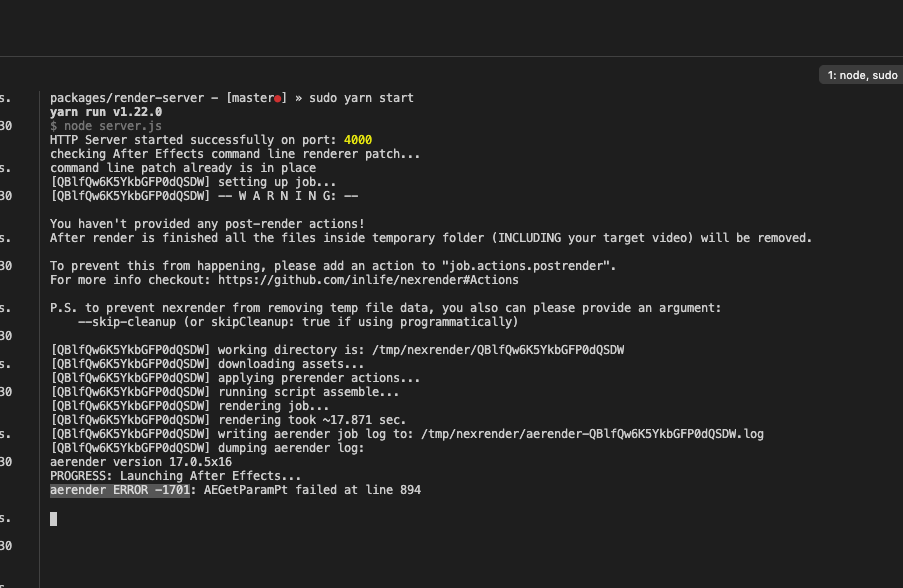
Problem: I am trying to render a composition and am so close. I keep running into aerender ERROR -1701: AEGetParamPt failed at line 894 after googling for a while I can't find what the cause is.
I suspect it permissions related. aerender works when I manually use it in the command line. As soon as I use it with Node.js this error happens.
It even happened when I was using a child process without this amazing lib. I know this exists https://github.com/inlife/nexrender/issues/223 which basically points to this https://community.adobe.com/t5/after-effects/aerender-error/td-p/10333215.
The recommendation is to install ExtendScript Tool Kit but I think thats out of date as I cant find a working version anywhere.
So excited to use this but frustrated with this issue. If anyone has insight that would help me 100%
 bluematter
All 14 comments
Hey @bluematter
Maybe that thread helps?
https://community.adobe.com/t5/get-started/adobe-extendscript-toolkit-cc-download-for-macos-10-13-2/td-p/9568122?page=1
 inlife
on 20 Mar 2020
inlife
on 20 Mar 2020
@inlife thanks for the quick response. I came across that but didn't fully follow through. Going to try one more time.
I also just came across this https://medium.com/adobetech/extendscript-debugger-for-visual-studio-code-public-release-a2ff6161fa01
I am wondering how you are getting it to render without Extend Script. Or do you have it installed?
bluematter
on 20 Mar 2020
Well, it seems to me the reason for that error might depend also on an after effects version, I have AE CC 2017 on my mac, as well as on OS version. That reminds me that I haven't actually tried rendering on the newest macos yet.
inlife
on 20 Mar 2020
Ahh I am using AE 17.0.5 the latest.
By the way, I am really excited about this. I built an online video editor https://storycreatorapp.com/ and am really excited to add this. I have so many cool ideas. I was planning on using child process in node and writing something like this myself. You are amazing for building this.
bluematter
on 20 Mar 2020
Oh, that editor looks amazing! Gives me a light sketch/zeplin vibe in terms of ui 😄
And it seems to me that product overall looks great, congrats!
inlife
on 20 Mar 2020
F*(& yes I love sketch. Heavily inspired by that amazing tool. Trying to achieve that but for video. I was trying to make an audio visualizer and got stuck. Thats when I started getting curious about AE CLI. 24 hours later and I am here ready to push this amazing tech to my limits. Damn aerender ERROR -1701: AEGetParamPt failed at line 894 issue still happening.
Downgrading AE is my next move.
bluematter
on 20 Mar 2020
:D
Have you installed ExtendScript Toolkit?
inlife
on 20 Mar 2020
Yup, I actually got it to install. Earlier I was searching for it but when you enable old apps to appear you need to go to the Apps tab and scroll down. From that, I was able to discover it. I installed it but no Bueno. Maybe a restart will do the trick.
bluematter
on 20 Mar 2020
I just discovered something. Maybe you have insight into why this is.
Even outside of nexrender. Just using the aerender command directly in the terminal causes the exact same issue.
However, when I cd into /Applications/Adobe After Effects 2020 then run ./aerender -project ~/Desktop/audio_visualizer.aep directly inside that folder IT WORKS.
I am not knowledgable enough around this particular issue to have much of an opinion other than it has to do with some sort of permissions issue. It seems like where the command is invoked matters.
Any insight? If not I will close this, definitely not related to your project. Some light could be useful for me and others though. Hopefully, the information up to this point will help others realize they need to be in the same directory as the aerender script. Not the complete answer but It's a start.
bluematter
on 20 Mar 2020
That's interesting. We had a small piece of code in the renderer, that could potentially have a connection to that issue. However, I had to disable it, since users had problems with it influencing plugins.
What I can try to do, is to push a small update that adds a flag, allowing to switch it on by hand. Will you be able to update nexrender to the new version and test if that helps?
inlife
on 20 Mar 2020
Dont sweat it. I got it working. Trying to figure out exactly what solved it as I did a brute force approach lol.
The key thing that I think solved it is escaping the spaces in the path to the aerender script.
I definitely knew this was important but you cant escape in my VS code with backticks \ inside quotes. So I used backticks template literal string instead like this.
    const result = await render(
      {
        template: {
          src: "file:///Users/michaelaubry/Desktop/audio_visualizer.aep",
          composition: "Comp 1"
        }
      },
      {
        binary: `/Applications/Adobe\ After\ Effects\ 2020/aerender`
      }
    );
I must have thought correlation was causation in my last hypothesis. One render attempt must have been missing backticks. The weird thing is the executable shouldn't have even run if the path was invalid which is weird.
Hope I am not causing too much confusion but if someone else runs into this try using ``` back ticks. like the example above :)
bluematter
on 20 Mar 2020
INTERESTING. I HAVE A PROFOUND UPDATE.
The issue is executing the command inside VS Code vs ITerm. It works just fine in ITerm. Craps out in VS Code. I might need to install something.
🤯
bluematter
on 20 Mar 2020
Oh, spaces between words in the folder title can indeed may cause something inside of the aerender binary when it attempts to use that path.
inlife
on 20 Mar 2020
Related issues
 darshak-gosar
·
3Comments
darshak-gosar
·
3Comments
 Morreski
·
5Comments
Morreski
·
5Comments
 ujukauboi
·
4Comments
ujukauboi
·
4Comments
 dsrts
·
3Comments
dsrts
·
3Comments
 JamesBotterill
·
4Comments
JamesBotterill
·
4Comments
Most helpful comment
INTERESTING. I HAVE A PROFOUND UPDATE.
The issue is executing the command inside VS Code vs ITerm. It works just fine in ITerm. Craps out in VS Code. I might need to install something.
🤯