Nexrender: Multiple Layer Property changes
Describe the bug
I am trying to change both the 'Source Text' property and a 'Source Text.fontSize'. However it will die on rendering (see below).
If I remove one (or the other) then it woks fine - the text resizes, or the text is changed, but I do not get to change both!
Trying to set it manually here but only one will ever work:
           const sourceTextFontSize = {
                type: 'data',
                layerName: key,
                property: 'Source Text.fontSize',
                value: '20'
            };
            assets.push(sourceTextFontSize);

            // const sourceTextAsset = {
            //     type: 'data',
            //     layerName: key,
            //     property: 'Source Text',
            //     value: 'string'
            // };
            // assets.push(sourceTextAsset);
I've tried changing the order but sort of at a loss on what to try now...
Information about environment
- Which version of nexrender are you using?
"@nexrender/action-copy": "^1.8.16",
        "@nexrender/action-encode": "^1.8.16",
        "@nexrender/action-upload": "^1.10.0",
        "@nexrender/core": "^1.10.0",
        "@nexrender/provider-ftp": "^1.10.0",
        "@nexrender/provider-gs": "^1.9.2",
        "@nexrender/provider-s3": "^1.8.16",
- What kind of the setup do you have? (server+worker or cli)
nexrender core - a node script on my machine. - Are you using pre-built binaries or globally installed npm packages?
pre-built? - Which kind (and version) of operating system you are running it in?
Mac OSX Catalina 10.15.2 (19C57) - Any additional information that might be helpful
node v12.14.1
npm 6.13.4
AE 17.0.2 (Latest at time of writing - I think AE2020)
Expected behavior
A clear and concise description of what you expected to happen.
It to render with multiple properties set.
**
[7s0l5YGgxgT56C2YaW80B] dumping aerender log:
internal/fs/utils.js:220
    throw err;
    ^

Error: ENOENT: no such file or directory, open '/var/folders/v3/1qpb9vbn7_qb_k5mt9x3sxh00000gn/T/nexrender/aerender-7s0l5YGgxgT56C2YaW80B.log'
    at Object.openSync (fs.js:440:3)
    at Object.readFileSync (fs.js:342:35)
    at ChildProcess.<anonymous> (/Users/robert/Documents/vidgen-v1/node_modules/@nexrender/core/src/tasks/render.js:114:40)
    at ChildProcess.emit (events.js:223:5)
    at maybeClose (internal/child_process.js:1021:16)
    at Socket.<anonymous> (internal/child_process.js:430:11)
    at Socket.emit (events.js:223:5)
    at Pipe.<anonymous> (net.js:664:12) {
  errno: -2,
  syscall: 'open',
  code: 'ENOENT',
  path: '/var/folders/v3/1qpb9vbn7_qb_k5mt9x3sxh00000gn/T/nexrender/aerender-7s0l5YGgxgT56C2YaW80B.log'
}
 Dezzymei
All 26 comments
hello @Dezzymei
could you check if /var/folders/v3/1qpb9vbn7_qb_k5mt9x3sxh00000gn/T/nexrender/aerender-7s0l5YGgxgT56C2YaW80B.log exists, and in case it does, post it here?
 inlife
on 22 Jan 2020
inlife
on 22 Jan 2020
I see it is being added to the script-JSX file:
/* start of custom user script */

(function() {
    nexrender.selectLayersByName(null, 'READY!', function(layer) {

        var parts = ["Source Text","fontSize"];
        var value = { "value": '20' }

        nexrender.changeValueForKeypath(layer, parts, value);

        return true;
    });
})();

(function() {
    nexrender.selectLayersByName(null, 'READY!', function(layer) {

        var parts = ["Source Text","font"];
        var value = { "value": 'Papyrus' }

        nexrender.changeValueForKeypath(layer, parts, value);

        return true;
    });
})();


/* end of custom user script */
exists, and in case it does, post it here
It does not exist :(
Dezzymei
on 22 Jan 2020
published a patch v1.10.1, try to update it and run the render again
inlife
on 22 Jan 2020
Well I have a more detailed error message saying that
Error: nexrender: Cound't find any layers by provided name (READY!) inside a composition: *
Dezzymei
on 22 Jan 2020
Strange because it works one at a time...
Dezzymei
on 22 Jan 2020
I tried without the exclamation mark to no avail, and it definitely exists!
Error: WARNING:After Effects warning: Project has missing fonts.

Running Script: /var/folders/v3/1qpb9vbn7_qb_k5mt9x3sxh00000gn/T/nexrender/p9WSWG8JUf5Nc0DX4XBfB/nexrender-p9WSWG8JUf5Nc0DX4XBfB-script.jsx
aerender ERROR: Error executing script: /var/folders/v3/1qpb9vbn7_qb_k5mt9x3sxh00000gn/T/nexrender/p9WSWG8JUf5Nc0DX4XBfB/nexrender-p9WSWG8JUf5Nc0DX4XBfB-script.jsx
Error: nexrender: Cound't find any layers by provided name (READY) inside a composition: *
aerender ERROR: Runtime error in After Effects.
aerender version 17.0.2x26
PROGRESS: Launching After Effects...
PROGRESS: ...After Effects successfully launched

    at ChildProcess.<anonymous> (/Users/robert/Documents/vidgen-v1/node_modules/@nexrender/core/src/tasks/render.js:118:31)
    at ChildProcess.emit (events.js:223:5)
    at maybeClose (internal/child_process.js:1021:16)
    at Process.ChildProcess._handle.onexit (internal/child_process.js:283:5)
does it work if you try to switch those assets places? to put another one in front
inlife
on 22 Jan 2020
No it does not work. The same issue.
Dezzymei
on 22 Jan 2020
we can try one other thing
so, I assume you installed the @nexrender/core via npm, right?
inlife
on 22 Jan 2020
Yes
Dezzymei
on 22 Jan 2020
I can install it locally if you want and checkout the codebase?
Dezzymei
on 22 Jan 2020
we going to try this, try to edit node_modules/@nexrender/core/src/assets/nexrender.jsx
try to comment out the condition for this if statement, leaving the code part non-commented
https://github.com/inlife/nexrender/blob/master/packages/nexrender-core/src/assets/nexrender.jsx#L80
so it would look like this:
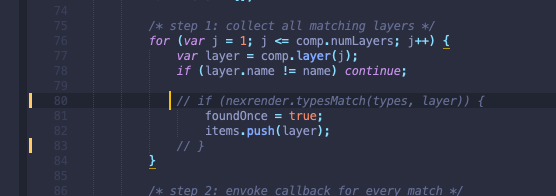
and then try to start rendering
inlife
on 22 Jan 2020
Same problem.
Error: WARNING:After Effects warning: Project has missing fonts.

Running Script: /var/folders/v3/1qpb9vbn7_qb_k5mt9x3sxh00000gn/T/nexrender/WXEhnYrmEgJhwiClqCnUc/nexrender-WXEhnYrmEgJhwiClqCnUc-script.jsx
aerender ERROR: Error executing script: /var/folders/v3/1qpb9vbn7_qb_k5mt9x3sxh00000gn/T/nexrender/WXEhnYrmEgJhwiClqCnUc/nexrender-WXEhnYrmEgJhwiClqCnUc-script.jsx
Error: nexrender: Cound't find any layers by provided name (READY) inside a composition: *
aerender ERROR: Runtime error in After Effects.
aerender version 17.0.2x26
PROGRESS: Launching After Effects...
PROGRESS: ...After Effects successfully launched

    at ChildProcess.<anonymous> (/Users/robert/Documents/vidgen-v1/node_modules/@nexrender/core/src/tasks/render.js:118:31)
    at ChildProcess.emit (events.js:223:5)
    at maybeClose (internal/child_process.js:1021:16)
    at Process.ChildProcess._handle.onexit (internal/child_process.js:283:5)
its like layer disappears, or changes name, very unusual
inlife
on 22 Jan 2020
It only happens when trying to adjust the same layer name.
I can adjust many different layers, but only once :(
Dezzymei
on 22 Jan 2020
Setting the composition name manually has the same issue.
Could the layers name actually change? Can these two changes be added at the same time?
Dezzymei
on 22 Jan 2020
what if you try accessing layers by indices, instead of layer names, will it kinda solve the issue?
inlife
on 22 Jan 2020
That was just about what I was going to try! :) I assume I just count which order it is in?
Dezzymei
on 22 Jan 2020
yes, it is
inlife
on 22 Jan 2020
IT works! :)
Dezzymei
on 22 Jan 2020
Both the font and size are changed. It even works with 3 changes.
So it looks like there is a problem when changing a layer properties in that the layer then can't be found when something else is updated...
Perhaps we can provide a list of value pairs to change when changing data assets?
e.g.
assets: [{
            type: 'data',
            layerName: 'layername',
            data: [{
                    property: 'Source Text',
                    value: "blah blah blah"
                },
                {
                    property: 'Source Text.font',
                    value: "Papyrus"
                },
                {
                    property: 'Source Text.fontSize',
                    value: "20"
                }
            ]
        }],
But that might be more work than finding this bug?! I don't know enough about the underlying code in this codebase, but will keep looking at this! :)
Dezzymei
on 22 Jan 2020
great, so yea, the bug is definitely somewhere there, where the layers are iterated
regarding your suggestion about data array, it actually looks quite good to me as well, so i think we could indeed add support for that kind of definition
but yea, the actual bug would still remain there, and thats something we should try to fix
I don't seem to understand what might be going wrong tho :(
inlife
on 22 Jan 2020
I just tried it on another project and it seems to work fine when getting the layername.
Clearly it is an issue with my project. Perhaps there are two layers with the same name and that has problems?
Dezzymei
on 22 Jan 2020
hard to say, in that case, the situation becomes even weirder :D
inlife
on 22 Jan 2020
Related issues
 whatneuron
·
3Comments
whatneuron
·
3Comments
 ujukauboi
·
4Comments
ujukauboi
·
4Comments
 senthudms
·
3Comments
senthudms
·
3Comments
 FRANK-AND-FREE
·
4Comments
FRANK-AND-FREE
·
4Comments
 leq382121
·
6Comments
leq382121
·
6Comments
Most helpful comment
published a patch
v1.10.1, try to update it and run the render again