Nexrender: Error: Error loading postrender module @nexrender/action-encode: Error: Error in action-encode module (ffmpeg)
MINGW64 /d/project/ifly/video/nexrender (master)
$ nexrender-cli --skip-cleanup --file ./aeJson/demo.json
> starting nexrender-cli
using automatically determined directory of After Effects installation:
 - C:\Program Files\Adobe\Adobe After Effects CC 2019\Support Files\aerender.exe
adding default render-only-node license for After Effects at:
 - C:\Users\Administrator\Documents\Adobe\ae_render_only_node.txt
checking After Effects command line renderer patch...
command line patch already is in place
[yUPo5wh1LCCYMGUQ89WG1] setting up job...
[yUPo5wh1LCCYMGUQ89WG1] working directory is: C:\Users\Administrator\AppData\Local\Temp\nexrender\yUPo5wh1LCCYMGUQ89WG1
[yUPo5wh1LCCYMGUQ89WG1] downloading assets...
[yUPo5wh1LCCYMGUQ89WG1] applying prerender actions...
[yUPo5wh1LCCYMGUQ89WG1] running script assemble...
[yUPo5wh1LCCYMGUQ89WG1] rendering job...
[yUPo5wh1LCCYMGUQ89WG1] rendering took ~10.321 sec.
[yUPo5wh1LCCYMGUQ89WG1] writing aerender job log to: C:\Users\Administrator\AppData\Local\Temp\nexrender\aerender-yUPo5wh1LCCYMGUQ89WG1.log
[yUPo5wh1LCCYMGUQ89WG1] applying postrender actions...
[yUPo5wh1LCCYMGUQ89WG1] starting action-encode action (ffmpeg)
[yUPo5wh1LCCYMGUQ89WG1] action-encode: input file C:\Users\Administrator\AppData\Local\Temp\nexrender\yUPo5wh1LCCYMGUQ89WG1\result.avi
[yUPo5wh1LCCYMGUQ89WG1] action-encode: output file C:\Users\Administrator\AppData\Local\Temp\nexrender\yUPo5wh1LCCYMGUQ89WG1\encoded.mp4
****************************************undefined*****C:\Users\Administrator\AppData\Local\Temp\nexrender\yUPo5wh1LCCYMGUQ89WG1****win32
[yUPo5wh1LCCYMGUQ89WG1] ffmpeg version N-92486-g8f875a90c4 Copyright (c) 2000-2018 the FFmpeg developers
  built with gcc 8.2.1 (GCC) 20181017

[yUPo5wh1LCCYMGUQ89WG1]   configuration: --enable-gpl --enable-version3 --enable-sdl2 --enable-fontconfig --enable-gnutls --enable-iconv --enable-libass --enable-libbluray --enable-libfreetype --enable-libmp3lame --enable-libopencore-amrnb --enable-libopencore-amrwb --enable-libopenjpeg --enable-libopus --enable-libshine --enable-libsnappy --enable-libsoxr --enable-libtheora --enable-libtwolame --enable-libvpx --enable-libwavpack --enable-libwebp --enable-libx264 --enable-libx265 --enable-libxml2 --enable-libzimg --enable-lzma --enable-zlib --enable-gmp --enable-libvidstab --enable-libvorbis --enable-libvo-amrwbenc --enable-libmysofa --enable-libspeex --enable-libxvid --enable-libaom --enable-libmfx --enable-amf --enable-ffnvcodec --enable-cuvid --enable-d3d11va --enable-nvenc --enable-nvdec --enable-dxva2 --enable-avisynth
  libavutil      56. 23.101 / 56. 23.101
  libavcodec     58. 39.100 / 58. 39.100
  libavformat    58. 22.100 / 58. 22.100
  libavdevice    58.  6.100 / 58.  6.100
  libavfilter     7. 44.100 /  7. 44.100
  libswscale      5.  4.100 /  5.  4.100
  libswresample   3.  4.100 /  3.  4.100
  libpostproc    55.  4.100 / 55.  4.100

[yUPo5wh1LCCYMGUQ89WG1] C:\Users\Administrator\AppData\Local\Temp\nexrender\yUPo5wh1LCCYMGUQ89WG1\result.avi: No such file or directory

> job rendering failed
Error: Error loading postrender module @nexrender/action-encode: Error: Error in action-encode module (ffmpeg)
    at requireg.catch.err (C:\Users\Administrator\AppData\Roaming\npm\node_modules\@nexrender\cli\node_modules\@nexrender\core\src\tasks\actions.js:25:35)
    at process._tickCallback (internal/process/next_tick.js:68:7)
How to solve the problem?
 xxcl-niky
All 10 comments
It looks like the file resulting file of aerender wasn't found. I would try aborting after it renders "[yUPo5wh1LCCYMGUQ89WG1] applying postrender actions..." and see if the result.avi made it in the folder.
 ujukauboi
on 17 Jun 2019
ujukauboi
on 17 Jun 2019
Error message states that there is no such file named result.avi for input
C:\Users\Administrator\AppData\Local\Temp\nexrender\yUPo5wh1LCCYMGUQ89WG1\result.avi: No such file or directory
Are you sure the file exists when action-encode starts? You can check existing files in the temp folder.
 inlife
on 17 Jun 2019
inlife
on 17 Jun 2019
It looks like the file resulting file of aerender wasn't found. I would try aborting after it renders "[yUPo5wh1LCCYMGUQ89WG1] applying postrender actions..." and see if the result.avi made it in the folder.
I can find aerender in my win10:
MINGW64 /d/project/ifly/video/nexrender (master)
$ aerender -version
aerender version 16.0x235
MINGW64 /d/project/ifly/video/nexrender (master)
xxcl-niky
on 17 Jun 2019
Error message states that there is no such file named result.avi for input
C:\Users\Administrator\AppData\Local\Temp\nexrender\yUPo5wh1LCCYMGUQ89WG1\result.avi: No such file or directoryAre you sure the file exists when
action-encodestarts? You can check existing files in the temp folder.
C:\Users\Administrator\AppData\Local\Temp\nexrender\yUPo5wh1LCCYMGUQ89WG1 This directory exists,but the .result.avi file does not exist, it may be caused by the failure of action-encode.
xxcl-niky
on 17 Jun 2019
no, it is caused by error in aerender
try checking the log for this job to see what happened inside aerender itself
inlife
on 17 Jun 2019
are you specifying the input for action-encode to be result.avi, if you are try removing that in your json.
 JamesBotterill
on 17 Jun 2019
JamesBotterill
on 17 Jun 2019
are you specifying the input for action-encode to be result.avi, if you are try removing that in your json.
Thank you for your answer.
I want to export MP4 videos, I remove actions. job rendering successfully finished.
json:
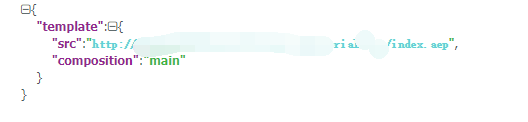
result:
`$ nexrender-cli --skip-cleanup --file ./aeJson/demo.json
starting nexrender-cli
using automatically determined directory of After Effects installation:
- C:\Program Files\Adobe\Adobe After Effects CC 2019\Support Files\aerender.exe
adding default render-only-node license for After Effects at:- C:\Users\Administrator\Documents\Adobe\ae_render_only_node.txt
checking After Effects command line renderer patch...
command line patch already is in place
[18dB1ZmoAYA_usqDjqWwA] setting up job...
[18dB1ZmoAYA_usqDjqWwA] working directory is: C:\Users\Administrator\AppData\Local\Temp\nexrender\18dB1ZmoAYA_usqDjqWwA
[18dB1ZmoAYA_usqDjqWwA] downloading assets...
[18dB1ZmoAYA_usqDjqWwA] applying prerender actions...
[18dB1ZmoAYA_usqDjqWwA] running script assemble...
[18dB1ZmoAYA_usqDjqWwA] rendering job...
[18dB1ZmoAYA_usqDjqWwA] rendering took ~22.607 sec.
[18dB1ZmoAYA_usqDjqWwA] writing aerender job log to: C:\Users\Administrator\AppData\Local\Temp\nexrender\aerender-18dB1ZmoAYA_usqDjqWwA.log
[18dB1ZmoAYA_usqDjqWwA] applying postrender actions...
[18dB1ZmoAYA_usqDjqWwA] skipping the clean up...
job rendering successfully finished`
but added actions to report the error.
json:
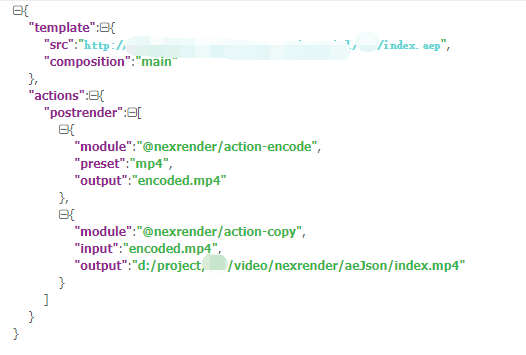
result:
`nexrender-cli --skip-cleanup --file ./aeJson/demo.json
starting nexrender-cli
using automatically determined directory of After Effects installation:
- C:\Program Files\Adobe\Adobe After Effects CC 2019\Support Files\aerender.exe
adding default render-only-node license for After Effects at:- C:\Users\Administrator\Documents\Adobe\ae_render_only_node.txt
checking After Effects command line renderer patch...
command line patch already is in place
[00WpyfNp1VpAAC8eeoVJ-] setting up job...
[00WpyfNp1VpAAC8eeoVJ-] working directory is: C:\Users\Administrator\AppData\Local\Temp\nexrender\00WpyfNp1VpAAC8eeoVJ-
[00WpyfNp1VpAAC8eeoVJ-] downloading assets...
[00WpyfNp1VpAAC8eeoVJ-] applying prerender actions...
[00WpyfNp1VpAAC8eeoVJ-] running script assemble...
[00WpyfNp1VpAAC8eeoVJ-] rendering job...
[00WpyfNp1VpAAC8eeoVJ-] rendering took ~15.421 sec.
[00WpyfNp1VpAAC8eeoVJ-] writing aerender job log to: C:\Users\Administrator\AppData\Local\Temp\nexrender\aerender-00WpyfNp1VpAAC8eeoVJ-.log
[00WpyfNp1VpAAC8eeoVJ-] applying postrender actions...
[00WpyfNp1VpAAC8eeoVJ-] starting action-encode action (ffmpeg)
[00WpyfNp1VpAAC8eeoVJ-] action-encode: input file C:\Users\Administrator\AppData\Local\Temp\nexrender\00WpyfNp1VpAAC8eeoVJ-\result.avi
[00WpyfNp1VpAAC8eeoVJ-] action-encode: output file C:\Users\Administrator\AppData\Local\Temp\nexrender\00WpyfNp1VpAAC8eeoVJ-\encoded.mp4
************undefinedC:\Users\Administrator\AppData\Local\Temp\nexrender\00WpyfNp1VpAAC8eeoVJ-*win32
[00WpyfNp1VpAAC8eeoVJ-] ffmpeg version N-92486-g8f875a90c4 Copyright (c) 2000-2018 the FFmpeg developers
built with gcc 8.2.1 (GCC) 20181017
configuration: --enable-gpl --enable-version3 --enable-sdl2 --enable-fontconfig --enable-gnutls --enable-iconv --enable-libass --enable-libbluray --enable-libfreetype --enable-libmp3lame --enable-libopencore-amrnb --enable-libopencore-amrwb --enable-libopenjpeg --enable-libopus --enable-libshine --enable-libsnappy --enable-libsoxr --enable-libtheora --enable-libtwolame --enable-libvpx --enable-libwavpack --enable-libwebp --enable-libx264 --enable-libx265 --enable-libxml2 --enable-libzimg --enable-lzma --enable-zlib --enable-gmp --enable-libvidstab --enable-libvorbis --enable-libvo-amrwbenc --enable-libmysofa --enable-libspeex --enable-libxvid --enable-libaom --enable-libmfx --enable-amf --enable-ffnvcodec --enable-cuvid --enable-d3d11va --enable-nvenc --enable-nvdec --enable-dxva2 --enable-avisynth
[00WpyfNp1VpAAC8eeoVJ-] libavutil 56. 23.101 / 56. 23.101
libavcodec 58. 39.100 / 58. 39.100
libavformat 58. 22.100 / 58. 22.100
libavdevice 58. 6.100 / 58. 6.100
libavfilter 7. 44.100 / 7. 44.100
libswscale 5. 4.100 / 5. 4.100
libswresample 3. 4.100 / 3. 4.100
libpostproc 55. 4.100 / 55. 4.100
[00WpyfNp1VpAAC8eeoVJ-] C:\Users\Administrator\AppData\Local\Temp\nexrender\00WpyfNp1VpAAC8eeoVJ-\result.avi: No such file or directory
job rendering failed
Error: Error loading postrender module @nexrender/action-encode: Error: Error in action-encode module (ffmpeg)
at requireg.catch.err (C:\Users\Administrator\AppData\Roaming\npm\node_modules\@nexrender\cli\node_modules\@nexrender\core\src\tasks\actions.js:25:35)
at process._tickCallback (internal/process/next_tick.js:68:7)
`
xxcl-niky
on 17 Jun 2019
try checking the After Effects log for this job to see what happened inside aerender itself
inlife
on 17 Jun 2019
@chrstnsmthng @JamesBotterill @franeko @inlife
My problem is solved, thank you for your answer.
Steps to solve the problem:
_This is due to the inconsistency between the layer composition name in my ‘aep’ file and the name synthesized in json._
xxcl-niky
on 18 Jun 2019
Glad to hear that, cheers!
inlife
on 18 Jun 2019
Related issues
ujukauboi
·
4Comments
 Dezzymei
·
3Comments
JamesBotterill
·
4Comments
Dezzymei
·
3Comments
JamesBotterill
·
4Comments
 FRANK-AND-FREE
·
4Comments
FRANK-AND-FREE
·
4Comments
 darshak-gosar
·
3Comments
darshak-gosar
·
3Comments
Most helpful comment
@chrstnsmthng @JamesBotterill @franeko @inlife
My problem is solved, thank you for your answer.
Steps to solve the problem:
_This is due to the inconsistency between the layer composition name in my ‘aep’ file and the name synthesized in json._