Nexrender: Injecting scripts does not work in AE 2018
Hey there, following new updates for 2018 AE the problems also follows. Injecting scripts using AE 2018 does not work anymore. Probably it could be due to AE changes. Hope this is bug and this is only informative goal post.
 leq382121
All 47 comments
hello,
most likely they've changed the file structure, which is not super great. And i dont have the new version to test it. Also worst part, now we need to support multiple versions at the same time ))
 inlife
on 1 Dec 2017
inlife
on 1 Dec 2017
The files are working and the trick with renaming/moving them in the same folder works, just if you use $.evaFile... it does not use the values of the scripts, but other files are being used when rendering.
leq382121
on 2 Dec 2017
Worked today on it and today I've found out that if you want to inject script, you have to use absolute path starting from root (~/root/users/user/bla/blah) and you can't just pass a script file next to the folder (only for scripts. Whatsoever img videos, vectors etc working).
I have an idea. what if you name folder inside the temp folder same every time and after each project being rendered save the project file somewhere else and unlink the present before new project would be started there and loop it? then we could use fixed link and it would satisfy the need. If this is a bit hard to understand, I can explain what i mean.
leq382121
on 4 Dec 2017
well that thing about absolute paths was there before too, thats why I implemented that project file patching in the first place, if i remember correctly
otherwise it won't see that script
inlife
on 4 Dec 2017
Yes, but the old way does not seems to be working anymore. and I've tried very dirty debugging with error catching in expression scripts and it took me a while to actually use data from Js. But this does not solve the problem since we are renaming extra files to the expected one and script glues them together in one folder to be used as expected files if the ones we wanted are not found.
leq382121
on 4 Dec 2017
also, related to that issue, if i understood correctly @joshea0 fixed/tried to fix that issue
in the commit https://github.com/joshea0/nexrender/commit/bfa317bbd005d57b0ea92b7078a937d227e9dc3c
does that part with filepath fix issue for you ?
inlife
on 4 Dec 2017
thanks for a suggestion. I will try that tomorrow. It is great that you still take care of you great project! :)
leq382121
on 4 Dec 2017
Please let me know if it works for you! If it fixes the issue I'd be happy
to write up a pull request with a cleaner fix since that branch of mine has
some slightly hacky stuff that is specific to the project I'm currently
working on.
On Dec 4, 2017 11:50, "Liutauras Razma" notifications@github.com wrote:
thanks for a suggestion. I will try that tomorrow. It is great that you
still take care of you great project! :)—
You are receiving this because you were mentioned.
Reply to this email directly, view it on GitHub
https://github.com/inlife/nexrender/issues/46#issuecomment-349024141,
or mute the thread
https://github.com/notifications/unsubscribe-auth/AG7jtkY-cCrv0b93Cx0M6tc2U4Cwe9O5ks5s9CLNgaJpZM4QyODQ
.
 joshea0
on 4 Dec 2017
joshea0
on 4 Dec 2017
Hi, I identified the problem with ae 2018, it doesn't save the $.evalfile in binary format, instead it stores it in plain text.
<cdat bdata="00000000"/>
<string>$.evalFile("/Users/Inlife/NXRendering/nm05/data.js"); getTime(time)</string>
What I dit is modify the task patch.js
I included the following code:
var DOMParser = require('xmldom').DOMParser;
var TheSerializer = require('xmldom').XMLSerializer;
var fulldom = require('xmldom');
and also:
```js
аs.readFile(projectName, (err, bin) => {
if (err) return callback(err);
    // convert to utf8 string
    let data = bin.toString('utf8');
    // create xml
    var xmlDoc = new DOMParser().parseFromString(data);
    // search all scripts
    var stringElements = xmlDoc.getElementsByTagName("string");
    // process in xml way

    for (var key=0;key<stringElements.length;key++){
        var elm= stringElements[key];
        var original = elm.textContent;
        if (original !== "-_0_/-"){
            elm.textContent = replacePath(original,replaceToPath);
            if(elm.textContent != original) {
                console.log("changed",elm.textContent,original);
            }
        }
    }
    data = new TheSerializer().serializeToString(xmlDoc);
```
The only part that it's ugly and is :
if (original !== "-_0_/-"){
Because I did it as a quick fix.
 xaviguardia
on 5 Dec 2017
xaviguardia
on 5 Dec 2017
Oh, so i see, now it's just a plain text
Well yea, xml parser can be used, but i guess just for that path replacing it can be inserted via regex as it worked before, if we don't want to add another dependency )
Also we somehow need to figure out way to detect project file version, and if it is >= 18, execute that new code, otherwise, execute old code. Does somebody have any idea ? 😄
And now i'm thinking, that we can slightly optimize that thing. Eval file is usually used while creating a template. But when we need to actually render it, ae reads it from filesystem and then evals it. What if we just insert the whole file content there, maybe with whitespace removal, or even some minification if aplicable ?
Basically we will be able to get rid of the slowest operation of "file read" on each frame, that should boost the rendering performance and speed quite nice.
What do you think guys?
inlife
on 5 Dec 2017
For defining the version using project file, we can just get value from tag
But I am always up for improvements!
leq382121
on 5 Dec 2017
I guess the best solution would to find some value representing the current project version inside the project file itself. Because the fact is that, user can for example create a project file w/o scripts.
However if this is impossible the way you @leq382121 suggested is also ok i think. )
inlife
on 5 Dec 2017
Talking about putting a script itself instead of passing the file would be a great idea I think. In this case I think we can just pass the scrips itself to the json files and we don't need to create 100 script files for each project in that case. Also thinking about possibility passing a text instead of writing the whole script if we would like to change text only. This could be defined in type, where we say script, image etc. But that's maybe for some future to consider, since sounds a bit crazy for now from the time scope.
leq382121
on 5 Dec 2017
Well it might sound crazy, but is actually very easy and fast to make. But you are right, keeping compatibility with old way of doing script/data type, and writing script content directly into project under new type is the right way
inlife
on 5 Dec 2017
Maybe i've explained a nit in complex way, but imagine:
name: iAmTheNameOfTheTextLayerInProj
type: text
src: I am the text which will be used in the template
And this combination sees that the type is a text and it will convert "I am the text which will be used in the template" to value in the expression straight into the project layer (inside aspx file) expression window as a source. (since in 2018 it's a plain text or could convert it to js and attach it somehow automatically).
leq382121
on 5 Dec 2017
Didn't find a nice way to identify AE 2018 version of the file. I am not very familiar with AE, but not everything is stored in clear text.
xaviguardia
on 5 Dec 2017
About injecting the whole script, I tried the boilerplate project that nexrenderer provides , changing the code and there is no performance difference.
xaviguardia
on 5 Dec 2017
@xaviguardia @inlife
the solution you proposed works well and now I am able to play with 2018 without a problem. Thanks guys for contribution! Cheers! Looking forward to make this tool better.
leq382121
on 5 Dec 2017
Okay, I have tested on my simple mini project, works. But In the project where we use easeAndWizz plugin, i guess it also replaces that. so maybe we can do it like some identification what we want to read? f.ex can we write a comment in our project template like //nex and it will only treat expressions with this comm and will skip others? @xaviguardia
leq382121
on 5 Dec 2017
FYI I have solved that issue by adding //nex comment under expressions i want to itterate like this:
// read project file contents
fs.readFile(projectName, (err, bin) => {
    if (err) return callback(err);

    // convert to utf8 string
    let data = bin.toString('utf8');
    // create xml
    var xmlDoc = new DOMParser().parseFromString(data);
    // search all scripts
    var stringElements = xmlDoc.getElementsByTagName("string");
    // process in xml way

    for (var key=0;key<stringElements.length;key++){
        var elm= stringElements[key];
        var original = elm.textContent;

        if (original.indexOf("//nex") != -1){
            elm.textContent = replacePath(original,replaceToPath);
            if(elm.textContent != original) {
                console.log("changed",elm.textContent,original);

            }
        }
    }

    data = new TheSerializer().serializeToString(xmlDoc);

    // save result
    fs.writeFile(projectName, data, callback);
});
Hi @leq382121 Nice!! will you update the code ?
xaviguardia
on 5 Dec 2017
I don't know how to push it here @xaviguardia , but you can find my forked repository with an update included 😃
leq382121
on 5 Dec 2017
I hope I will get some free time, and be able to research that thing a little bit more, fix the issue, and add that feature for inserted code soon and push it. Not sure about timing though.
inlife
on 6 Dec 2017
Hey, can you give a working flow? I've updated my repo based on @leq382121 code, but adding //nex under regular expressins inside AE projects has no effect. The path script is not used to modify string elements within my comps.
 MrSKYone
on 12 Dec 2017
MrSKYone
on 12 Dec 2017
@MrSKYone check list:
- Are you using AE 2018?
- Is your $.evalFile path file name in the end is correct?
- is the expression is valid?
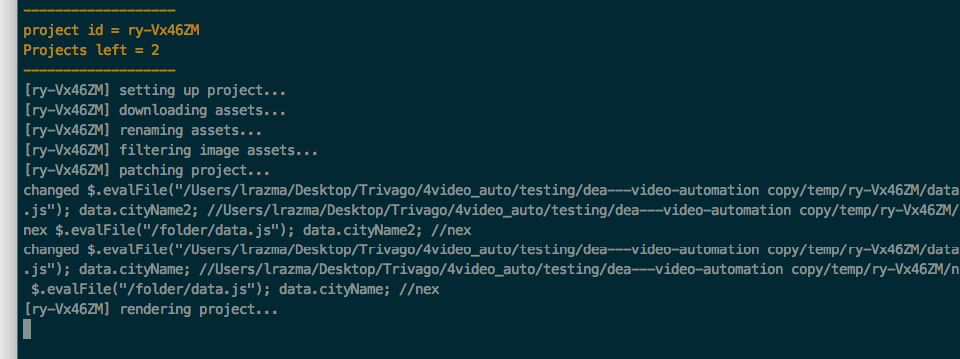
This is how it looks in my project file when setting up the value from js file, json object:

This is how it's being threaten in the process:
leq382121
on 12 Dec 2017
Hey, here is the full details:
I'm using AE CC 2018
here is the regular expression i'm using:
$.evalFile("/Users/hugdubs/Documents/TRYouts/CODE/NextRendering/nexrender-boilerplate/temp/Hk_-TTBCb/data.js"); getText().var3
//nex
here is my data.js file
var items = [
    {"var1":'bla',
     "var2":'blabla',
     "var3":'blablabla'}
];

function getCurrent() {
    for (var i = 0; i < items.length; i++) {
        return i;
    }
}

function getText() {
    return items[getCurrent()] || { text: "none" };
}
I'm sure that the case is not in the "//nex" thing. What i think you just select stuff from js, but you don't run functions inside your template. Try calling your functions like
$.evalFile("/Users/hugdubs/Documents/TRYouts/CODE/NextRendering/nexrender-boilerplate/temp/Hk_-TTBCb/data.js"); getCurrent() getText().var3;
other thing. i'm not sure about your
|| {text:"none"};
You don't chose var.text anywhere in your expression. Are you sure it returns "none" and attach it where you want? not sure how he understands that he should use text value even though you return it. Because it's not what it expects to be returned.
leq382121
on 12 Dec 2017
@leq382121 I managed to make the patch script work.
However, the patch is not correct:
$.evalFile("data.js"); items.var3; //nex
is turned into
$.evalFile("data.js"); items.var3; //Users/hugdubs/Documents/TRYouts/CODE/NEXTMOTION/temp/H1KXtBabM/nex
I guess it should be turned into:
$.evalFile("//Users/hugdubs/Documents/TRYouts/CODE/NEXTMOTION/temp/H1KXtBabM/data.js"); items.var3;
[H1KXtBabM] setting up project...
[H1KXtBabM] downloading assets...
[H1KXtBabM] renaming assets...
[H1KXtBabM] filtering image assets...
[H1KXtBabM] patching project...
changed $.evalFile("data.js"); items.var3; //Users/hugdubs/Documents/TRYouts/CODE/NEXTMOTION/temp/H1KXtBabM/nex $.evalFile("data.js"); items.var3; //nex
[H1KXtBabM] rendering project...
[H1KXtBabM] verifying project...
[H1KXtBabM] applying actions: moving result file...
[H1KXtBabM] cleaning up...
Any idea?
MrSKYone
on 12 Dec 2017
try adding
$.evalFile("/folder/data.js"); items.var3;
But i have no idea why this could be happening. The only reason comes to my head that maybe you accidentally typed something in the task files of nexrender, but otherwise, no idea..
leq382121
on 12 Dec 2017
I've tried to quickly modify your code so it makes the right changes:
function processTemplateFile(project, callback) {
    // project file template name
    let projectName     = path.join( project.workpath, project.template );
    let replaceToPath   = path.join( process.cwd(), project.workpath, path.sep); // absolute path
    let abPath          = "$.evalFile("+path.join( process.cwd(), project.workpath, path.sep) + "data.js);";

    // escape single backslash to double in win
    replaceToPath = replaceToPath.replace(/\\/g, '\\\\');

    // read project file contents
    fs.readFile(projectName, (err, bin) => {
        if (err) return callback(err);

        // convert to utf8 string
        let data = bin.toString('utf8');
        // create xml
        var xmlDoc = new DOMParser().parseFromString(data);
        // search all scripts
        var stringElements = xmlDoc.getElementsByTagName("string");
        // process in xml way

        for (var key=0;key<stringElements.length;key++){
            var elm= stringElements[key];
            var original = elm.textContent;
            if (original.indexOf("//nex") != -1){
                //elm.textContent = replacePath(original,replaceToPath);
                elm.textContent = original.replace('$.evalFile("data.js");', abPath);
                elm.textContent = elm.textContent.replace('//nex', '');
                if(elm.textContent != original) {
                    console.log("changed",elm.textContent,original);
                }
            }
        }

        data = new TheSerializer().serializeToString(xmlDoc);

        // save result
        fs.writeFile(projectName, data, callback);
    });
}
now my regular expression
$.evalFile("data.js"); items.var3;
becomes
$.evalFile("/Users/hugdubs/Documents/TRYouts/CODE/NEXTMOTION/temp/H1KXtBabM/data.js"); items.var3;
however, the data from the data.js file is not used during render:
my data.js
var items = {"var1":"bla", "var2":"blabla", "var3":"blablabla"};
MrSKYone
on 12 Dec 2017
Ok my bad, this last one is on me:
when modifying @leq382121 's script, I forgot to wrap the path with " "
So changing @leq382121 script from is original solution to:
patch.js
function processTemplateFile(project, callback) {
    // project file template name
    let projectName     = path.join( project.workpath, project.template );
    let replaceToPath   = path.join( process.cwd(), project.workpath, path.sep); // absolute path
    let abPath          = '$.evalFile("'+path.join( process.cwd(), project.workpath, path.sep) + 'data.js");';

    // escape single backslash to double in win
    replaceToPath = replaceToPath.replace(/\\/g, '\\\\');

    // read project file contents
    fs.readFile(projectName, (err, bin) => {
        if (err) return callback(err);

        // convert to utf8 string
        let data = bin.toString('utf8');
        // create xml
        var xmlDoc = new DOMParser().parseFromString(data);
        // search all scripts
        var stringElements = xmlDoc.getElementsByTagName("string");
        // process in xml way

        for (var key=0;key<stringElements.length;key++){
            var elm= stringElements[key];
            var original = elm.textContent;
            if (original.indexOf("//nex") != -1){
                //elm.textContent = replacePath(original,replaceToPath);
                elm.textContent = original.replace('$.evalFile("data.js");', abPath);
                elm.textContent = elm.textContent.replace('//nex', '');
                if(elm.textContent != original) {
                    console.log("changed",elm.textContent,original);
                }
            }
        }

        data = new TheSerializer().serializeToString(xmlDoc);

        // save result
        fs.writeFile(projectName, data, callback);
    });
}
is effectively adjusting the paths.
this solution works with both AE CC 17 and 18.
thanks for this work around
MrSKYone
on 12 Dec 2017
the previous was very specific to AE 2018 and Its somehow works with my files. Anyways, nicely done! @MrSKYone
But what if i use different scripts? like i want to use 3 scripts instead of one? Do i have now use data.js according to your solution, right?
leq382121
on 12 Dec 2017
I would say you might be able to merge them? You are right, this solution is only working for data.js.
This might not be a sustainable solution and I admit I didn't thought about the "multiple scripts" scenario.
MrSKYone
on 12 Dec 2017
All my research about the new version have resulted in new thoughts and ideas.
I found a thing called ae-to-json https://github.com/Jam3/ae-to-json
Its made for after effects scripting environment, but i guess it can be forked and remade in more backend compatible way
I realized that we can change values in the project file itself, just like we do with patching for scripts. And i think this is the better way, than doin some sort of hacks, like the ones we are doing currently.
Basically main idea and result of my research is to create a new version of nexrender, which will work differently on backend with project files, more natively and more stable i believe.
What i want to do, is to create/find a aepx file parser into a json like structure, modify this structure just before the render, and then save it and do the render.
inlife
on 13 Dec 2017
That's a huge plans @inlife . I will continue working on the present state and develop my own project using your library to support my project, but I am looking forward to more flexibility and great improvement!
leq382121
on 13 Dec 2017
Ye, that will definitely be a new major version, and most likely it will have some incompatible changes with current API.
But i guess this is ok, considering how old is current version of nexrender actually is 😄
inlife
on 13 Dec 2017
guys, wanted to ask you
does anyone use a filter feature in the nexrender ?
the one that uses jimp backend to resize/filter images on the fly just before starting render
inlife
on 21 Jan 2018
@inlife Hey,
it really depends on the project but I'm defining all the sizes in the After effects already, so I don't use it personally.
leq382121
on 21 Jan 2018
im just thinking of removing jimp as dependency, and removing filtering task
as that can be done on pre-download stage by user on his own
inlife
on 22 Jan 2018
Might not be related but having some filter action to resize content based on comp resolution would be awesome. One use case would be to have a 720p resolution source that would automatically be stretched to 1920x1080 if the rendered comp is 1080p. Hope I'm clear enough for you to understand haha.
MrSKYone
on 22 Jan 2018
@MrSKYone hehe, ye, i undestand. However for that we would need to somehow understand what is the composition resolution from reading the project file.
And we dont yet know how to read it.
I've recently created a repo with attempt to research and reverse the format:
https://github.com/inlife/aftereffects-project-research
so this might be a feature for the future, ofc if we will be able to understand how do it
but for now i would suggest resizing content before sending it to AE input
inlife
on 22 Jan 2018
I wouldn't mind feeding the targt resolution directly into the start.js :-)
this would be the filter
MrSKYone
on 22 Jan 2018
oh well, you could do that even now quite simple, by resizing images or a video just before feeding it into nexrender
like for example using ffmpeg or jimp for images
inlife
on 22 Jan 2018
FYI @MrSKYone @inlife , remember that thing with "//nex" for AE 2018?
I've solved the pathing issue just by replacing "//nex" to "" while pathing.
    fs.readFile(projectName, (err, bin) => {
        if (err) return callback(err);

        // convert to utf8 string
        let data = bin.toString('utf8');
        // create xml
        var xmlDoc = new DOMParser().parseFromString(data);
        // search all scripts
        var stringElements = xmlDoc.getElementsByTagName("string");
        // process in xml way

        for (var key=0;key<stringElements.length;key++){
            var elm= stringElements[key];
            var original = elm.textContent;
            if (original.indexOf("//nex") != -1){
                elm.textContent = replacePath(original.replace('//nex',''),replaceToPath)
                if(elm.textContent != original) {
                    console.log("#----");
                    console.log("original: ",elm.textContent,original);
                    console.log("changed to:",elm.textContent);
                }
            }
        }

        data = new TheSerializer().serializeToString(xmlDoc);

        // save result
        fs.writeFile(projectName, data, callback);
    });
how is that you still have this condition then?
if (original.indexOf("//nex") != -1){
                elm.textContent = replacePath(original.replace('//nex',''),replaceToPath)
                if(elm.textContent != original) {
                    console.log("#----");
                    console.log("original: ",elm.textContent,original);
                    console.log("changed to:",elm.textContent);
                }
            }
Am I missing something?
MrSKYone
on 22 Jan 2018
When i made a solution before, you had a problem while patching the location and folder uri was somehow binded with //nex somehow. Now before patching I remove the //nex from the script and only then patching starts which means no irritation with uri anymore.
leq382121
on 24 Jan 2018
issue has been resolved in latest pre-release version, closing the issue
inlife
on 3 Feb 2019
Related issues
 pdkn
·
5Comments
pdkn
·
5Comments
 FRANK-AND-FREE
·
4Comments
FRANK-AND-FREE
·
4Comments
 ujukauboi
·
4Comments
ujukauboi
·
4Comments
 panchenkoprog
·
5Comments
panchenkoprog
·
5Comments
 bluematter
·
5Comments
bluematter
·
5Comments
Most helpful comment
Hi, I identified the problem with ae 2018, it doesn't save the $.evalfile in binary format, instead it stores it in plain text.
What I dit is modify the task patch.js
I included the following code:
and also:
```js
аs.readFile(projectName, (err, bin) => {
if (err) return callback(err);
```
The only part that it's ugly and is :
if (original !== "-_0_/-"){Because I did it as a quick fix.