Newpipe: can't import subscription from file
The file is downloading from youtube site but when it's saved on phone and i want to import it to newpipe i see only this bubble message that claims the import isn't possible.
Sony Xperia Z5 premium
Android ver. 7
Newpipe ver. 0.19.8
 suchyraz
All 13 comments
Please follow the issue template when creating an issue, don't just delete everything! Now I have to ask questions you would have already answered: what are the exact steps leading to the bug? Could you provide the subscription file downloaded from yt, if it does not contain sensitive data?
 Stypox
on 4 Aug 2020
Stypox
on 4 Aug 2020
I can but dont know how. I'm from Poland and my English is pretty poor.
suchyraz
on 4 Aug 2020
That is why didnt fill all template
suchyraz
on 4 Aug 2020
@suchyraz to upload files to GitHub, just drag them over the comment you are writing
Stypox
on 4 Aug 2020
Happened to me too... Though some of my subscription actually get recognized some not...
 elsaversailles
on 5 Aug 2020
elsaversailles
on 5 Aug 2020
I also have this issue. The XML file you export from the Subscription Manager can't be accepted by the app, as it requires a zip. Not sure if this is a separate issue as OP but this might be in the right direction
 ItCameFromSpace
on 6 Aug 2020
ItCameFromSpace
on 6 Aug 2020
@ItCameFromSpace: No, you need to use Subscriptions > Subscriptions > Import from > YouTube
 wb9688
on 6 Aug 2020
wb9688
on 6 Aug 2020
I followed the instructions and got a subscription_manager.bin file from YouTube.
Importing this file into NewPipe fails with a "Could not import subscriptions" notification.
 caugner
on 6 Aug 2020
caugner
on 6 Aug 2020
@caugner
Exactly as in my case
suchyraz
on 8 Aug 2020
According to the NewPipeExtractor tests for the YoutubeSubscriptionExtractor, the subscriptions export used to be a XML format:
- https://github.com/TeamNewPipe/NewPipeExtractor/blob/5c420340ceb3912b7f54e2df7eb4e27c401f0536/extractor/src/test/java/org/schabi/newpipe/extractor/services/youtube/YoutubeSubscriptionExtractorTest.java#L37-L38
- https://github.com/TeamNewPipe/NewPipeExtractor/blob/5c420340ceb3912b7f54e2df7eb4e27c401f0536/extractor/src/test/resources/youtube_export_test.xml
However, the subscription_manager.bin seems to be a binary file (at least according to the file extension).
caugner
on 10 Aug 2020
* FIX *
To successfully import the subscription file, do not select the .XML file produced by the NewPipe link. Instead, use a browser to navigate to YouTube.com/subscription_manager and * VIEW THE PAGE IN DESKTOP MODE. *
Scroll to the bottom of this page and there is an export button with a tool tip about RSS Feeds. Click that export button to begin the download.
It will download a file named "subscription_manager". It has no file extension, do not give it one.
Now simply go to NewPipe Subscriptions tab, tap YouTube, tap Import, navigate to the file with no file extension, and select it.
It seems that when acquiring the subs export file within NewPipe, it will download an XML file that has the XML extension already. Using 0.19.8 of NewPipe Whenever I attempted to import that XML file it would accept the file, but a "imported" notification would come up almost right away, with no import actually have taken place.
Although the exported file with no extension has all XML syntax as it's content, not having an XML extension permits NewPipe to parse all of the XML data within the file for a proper input.
Hope this helps.
 tylers86
on 11 Aug 2020
tylers86
on 11 Aug 2020
I know (maybe) what's happening. At least in my case it did work!
Assuming you already downloaded the "subscription_manager.xml" file from your youtube account, do the next:
Check if you are clicking the option "import from" then "Previous export".
If you are clicking this button IT WON'T WORK
You have to click the second option "Youtube" and THEN click on the bottom of the page "IMPORT FILE"
And now choose the file you previous downloaded from youtube (in my case it was a XML file)
Now it may work.
Check the green arrow in the attached images to see where to click.
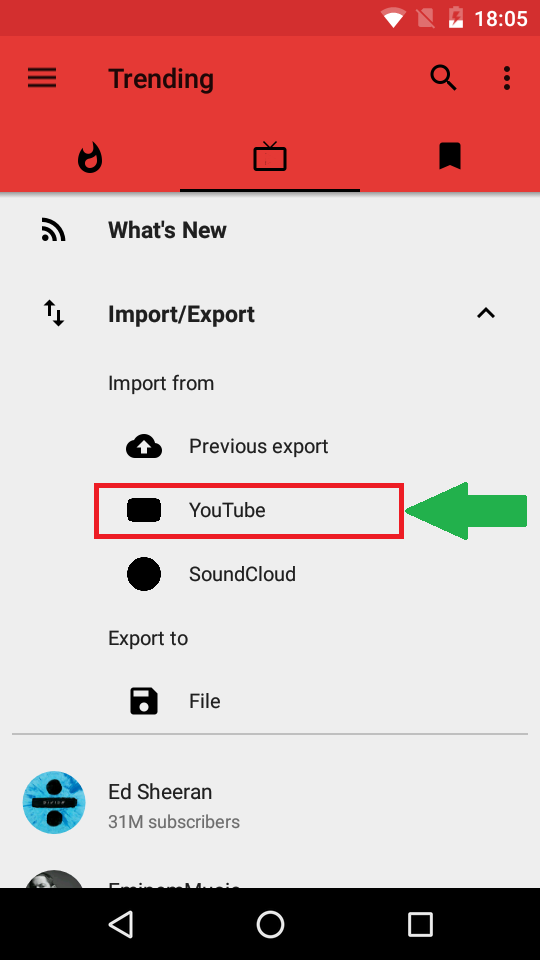
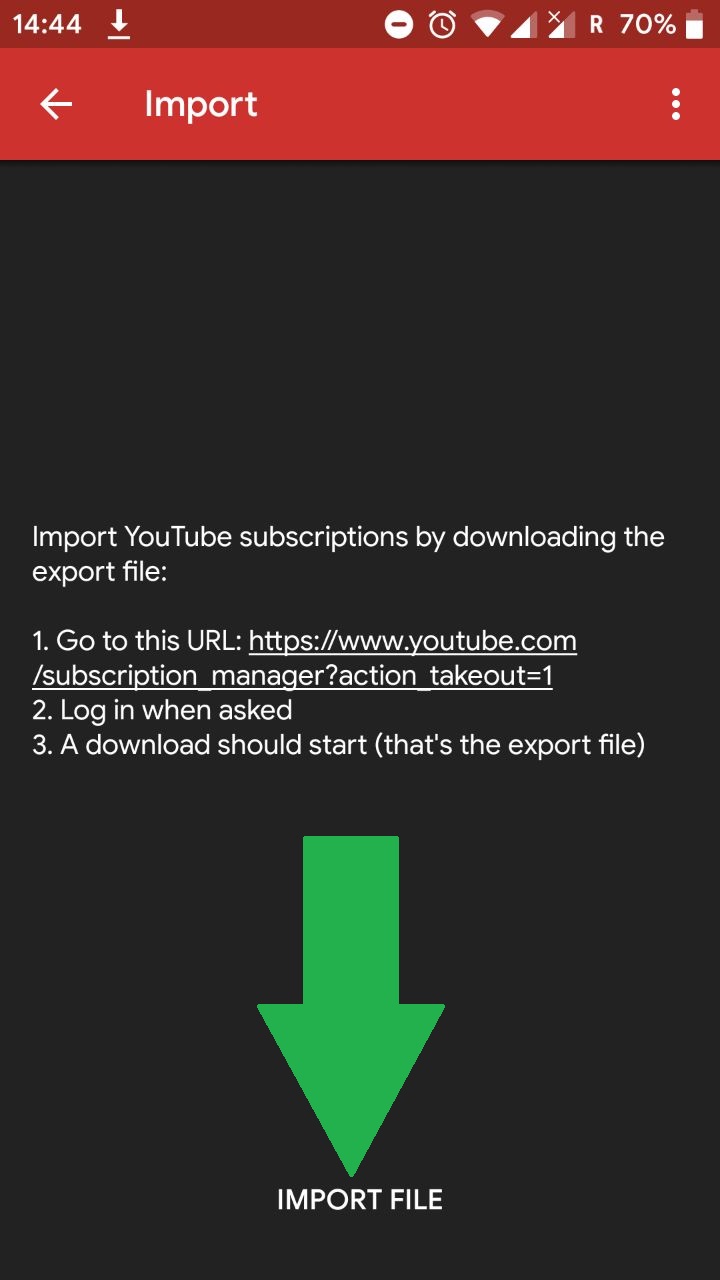
 kelvinkad
on 12 Aug 2020
kelvinkad
on 12 Aug 2020
Let's keep only TeamNewPipe/NewPipeExtractor#384 open
Stypox
on 12 Aug 2020
Related issues
 cavemandaveman
·
3Comments
cavemandaveman
·
3Comments
 f242
·
3Comments
f242
·
3Comments
 ghost
·
3Comments
ghost
·
3Comments
 Knowbody42
·
3Comments
Knowbody42
·
3Comments
 hassanseoul123
·
3Comments
hassanseoul123
·
3Comments