NewPipe v0.19.8 Not showing comments
Issue: NewPipe doesn't display comments on any video. This is as of version 0.19.8. Since it hasn't been brought up by anyone yet I'm assuming it's a isolated case, but it's odd nonetheless. I'm on a Poco F1 running MIUI 11(Android 10).
I'll take up the last paragraph on a thank you note. Seriously, you guys are absolutely amazing! I only play music in NewPipe, satisfy my inner data hoarder with NewPipe, most of my viewing is done on NewPipe. It's freaking awesome that I'm able to experience all this, for absolutely zero costs! And the quick response to the changes Google made upstream is a great sign that I can get behind. Cheers to every dev on this project, you are a huge part of my digital life :)
 GitterDoneBoi
All 21 comments
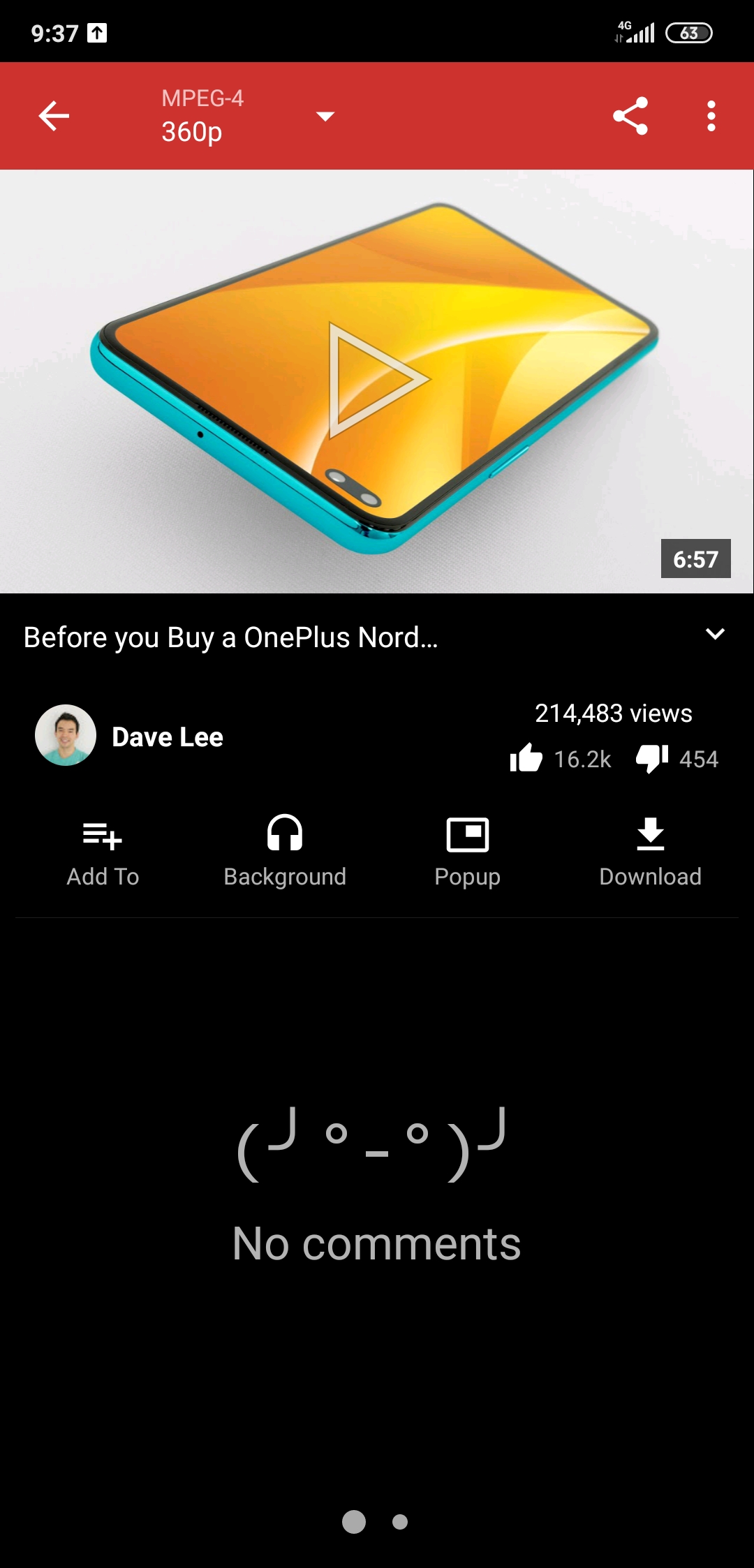
This is newpipe
GitterDoneBoi
on 29 Jul 2020
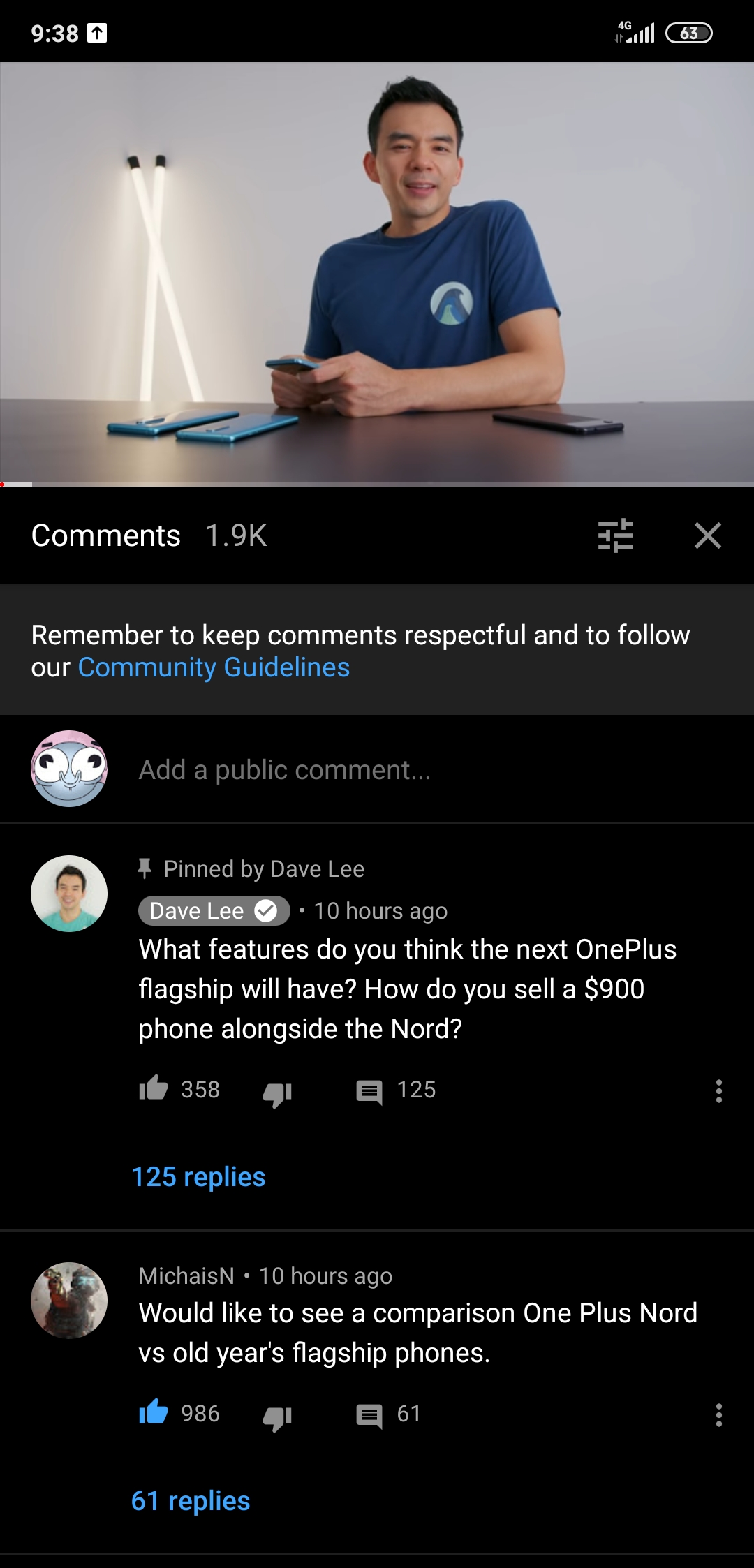
And YouTube Vanced for comparison
GitterDoneBoi
on 29 Jul 2020
Please ensure you have comments enabled in the settings.
 gkeegan
on 29 Jul 2020
gkeegan
on 29 Jul 2020
@gkeegan: If that was the case, there also wasn't a "No comments".
@GitterDoneBoi: Do you always have this for all videos? Could you please press Settings -> History & cache -> Wipe cached metadata and try a few videos? If it's not for all videos, it's a known issue that sometimes it fails to load.
 wb9688
on 29 Jul 2020
wb9688
on 29 Jul 2020
@gkeegan I do have comments enabled, hence the existence of a comment page
GitterDoneBoi
on 29 Jul 2020
@wb9688 I just tried this, no luck though. It's still the same for every video.
GitterDoneBoi
on 29 Jul 2020
Could you install a https://wb9688.stackstorage.com/s/eBfTmrxPUsGTNGAx, connect your phone to your PC through USB, open Chrome, go to chrome://inspect, open that debug version of NewPipe on your phone, select that NewPipe instance in Chrome, go to the Network tab, try to reproduce the issue, and once you've successfully reproduced the issue, right-click in Chrome, select "Save as HAR with Content" and send me that HAR? Then I might be able to fix this issue.
wb9688
on 29 Jul 2020

That's...odd. The debug version works perfectly fine.
GitterDoneBoi
on 29 Jul 2020
@wb9688 Update: Reinstalling NewPipe did the trick, but I think I have narrowed down to the problem. When I opened the fresh app, everything worked fine but when I imported this backup of my settings everything reverted back to the problem state.
Here is the backup in question
GitterDoneBoi
on 29 Jul 2020
The problem is fixed now btw so I still appreciate you providing the debug to help me fix it faster :) thanks!
GitterDoneBoi
on 29 Jul 2020
Actually it is still the same. I tried clean install too. Still does not work. Back to the old. Does not play anything at all. No matter what I do. Tried in 5 different phones, and on 2 android TV. Download too does not work.
0.19.8 FDroid version.
Snapshot and details: https://github.com/TeamNewPipe/NewPipe/commit/7918e3a1aa4d0c5632c18a553f8813de1fa9d855#commitcomment-41083426
 vdbhb59
on 31 Jul 2020
vdbhb59
on 31 Jul 2020
I had comments and 80% of videos not running ("video unavailable") .
I uninstalled and reinstalled. For some reason my settings/subscriptions were untouched. It worked when I cleared "data". I'm not sure why "data" doesn't get cancelled when uninstalling.
This fixed the comments and the videos that wouldn't run.
But after changing the settings (download location, default resolution, restricted content etc.) it turned back to comments not working and also many videos failing.
 aand18
on 15 Aug 2020
aand18
on 15 Aug 2020
I think I've narrowed it down to "YouTube restricted mode" in the Content settings. Disabling this makes everything work. BTW, what does it do?
aand18
on 15 Aug 2020
For some reason my settings/subscriptions were untouched. It worked when I cleared "data". I'm not sure why "data" doesn't get cancelled when uninstalling.
@aand18: That's not possible, unless you didn't actually uninstall or your device's Android is buggy.
I think I've narrowed it down to "YouTube restricted mode" in the Content settings. Disabling this makes everything work. BTW, what does it do?
Enable YouTube's restricted mode, so that you can't watch inappropriate videos.
wb9688
on 15 Aug 2020
For some reason my settings/subscriptions were untouched. It worked when I cleared "data". I'm not sure why "data" doesn't get cancelled when uninstalling.
@aand18: That's not possible, unless you didn't actually uninstall or your device's Android is buggy.
It's a vanilla Samsung S8...might be bugged 🤷♂️ . All I know is it happened before with NewPipe, I had to uninstall the F-Droid variant to be able to install the GitHub release - all my settings were kept.
I think I've narrowed it down to "YouTube restricted mode" in the Content settings. Disabling this makes everything work. BTW, what does it do?
Enable YouTube's restricted mode, so that you can't watch inappropriate videos.
Maybe "YouTube restricted mode" was broken before v0.19.8. Anyway, it makes sense, restricted blocks only some videos and all comments.
BTW "YouTube restricted mode" deserves a clearer name. Like "Restrict mature content"...
aand18
on 15 Aug 2020
@aand18: There was no such setting before it was added and it's disabled by default in NewPipe. The other (broken) setting that existed was "Age restricted content", which will show an error for 18+ videos if that's disabled, but it has been fixed now. I do think "YouTube restricted mode" is a clear name, as YouTube calls that feature "Restricted Mode", see https://support.google.com/youtube/answer/174084.
wb9688
on 15 Aug 2020
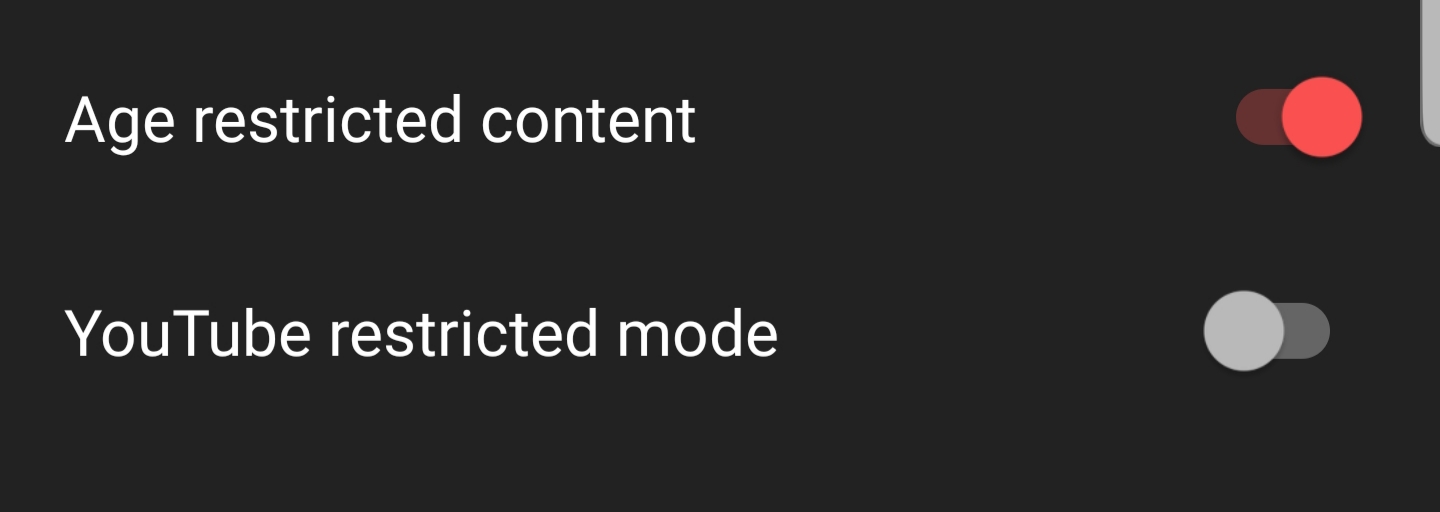
@wb9688 thanks for helping figure this out. I'm trying to understand my confusion an why I had it enabled.
I understand that you're familiar with YouTube's terminology, but for the random NewPipe user (me) reading "YouTube restricted mode" in NewPipe context, it tells me nothing - restricted in what way? I have no idea what it does. Frankly I don't remember ever hearing about this YouTube feature before, at least not by this name.
But the toggle comes immediately below "Age restricted content" so they "feel" similar, when actually they're opposites, maybe even mutually exclusive?
May I suggest "filter mature content"? This is how they define it in the page you linked and it's less ambiguous.
aand18
on 16 Aug 2020
How about "Youtube's Restricted Mode" which would imply this is Youtube's terminology and not Newpipe's?
Edit: Or even "Enable Youtube's Restricted Mode"
 opusforlife2
on 16 Aug 2020
opusforlife2
on 16 Aug 2020
Perhaps we could change the "No comments" error to suggest turning YouTube's restricted mode off?
 snappyapple632
on 28 Aug 2020
snappyapple632
on 28 Aug 2020
@snappyapple632: The comments issue is unrelated to Restricted Mode. YouTube changed their mobile site (and then seemed to have changed it back) so comments might not work anymore.
wb9688
on 28 Aug 2020
@GitterDoneBoi @vdbhb59 Can you see if the two toggles discussed above were causing your issue?
opusforlife2
on 10 Oct 2020
Related issues
 B0pol
·
3Comments
B0pol
·
3Comments
 android1973
·
3Comments
android1973
·
3Comments
 probonopd
·
3Comments
probonopd
·
3Comments
 PanderMusubi
·
3Comments
PanderMusubi
·
3Comments
 danialbehzadi
·
3Comments
danialbehzadi
·
3Comments