Newman: Request Headers in HTML Reports Not Working
- Newman Version (can be found via
newman -v):
3.9.3 - OS details (type, version, and architecture):
Mac OS Sierra 10.12.6 - Are you using Newman as a library, or via the CLI?
CLI - Did you encounter this recently, or has this bug always been there:
First time trying it. - Expected behaviour:
I was expecting that I would be able to see the Request headers in the HTML report.
- Command / script used to run Newman:
Via Jenkins build:
- Command / script used to run Newman:
sudo docker run -v $PWD:/etc/newman postman/newman_ubuntu1404:latest \
    run "collections/$testSuite/collection.json" \
    --disable-unicode \
    --color \
    --delay-request 100 \
    --reporters "cli,html" \
    --environment "environments/$environment.json" \
    --reporter-html-export "collections/$testSuite/results/${BUILD_NUMBER}-${testSuite}-${environment}-${gitBranch}-results.html" \
    --reporter-html-template "collections/$testSuite/results/results_template.hbs"
I have noticed that when I modify my results template to include the Request Headers and Request Body that for some reason the Headers are not being populated.
Here is the code that I have added:
<div class="col-md-12"> </div>
<br/><div class="col-md-4">Request Headers</div><div class="col-md-8">{{request.headers}}</div><br/>
I have verified that if I do something like console.log(request.headers); in the Postman app that I am seeing the object and values in the console as expected. However in Newman that doesnt seem to be the case.
Is this a bug or am I missing something?
 mccannt
All 13 comments
@mccannt Could you take a look at the workaround suggested in https://github.com/postmanlabs/newman/issues/1376?
 kunagpal
on 15 May 2018
kunagpal
on 15 May 2018
@kunagpal Thx for the quick reply.
Are you talking about something like this? ...
<div class="col-md-12"> </div>
<br/><div class="col-md-4">Request Headers</div><div class="col-md-8">
{{#each request.headers}}
<div class="col-md-8"><b>{{this.key}}:</b> {{this.value}}</div>
{{/each}}</div><br/>
I tried that block of code and did not have any luck.
mccannt
on 15 May 2018
@mccannt You'll have to use @key and @value for the request headers names and values respectively, instead of this.key and this.value.
kunagpal
on 18 May 2018
I tried {{@key}}
but response is
members |
-- | --
reference |
Type |
_postman_listIndexKey |
_postman_listIndexCaseInsensitive |
_postman_listAllowsMultipleValues
and for {{@value}}
blank values.
can you please help
@kunagpal
 ssharmasurender3
on 28 Dec 2018
ssharmasurender3
on 28 Dec 2018
Facing the exact same problem as @ssharmasurender3 . The @key is not showing the actual headers that I am sending in the request and @value is all blanks.
 mandeepm91
on 11 Jan 2019
mandeepm91
on 11 Jan 2019
It seems that the information is hidden inside request.headers.members (which seems kind of wrong). Can this bug ticket be reopened @kunagpal?
So the only workaround I could find was the following:
{{#each request.headers.members}}
<tr>
    <td class="text-nowrap">{{key}}</td>
    <td>{{value}}</td>
</tr>
{{/each}}
 vdespa
on 18 Mar 2019
vdespa
on 18 Mar 2019
Excellent
ssharmasurender3
on 18 Mar 2019
It seems that the information is hidden inside
request.headers.members(which seems kind of wrong). Can this bug ticket be reopened @kunagpal?
Brilliant, thanks!
 azgo
on 21 Mar 2019
azgo
on 21 Mar 2019
Also. To add, the full structure of the header objects in the headers.members are listed here http://www.postmanlabs.com/postman-collection/Header.html
 shamasis
on 21 Mar 2019
shamasis
on 21 Mar 2019
Just adding this for reference and a potential workaround for the issue here:
A different version of the html reporter called htmlextra includes the request and response Headers, for each of the requests in your collections.
 DannyDainton
on 21 Mar 2019
DannyDainton
on 21 Mar 2019
Just adding this for reference and a potential workaround for the issue here:
A different version of the
htmlreporter calledhtmlextraincludes the request and response Headers, for each of the requests in your collections.
Yes, I was using htmlextra 1.6.6. and it has this "featurebug". Took a day for me to check around how others work with request headers/params :/.
azgo
on 22 Mar 2019
It's now on 1.6.9 - Can you update and try again?
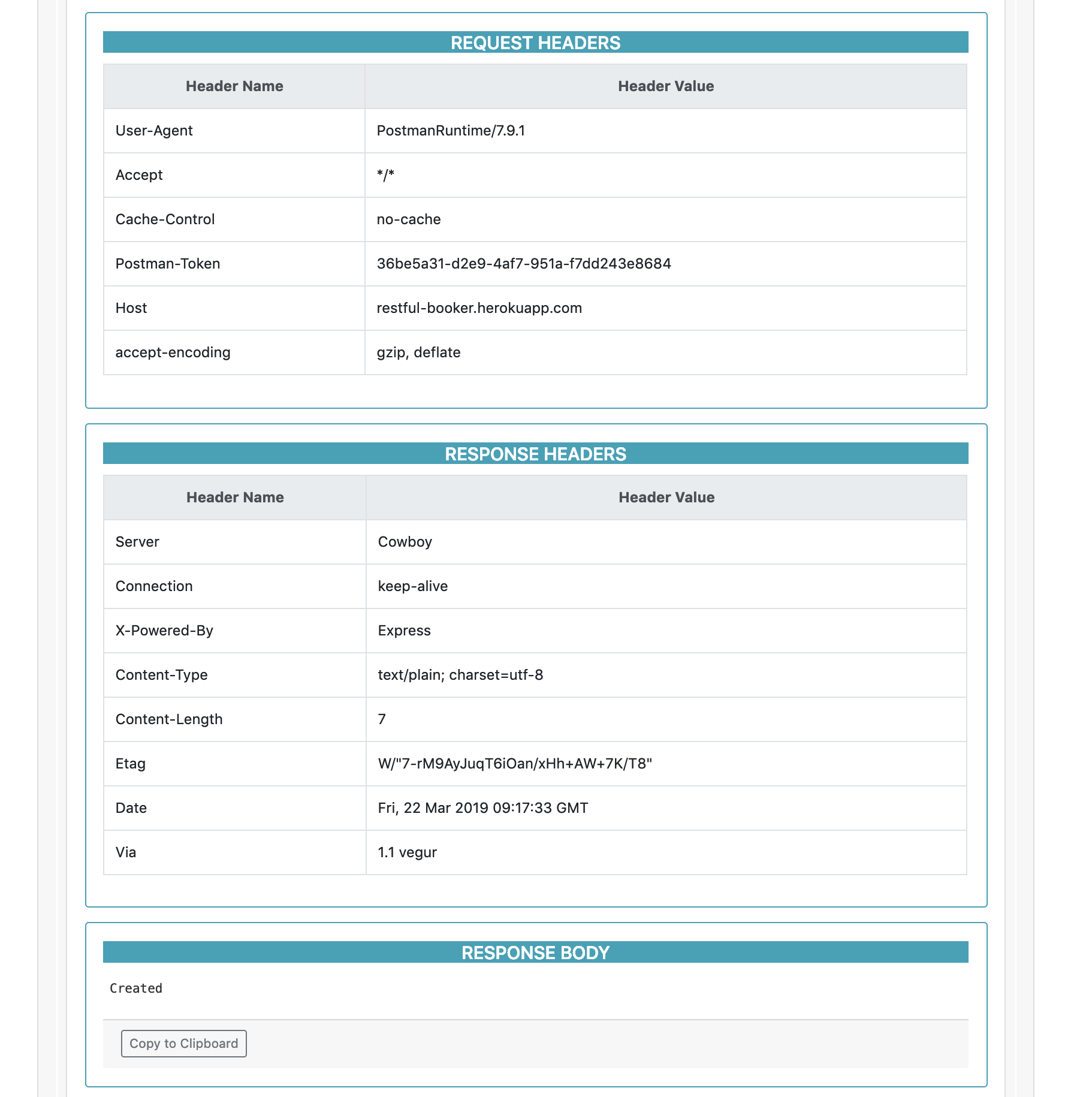
If you check the CHANGELOG.md file, it was added in 1.6.8.
DannyDainton
on 22 Mar 2019
Hey,
Thanks, it works now, I did the same meanwhile. Also would you add this in case of request params, please?
{{#if body.urlencoded}}
<div class="row">
<div class="col-sm-12 mb-3">
<div class="card-deck">
<div class="card border-info" style="width: 50rem;">
<div class="card-body">
<h5 class="card-title text-uppercase text-white text-center bg-info">Request Parameters</h5>
<div class="table-responsive">
<table class="table table-bordered">
<thead class="text-white text-center"><tr><th>Parameter Name</th><th>Parameter Value</th></tr></thead>
<tbody>
{{#each body.urlencoded.members}}
<tr>
<td class="text-nowrap">{{key}}</td>
<td>{{value}}</td>
</tr>
{{/each}}
</tbody>
</table>
</div>
</div>
</div>
</div>
</div>
</div>
{{/if}}
Brgds,
azgo
on 25 Mar 2019
Related issues
 Pixcell
·
3Comments
Pixcell
·
3Comments
 vijaygroovey
·
3Comments
vijaygroovey
·
3Comments
 rycornell
·
5Comments
rycornell
·
5Comments
 AlphaWong
·
3Comments
AlphaWong
·
3Comments
 al-tr
·
4Comments
al-tr
·
4Comments
Most helpful comment
I tried {{@key}}
but response is
members |
-- | --
reference |
Type |
_postman_listIndexKey |
_postman_listIndexCaseInsensitive |
_postman_listAllowsMultipleValues
and for {{@value}}
blank values.
can you please help
@kunagpal