Newman: How can we get Request data in report ?
- "newman":"2.1.2" or newman 3.0.1
- OS details (type, version, and architecture): windows 10
- Command / script used to run Newman:
#newman2
newman -c src\collections\customer-service-BEB-securite.postman_collection.json -d src\fileparameter\customer.json -H results\test\customer.html -O results\log\customer.json

#newman3
newman run src\collections\customer-service-BEB-securite.postman_collection.json -d src\fileparameter\customer.json   -r html,cli,json,junit
Issue
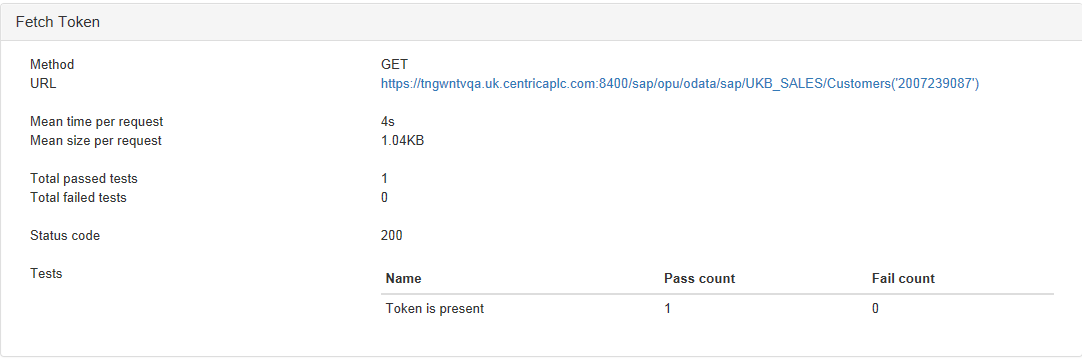
When running newman, in html report we have response data but not request data.
Like you can see in screenshot :

How can we log the request data in repport ?
We need it to debug when fails occurs.
Thank you !
Victorien
 vitoo
vitoo
All 26 comments
@vitoo Please use the following command to generate a JSON report, which contains comprehensive information about the collection run:
newman run src\collections\customer-service-BEB-securite.postman_collection.json -d src\fileparameter\customer.json -r html,cli,json,junit --reporter-json-export verbose-report.json
 kunagpal
on 18 Oct 2016
kunagpal
on 18 Oct 2016
@kunagpal thanks, we can't show request in html report yet ?
It's a really super verbose report, 12'000 lines !
vitoo
on 18 Oct 2016
@vitoo Unfortunately, no, as the HTML report is meant to be a concise summary of collection run information. However, we might consider adding more details to the HTML report format in a future release.
kunagpal
on 19 Oct 2016
@kunagpal Maybe a html report with a hidden request div, so we can toggle the div to see it ?
vitoo
on 19 Oct 2016
@vitoo Precisely, as the report can still be kept concise (at least at first glance), which is the bottom line. Are there any other things that you might want to see in this report?
kunagpal
on 19 Oct 2016
@kunagpal Maybe an another show/hide div with assertion result colored in green/red ?
Thanks
vitoo
on 19 Oct 2016
Yes, differential colour support can (should) be added. We'll keep you posted on it's progress over time. :)
kunagpal
on 19 Oct 2016
This is not a part of our current roadmap, but has been marked as a feature request and added to our internal tracker. We'll update this thread when any progress occurs on this. :)
kunagpal
on 20 Oct 2016
We will track these here as well, @kunagpal :)
 czardoz
on 29 Oct 2016
czardoz
on 29 Oct 2016
You could try providing your own HTML reporter template. There's a cli option for the same. Use the current template as reference maybe? We will better document this soon.
 shamasis
on 30 Oct 2016
shamasis
on 30 Oct 2016
@vitoo I added this in my postman collections to show the params:
tests[`[INFO] Request params: ${JSON.stringify(request.data)}`] = true;
 keithmork
on 1 Nov 2016
keithmork
on 1 Nov 2016
@vitoo Unfortunately, showing request data in the generated report(s) is beyond the scope of the built in Newman reporters. However, you're more than welcome to create your very own custom reporter for the same. For more details, check out https://www.getpostman.com/docs/postman/collection_runs/command_line_integration_with_newman#custom-reporters.
kunagpal
on 16 Jun 2017
Am not getting Headers and response body in HTML report. could someone help me on this please.
 ManikandanRajendran
on 22 Aug 2017
ManikandanRajendran
on 22 Aug 2017
@vitoo - could you please advice on above issue please?
ManikandanRajendran
on 22 Aug 2017
Sorry i can't help you with reports, you can try to customize one report
or the https://github.com/postmanlabs/newman/issues/712#issuecomment-257480793 solution
vitoo
on 22 Aug 2017
@vitoo - thanks for your reply. am sorry to ask you again. you mentioned as you are getting responses in html report when you reporting this issue (starting of this issue). I tried with that sample code you gave and still am not getting the response in report. please guide me if you have any idea.
ManikandanRajendran
on 24 Aug 2017
I'd just like to add my +1 to this- it would be nice if the stock reporters had the same options for verbosity without having to write custom ones.
 JDunn3
on 13 Nov 2017
JDunn3
on 13 Nov 2017
+1 for this
 ryanvgates
on 12 Jan 2018
ryanvgates
on 12 Jan 2018
I wrote a few lines to get the request/response (header and body) in the default html report
but I had difficulties to get the request headers.
I am getting the response headers in this way:
<tbody>{{#each response.header}}<tr><td>{{this.key}}</td><td>{{this.value}}</td></tr>{{/each}}</tbody>
I tried this:
<tbody>{{#each request.header}}<tr><td>{{this.key}}</td><td>{{this.value}}</td></tr>{{/each}}</tbody>
...but it doesn't work :(
A possible workaround is to get the headers as a string in this way:
{{request.headers}}
Is there a way to access the request header in the same way as the response headers?
 JoGosGitHub
on 12 Feb 2018
JoGosGitHub
on 12 Feb 2018
@ kunagpal
I am running my collection through newman .I have 9 iterations with the different set of data and based on the data other request is going.I use postman.setNextRequest("nameofrequest").But in my html report showing error ,for each iterations same data is listing.
Can you give solution for this problem?
 bincygijo
on 6 Jun 2018
bincygijo
on 6 Jun 2018
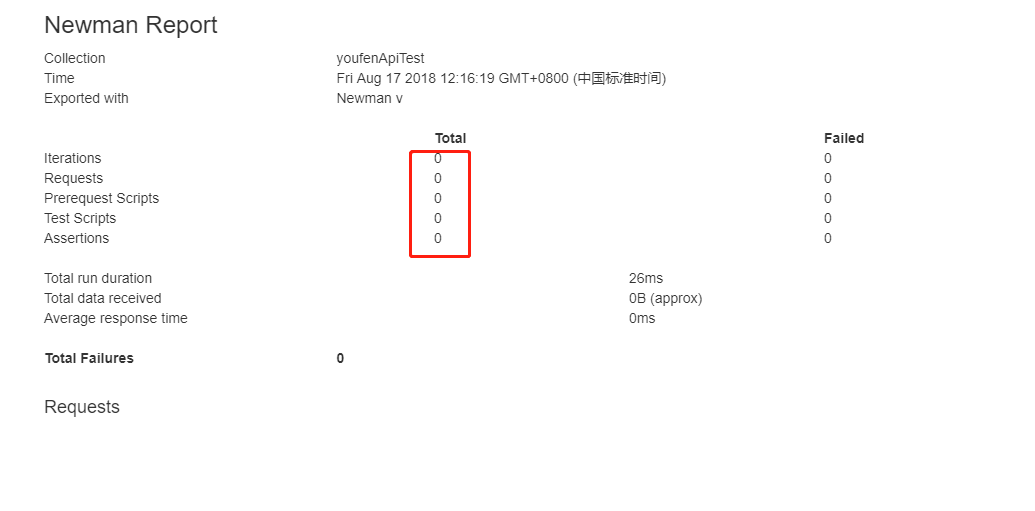
My Newman report does not generate any data, only the field name, the data is displayed as 0 How to handle
 sutianli
on 17 Aug 2018
sutianli
on 17 Aug 2018
sutianli
on 17 Aug 2018
@sutianli There are no requests in Requests sections as well. Can you verify collection is selected correctly?
Also, test if you are getting the same result in CLI reporter.
 codenirvana
on 17 Aug 2018
codenirvana
on 17 Aug 2018
The verbose feedback is certainly verbose, but not useful for troubleshooting many issues. It would be great to have Newman log what the Postman console logs.
I'm trying to troubleshoot an auth issue. We run a pre-request script to generate and fetch an auth token from a couple of internal websites. This works fine in Postman but in Newman the response from the first auth request is 400 Bad Request and the second request does not appear to be sent (perhap because the first one failed?).
Is there any way to see what Newman is actually sending in the way of headers and body?
 JoyShafer
on 5 Jan 2021
JoyShafer
on 5 Jan 2021
Bump
 aaiezza
on 19 Mar 2021
aaiezza
on 19 Mar 2021
I am facing the same issue . My postman request work but newman is giving 400
 vijayarondla-mosaic
on 30 Mar 2021
vijayarondla-mosaic
on 30 Mar 2021
Related issues
 brimchan
·
3Comments
brimchan
·
3Comments
 saikatharryc
·
3Comments
saikatharryc
·
3Comments
 al-tr
·
4Comments
al-tr
·
4Comments
 Vijayabaskar03
·
4Comments
Vijayabaskar03
·
4Comments
 vijaygroovey
·
3Comments
vijaygroovey
·
3Comments
Most helpful comment
The verbose feedback is certainly verbose, but not useful for troubleshooting many issues. It would be great to have Newman log what the Postman console logs.
I'm trying to troubleshoot an auth issue. We run a pre-request script to generate and fetch an auth token from a couple of internal websites. This works fine in Postman but in Newman the response from the first auth request is 400 Bad Request and the second request does not appear to be sent (perhap because the first one failed?).
Is there any way to see what Newman is actually sending in the way of headers and body?