Newman: api tests run well on Postman, but has error "Encountered an error during JSON.parse(): Unexpected token" through Newman.
We have tests that run well on Postman, but got error "Encountered an error during JSON.parse(): Unexpected token" run through Newman.
Same JSON.parse() works fine in other api tests. Only 3 api tests failed on JSON.parse(). The only difference about these api endpoints were these 3 endpoints used to return text/html before. We recently changed it to application/json, so that all of the tests are passed after JSON.parse(responseBody). But the error "Encountered an error during JSON.parse(): Unexpected token" prevent part of the tests to run through Newman.
Please advice. Thanks!
 fantagaro
All 20 comments
@fantagaro What version of Newman are you using? You can use newman -V.
Also, can you attach a screenshot of your command line?
 abhijitkane
on 8 Aug 2016
abhijitkane
on 8 Aug 2016
2.1.2
Which part of command line? We export the test collection to json file and run by Newman in Jenkins.
fantagaro
on 8 Aug 2016
@fantagaro - you mind trying out some basic debugging first?
Can you put each json.parse in try catch block and log the errors?
var responseJSON;
try {
responseJSON = JSON.parse(responseBody);
catch (err) {
console.log(err);
}
 shamasis
on 8 Aug 2016
shamasis
on 8 Aug 2016
Also log the responseBody in those cases.
shamasis
on 8 Aug 2016
I replaced responseJSON = JSON.parse(responseBody); to
try {
responseJSON = JSON.parse(responseBody);
catch (err) {
console.log(err);
console.log(responseBody);
}
In the Jenkins console log, I got "Unexpected token catch" instead of "Encountered an error during JSON.parse(): Unexpected token". No other info prints out.
fantagaro
on 8 Aug 2016

fantagaro
on 8 Aug 2016
Hi @fantagaro,
There is a typo in the code snippet, its missing closing braces for the try block
Try this instead
try {
    responseJSON = JSON.parse(responseBody);
}
catch (err) {
    console.log(err);
    console.log(responseBody);
}
 elssar
on 9 Aug 2016
elssar
on 9 Aug 2016
Thanks @elssar!
Here's the new error message:

fantagaro
on 9 Aug 2016
So looks like Newman has trouble with the params in the URL.
fantagaro
on 9 Aug 2016
@fantagaro can you add a console.log(responseBody) at the top of your test script, and paste the output here?
 czardoz
on 10 Aug 2016
czardoz
on 10 Aug 2016
@czardoz Added console.log(responseBody); to the top of the test script and attached the result.

fantagaro
on 10 Aug 2016
Thanks for looking into it! @czardoz
fantagaro
on 10 Aug 2016
Hi @czardoz we tested locally using newman, same error.
Here's the command line:
clone the repo
npm install
npm run test-mobile-sdk-production
fantagaro
on 16 Aug 2016
@abhijitkane thanks for logging the bug, and look forward to solutions. Thanks!
fantagaro
on 16 Aug 2016
We could not replicate this issue. It would be best if you can mail us at [email protected]. We might need additional information to debug this and they might not be shareable in public forum.
Also, before mailing, you may try running this collection in latest Newman v3. Newman v3 provides a better stack trace for debugging your error.
Closing this issue here.
shamasis
on 21 Aug 2016
My coworker sent an email to [email protected] and the issue has been solved!
fantagaro
on 24 Aug 2016
Thank you. Would you be able to summarise the solution here? Would help others when the stumble over this issue. 😊
shamasis
on 24 Aug 2016
I work with @fantagaro and emailed [email protected].
@czardoz noticed there was an extra character at the beginning of our api response. The character turned out to be the BOM. After removing the stray BOM, node is able to successfully call JSON.parse.
Confirmed the issue with:
curl --silent $URL | hexdump -C and the first bytes were 0xEF 0xBB 0xBF
Sidenote:
JSON.parse implementations are not required to ignore the presence of BOM.
If I read
In the interests of interoperability, implementations
   that parse JSON texts MAY ignore the presence of a byte order mark
   rather than treating it as an error.
from https://tools.ietf.org/html/rfc7159 correctly.
 suhasgaddam
on 24 Aug 2016
suhasgaddam
on 24 Aug 2016
We are working on a variant that does the same. :-)
shamasis
on 24 Aug 2016
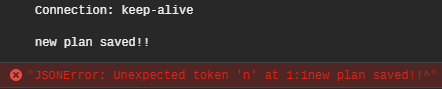
Hey, I'm facing a similar issue.
Tests did run successfully but console shows error for this one particular request only.
Although this problem goes away if I send JSON instead of plain text.
 mesmitpatel
on 3 Sep 2020
mesmitpatel
on 3 Sep 2020
Related issues
 Schveitzer
·
4Comments
Schveitzer
·
4Comments
 Pixcell
·
3Comments
Pixcell
·
3Comments
 AlphaWong
·
3Comments
AlphaWong
·
3Comments
 leonvangendt
·
5Comments
leonvangendt
·
5Comments
 Vijayabaskar03
·
4Comments
Vijayabaskar03
·
4Comments
Most helpful comment
Hi @fantagaro,
There is a typo in the code snippet, its missing closing braces for the try block
Try this instead