Netmiko: send_config_set not working with IOS XR due to abbreviated "config term" command on IOS-XR 7.0 code
Hi,
send_config_set is not working when dealing with IOS XR (7.0.1) send_command is working but the send_config_set is timing out.
device_type is set to 'cisco_xr'
output:
Traceback (most recent call last):
  File "myUserDirectory\AppData\Local\Programs\Python\Python38-32\lib\site-packages\paramiko\channel.py", line 699, in recv
    out = self.in_buffer.read(nbytes, self.timeout)
  File "myUserDirectory\AppData\Local\Programs\Python\Python38-32\lib\site-packages\paramiko\buffered_pipe.py", line 164, in read
    raise PipeTimeout()
paramiko.buffered_pipe.PipeTimeout

During handling of the above exception, another exception occurred:

Traceback (most recent call last):
  File "myUserDirectory\AppData\Local\Programs\Python\Python38-32\lib\site-packages\netmiko\base_connection.py", line 550, in _read_channel_expect
    new_data = self.remote_conn.recv(MAX_BUFFER)
  File "myUserDirectory\AppData\Local\Programs\Python\Python38-32\lib\site-packages\paramiko\channel.py", line 701, in recv
    raise socket.timeout()
socket.timeout

During handling of the above exception, another exception occurred:

Traceback (most recent call last):
  File "myUserDirectory\PycharmProjects\untitled\NetmikoIOS.py", line 26, in <module>
    output = net_connect.send_config_set(config_commands)
  File "myUserDirectory\AppData\Local\Programs\Python\Python38-32\lib\site-packages\netmiko\cisco\cisco_xr.py", line 19, in send_config_set
    return super().send_config_set(
  File "myUserDirectory\AppData\Local\Programs\Python\Python38-32\lib\site-packages\netmiko\base_connection.py", line 1728, in send_config_set
    output += self.config_mode(*cfg_mode_args)
  File "myUserDirectory\AppData\Local\Programs\Python\Python38-32\lib\site-packages\netmiko\cisco_base_connection.py", line 40, in config_mode
    return super().config_mode(config_command=config_command, pattern=pattern)
  File "myUserDirectory\AppData\Local\Programs\Python\Python38-32\lib\site-packages\netmiko\base_connection.py", line 1621, in config_mode
    output += self.read_until_pattern(pattern=re.escape(config_command.strip()))
  File "myUserDirectory\AppData\Local\Programs\Python\Python38-32\lib\site-packages\netmiko\base_connection.py", line 627, in read_until_pattern
    return self._read_channel_expect(*args, **kwargs)
  File "myUserDirectory\AppData\Local\Programs\Python\Python38-32\lib\site-packages\netmiko\base_connection.py", line 560, in _read_channel_expect
    raise NetmikoTimeoutException(
netmiko.ssh_exception.NetmikoTimeoutException: Timed-out reading channel, data not available.

Process finished with exit code 1
Thanks
 fadisaqal
All 30 comments
Hi @fadisaqal ,
Consider reviewing this section (*) and / or showing a fragment of the tested data.
 nullbitzero
on 30 Apr 2020
nullbitzero
on 30 Apr 2020
I added cmd_verify=False, it didn't change anything.
This is what I'm trying to achieve:
RtObject = {
'device_type': 'cisco_xr',
'host': IP address,
'username': 'Username',
'password': 'password',
'port': 22, # optional, defaults to 22
}
net_connect = ConnectHandler(**RtObject)
config_commands = [ 'interface GigabitEthernetx/x/x/x',
'description xxxxxxxx',
'no shut',
'commit' ]
output = net_connect.send_config_set(config_commands, cmd_verify=False )
print(output)
fadisaqal
on 2 May 2020
Don't put commit in the set of configuration commands.
Instead call the commit() method separately after the configuration changes.
 ktbyers
on 2 May 2020
ktbyers
on 2 May 2020
Don't put
commitin the set of configuration commands.Instead call the
commit()method separately after the configuration changes.
Tried that as well, didn't change anything
fadisaqal
on 3 May 2020
I'm having the same issue and my problem is that routers have prompt configured, so a simple show command (in this case send_command_expect) works well but when I want to change de configuration with send_config_set it doesn't work because when you enter in config mode, the real hostname of the device appears and netmiko stops there.
Also tried cmd_verify=False but nothing changed, any suggestions?
Tried the same code but without the "prompt xxxx" in the router configuration and the script runs with no problem.
 rfsp
on 10 May 2020
rfsp
on 10 May 2020
@fadisaqal Please post the exception with the commit separate and with cmd_verify=False. Thanks.
ktbyers
on 10 May 2020
@rfsp Please show what your CLI prompt behavior looks like (i.e. copy and paste what you described above here).
ktbyers
on 10 May 2020
Hello, thank you for your help.
My router relevant configs:
hostname EWM_20555_XPT
prompt 0073-LSB-Ext_Fgvz%p%s
0073-LSB-Ext_Fgvz#
0073-LSB-Ext_Fgvz# conf t
Enter configuration commands, one per line. End with CNTL/Z.
EWM_20555_XPT(config)#
My code is:
connection = ConnectHandler(**a_device)
connection.send_config_set(['interface fa0/1','description ## LAN Principal ##'])
connection.save_config()
connection.disconnect()
The ouput is:
Timed-out reading channel, data not available.
The logging:
INFO:paramiko.transport:Authentication (password) successful!
DEBUG:paramiko.transport:[chan 0] Max packet in: 32768 bytes
DEBUG:paramiko.transport:[chan 0] Max packet out: 4096 bytes
DEBUG:paramiko.transport:Secsh channel 0 opened.
DEBUG:paramiko.transport:[chan 0] Sesch channel 0 request ok
DEBUG:paramiko.transport:[chan 0] Sesch channel 0 request ok
DEBUG:netmiko:read_channel:
0073-LSB-Ext_Fgvz#
DEBUG:netmiko:read_channel:
DEBUG:netmiko:read_channel:
DEBUG:netmiko:read_channel:
DEBUG:netmiko:write_channel: b'\n'
DEBUG:netmiko:read_channel:
0073-LSB-Ext_Fgvz#
DEBUG:netmiko:read_channel:
DEBUG:netmiko:[find_prompt()]: prompt is 0073-LSB-Ext_Fgvz#
DEBUG:netmiko:read_channel:
DEBUG:netmiko:In disable_paging
DEBUG:netmiko:Command: terminal length 0
DEBUG:netmiko:write_channel: b'terminal length 0\n'
DEBUG:netmiko:Pattern is: terminal\ length\ 0
DEBUG:netmiko:_read_channel_expect read_data: t
DEBUG:netmiko:_read_channel_expect read_data: ermin
DEBUG:netmiko:_read_channel_expect read_data: al len
DEBUG:netmiko:_read_channel_expect read_data: gth 0
DEBUG:netmiko:Pattern found: terminal\ length\ 0 terminal length 0
DEBUG:netmiko:terminal length 0
DEBUG:netmiko:Exiting disable_paging
DEBUG:netmiko:write_channel: b'terminal width 511\n'
DEBUG:netmiko:Pattern is: terminal\ width\ 511
DEBUG:netmiko:_read_channel_expect read_data: 0073-LSB-Ext_Fgvz#
DEBUG:netmiko:_read_channel_expect read_data: termi
DEBUG:netmiko:_read_channel_expect read_data: nal wi
DEBUG:netmiko:_read_channel_expect read_data: dth 5
DEBUG:netmiko:_read_channel_expect read_data: 11
0073-LSB-Ext_Fgvz#
DEBUG:netmiko:Pattern found: terminal\ width\ 511 0073-LSB-Ext_Fgvz#terminal width 511
0073-LSB-Ext_Fgvz#
DEBUG:netmiko:read_channel:
DEBUG:netmiko:read_channel:
DEBUG:netmiko:write_channel: b'\n'
DEBUG:netmiko:read_channel:
0073-LSB-Ext_Fgvz#
DEBUG:netmiko:read_channel:
DEBUG:netmiko:[find_prompt()]: prompt is 0073-LSB-Ext_Fgvz#
DEBUG:netmiko:write_channel: b'\n'
DEBUG:netmiko:Pattern is: #
DEBUG:netmiko:_read_channel_expect read_data:
DEBUG:netmiko:_read_channel_expect read_data: 0073-LSB-Ext_Fgvz#
DEBUG:netmiko:Pattern found: #
0073-LSB-Ext_Fgvz#
DEBUG:netmiko:write_channel: b'config term\n'
DEBUG:netmiko:Pattern is: config\ term
DEBUG:netmiko:_read_channel_expect read_data: c
DEBUG:netmiko:_read_channel_expect read_data: onfig
DEBUG:netmiko:_read_channel_expect read_data: term
DEBUG:netmiko:Pattern found: config\ term config term
DEBUG:netmiko:Pattern is: 0073-LSB-Ext_Fgv
DEBUG:netmiko:_read_channel_expect read_data: Enter configuration commands, one per line. End with CNTL/Z.
EWM_20555_XPT(config)#
DEBUG:paramiko.transport:EOF in transport thread
rfsp
on 10 May 2020
@fadisaqal Please post the exception with the commit separate and with cmd_verify=False. Thanks.
This is the exception with the commit, I also tried it without the commit part altogether, it didn't work as well.
Traceback (most recent call last):
  File "myUserDirectory\AppData\Local\Programs\Python\Python38-32\lib\site-packages\paramiko\channel.py", line 699, in recv
    out = self.in_buffer.read(nbytes, self.timeout)
  File "myUserDirectory\AppData\Local\Programs\Python\Python38-32\lib\site-packages\paramiko\buffered_pipe.py", line 164, in read
    raise PipeTimeout()
paramiko.buffered_pipe.PipeTimeout

During handling of the above exception, another exception occurred:

Traceback (most recent call last):
  File "myUserDirectory\AppData\Local\Programs\Python\Python38-32\lib\site-packages\netmiko\base_connection.py", line 550, in _read_channel_expect
    new_data = self.remote_conn.recv(MAX_BUFFER)
  File "myUserDirectory\AppData\Local\Programs\Python\Python38-32\lib\site-packages\paramiko\channel.py", line 701, in recv
    raise socket.timeout()
socket.timeout

During handling of the above exception, another exception occurred:

Traceback (most recent call last):
  File "myUserDirectory/PycharmProjects/Netmiko/NetmikoIOSXR.py", line 25, in <module>
    net_connect.commit()
  File "myUserDirectory\AppData\Local\Programs\Python\Python38-32\lib\site-packages\netmiko\cisco\cisco_xr.py", line 95, in commit
    output = self.config_mode()
  File "myUserDirectory\AppData\Local\Programs\Python\Python38-32\lib\site-packages\netmiko\cisco_base_connection.py", line 40, in config_mode
    return super().config_mode(config_command=config_command, pattern=pattern)
  File "myUserDirectory\AppData\Local\Programs\Python\Python38-32\lib\site-packages\netmiko\base_connection.py", line 1621, in config_mode
    output += self.read_until_pattern(pattern=re.escape(config_command.strip()))
  File "myUserDirectory\AppData\Local\Programs\Python\Python38-32\lib\site-packages\netmiko\base_connection.py", line 627, in read_until_pattern
    return self._read_channel_expect(*args, **kwargs)
  File "myUserDirectory\AppData\Local\Programs\Python\Python38-32\lib\site-packages\netmiko\base_connection.py", line 560, in _read_channel_expect
    raise NetmikoTimeoutException(
netmiko.ssh_exception.NetmikoTimeoutException: Timed-out reading channel, data not available.

Process finished with exit code 1
Any news?
rfsp
on 20 May 2020
@rfsp Why did your prompt change here?
DEBUG:netmiko:Pattern is: 0073-LSB-Ext_Fgv
DEBUG:netmiko:_read_channel_expect read_data: Enter configuration commands, one per line. End with CNTL/Z.

EWM_20555_XPT(config)#
DEBUG:paramiko.transport:EOF in transport thread
It was 0073-LSB-Ext_Fgvz# now it changed to something different.
This configuration here probably needs to be eliminated:
prompt 0073-LSB-Ext_Fgvz%p%s
@fadisaqal I would need your log file associated with the commit() exception to see what is going on:
https://github.com/ktbyers/netmiko/blob/develop/COMMON_ISSUES.md#enable-netmiko-logging-of-all-reads-and-writes-of-the-communications-channel
ktbyers
on 20 May 2020
It changed from 0073-LSB-Ext_Fgvz# to EWM_20555_XPT because this (EWM_20555_XPT) is the real hostname.
0073-LSB-Ext_Fgvz# is just the prompt that in configured.
This has been done because company policies demand for the hostname to have this structure (EWM_20555_XPT) but that hostname doesn't easily identify the router and clients site id.
So with this configuration is not possivel to change de configuration with netmiko?
Can we just "bypass" the hostname/prompt check?
Thank you.
rfsp
on 21 May 2020
@rfsp Can you post the full exception stack trace that you receive?
ktbyers
on 21 May 2020
@rfsp Can we just "bypass" the hostname/prompt check? -- probably, but it is going to painful and you are likely going to have to handle a lot of complexities that Netmiko would normally handle for you.
ktbyers
on 21 May 2020
The issue is not with the hostname, in my case it's not getting into config mode because it's trying to type config term. On our routers typing configur is enough to get into config mode.
DEBUG:paramiko.transport:starting thread (client mode): 0x3a981f0
DEBUG:paramiko.transport:Local version/idstring: SSH-2.0-paramiko_2.7.1
DEBUG:paramiko.transport:Remote version/idstring: SSH-2.0-Cisco-2.0
INFO:paramiko.transport:Connected (version 2.0, client Cisco-2.0)
DEBUG:paramiko.transport:kex algos:['ecdh-sha2-nistp521', 'ecdh-sha2-nistp384', 'ecdh-sha2-nistp256', 'diffie-hellman-group14-sha1'] server key:['ecdsa-sha2-nistp521', 'ecdsa-sha2-nistp384', 'ecdsa-sha2-nistp256', 'ssh-dss', 'ssh-rsa'] client encrypt:['aes128-ctr', 'aes192-ctr', 'aes256-ctr', '[email protected]', '[email protected]'] server encrypt:['aes128-ctr', 'aes192-ctr', 'aes256-ctr', '[email protected]', '[email protected]'] client mac:['hmac-sha2-512', 'hmac-sha2-256', 'hmac-sha1'] server mac:['hmac-sha2-512', 'hmac-sha2-256', 'hmac-sha1'] client compress:['none'] server compress:['none'] client lang:[''] server lang:[''] kex follows?False
DEBUG:paramiko.transport:Kex agreed: ecdh-sha2-nistp256
DEBUG:paramiko.transport:HostKey agreed: ecdsa-sha2-nistp256
DEBUG:paramiko.transport:Cipher agreed: aes128-ctr
DEBUG:paramiko.transport:MAC agreed: hmac-sha2-256
DEBUG:paramiko.transport:Compression agreed: none
DEBUG:paramiko.transport:kex engine KexNistp256 specified hash_algo <built-in function openssl_sha256>
DEBUG:paramiko.transport:Switch to new keys ...
DEBUG:paramiko.transport:userauth is OK
INFO:paramiko.transport:Authentication (password) successful!
DEBUG:paramiko.transport:[chan 0] Max phad acket in: 32768 bytes
DEBUG:paramiko.transport:[chan 0] Max packet out: 32768 bytes
DEBUG:paramiko.transport:Secsh channel 0 opened.
DEBUG:paramiko.transport:[chan 0] Sesch channel 0 request ok
DEBUG:paramiko.transport:[chan 0] Sesch channel 0 request ok
DEBUG:netmiko:read_channel:


DEBUG:netmiko:read_channel:


RP/0/RP0/CPU0:ER1076-N560-B6-PE1#
DEBUG:netmiko:read_channel:
DEBUG:netmiko:read_channel:
DEBUG:netmiko:read_channel:
DEBUG:netmiko:write_channel: b'\n'
DEBUG:netmiko:read_channel:
DEBUG:netmiko:read_channel:
DEBUG:netmiko:write_channel: b'\n'
DEBUG:netmiko:read_channel:
DEBUG:netmiko:write_channel: b'\n'
DEBUG:netmiko:read_channel:


DEBUG:netmiko:write_channel: b'\n'
DEBUG:netmiko:read_channel: RP/0/RP0/CPU0:ER1076-N560-B6-PE1#
DEBUG:netmiko:read_channel:


RP/0/RP0/CPU0:ER1076-N560-B6-PE1#


RP/0/RP0/CPU0:ER1076-N560-B6-PE1#


RP/0/RP0/CPU0:ER1076-N560-B6-PE1#
DEBUG:netmiko:Clear buffer detects data in the channel
DEBUG:netmiko:read_channel:
DEBUG:netmiko:[find_prompt()]: prompt is RP/0/RP0/CPU0:ER1076-N560-B6-PE1#
DEBUG:netmiko:read_channel:
DEBUG:netmiko:In disable_paging
DEBUG:netmiko:Command: terminal length 0

DEBUG:netmiko:write_channel: b'terminal length 0\n'
DEBUG:netmiko:Pattern is: terminal\ length\ 0
DEBUG:netmiko:_read_channel_expect read_data: terminal

DEBUG:netmiko:_read_channel_expect read_data: RP/0/RP0/CPU0:ER1076-N560-B6-PE1#terminal length

DEBUG:netmiko:_read_channel_expect read_data: RP/0/RP0/CPU0:ER1076-N560-B6-PE1#terminal length 0


Thu May 21 01:38:43.447 AST


DEBUG:netmiko:Pattern found: terminal\ length\ 0 terminal
RP/0/RP0/CPU0:ER1076-N560-B6-PE1#terminal length
RP/0/RP0/CPU0:ER1076-N560-B6-PE1#terminal length 0


Thu May 21 01:38:43.447 AST


DEBUG:netmiko:terminal
RP/0/RP0/CPU0:ER1076-N560-B6-PE1#terminal length
RP/0/RP0/CPU0:ER1076-N560-B6-PE1#terminal length 0


Thu May 21 01:38:43.447 AST


DEBUG:netmiko:Exiting disable_paging
DEBUG:netmiko:write_channel: b'terminal width 511\n'
DEBUG:netmiko:Pattern is: terminal\ width\ 511
DEBUG:netmiko:_read_channel_expect read_data: RP/0/RP0/CPU0:ER1076-N560-B6-PE1#
DEBUG:netmiko:_read_channel_expect read_data: terminal

DEBUG:netmiko:_read_channel_expect read_data: RP/0/RP0/CPU0:ER1076-N560-B6-PE1#terminal width
RP/0/RP0/CPU0:ER1076-N560-B6-PE1#terminal width 511


DEBUG:netmiko:Pattern found: terminal\ width\ 511 RP/0/RP0/CPU0:ER1076-N560-B6-PE1#terminal
RP/0/RP0/CPU0:ER1076-N560-B6-PE1#terminal width
RP/0/RP0/CPU0:ER1076-N560-B6-PE1#terminal width 511


DEBUG:netmiko:read_channel: Thu May 21 01:38:43.776 AST

RP/0/RP0/CPU0:ER1076-N560-B6-PE1#
DEBUG:netmiko:Clear buffer detects data in the channel
DEBUG:netmiko:read_channel:
DEBUG:netmiko:write_channel: b'\n'
DEBUG:netmiko:Pattern is: [#\$]
DEBUG:netmiko:_read_channel_expect read_data:


DEBUG:netmiko:_read_channel_expect read_data: RP/0/RP0/CPU0:ER1076-N560-B6-PE1#
DEBUG:netmiko:Pattern found: [#\$]


RP/0/RP0/CPU0:ER1076-N560-B6-PE1#
DEBUG:netmiko:write_channel: b'config term\n'
DEBUG:netmiko:Pattern is: config\ term
DEBUG:netmiko:_read_channel_expect read_data: config

DEBUG:netmiko:_read_channel_expect read_data: RP/0/RP0/CPU0:ER1076-N560-B6-PE1#configurterm


DEBUG:netmiko:_read_channel_expect read_data:                                          ^

% Invalid input detected at '^' marker.
@fadisaqal Yeah, that should work? Is there some other command that config is conflicting with?
Here is me doing this manually on an IOS-XR device?
RP/0/RP0/CPU0:iosxr3#config term
Wed May 20 23:05:46.105 UTC
RP/0/RP0/CPU0:iosxr3(config)#
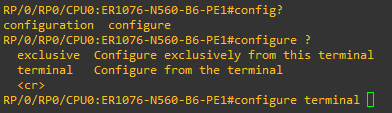
Yes, check the snippet
fadisaqal
on 21 May 2020
Which IOS-XR OS version are you on?
ktbyers
on 21 May 2020
I'm on 7.0.1
fadisaqal
on 21 May 2020
Okay, I will make a fix for it...must have been a command added in XR 7.X code. I don't have that on my 6.5.3 box.
I will convert it over to the canonical command i.e. configure terminal
ktbyers
on 21 May 2020
Okay, that'd be great :D
Thanks a lot
fadisaqal
on 21 May 2020
@fadisaqal Should be fixed here:
ktbyers
on 21 May 2020
@ktbyers @fadisaqal This fix to move from config term -> configure terminal has issues with admin mode configuration. Ideally "config terminal" would work with both XR and admin mode of configuration as well as with controllers like NSO devices.
Here is a snippet from the official 7.0.1 image. Configuration validation was a feature introduced in 7.0.1. hence config? -> configuration and configure as options. But "config ?" -> will lead to configure terminal. This was probably done to maintain backward compatibility.
RP/0/RSP0/CPU0:ios#show version
Thu Jul  9 20:08:27.673 UTC
Cisco IOS XR Software, Version 7.0.1
Copyright (c) 2013-2019 by Cisco Systems, Inc.

Build Information:
 Built By     : ************
 Built On     : Thu Aug 29 17:35:03 PDT 2019
 Built Host   : ************
 Workspace    : ************
 Version      : 7.0.1
 Location     : /opt/cisco/XR/packages/

cisco *********
System uptime is 12 minutes


RP/0/RSP0/CPU0:ios#config?
configuration  configure                  <<<<<< new feature called configuration validation was added in 7.0.1


RP/0/RSP0/CPU0:ios#config ?               <<<<<< probably to maintain backward compatibility, "config " is treated as previous configure with no ambiguity.
  exclusive  Configure exclusively from this terminal
  terminal   Configure from the terminal
  <cr>


RP/0/RSP0/CPU0:ios#config terminal
Thu Jul  9 20:08:57.009 UTC
RP/0/RSP0/CPU0:ios(config)#exit


RP/0/RSP0/CPU0:ios#admin                <<<< admin mode is for configurations related to the "chassis management"
Thu Jul  9 20:11:01.641 UTC

cisco connected from 127.0.0.1 using console on sysadmin-vm:0_RSP0


sysadmin-vm:0_RSP0# config term
Thu Jul  9  20:11:11.745 UTC+00:00
Entering configuration mode terminal
sysadmin-vm:0_RSP0(config)# exit
Thu Jul  9  20:11:13.514 UTC+00:00


sysadmin-vm:0_RSP0# configure terminal                  <<<<<< here the canonical is not supported.
--------------------^
syntax error: expecting
  activate   - Enable additional commands and configs
  add        -
  attach     - Attach to Host
  cd         - Change working directory
  clear      - Clear parameter
  compare    - Compare running configuration to another configuration or a file
  config     - Manipulate software configuration information
  controller - Access to hardware controller data
  copy       - Copy files or directories
  deactivate - Disable additional commands and configs
  debug      - start debug for process
  delete     - Delete file
  describe   - Display transparent command  information
  devtools   - Enable/disable development tools
  dir        - List contents of directory1


RP/0/RSP0/CPU0:ios#describe config terminal
The command is defined in config.parser


User needs ALL of the following taskids:


It will take the following actions:
Thu Jul  9 20:18:25.394 UTC
  Spawn the process:
        cfgmgr_cmd_config_target_sessions
  Spawn the process:                      <<<<<< process spawned by config terminal in XR mode
        config


RP/0/RSP0/CPU0:ios#describe configure terminal
The command is defined in config.parser


User needs ALL of the following taskids:


It will take the following actions:
Thu Jul  9 20:18:32.989 UTC
  Spawn the process:
        cfgmgr_cmd_config_target_sessions
  Spawn the process:
        config                  <<<<<< same process spawned by configure terminal
@fadisaqal Can you share any other details regarding the system where the "config terminal" is not working for you?
 AnandJyrm
on 9 Jul 2020
AnandJyrm
on 9 Jul 2020
@AnandJyrm There is a screenshot above, but basically IOS-XR 7 added a conflicting command and consequently, you can't use the abbreviated command of config.
So Cisco XR now has contradictory requirements i.e. IOS-XR 7 requires fully stating configure and IOS-XR 6 in admin requires using the abbreviated word config.
So it really is a Cisco misdesign...and I think the fix Netmiko put in here is the proper fix.
I am open to discussing more, but the workaround would be add the send_config_set() argument to pass in the command that goes into configuration mode.
ktbyers
on 9 Jul 2020
@ktbyers To maintain compatibility with previous releases, "config terminal" is still unambiguously mapped to the config process. I can try to confirm that with the IOS XR team. Hoping that netmiko can have a solution which will work with previous releases (both XR and admin mode) without any explicit version checks.
I would like to hear from @fadisaqal on what platform he is facing this issue with "config terminal". and what the result of "config ?" is on that device. Both config terminal and configure terminal spawn the same process in XR in both 6.x and 7.x versions in my case.
RP/0/RSP0/CPU0:ios#describe config terminal

Spawn the process:
        cfgmgr_cmd_config_target_sessions


RP/0/RSP0/CPU0:ios#describe configure terminal

Spawn the process:
        cfgmgr_cmd_config_target_sessions
@AnandJyrm Here is his screenshot from IOS-XR version 7.0.1 (as per above)
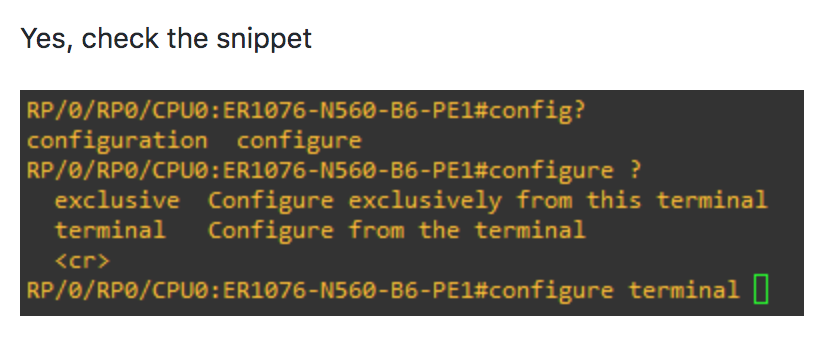
As you can see there is configure and configuration available in that context so abbreviated command won't work. Note, this issue was reported by fadisaqal because we previously used the abbreviated command and it broke on IOS-XR 7.
ktbyers
on 10 Jul 2020
Sorry, I was misreading what you put in earlier...
@AnandJyrm Okay, so you are saying that even though context sensitive help doesn't work and even though the abbreviate command is not unique that config terminal should work in IOS-XR 7?
The device @fadisaqal was using clearly looked like it was having a failure here because of this (when config term was used):
This is from the logs of his session:
DEBUG:netmiko:write_channel: b'config term\n'
DEBUG:netmiko:Pattern is: config\ term
DEBUG:netmiko:_read_channel_expect read_data: config

DEBUG:netmiko:_read_channel_expect read_data: RP/0/RP0/CPU0:ER1076-N560-B6-PE1#configurterm


DEBUG:netmiko:_read_channel_expect read_data:                                          ^

% Invalid input detected at '^' marker.
Netmiko sends "config term"
Netmiko reads back "config"
Then the IOS-XR repainted the line when the "% Invalid input detected at '^' marker was output on the screen. Definitely a bit hard to tell here, but that is how I would interpret this (i.e. that the device rejected the 'config term' as invalid).
Why doesn't the canonical command configure terminal work in admin mode configuration?
ktbyers
on 10 Jul 2020
TLDR: <space> replaced with <tab> maybe???
I will give some overly simplified background of admin and xr for context:
_IOS XR was designed to drive carrier grade distributed chassis, where the admin VM was meant for chassis management and the XR VM was meant for data/control plane functionality to forward traffic. This design is carried over from the legacy platforms/OS from much before. The code which controls the processes running on the admin VM is completely different from the code which runs on the XR VM._
_IOS XR running on older platforms like NCS5500 and NCS560 (on which the issue was reported) have the same admin mode concept, while newer platforms like 8000 series now run a thinner version of XR which does away with admin mode entirely._
Why doesn't the canonical command configure terminal work in admin mode configuration?
It looks to be day 1 design oversight or some carried over code from the legacy systems from before. I will raise an issue to get it resolved in newer versions.
Coming to @fadisaqal's issue.
DEBUG:netmiko:write_channel: b'config term\n'
DEBUG:netmiko:Pattern is: config\ term
DEBUG:netmiko:_read_channel_expect read_data: config

DEBUG:netmiko:_read_channel_expect read_data: RP/0/RP0/CPU0:ER1076-N560-B6-PE1#configurterm
DEBUG:netmiko:_read_channel_expect read_data:                                          ^
This behavior looks anomalous to me. If netmiko sent "config term", shouldn't the read_channel_expect read_data be:
DEBUG:netmiko:_read_channel_expect read_data: RP/0/RP0/CPU0:ER1076-N560-B6-PE1#config term
DEBUG:netmiko:_read_channel_expect read_data:                                          ^
It looks as if instead of sending the characters config <space> term , config <tab> term was sent to the router. The tab would cause the router to try and auto complete the word config to configur. Hence it reads configurterm with no space.
Here is the result of manually executing config <space> term
RP/0/RP0/CPU0:*******#config term
Fri Jul 10 06:03:15.505 PDT
RP/0/RP0/CPU0:*******(config)#
RP/0/RP0/CPU0:*******(config)#exit
And with config <tab> term
RP/0/RP0/CPU0:*******#configurterm
                             ^
% Invalid input detected at '^' marker.
@ktbyers Is there some feature of netmiko which might be doing this conversion of space and tab? the current version of netmiko we are using does not have such behavior:
Debug---:netmiko:write_channel: b'config term\n'
Debug---:netmiko:Pattern is: RP/0/XXXXXXXXX.*config
Debug---:netmiko:_read_channel_expect read_data: config term
Debug---:netmiko:_read_channel_expect read_data: Fri Jul 10 06:14:54.252 PDT
Debug---:netmiko:_read_channel_expect read_data: RP/0/XXXXXXXXX(config)#
You can see in the log output that Netmiko wrote a space and not a tab (that is a byte string so if it was a tab it would show up as \t. I just verified that in the Python interpreter as well.
DEBUG:netmiko:write_channel: b'config term\n'
On this question/statement:
This behavior looks anomalous to me. If netmiko sent "config term", shouldn't the read_channel_expect read_data be:

DEBUG:netmiko:_read_channel_expect read_data: RP/0/RP0/CPU0:ER1076-N560-B6-PE1#config term
DEBUG:netmiko:_read_channel_expect read_data:
Here is what I interpret this as, but definitely could be wrong (easy solution is to just have @fadisaqal manually test on that device and see what happens):
# So first Netmiko clearly sent 'config term' here (using space and not a tab)

DEBUG:netmiko:write_channel: b'config term\n'

# First read here Netmiko gets back the 'config' part of what was sent (echoed out)
DEBUG:netmiko:_read_channel_expect read_data: config

# So this line gets harder:
# I think the very end part of this i.e. 'term' is from the original command echo
# I think the remaining part of that is from the device repainting the line (ANSI codes/backspaces). This includes the
# device's prompt and the 'configur' word which is actually where the command would cease to be unique (but I
# definitely could be wrong here). Would need the `repr` of the data to know more definitively.
DEBUG:netmiko:_read_channel_expect read_data: RP/0/RP0/CPU0:ER1076-N560-B6-PE1#configurterm
DEBUG:netmiko:_read_channel_expect read_data:                                          ^
So easy solution is let's have @fadisaqal manually check his device that was failing.
Note, there is already a workaround which is if you are in admin mode to just specify the config command.
One possible solution is to add the config_mode_command='config term' argument to send_config_set()
Obviously would be better if one command worked ubiquitously in both cases, however.
ktbyers
on 10 Jul 2020
Related issues
ktbyers
·
4Comments
 dweber42
·
5Comments
dweber42
·
5Comments
 yixiuGit
·
4Comments
yixiuGit
·
4Comments
 edurguti
·
7Comments
edurguti
·
7Comments
 dfields186
·
6Comments
dfields186
·
6Comments