Netmiko: Issue installing Netmiko in GNS3 on a Network Automation docker container
I am having an issue trying to resolve installing netmiko on a Network Automation docker in GNS3. Here is the output I receive when trying to install netmiko:
root@NetworkAutomation-1:~# python3 -m pip install netmiko
The directory '/root/.cache/pip/http' or its parent directory is not owned by the current user and the cache has been disabled. Please check the permissions and owner of that directory. If executing pip with sudo, you may want sudo's -H flag.
The directory '/root/.cache/pip' or its parent directory is not owned by the current user and caching wheels has been disabled. check the permissions and owner of that directory. If executing pip with sudo, you may want sudo's -H flag.
Collecting netmiko
Downloading https://files.pythonhosted.org/packages/96/f8/4ecb91398a14bc1942322e87203859b04421cdb2b8b5c7d9b3fc9a168e21/netmiko-2.1.1.tar.gz (71kB)
100% |################################| 71kB 1.1MB/s
Collecting paramiko>=2.0.0 (from netmiko)
Downloading https://files.pythonhosted.org/packages/3e/db/cb7b6656e0e7387637ce850689084dc0b94b44df31cc52e5fc5c2c4fd2c1/paramiko-2.4.1-py2.py3-none-any.whl (194kB)
100% |################################| 194kB 1.5MB/s
Collecting scp>=0.10.0 (from netmiko)
Downloading https://files.pythonhosted.org/packages/ef/8c/399c5ddffc8c1bd2593ee6c8937ed31f005dcfa0c591da149f7b4b993f14/scp-0.11.0-py2.py3-none-any.whl
Collecting pyyaml (from netmiko)
Downloading https://files.pythonhosted.org/packages/9e/a3/1d13970c3f36777c583f136c136f804d70f500168edc1edea6daa7200769/PyYAML-3.13.tar.gz (270kB)
100% |################################| 276kB 2.1MB/s
Collecting pyserial (from netmiko)
Downloading https://files.pythonhosted.org/packages/0d/e4/2a744dd9e3be04a0c0907414e2a01a7c88bb3915cbe3c8cc06e209f59c30/pyserial-3.4-py2.py3-none-any.whl (193kB)
100% |################################| 194kB 2.4MB/s
Collecting textfsm (from netmiko)
Downloading https://files.pythonhosted.org/packages/a1/0d/a1b490503545b3b4600b965eae5d44cc2b6ce27cfb44f4debc563dbb56d3/textfsm-0.4.1.tar.gz
Requirement already satisfied (use --upgrade to upgrade): pyasn1>=0.1.7 in /usr/local/lib/python3.5/dist-packages (from paramiko>=2.0.0->netmiko)
Requirement already satisfied (use --upgrade to upgrade): bcrypt>=3.1.3 in /usr/local/lib/python3.5/dist-packages (from paramiko>=2.0.0->netmiko)
Requirement already satisfied (use --upgrade to upgrade): pynacl>=1.0.1 in /usr/local/lib/python3.5/dist-packages (from paramiko>=2.0.0->netmiko)
Collecting cryptography>=1.5 (from paramiko>=2.0.0->netmiko)
Downloading https://files.pythonhosted.org/packages/ec/b2/faa78c1ab928d2b2c634c8b41ff1181f0abdd9adf9193211bd606ffa57e2/cryptography-2.2.2.tar.gz (443kB)
100% |################################| 450kB 1.4MB/s
Requirement already satisfied (use --upgrade to upgrade): six>=1.4.1 in /usr/local/lib/python3.5/dist-packages (from bcrypt>=3.1.3->paramiko>=2.0.0->netmiko)
Requirement already satisfied (use --upgrade to upgrade): cffi>=1.1 in /usr/local/lib/python3.5/dist-packages (from bcrypt>=3.1.3->paramiko>=2.0.0->netmiko)
Requirement already satisfied (use --upgrade to upgrade): idna>=2.1 in /usr/local/lib/python3.5/dist-packages (from cryptography>=1.5->paramiko>=2.0.0->netmiko)
Requirement already satisfied (use --upgrade to upgrade): asn1crypto>=0.21.0 in /usr/local/lib/python3.5/dist-packages (from cryptography>=1.5->paramiko>=2.0.0->netmiko)
Requirement already satisfied (use --upgrade to upgrade): pycparser in /usr/local/lib/python3.5/dist-packages (from cffi>=1.1->bcrypt>=3.1.3->paramiko>=2.0.0->netmiko)
Installing collected packages: cryptography, paramiko, scp, pyyaml, pyserial, textfsm, netmiko
Running setup.py install for cryptography ... error
Complete output from command /usr/bin/python3 -u -c "import setuptools, tokenize;__file__='/tmp/pip-build-x02kahmv/cryptography/setup.py';exec(compile(getattr(tokenize, 'open', open)(__file__).read().replace('\r\n', '\n'), __file__, 'exec'))" install --record /tmp/pip-p3yna2ee-record/install-record.txt --single-version-externally-managed --compile:
/usr/lib/python3.5/distutils/dist.py:261: UserWarning: Unknown distribution option: 'python_requires'
warnings.warn(msg)
running install
running build
running build_py
creating build
creating build/lib.linux-x86_64-3.5
creating build/lib.linux-x86_64-3.5/cryptography
copying src/cryptography/__about__.py -> build/lib.linux-x86_64-3.5/cryptography
copying src/cryptography/fernet.py -> build/lib.linux-x86_64-3.5/cryptography
copying src/cryptography/utils.py -> build/lib.linux-x86_64-3.5/cryptography
copying src/cryptography/exceptions.py -> build/lib.linux-x86_64-3.5/cryptography
copying src/cryptography/__init__.py -> build/lib.linux-x86_64-3.5/cryptography
creating build/lib.linux-x86_64-3.5/cryptography/x509
copying src/cryptography/x509/oid.py -> build/lib.linux-x86_64-3.5/cryptography/x509
copying src/cryptography/x509/name.py -> build/lib.linux-x86_64-3.5/cryptography/x509
copying src/cryptography/x509/extensions.py -> build/lib.linux-x86_64-3.5/cryptography/x509
copying src/cryptography/x509/certificate_transparency.py -> build/lib.linux-x86_64-3.5/cryptography/x509
copying src/cryptography/x509/base.py -> build/lib.linux-x86_64-3.5/cryptography/x509
copying src/cryptography/x509/__init__.py -> build/lib.linux-x86_64-3.5/cryptography/x509
copying src/cryptography/x509/general_name.py -> build/lib.linux-x86_64-3.5/cryptography/x509
creating build/lib.linux-x86_64-3.5/cryptography/hazmat
copying src/cryptography/hazmat/__init__.py -> build/lib.linux-x86_64-3.5/cryptography/hazmat
creating build/lib.linux-x86_64-3.5/cryptography/hazmat/backends
copying src/cryptography/hazmat/backends/__init__.py -> build/lib.linux-x86_64-3.5/cryptography/hazmat/backends
copying src/cryptography/hazmat/backends/interfaces.py -> build/lib.linux-x86_64-3.5/cryptography/hazmat/backends
creating build/lib.linux-x86_64-3.5/cryptography/hazmat/primitives
copying src/cryptography/hazmat/primitives/padding.py -> build/lib.linux-x86_64-3.5/cryptography/hazmat/primitives
copying src/cryptography/hazmat/primitives/constant_time.py -> build/lib.linux-x86_64-3.5/cryptography/hazmat/primitives
copying src/cryptography/hazmat/primitives/keywrap.py -> build/lib.linux-x86_64-3.5/cryptography/hazmat/primitives
copying src/cryptography/hazmat/primitives/hmac.py -> build/lib.linux-x86_64-3.5/cryptography/hazmat/primitives
copying src/cryptography/hazmat/primitives/mac.py -> build/lib.linux-x86_64-3.5/cryptography/hazmat/primitives
copying src/cryptography/hazmat/primitives/__init__.py -> build/lib.linux-x86_64-3.5/cryptography/hazmat/primitives
copying src/cryptography/hazmat/primitives/serialization.py -> build/lib.linux-x86_64-3.5/cryptography/hazmat/primitives
copying src/cryptography/hazmat/primitives/cmac.py -> build/lib.linux-x86_64-3.5/cryptography/hazmat/primitives
copying src/cryptography/hazmat/primitives/hashes.py -> build/lib.linux-x86_64-3.5/cryptography/hazmat/primitives
creating build/lib.linux-x86_64-3.5/cryptography/hazmat/bindings
copying src/cryptography/hazmat/bindings/__init__.py -> build/lib.linux-x86_64-3.5/cryptography/hazmat/bindings
creating build/lib.linux-x86_64-3.5/cryptography/hazmat/backends/openssl
copying src/cryptography/hazmat/backends/openssl/ciphers.py -> build/lib.linux-x86_64-3.5/cryptography/hazmat/backends/openssl
copying src/cryptography/hazmat/backends/openssl/encode_asn1.py -> build/lib.linux-x86_64-3.5/cryptography/hazmat/backends/openssl
copying src/cryptography/hazmat/backends/openssl/aead.py -> build/lib.linux-x86_64-3.5/cryptography/hazmat/backends/openssl
copying src/cryptography/hazmat/backends/openssl/dsa.py -> build/lib.linux-x86_64-3.5/cryptography/hazmat/backends/openssl
copying src/cryptography/hazmat/backends/openssl/decode_asn1.py -> build/lib.linux-x86_64-3.5/cryptography/hazmat/backends/openssl
copying src/cryptography/hazmat/backends/openssl/utils.py -> build/lib.linux-x86_64-3.5/cryptography/hazmat/backends/openssl
copying src/cryptography/hazmat/backends/openssl/ec.py -> build/lib.linux-x86_64-3.5/cryptography/hazmat/backends/openssl
copying src/cryptography/hazmat/backends/openssl/x509.py -> build/lib.linux-x86_64-3.5/cryptography/hazmat/backends/openssl
copying src/cryptography/hazmat/backends/openssl/rsa.py -> build/lib.linux-x86_64-3.5/cryptography/hazmat/backends/openssl
copying src/cryptography/hazmat/backends/openssl/backend.py -> build/lib.linux-x86_64-3.5/cryptography/hazmat/backends/openssl
copying src/cryptography/hazmat/backends/openssl/hmac.py -> build/lib.linux-x86_64-3.5/cryptography/hazmat/backends/openssl
copying src/cryptography/hazmat/backends/openssl/__init__.py -> build/lib.linux-x86_64-3.5/cryptography/hazmat/backends/openssl
copying src/cryptography/hazmat/backends/openssl/x25519.py -> build/lib.linux-x86_64-3.5/cryptography/hazmat/backends/openssl
copying src/cryptography/hazmat/backends/openssl/dh.py -> build/lib.linux-x86_64-3.5/cryptography/hazmat/backends/openssl
copying src/cryptography/hazmat/backends/openssl/cmac.py -> build/lib.linux-x86_64-3.5/cryptography/hazmat/backends/openssl
copying src/cryptography/hazmat/backends/openssl/hashes.py -> build/lib.linux-x86_64-3.5/cryptography/hazmat/backends/openssl
creating build/lib.linux-x86_64-3.5/cryptography/hazmat/primitives/kdf
copying src/cryptography/hazmat/primitives/kdf/x963kdf.py -> build/lib.linux-x86_64-3.5/cryptography/hazmat/primitives/kdf
copying src/cryptography/hazmat/primitives/kdf/pbkdf2.py -> build/lib.linux-x86_64-3.5/cryptography/hazmat/primitives/kdf
copying src/cryptography/hazmat/primitives/kdf/concatkdf.py -> build/lib.linux-x86_64-3.5/cryptography/hazmat/primitives/kdf
copying src/cryptography/hazmat/primitives/kdf/hkdf.py -> build/lib.linux-x86_64-3.5/cryptography/hazmat/primitives/kdf
copying src/cryptography/hazmat/primitives/kdf/__init__.py -> build/lib.linux-x86_64-3.5/cryptography/hazmat/primitives/kdf
copying src/cryptography/hazmat/primitives/kdf/scrypt.py -> build/lib.linux-x86_64-3.5/cryptography/hazmat/primitives/kdf
copying src/cryptography/hazmat/primitives/kdf/kbkdf.py -> build/lib.linux-x86_64-3.5/cryptography/hazmat/primitives/kdf
creating build/lib.linux-x86_64-3.5/cryptography/hazmat/primitives/ciphers
copying src/cryptography/hazmat/primitives/ciphers/aead.py -> build/lib.linux-x86_64-3.5/cryptography/hazmat/primitives/ciphers
copying src/cryptography/hazmat/primitives/ciphers/algorithms.py -> build/lib.linux-x86_64-3.5/cryptography/hazmat/primitives/ciphers
copying src/cryptography/hazmat/primitives/ciphers/base.py -> build/lib.linux-x86_64-3.5/cryptography/hazmat/primitives/ciphers
copying src/cryptography/hazmat/primitives/ciphers/__init__.py -> build/lib.linux-x86_64-3.5/cryptography/hazmat/primitives/ciphers
copying src/cryptography/hazmat/primitives/ciphers/modes.py -> build/lib.linux-x86_64-3.5/cryptography/hazmat/primitives/ciphers
creating build/lib.linux-x86_64-3.5/cryptography/hazmat/primitives/twofactor
copying src/cryptography/hazmat/primitives/twofactor/hotp.py -> build/lib.linux-x86_64-3.5/cryptography/hazmat/primitives/twofactor
copying src/cryptography/hazmat/primitives/twofactor/utils.py -> build/lib.linux-x86_64-3.5/cryptography/hazmat/primitives/twofactor
copying src/cryptography/hazmat/primitives/twofactor/totp.py -> build/lib.linux-x86_64-3.5/cryptography/hazmat/primitives/twofactor
copying src/cryptography/hazmat/primitives/twofactor/__init__.py -> build/lib.linux-x86_64-3.5/cryptography/hazmat/primitives/twofactor
creating build/lib.linux-x86_64-3.5/cryptography/hazmat/primitives/asymmetric
copying src/cryptography/hazmat/primitives/asymmetric/dsa.py -> build/lib.linux-x86_64-3.5/cryptography/hazmat/primitives/asymmetric
copying src/cryptography/hazmat/primitives/asymmetric/padding.py -> build/lib.linux-x86_64-3.5/cryptography/hazmat/primitives/asymmetric
copying src/cryptography/hazmat/primitives/asymmetric/utils.py -> build/lib.linux-x86_64-3.5/cryptography/hazmat/primitives/asymmetric
copying src/cryptography/hazmat/primitives/asymmetric/ec.py -> build/lib.linux-x86_64-3.5/cryptography/hazmat/primitives/asymmetric
copying src/cryptography/hazmat/primitives/asymmetric/rsa.py -> build/lib.linux-x86_64-3.5/cryptography/hazmat/primitives/asymmetric
copying src/cryptography/hazmat/primitives/asymmetric/__init__.py -> build/lib.linux-x86_64-3.5/cryptography/hazmat/primitives/asymmetric
copying src/cryptography/hazmat/primitives/asymmetric/x25519.py -> build/lib.linux-x86_64-3.5/cryptography/hazmat/primitives/asymmetric
copying src/cryptography/hazmat/primitives/asymmetric/dh.py -> build/lib.linux-x86_64-3.5/cryptography/hazmat/primitives/asymmetric
creating build/lib.linux-x86_64-3.5/cryptography/hazmat/bindings/openssl
copying src/cryptography/hazmat/bindings/openssl/__init__.py -> build/lib.linux-x86_64-3.5/cryptography/hazmat/bindings/openssl
copying src/cryptography/hazmat/bindings/openssl/_conditional.py -> build/lib.linux-x86_64-3.5/cryptography/hazmat/bindings/openssl
copying src/cryptography/hazmat/bindings/openssl/binding.py -> build/lib.linux-x86_64-3.5/cryptography/hazmat/bindings/openssl
running egg_info
writing src/cryptography.egg-info/PKG-INFO
writing dependency_links to src/cryptography.egg-info/dependency_links.txt
writing top-level names to src/cryptography.egg-info/top_level.txt
writing requirements to src/cryptography.egg-info/requires.txt
warning: manifest_maker: standard file '-c' not found
reading manifest file 'src/cryptography.egg-info/SOURCES.txt'
reading manifest template 'MANIFEST.in'
no previously-included directories found matching 'docs/_build'
warning: no previously-included files matching '*' found under directory 'vectors'
writing manifest file 'src/cryptography.egg-info/SOURCES.txt'
running build_ext
generating cffi module 'build/temp.linux-x86_64-3.5/_padding.c'
creating build/temp.linux-x86_64-3.5
generating cffi module 'build/temp.linux-x86_64-3.5/_constant_time.c'
generating cffi module 'build/temp.linux-x86_64-3.5/_openssl.c'
building '_openssl' extension
creating build/temp.linux-x86_64-3.5/build
creating build/temp.linux-x86_64-3.5/build/temp.linux-x86_64-3.5
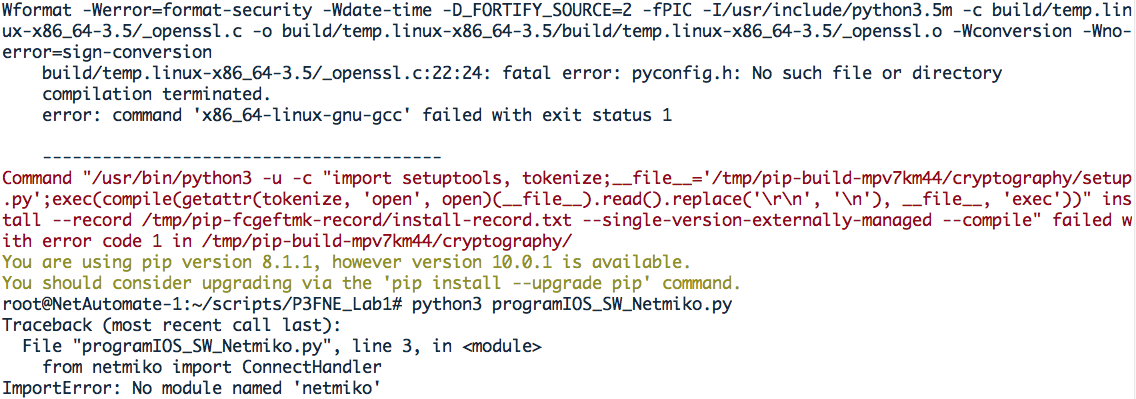
x86_64-linux-gnu-gcc -pthread -DNDEBUG -g -fwrapv -O2 -Wall -Wstrict-prototypes -g -fstack-protector-strong -Wformat -Werror=format-security -Wdate-time -D_FORTIFY_SOURCE=2 -fPIC -I/usr/include/python3.5m -c build/temp.linux-x86_64-3.5/_openssl.c -o build/temp.linux-x86_64-3.5/build/temp.linux-x86_64-3.5/_openssl.o -Wconversion -Wno-error=sign-conversion
build/temp.linux-x86_64-3.5/_openssl.c:22:24: fatal error: pyconfig.h: No such file or directory
compilation terminated.
error: command 'x86_64-linux-gnu-gcc' failed with exit status 1

----------------------------------------
Command "/usr/bin/python3 -u -c "import setuptools, tokenize;__file__='/tmp/pip-build-x02kahmv/cryptography/setup.py';exec(compile(getattr(tokenize, 'open', open)(__file__).read().replace('\r\n', '\n'), __file__, 'exec'))" install --record /tmp/pip-p3yna2ee-record/install-record.txt --single-version-externally-managed --compile" failed with error code 1 in /tmp/pip-build-x02kahmv/cryptography/
You are using pip version 8.1.1, however version 10.0.1 is available.
You should consider upgrading via the 'pip install --upgrade pip' command.
root@NetworkAutomation-1:~#
root@NetworkAutomation-1:~# python3 netmiko1.py
Traceback (most recent call last):
File "netmiko1.py", line 1, in
from netmiko import ConnectHandler
ImportError: No module named 'netmiko'
root@NetworkAutomation-1:~#
 bdbrown69
All 15 comments
It looks like you are missing this header file that you need:
pyconfig.h: No such file or directory
compilation terminated.
 ktbyers
on 13 Jul 2018
ktbyers
on 13 Jul 2018
So after running apt-get install python-dev libxml2-dev libxslt-dev
I then tried to install netmiko again and this time received a lot more errors it seems like. I'm new to this so any advice you can offer, I'm most grateful! (See below output)
root@NetworkAutomation-1:~# python3 -m pip install netmiko
The directory '/root/.cache/pip/http' or its parent directory is not owned by the current user and the cache has been disabled. Please check the permissions and owner of that directory. If executing pip with sudo, you may want sudo's -H flag.
The directory '/root/.cache/pip' or its parent directory is not owned by the current user and caching wheels has been disabled. check the permissions and owner of that directory. If executing pip with sudo, you may want sudo's -H flag.
Collecting netmiko
Exception:
Traceback (most recent call last):
File "/usr/share/python-wheels/urllib3-1.13.1-py2.py3-none-any.whl/urllib3/connection.py", line 137, in _new_conn
(self.host, self.port), self.timeout, **extra_kw)
File "/usr/share/python-wheels/urllib3-1.13.1-py2.py3-none-any.whl/urllib3/util/connection.py", line 91, in create_connection
raise err
File "/usr/share/python-wheels/urllib3-1.13.1-py2.py3-none-any.whl/urllib3/util/connection.py", line 81, in create_connection
sock.connect(sa)
OSError: [Errno 101] Network is unreachable
During handling of the above exception, another exception occurred:
Traceback (most recent call last):
File "/usr/share/python-wheels/urllib3-1.13.1-py2.py3-none-any.whl/urllib3/connectionpool.py", line 560, in urlopen
body=body, headers=headers)
File "/usr/share/python-wheels/urllib3-1.13.1-py2.py3-none-any.whl/urllib3/connectionpool.py", line 346, in _make_request
self._validate_conn(conn)
File "/usr/share/python-wheels/urllib3-1.13.1-py2.py3-none-any.whl/urllib3/connectionpool.py", line 787, in _validate_conn
conn.connect()
File "/usr/share/python-wheels/urllib3-1.13.1-py2.py3-none-any.whl/urllib3/connection.py", line 217, in connect
conn = self._new_conn()
File "/usr/share/python-wheels/urllib3-1.13.1-py2.py3-none-any.whl/urllib3/connection.py", line 146, in _new_conn
self, "Failed to establish a new connection: %s" % e)
requests.packages.urllib3.exceptions.NewConnectionError:
During handling of the above exception, another exception occurred:
Traceback (most recent call last):
File "/usr/lib/python3/dist-packages/pip/basecommand.py", line 209, in main
status = self.run(options, args)
File "/usr/lib/python3/dist-packages/pip/commands/install.py", line 317, in run
requirement_set.prepare_files(finder)
File "/usr/lib/python3/dist-packages/pip/req/req_set.py", line 360, in prepare_files
ignore_dependencies=self.ignore_dependencies))
File "/usr/lib/python3/dist-packages/pip/req/req_set.py", line 512, in _prepare_file
finder, self.upgrade, require_hashes)
File "/usr/lib/python3/dist-packages/pip/req/req_install.py", line 273, in populate_link
self.link = finder.find_requirement(self, upgrade)
File "/usr/lib/python3/dist-packages/pip/index.py", line 442, in find_requirement
all_candidates = self.find_all_candidates(req.name)
File "/usr/lib/python3/dist-packages/pip/index.py", line 400, in find_all_candidates
for page in self._get_pages(url_locations, project_name):
File "/usr/lib/python3/dist-packages/pip/index.py", line 545, in _get_pages
page = self._get_page(location)
File "/usr/lib/python3/dist-packages/pip/index.py", line 648, in _get_page
return HTMLPage.get_page(link, session=self.session)
File "/usr/lib/python3/dist-packages/pip/index.py", line 757, in get_page
"Cache-Control": "max-age=600",
File "/usr/share/python-wheels/requests-2.9.1-py2.py3-none-any.whl/requests/sessions.py", line 480, in get
return self.request('GET', url, *kwargs)
File "/usr/lib/python3/dist-packages/pip/download.py", line 378, in request
return super(PipSession, self).request(method, url, *args, *kwargs)
File "/usr/share/python-wheels/requests-2.9.1-py2.py3-none-any.whl/requests/sessions.py", line 468, in request
resp = self.send(prep, *send_kwargs)
File "/usr/share/python-wheels/requests-2.9.1-py2.py3-none-any.whl/requests/sessions.py", line 576, in send
r = adapter.send(request, *kwargs)
File "/usr/share/python-wheels/CacheControl-0.11.5-py2.py3-none-any.whl/cachecontrol/adapter.py", line 46, in send
resp = super(CacheControlAdapter, self).send(request, **kw)
File "/usr/share/python-wheels/requests-2.9.1-py2.py3-none-any.whl/requests/adapters.py", line 376, in send
timeout=timeout
File "/usr/share/python-wheels/urllib3-1.13.1-py2.py3-none-any.whl/urllib3/connectionpool.py", line 610, in urlopen
_stacktrace=sys.exc_info()[2])
File "/usr/share/python-wheels/urllib3-1.13.1-py2.py3-none-any.whl/urllib3/util/retry.py", line 228, in increment
total -= 1
TypeError: unsupported operand type(s) for -=: 'Retry' and 'int'
You are using pip version 8.1.1, however version 10.0.1 is available.
You should consider upgrading via the 'pip install --upgrade pip' command.
root@NetworkAutomation-1:~#
bdbrown69
on 13 Jul 2018
It looks like PIP is complaining it can't reach the Internet (pypi).
Kirk
ktbyers
on 13 Jul 2018
Essentially I'm trying to run this script:
from netmiko import ConnectHandler
iosv_l2 = {
'device_type': 'cisco_ios',
'ip': '192.168.122.72',
'username': 'bart',
'password': 'cisco'
}
net_connect = ConnectHandler(**iosv_l2)
output = net_connect.send_command('sho ip int brief')
print (output)
config_commands = ['int loop 0', 'ip address 1.1.1.1 255.255.255.0']
output = net_connect.send_config_set(config_commands)
print (output)
for n in range (11,21):
print ("Creating VLAN " + str(n))
config_commands = ['vlan database', 'vlan ' + str(n), 'name Pyton_VLAN ' + $
output = net_connect.send_config_set(config_commands)
print (output)
but when I run the script, this is all I get:
root@NetworkAutomation-1:~# python3 netmiko1.py
Traceback (most recent call last):
File "netmiko1.py", line 1, in
from netmiko import ConnectHandler
ImportError: No module named 'netmiko'
and have been unsuccessful in getting netmiko installed!
bdbrown69
on 13 Jul 2018
Yes, you have some sort of an OS or connectivity issue that is preventing you from getting Netmiko installed.
Does installing any package via PIP work?
ktbyers
on 13 Jul 2018
I was getting the same issue on the following topology:

After going over lecture 27 in David Bombals Python Network Programming for Network Engineers (Python 3) course (Obligatory shout out to Kirks awesome, comprehensive Python Network Automation course {Premium Package highly recommended}, to restore the irony balance of asking him for free support on someone elses course :-) ), I had Internet access from the Network Automation container:
root@NetAutomate-1:~# curl www.google.com
<!doctype html><html itemscope="" itemtype="http://schema.org/WebPage" lang="en-GB"><head><meta content="text/html; charset=UTF-8" http-equiv="Content-Type"><meta content="/images/branding/googleg/1x/googleg_standard_color_128dp.png" itemprop="image"><title>Google</title><script nonce="5kmKqflJO2k8L7/0fYG5OA==">(function(){window.google={kEI:'GqVLW4eoKcbsaZ65vbAF',kEXPI:'0,1353746,58,884,1073,1018,280,711,387,1252,606,189,126,8,136,2339588,183,244,32,329294,1294,12383,2349,2506,32692,15247,867,317,1251,7,7357,3231,5281,1100,3335,2,2,1849,4952,368,549,664,2102,113,1150,1051,3191,224,501,3,344,1361,139,130,4831,2,14,260,575,1119,2,578,728,311,297,1614,210,58,2,4,933,364,1712,1376,505,730,377,1240,479,609,51,634,8,1569,223,551,1233,1015,283,2,1037,87,1413,288,438,334,864,23,369,89,44,22,42,557,5,2,2,151,506,737,630,275,192,3,935,314,82,29,272,141,186,570,509,1587,296,341,106,194,703,36,832,11,43,18,7,10,162,334,123,7,1119,120,105,386,8,806,278,7,3,25,465,466,152,29,460,245,2,187,4,4,4,4,72,7,406,107,344,7,63,75,141,302,50,212,1004,32,64,673,536,60,648,30,288,1,486,2,491,439,2324482,3685999,2553,75,8797711,4,1572,549,332,445,1,2,1,1,77,1,1,900,583,9,304,1,8,1,2,1,1,1600,1,29,335,5,81,17,36,9,1,16,1,1,1,1,1,15,22309786',authuser:0,kscs:'c9c918f0_GqVLW4eoKcbsaZ65vbAF',kGL:'GB'};google.kHL='en-GB';})();google.time=function(){return(new Date).getTime()};(function(){google.lc=[];google.li=0;google.getEI=function(a){for(var b;a&&(!a.getAttribute||!(b=a.getAttribute("eid")));)a=a.parentNode;return b||google.kEI};google.getLEI=function(a){for(var b=null;a&&(!a.getAttribute||!(b=a.getAttribute("leid")));)a=a.parentNode;return b};google.https=function(){return"https:"==window.location.protocol};google.ml=function(){return null};google.wl=function(a,b){try{google.ml(Error(a),!1,b)}catch(d){}};google.log=function(a,b,d,c,g){if(a=google.logUrl(a,b,d,c,g)){b=new Image;var e=google.lc,f=google.li;e[f]=b;b.onerror=b.onload=b.onabort=function(){delete e[f]};google.vel&&google.vel.lu&&google.vel.lu(a);b.src=a;google.li=f+1}};google.logUrl=function(a,b,d,c,g){var e="",f=google.ls||"";d||-1!=b.search("&ei=")||(e="&ei="+google.getEI(c),-1==b.search("&lei=")&&(c=google.getLEI(c))&&(e+="&lei="+c));c="";!d&&google.cshid&&-1==b.search("&cshid=")&&"slh"!=a&&(c="&cshid="+google.cshid);a=d||"/"+(g||"gen_204")+"?atyp=i&ct="+a+"&cad="+b+e+f+"&zx="+google.time()+c;/^http:/i.test(a)&&google.https()&&(google.ml(Error("a"),!1,{src:a,glmm:1}),a="");return a};}).call(this);(function(){google.y={};google.x=function(a,b){if(a)var c=a.id;else{do c=Math.random();while(google.y[c])}google.y[c]=[a,b];return!1};google.lm=[];google.plm=function(a){google.lm.push.apply(google.lm,a)};google.lq=[];google.load=function(a,b,c){google.lq.push([[a],b,c])};google.loadAll=function(a,b){google.lq.push([a,b])};}).call(this);google.f={};</script><script nonce="5kmKqflJO2k8L7/0fYG5OA==">var a=window.location,b=a.href.indexOf("#");if(0<=b){var c=a.href.substring(b+1);/(^|&)q=/.test(c)&&-1==c.indexOf("#")&&a.replace("/search?"+c.replace(/(^|&)fp=[^&]*/g,"")+"&cad=h")};</script><style>#gbar,#guser{font-size:13px;padding-top:1px !important;}#gbar{height:22px}#guser{padding-bottom:7px !important;text-align:right}.gbh,.gbd{border-top:1px solid #c9d7f1;font-size:1px}.gbh{height:0;position:absolute;top:24px;width:100%}@media all{.gb1{height:22px;margin-right:.5em;vertical-align:top}#gbar{float:left}}a.gb1,a.gb4{text-decoration:underline !important}a.gb1,a.gb4{color:#00c !important}.gbi .gb4{color:#dd8e27 !important}.gbf .gb4{color:#900 !important}
</style><style>body,td,a,p,.h{font-family:arial,sans-serif}body{margin:0;overflow-y:scroll}#gog{padding:3px 8px 0}td{line-height:.8em}.gac_m td{line-height:17px}form{margin-bottom:20px}.h{color:#36c}.q{color:#00c}.ts td{padding:0}.ts{border-collapse:collapse}em{font-weight:bold;font-style:normal}.lst{height:25px;width:496px}.gsfi,.lst{font:18px arial,sans-serif}.gsfs{font:17px arial,sans-serif}.ds{display:inline-box;display:inline-block;margin:3px 0 4px;margin-left:4px}input{font-family:inherit}a.gb1,a.gb2,a.gb3,a.gb4{color:#11c !important}body{background:#fff;color:black}a{color:#11c;text-decoration:none}a:hover,a:active{text-decoration:underline}.fl a{color:#36c}a:visited{color:#551a8b}a.gb1,a.gb4{text-decoration:underline}a.gb3:hover{text-decoration:none}#ghead a.gb2:hover{color:#fff !important}.sblc{padding-top:5px}.sblc a{display:block;margin:2px 0;margin-left:13px;font-size:11px}.lsbb{background:#eee;border:solid 1px;border-color:#ccc #999 #999 #ccc;height:30px}.lsbb{display:block}.ftl,#fll a{display:inline-block;margin:0 12px}.lsb{background:url(/images/nav_logo229.png) 0 -261px repeat-x;border:none;color:#000;cursor:pointer;height:30px;margin:0;outline:0;font:15px arial,sans-serif;vertical-align:top}.lsb:active{background:#ccc}.lst:focus{outline:none}</style><script nonce="5kmKqflJO2k8L7/0fYG5OA=="></script><link href="/images/branding/product/ico/googleg_lodp.ico" rel="shortcut icon"></head><body bgcolor="#fff"><script nonce="5kmKqflJO2k8L7/0fYG5OA==">(function(){var src='/images/nav_logo229.png';var iesg=false;document.body.onload = function(){window.n && window.n();if (document.images){new Image().src=src;}
if (!iesg){document.f&&document.f.q.focus();document.gbqf&&document.gbqf.q.focus();}
}
})();</script><div id="mngb"> <div id=gbar><nobr><b class=gb1>Search</b> <a class=gb1 href="http://www.google.co.uk/imghp?hl=en&tab=wi">Images</a> <a class=gb1 href="http://maps.google.co.uk/maps?hl=en&tab=wl">Maps</a> <a class=gb1 href="https://play.google.com/?hl=en&tab=w8">Play</a> <a class=gb1 href="http://www.youtube.com/?gl=GB&tab=w1">YouTube</a> <a class=gb1 href="http://news.google.co.uk/nwshp?hl=en&tab=wn">News</a> <a class=gb1 href="https://mail.google.com/mail/?tab=wm">Gmail</a> <a class=gb1 href="https://drive.google.com/?tab=wo">Drive</a> <a class=gb1 style="text-decoration:none" href="https://www.google.co.uk/intl/en/options/"><u>More</u> »</a></nobr></div><div id=guser width=100%><nobr><span id=gbn class=gbi></span><span id=gbf class=gbf></span><span id=gbe></span><a href="http://www.google.co.uk/history/optout?hl=en" class=gb4>Web History</a> | <a href="/preferences?hl=en" class=gb4>Settings</a> | <a target=_top id=gb_70 href="https://accounts.google.com/ServiceLogin?hl=en&passive=true&continue=http://www.google.com/" class=gb4>Sign in</a></nobr></div><div class=gbh style=left:0></div><div class=gbh style=right:0></div> </div><center><br clear="all" id="lgpd"><div id="lga"><img alt="Google" height="92" src="/images/branding/googlelogo/1x/googlelogo_white_background_color_272x92dp.png" style="padding:28px 0 14px" width="272" id="hplogo" onload="window.lol&&lol()"><br><br></div><form action="/search" name="f"><table cellpadding="0" cellspacing="0"><tr valign="top"><td width="25%"> </td><td align="center" nowrap=""><input name="ie" value="ISO-8859-1" type="hidden"><input value="en-GB" name="hl" type="hidden"><input name="source" type="hidden" value="hp"><input name="biw" type="hidden"><input name="bih" type="hidden"><div class="ds" style="height:32px;margin:4px 0"><input style="color:#000;margin:0;padding:5px 8px 0 6px;vertical-align
However I got the same error:
I tried adding repos:
add-apt-repository "deb http://archive.ubuntu.com/ubuntu $(lsb_release -sc) main universe restricted multiverse"
However, I still couldn't find the python3-dev, libxml2-dev or libxslt-dev packages.
root@NetAutomate-1:~# apt-get install python3-dev libxml2-dev libxslt-dev
Reading package lists... Done
Building dependency tree
Reading state information... Done
Package python3-dev is not available, but is referred to by another package.
This may mean that the package is missing, has been obsoleted, or
is only available from another source
W: Target Packages (main/binary-amd64/Packages) is configured multiple times in /etc/apt/sources.list:3 and /etc/apt/sources.list:50
W: Target Packages (main/binary-all/Packages) is configured multiple times in /etc/apt/sources.list:3 and /etc/apt/sources.list:50
W: Target Packages (universe/binary-amd64/Packages) is configured multiple times in /etc/apt/sources.list:14 and/etc/apt/sources.list:50
W: Target Packages (universe/binary-all/Packages) is configured multiple times in /etc/apt/sources.list:14 and /etc/apt/sources.list:50
W: Target Packages (restricted/binary-amd64/Packages) is configured multiple times in /etc/apt/sources.list:3 and /etc/apt/sources.list:50
W: Target Packages (restricted/binary-all/Packages) is configured multiple times in /etc/apt/sources.list:3 and /etc/apt/sources.list:50
W: Target Packages (multiverse/binary-amd64/Packages) is configured multiple times in /etc/apt/sources.list:24 and /etc/apt/sources.list:50
W: Target Packages (multiverse/binary-all/Packages) is configured multiple times in /etc/apt/sources.list:24 and/etc/apt/sources.list:50
E: Package 'python3-dev' has no installation candidate
E: Unable to locate package libxml2-dev
E: Unable to locate package libxslt-dev
My sources.list was as follows:
# See http://help.ubuntu.com/community/UpgradeNotes for how to upgrade to
# newer versions of the distribution.
deb http://archive.ubuntu.com/ubuntu/ xenial main restricted
# deb-src http://archive.ubuntu.com/ubuntu/ xenial main restricted
## Major bug fix updates produced after the final release of the
## distribution.
deb http://archive.ubuntu.com/ubuntu/ xenial-updates main restricted
# deb-src http://archive.ubuntu.com/ubuntu/ xenial-updates main restricted
## N.B. software from this repository is ENTIRELY UNSUPPORTED by the Ubuntu
## team. Also, please note that software in universe WILL NOT receive any
## review or updates from the Ubuntu security team.
deb http://archive.ubuntu.com/ubuntu/ xenial universe
deb-src http://archive.ubuntu.com/ubuntu/ xenial universe
deb http://archive.ubuntu.com/ubuntu/ xenial-updates universe
deb-src http://archive.ubuntu.com/ubuntu/ xenial-updates universe
## N.B. software from this repository is ENTIRELY UNSUPPORTED by the Ubuntu
## team, and may not be under a free licence. Please satisfy yourself as to
## your rights to use the software. Also, please note that software in
## multiverse WILL NOT receive any review or updates from the Ubuntu
## security team.
deb http://archive.ubuntu.com/ubuntu/ xenial multiverse
# deb-src http://archive.ubuntu.com/ubuntu/ xenial multiverse
deb http://archive.ubuntu.com/ubuntu/ xenial-updates multiverse
# deb-src http://archive.ubuntu.com/ubuntu/ xenial-updates multiverse
## N.B. software from this repository may not have been tested as
## extensively as that contained in the main release, although it includes
## newer versions of some applications which may provide useful features.
## Also, please note that software in backports WILL NOT receive any review
## or updates from the Ubuntu security team.
deb http://archive.ubuntu.com/ubuntu/ xenial-backports main restricted universe multiverse
# deb-src http://archive.ubuntu.com/ubuntu/ xenial-backports main restricted universe multiverse
## Uncomment the following two lines to add software from Canonical's
## 'partner' repository.
## This software is not part of Ubuntu, but is offered by Canonical and the
## respective vendors as a service to Ubuntu users.
# deb http://archive.canonical.com/ubuntu xenial partner
# deb-src http://archive.canonical.com/ubuntu xenial partner
deb http://security.ubuntu.com/ubuntu/ xenial-security main restricted
# deb-src http://security.ubuntu.com/ubuntu/ xenial-security main restricted
deb http://security.ubuntu.com/ubuntu/ xenial-security universe
deb-src http://security.ubuntu.com/ubuntu/ xenial-security universe
deb http://security.ubuntu.com/ubuntu/ xenial-security multiverse
# deb-src http://security.ubuntu.com/ubuntu/ xenial-security multiverse
deb http://archive.ubuntu.com/ubuntu xenial main universe restricted multiverse
# deb-src http://archive.ubuntu.com/ubuntu xenial main universe restricted multiverse
I removed the duplicate line (I'd added in error) from sources.list file and ran the following commands to upgrade, then install the python3-venv & python3-dev packages:
apt-get upgrade
apt-get install python3-venv
apt-get install python3-dev
The packages installed successfully:
root@NetAutomate-1:~# apt-get upgrade
Reading package lists... Done
Building dependency tree
Reading state information... Done
Calculating upgrade... Done
0 upgraded, 0 newly installed, 0 to remove and 0 not upgraded.
root@NetAutomate-1:~# apt-get update
Get:1 http://archive.ubuntu.com/ubuntu xenial InRelease [247 kB]
Get:2 http://ppa.launchpad.net/ansible/ansible-2.5/ubuntu xenial InRelease [18.0 kB]
Get:3 http://security.ubuntu.com/ubuntu xenial-security InRelease [107 kB]
Get:4 http://archive.ubuntu.com/ubuntu xenial-updates InRelease [109 kB]
Get:5 http://ppa.launchpad.net/ansible/ansible-2.5/ubuntu xenial/main amd64 Packages [468 B]
Get:6 http://archive.ubuntu.com/ubuntu xenial-backports InRelease [107 kB]
Get:7 http://archive.ubuntu.com/ubuntu xenial/universe Sources [9802 kB]
Get:8 http://security.ubuntu.com/ubuntu xenial-security/universe Sources [83.5 kB]
Get:9 http://security.ubuntu.com/ubuntu xenial-security/main amd64 Packages [663 kB]
Get:10 http://security.ubuntu.com/ubuntu xenial-security/restricted amd64 Packages [12.7 kB]
Get:11 http://security.ubuntu.com/ubuntu xenial-security/universe amd64 Packages [453 kB]
Get:12 http://security.ubuntu.com/ubuntu xenial-security/multiverse amd64 Packages [3738 B]
Get:13 http://archive.ubuntu.com/ubuntu xenial/main amd64 Packages [1558 kB]
Get:14 http://archive.ubuntu.com/ubuntu xenial/restricted amd64 Packages [14.1 kB]
Get:15 http://archive.ubuntu.com/ubuntu xenial/universe amd64 Packages [9827 kB]
Get:16 http://archive.ubuntu.com/ubuntu xenial/multiverse amd64 Packages [176 kB]
Get:17 http://archive.ubuntu.com/ubuntu xenial-updates/universe Sources [260 kB]
Get:18 http://archive.ubuntu.com/ubuntu xenial-updates/main amd64 Packages [1040 kB]
Get:19 http://archive.ubuntu.com/ubuntu xenial-updates/restricted amd64 Packages [13.1 kB]
Get:20 http://archive.ubuntu.com/ubuntu xenial-updates/universe amd64 Packages [827 kB]
Get:21 http://archive.ubuntu.com/ubuntu xenial-updates/multiverse amd64 Packages [18.8 kB]
Get:22 http://archive.ubuntu.com/ubuntu xenial-backports/main amd64 Packages [7321 B]
Get:23 http://archive.ubuntu.com/ubuntu xenial-backports/universe amd64 Packages [8086 B]
Fetched 25.4 MB in 9s (2620 kB/s)
Reading package lists... Done
root@NetAutomate-1:~# apt-get install python3-venv
Reading package lists... Done
Building dependency tree
Reading state information... Done
The following additional packages will be installed:
python3.5-venv
The following NEW packages will be installed:
python3-venv python3.5-venv
0 upgraded, 2 newly installed, 0 to remove and 39 not upgraded.
Need to get 7104 B of archives.
After this operation, 39.9 kB of additional disk space will be used.
Do you want to continue? [Y/n] y
Get:1 http://archive.ubuntu.com/ubuntu xenial-updates/universe amd64 python3.5-venv amd64 3.5.2-2ubuntu0~16.04.4
[5998 B]
Get:2 http://archive.ubuntu.com/ubuntu xenial/universe amd64 python3-venv amd64 3.5.1-3 [1106 B]
Fetched 7104 B in 0s (33.9 kB/s)
debconf: delaying package configuration, since apt-utils is not installed
Selecting previously unselected package python3.5-venv.
(Reading database ... 17048 files and directories currently installed.)
Preparing to unpack .../python3.5-venv_3.5.2-2ubuntu0~16.04.4_amd64.deb ...
Unpacking python3.5-venv (3.5.2-2ubuntu0~16.04.4) ...
Selecting previously unselected package python3-venv.
Preparing to unpack .../python3-venv_3.5.1-3_amd64.deb ...
Unpacking python3-venv (3.5.1-3) ...
Setting up python3.5-venv (3.5.2-2ubuntu0~16.04.4) ...
Setting up python3-venv (3.5.1-3) ...
root@NetAutomate-1:~# apt-get install python3-dev
Reading package lists... Done
Building dependency tree
Reading state information... Done
The following additional packages will be installed:
libpython3-dev libpython3.5 libpython3.5-dev python3.5-dev
The following NEW packages will be installed:
libpython3-dev libpython3.5 libpython3.5-dev python3-dev python3.5-dev
0 upgraded, 5 newly installed, 0 to remove and 39 not upgraded.
Need to get 39.1 MB of archives.
After this operation, 58.6 MB of additional disk space will be used.
Do you want to continue? [Y/n] y
Get:1 http://archive.ubuntu.com/ubuntu xenial-updates/main amd64 libpython3.5 amd64 3.5.2-2ubuntu0~16.04.4 [1360kB]
Get:2 http://archive.ubuntu.com/ubuntu xenial-updates/main amd64 libpython3.5-dev amd64 3.5.2-2ubuntu0~16.04.4 [37.3 MB]
Get:3 http://archive.ubuntu.com/ubuntu xenial/main amd64 libpython3-dev amd64 3.5.1-3 [6926 B]
Get:4 http://archive.ubuntu.com/ubuntu xenial-updates/main amd64 python3.5-dev amd64 3.5.2-2ubuntu0~16.04.4 [413kB]
Get:5 http://archive.ubuntu.com/ubuntu xenial/main amd64 python3-dev amd64 3.5.1-3 [1186 B]
Fetched 39.1 MB in 14s (2749 kB/s)
debconf: delaying package configuration, since apt-utils is not installed
Selecting previously unselected package libpython3.5:amd64.
(Reading database ... 17058 files and directories currently installed.)
Preparing to unpack .../libpython3.5_3.5.2-2ubuntu0~16.04.4_amd64.deb ...
Unpacking libpython3.5:amd64 (3.5.2-2ubuntu0~16.04.4) ...
Selecting previously unselected package libpython3.5-dev:amd64.
Preparing to unpack .../libpython3.5-dev_3.5.2-2ubuntu0~16.04.4_amd64.deb ...
Unpacking libpython3.5-dev:amd64 (3.5.2-2ubuntu0~16.04.4) ...
Selecting previously unselected package libpython3-dev:amd64.
Preparing to unpack .../libpython3-dev_3.5.1-3_amd64.deb ...
Unpacking libpython3-dev:amd64 (3.5.1-3) ...
Selecting previously unselected package python3.5-dev.
Preparing to unpack .../python3.5-dev_3.5.2-2ubuntu0~16.04.4_amd64.deb ...
Unpacking python3.5-dev (3.5.2-2ubuntu0~16.04.4) ...
Selecting previously unselected package python3-dev.
Preparing to unpack .../python3-dev_3.5.1-3_amd64.deb ...
Unpacking python3-dev (3.5.1-3) ...
Processing triggers for libc-bin (2.23-0ubuntu10) ...
Setting up libpython3.5:amd64 (3.5.2-2ubuntu0~16.04.4) ...
Setting up libpython3.5-dev:amd64 (3.5.2-2ubuntu0~16.04.4) ...
Setting up libpython3-dev:amd64 (3.5.1-3) ...
Setting up python3.5-dev (3.5.2-2ubuntu0~16.04.4) ...
Setting up python3-dev (3.5.1-3) ...
Processing triggers for libc-bin (2.23-0ubuntu10) ...
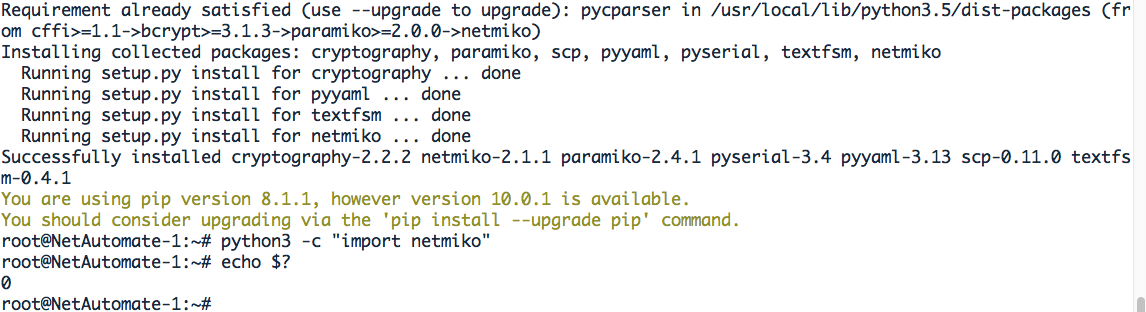
After that, running the pip3 install -U netmiko command worked and I was able to import the module:
I was then able to run the following script successfully:
# First pass at Netmiko from DBs Python Network Programming for Network Engineers (Python 3)
import getpass
from netmiko import ConnectHandler
def main():
user = input("Enter your remote account: ")
password = getpass.getpass()
iosv_l2 = {
'device_type': 'cisco_ios',
'ip': '192.168.122.72',
'username': user,
'password': password,
}
net_connect = ConnectHandler(**iosv_l2)
output = net_connect.send_command('show ip interface brief')
print(output)
config_commands = ['int loop 0', 'ip address 1.1.1.1 255.255.255.255']
output = net_connect.send_config_set(config_commands)
print(output)
for vlan_id in range(2, 33):
print("Creating VLAN " + str(vlan_id) + ".")
config_commands = ['vlan ' + str(vlan_id), 'name PYTHON_VLAN_' + str(vlan_id)]
output = net_connect.send_config_set(config_commands)
print(output)
if __name__ == '__main__':
main()
@bdbrown69 - Let me know if this works for you too. If it does; please feel free to close the issue @ktbyers (Can I get this assigned to me? ;-) )
 Collisio-Adolebitque
on 15 Jul 2018
Collisio-Adolebitque
on 15 Jul 2018
@Collisio-Adolebitque Great...thanks!
@bdbrown69 Does a similar process work for you?
ktbyers
on 15 Jul 2018
So your process was (if I read it right...as I looked at it pretty quickly):
apt-get upgrade
apt-get install python3-venv
apt-get install python3-dev

pip3 install -U netmiko
@ktbyers Well, it just looks easy when you write it like that. :-)
Collisio-Adolebitque
on 16 Jul 2018
Thank you all for your assistance and I apologize for not responding back earlier...work pulled me away!
Here are the steps I had to perform.
I first had to do the following:
nano /etc/apt/sources.list
Then uncomment the following two lines:
deb http://archive.canonical.com/ubuntu xenial partner
deb-src http://archive.canonical.com/ubuntu xenial partner
save the file, then:
apt-get update
apt-get install python3-venv
apt-get install python3-dev
next type this:
python3 -m pip install netmiko
Now when I try to run my initial script I no longer get the
ImportError: No module named 'netmiko'
I get this error which I'm try to troubleshoot:
Traceback (most recent call last):
File "/usr/local/lib/python3.5/dist-packages/netmiko/base_connection.py", line 689, in establish_connection
self.remote_conn_pre.connect(**ssh_connect_params)
File "/usr/local/lib/python3.5/dist-packages/paramiko/client.py", line 357, in connect
raise NoValidConnectionsError(errors)
paramiko.ssh_exception.NoValidConnectionsError: [Errno None] Unable to connect to port 22 on 192.168.122.72
During handling of the above exception, another exception occurred:
Traceback (most recent call last):
File "netmiko1.py", line 10, in
net_connect = ConnectHandler(*iosv_l2)
File "/usr/local/lib/python3.5/dist-packages/netmiko/ssh_dispatcher.py", line 178, in ConnectHandler
return ConnectionClass(args, **kwargs)
File "/usr/local/lib/python3.5/dist-packages/netmiko/base_connection.py", line 207, in __init__
self.establish_connection()
File "/usr/local/lib/python3.5/dist-packages/netmiko/base_connection.py", line 693, in establish_connection
raise NetMikoTimeoutException(msg)
netmiko.ssh_exception.NetMikoTimeoutException: Connection to device timed-out: cisco_ios 192.168.122.72:22
root@NetworkAutomation-1:~#
bdbrown69
on 17 Jul 2018
Can you ping and SSH to the switch with IP: 192.168.122.72 from the network automation container?
Collisio-Adolebitque
on 17 Jul 2018
Ping and SSH work now!
It helps to double check the configuration on the switch...I had to enable SSH. Once that was done, the script was able to run successfully.
All - thanks again for your input and assistance! I've been in networking for a number of years and am now just learning Python and how it can help automate a lot of my daily tasks...I'm hooked!
bdbrown69
on 17 Jul 2018
The directory '/root/.cache/pip/http' or its parent directory is not owned by the current user and the cache has been disabled.
Are you still seeing this issue? I ended up reinstalling the GNS3 VM entirely because in every project I created, the folder/file permissions in the Network Automation docker belonged to "1000:1000" instead of "root:root"
Typels -la or ll into the Network Automation device and see if anything in the home directory belong to someone other than root. This issue was recursive into folders like .ssh .gns3_perms and so forth. Each time I'd start up, I would change the owner of those folders, but the 'fix' wouldn't persist.
I never did find a fix, I just finished reinstalling. Now I am back to trying to get netmiko working with python3...
 Jason-Engel
on 28 Jul 2018
Jason-Engel
on 28 Jul 2018
@Jason-Engel Can you explain what your issue is?
Is it a file-system permissions issue or is there something else going on?
ktbyers
on 28 Jul 2018
What led me to reading this Issue/Discussion was actually caused by pip within the Network Automation appliance in GNS3 2.1.8, and not a netmiko issue directly. (Pip was causing issues while I was trying to get netmiko up and running). After reviewing the thread a bit more, what I was experiencing doesn't belong in a netmiko discussion per se.
While struggling with dependencies in the Network Automation appliance, so that I could get netmiko working, I was noticing that the appliance was launching with Linux file/folder permissions set to 1000:1000 instead of root:root which was causing ssh, apt and pip3 operations to fail. Sorry for the confusion, and veering off-topic.
Jason-Engel
on 29 Jul 2018
Related issues
 JoshuaSmeda
·
3Comments
ktbyers
·
7Comments
JoshuaSmeda
·
3Comments
ktbyers
·
7Comments
 Bizzy211
·
4Comments
Bizzy211
·
4Comments
 sanidhyamangal
·
7Comments
sanidhyamangal
·
7Comments
 Rooster-OC
·
5Comments
Rooster-OC
·
5Comments
Most helpful comment
So your process was (if I read it right...as I looked at it pretty quickly):