Netlify-cms: Integrating netlify-cms Identity with Vercel
Describe the bug
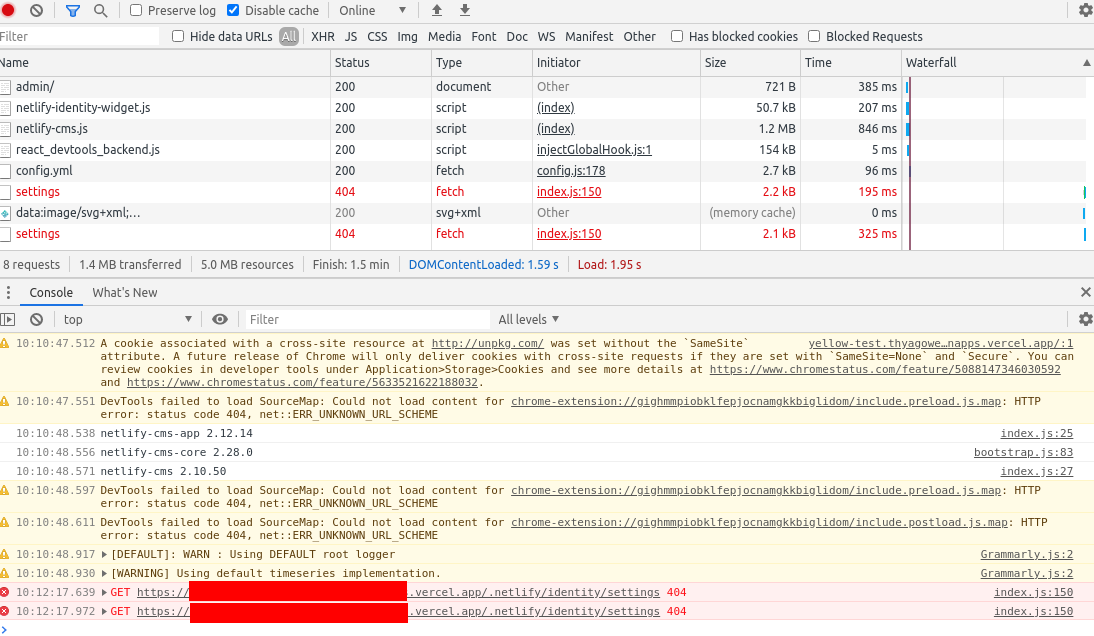
I'm unable to make my dynamic generated NextJS blog to work in Vercel, even though I went through all the steps. I keep getting an Identity error.
- Hooked up the netlify-cms script into admin/index.html
- Created and configured correctly a config.yml file, setting git-gateway as backend name, the site domain, and the branch
- Was able to create a local_backend to test the settings
When I navigate to the /admin/ path, a button labeled "Login with Netlify Identity" appears, I click on it and all I see is the message "Unable to access identity settings. When using git-gateway backend make sure to enable Identity service and Git Gateway.".
Expected behavior
To be able to log in and use the admin area
Screenshots
This is what I see in the network tab:
Applicable Versions:
- Netlify CMS version: [e.g. 2.10.50]
- Git provider: GitHub
- OS: Ubuntu 16.04
CMS configuration
backend:
  name: git-gateway
  branch: master
  site_domain: https://[username].vercel.app/

local_backend: true
publish_mode: editorial_workflow

slug:
  encoding: 'ascii'
  clean_accents: true
  sanitize_replacement: '_'

media_folder: /uploads

collections:
  - name: 'blog'
    label: 'Artigos'
    folder: 'posts'
    create: true
    delete: true

    slug: '{{slug}}'

    fields:
      - {
          label: 'Title',
          name: 'title',
          widget: 'string',
          required: true,
        }
      - { label: 'Autor', name: 'author', widget: 'string', required: true }
      - {
          label: 'Category',
          name: 'category',
          collection: 'categories',
          widget: 'relation',
          required: true,
          searchFields: 'title',
          valueField: 'title',
          displayFields: ['title'],
          default: 'Uncategorized',
        }
      - {
          label: 'Publish Date',
          name: 'publishDate',
          widget: 'datetime',
          required: true,
        }
      - { label: 'Thumbnail', name: 'image', widget: 'image', required: true }
      - {
          label: 'Featured article?',
          name: 'featured',
          widget: 'boolean',
          default: false,
        }
      - { label: 'Corpo', name: 'body', widget: 'markdown', required: true }
Additional context
While I was following the integration steps, I created a Netlify account and could only see the Identity options after I linked my repo. Is this necessary, even though I'll be using another service do deploy it?
 thyagoweber-sevenapps
All 2 comments
Hi @thyagoweber-sevenapps, identity is a backend service that providers user management and git-gateway is a backend service that allows accessing a GitHub/GitLab repo without a GitHub/GitLab account.
Netlify can provide those services for you and you can also self host them:
https://github.com/hfte/netlify-cms-with-selfhosted-gotrue-and-git-gateway
Another option is to use a GitHub backend directly (or GitLab), but then any CMS user would need a GitHub/GitLab account.
If you use a GitHub backend you'll need a backend service to facilitate authentication either using Netlify as described here or use one of these external solutions
 erezrokah
on 21 Jun 2020
erezrokah
on 21 Jun 2020
Some example with setting up authentication using - https://github.com/netlify/netlify-identity-widget for Vercel deployment would be great. I want to migrate 4-5 smaller, non-profit projects to use Netlify CMS and I'm starting playing around with Netlify's services, however 300 mins/build time might not be enough for those so this is why I would also prefer to deploy them on Vercel without creating multiple custom authorization Apps on Github.
@thyagoweber-sevenapps as far as I can tell you have to have it linked on Netlify to use Identity. Probably based on linked repo there is system set up to publish in there on your behalf.
@edit
I've managed to solve that with help from stackoverflow: https://github.com/pacxiu/next-with-netlify/commit/a4c9de3a8e024baf5b3c9f9c8ee4f49eb9fb10ae
Here is original post on forum - https://stackoverflow.com/questions/52174873/using-netlifys-hosted-identity-service-with-self-hosted-netlify-cms
Now you can publish on Vercel :) @tonyrzhang
 pacxiu
on 22 Jul 2020
pacxiu
on 22 Jul 2020
Related issues
 bkroggel
·
3Comments
bkroggel
·
3Comments
 ghost
·
3Comments
ghost
·
3Comments
 zebapy
·
3Comments
zebapy
·
3Comments
 kalwalt
·
3Comments
kalwalt
·
3Comments
 tech4him1
·
3Comments
tech4him1
·
3Comments
Most helpful comment
Some example with setting up authentication using - https://github.com/netlify/netlify-identity-widget for Vercel deployment would be great. I want to migrate 4-5 smaller, non-profit projects to use Netlify CMS and I'm starting playing around with Netlify's services, however 300 mins/build time might not be enough for those so this is why I would also prefer to deploy them on Vercel without creating multiple custom authorization Apps on Github.
@thyagoweber-sevenapps as far as I can tell you have to have it linked on Netlify to use
Identity. Probably based on linked repo there is system set up to publish in there on your behalf.@edit
I've managed to solve that with help from stackoverflow: https://github.com/pacxiu/next-with-netlify/commit/a4c9de3a8e024baf5b3c9f9c8ee4f49eb9fb10ae
Here is original post on forum - https://stackoverflow.com/questions/52174873/using-netlifys-hosted-identity-service-with-self-hosted-netlify-cms
Now you can publish on Vercel :) @tonyrzhang