Netlify-cms: "Load_config_file: false" issues
Describe the bug
When I manually initialize Netlify CMS, using window.CMS_MANUAL_INIT = true and init({ config: { load_config_file: false, ... }}), I would expect to not need the config file anymore. But instead, it still tries to read the config file, and thus runs into errors.
To Reproduce
I have tested 3 situations, with only one providing near satisfactory results:
- With no config file.
window.CMS_MANUAL_INIT = true;
init({
    config: {
        backend: {
            name: 'git-gateway',
        },
        load_config_file: false,
        // ...
    },
});
This results in an error: Error: Failed to load config.yml (404). This blocks users from being able to continue into the CMS.
- With an empty config file.
window.CMS_MANUAL_INIT = true;
init({
    config: {
        backend: {
            name: 'git-gateway',
        },
        load_config_file: false,
        // ...
    },
});
This results in a blocking error as well:
config should have required property 'backend'
config should have required property 'collections'
config should have required property 'media_folder'
config should have required property 'media_library'
config should match some schema in anyOf
- With no config file.
window.CMS_MANUAL_INIT = true;
init({
    config: {
        backend: {
            name: 'git-gateway',
        },
        // ...
    },
});
This also results in an error, but the the error page appears for a second and goes away, allowing the users to continue normal operation. The error again says: Error: Failed to load config.yml (404).
Expected behavior
I would expect any of the situations mentioned above to not result in an error. It seems Netlify CMS is still trying to access the config file even though it is supposed to be using the JavaScript based config.
Applicable Versions:
- Netlify CMS version: 2.10.48
- Git provider: Git-Gateway, GitLab
- OS: Linux Mint 19.3 Tricia
- Browser version: Brave 1.8.96 (Chromium 81.0.4044.138)
CMS configuration
Not existent :)
Relevant information on configuration found in reproduction section.
Additional context
This is through Vanilla JavaScript, and not NodeJS or React.
 HeyITGuyFixIt
All 10 comments
Are you setting the window.CMS_MANUAL_INIT before importing netlify-cms for the first time?
It should be
window.CMS_MANUAL_INIT = true;

import CMS, {init} from 'netlify-cms';

init(...);
If that still doesn't work try putting the window.CMS_MANUAL_INIT = true; in a script tag in your index.html before including your js file.
 hanneskuettner
on 17 May 2020
hanneskuettner
on 17 May 2020
That appears to be the issue. I set the variable after loading the Netlify CMS script. Moving it like you said allows me to use the third scenario without any issue.
HeyITGuyFixIt
on 17 May 2020
Perfect!
We should take this as a hint to improve the docs to address the necessary order of operations more clearly.
hanneskuettner
on 17 May 2020
Thanks @HeyITGuyFixIt for reporting and @hanneskuettner for following up with a solution.
Just to clarify, this is the example from the docs - that works right?:
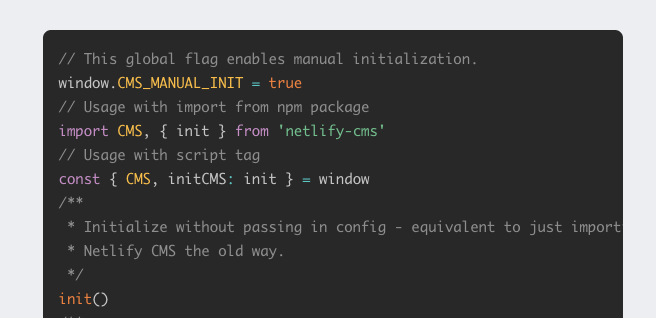
I think we can remove the following comment:
Injecting config is technically already possible by setting window.CMS_CONFIG before importing/requiring/running Netlify CMS, but most projects are modular and don't want to use globals, plus window.CMS_CONFIG is an internal, not technically supported, and provides no validation.
And replace it with a clarification on setting that global flag before importing the CMS, WDYT?
 erezrokah
on 17 May 2020
erezrokah
on 17 May 2020
@erezrokah that's a great solution I think!
hanneskuettner
on 17 May 2020
That's definitely a good idea. For those using React, there probably isn't any confusion with the current example given in the docs. But with those using Vanilla JavaScript, like me, the docs aren't clear on this implementation. Especially with those like me that don't know NodeJS or React. Those not using React or NodeJS but having a good knowledge of those may be able to infer the necessary order of things, but it still ought to be clearer.
HeyITGuyFixIt
on 17 May 2020
I'm running into this problem as well on my gatsby site during local development. I'm using gatsby-plugin-netlify-cms and the netlify-cms-app dependency in place of netlify-cms. I'm manually initializing the configuration in a Javascript file.
import collections from "./collections"
const config = {
  backend: {
    branch: "master",
    name: "github"
  },
  load_config_file: false,
  local_backend: true,
  media_folder: "static/assets",
  collections
}
export default config
My admin/index.html:
<!DOCTYPE html>
<html>
  <head>
    <meta charset="utf-8" />
    <meta name="viewport" content="width=device-width, initial-scale=1.0" />
    <title>Content Manager</title>
  </head>
  <body>
    <script src="https://unpkg.com/netlify-cms@^2.0.0/dist/netlify-cms.js"></script>
  </body>
</html>
I'm running npx netlify-cms-proxy-server, followed by gatsby develop
It seems to work properly after I nuke the public and .cache folders in the repository, but it stops working randomly thereafter.
 R-Bower
on 20 May 2020
R-Bower
on 20 May 2020
Hi @R-Bower, when using Gatsby with the CMS plugin you don't need to create an index.html file at all, and for using manual initialisation you need to set https://www.gatsbyjs.org/packages/gatsby-plugin-netlify-cms/#manualinit
erezrokah
on 20 May 2020
Hi @R-Bower, when using Gatsby with the CMS plugin you don't need to create an
index.htmlfile at all, and for using manual initialisation you need to set https://www.gatsbyjs.org/packages/gatsby-plugin-netlify-cms/#manualinit
Confirmed working now, thank you! I was using the documentation provided here to setup initially, and then switched over to the plugin. Given that the netlify-cms package has deprecation warnings, should this guide be updated with a disclaimer?
R-Bower
on 20 May 2020
You're right @R-Bower, individual guides should get more visibility in the docs.
Can you add your thought to https://github.com/netlify/netlify-cms/issues/3764?
erezrokah
on 21 May 2020
Related issues
 papandreou
·
3Comments
papandreou
·
3Comments
 emckay
·
3Comments
emckay
·
3Comments
 calavera
·
3Comments
calavera
·
3Comments
 tech4him1
·
3Comments
tech4him1
·
3Comments
 bkroggel
·
3Comments
bkroggel
·
3Comments
Most helpful comment
You're right @R-Bower, individual guides should get more visibility in the docs.
Can you add your thought to https://github.com/netlify/netlify-cms/issues/3764?