Netlify-cms: preview_path does not appear..
I tried to follow the doc but the preview link does not appear at all.
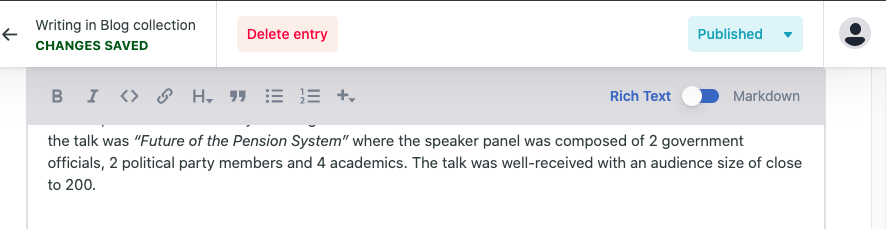
Am I missing something?
here is my setting
# config.yml

backend:
  name: git-gateway
  branch: master # Branch to update (optional; defaults to master)
media_folder: "assets/images"
# publish_mode: editorial_workflow

collections:
  - name: "blog"
    label: "Blog"
    folder: "_posts/"
    slug: "{{year}}-{{month}}-{{day}}-{{slug}}"
    preview_path: blog/{{slug}}
    create: true
    editor:
      preview: false
    fields:
      - { label: "Layout", name: "layout", widget: "hidden", default: "single" }
      - { label: "Title", name: "title", widget: "string" }
      - { label: "Publish Date", name: "date", widget: "datetime" }
      - { label: "Body", name: "body", widget: "markdown" }
      - { label: "tags", name: "tags", widget: "list", default: ["others"] }
      - {
          label: "categories",
          name: "categories",
          widget: "list",
          default: ["APEC Study Centre"],
        }
      - { label: "execept", name: "execept", widget: "string", required: false}
      - { label: "tagline", name: "tagline", widget: "string", required: false}
      - label: "sidebar"
        name: "sidebar"
        widget: "list"
        required: false
        fields:
          - {
              label: "image",
              name: "image",
              widget: "image",
              allow_mulitple: false,
              # default: "",
              required: false
            }
Thank you.
 fdq09eca
All 7 comments
Hi @fdq09eca, preview_path is useful when working with publish_mode: editorial_workflow.
In publish_mode: editorial_workflow the CMS will create a PR instead of committing to the master branch when you create/edit an entry. Then if your CI system creates a preview for that PR the URL should appear.
Since you have editorial workflow disabled you should also set a site_url (https://www.netlifycms.org/docs/deploy-preview-links/#preview-links-for-published-content) to show preview paths for published content.
 erezrokah
on 13 May 2020
erezrokah
on 13 May 2020

um.. it still not appears anything, but is this functionality not available in local development? i am running on a local Jekyll sever
fdq09eca
on 13 May 2020
For it to work you need to make sure the PR is created for that entry and there is a matching commit status on that PR.
erezrokah
on 13 May 2020
it did create a PR. and the preview link also appeared. but the link is not working.. it brings me to page not found.
== UPDATE ==
my bad, it is because I default the categories.. i tried
preview_path: "{{fields.categories}}/{{slug}}"
but the {{fields.categories}} are delimited by - while the dynamic link is delimited by %20 i.e. space.
Any possibility that I could change the delimiter of {{fields.categories}} to space?
Thanks.
fdq09eca
on 13 May 2020
Hi @fdq09eca, you can use sanitize_replacement https://www.netlifycms.org/docs/configuration-options/#slug-type
erezrokah
on 14 May 2020
Closing, please comment if necessary
erezrokah
on 25 May 2020
@erezrokah, sanitize_replacement with the preview_path shows an error when I use a character like / or . The error is The replacement character(s) (options.replacement) is itself unsafe.
Basically, when the preview_path resolves to something that includes a /, it is replaced with - which prevents being able to use something like a slug entry field in the CMS as the preview_path
 idrisadetunmbi
on 24 Aug 2020
idrisadetunmbi
on 24 Aug 2020
Related issues
 andresalerno
·
3Comments
andresalerno
·
3Comments
 BerkeleyTrue
·
3Comments
BerkeleyTrue
·
3Comments
 tech4him1
·
3Comments
tech4him1
·
3Comments
 dur41d
·
3Comments
dur41d
·
3Comments
 ciokan
·
3Comments
ciokan
·
3Comments