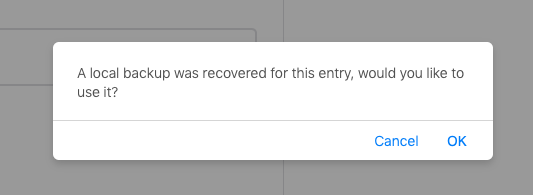
Netlify-cms: "A local backup was recovered for this entry, would you like to use it?"
Describe the bug
Every time I create a new entry, I get this alert. It restores data from the last post I made. This alert should only appear if the last post was not successful or aborted.
To Reproduce
- Create a new [content type]
- Post entry (Publish now).
- Land back at edit view for the new post
- Go back (using Netlify CMS UI)
- Create another new [content type]
- An alert will appear
- Alert appears: "A local backup was recovered for this entry, would you like to use it?"
- OK: New post with data from the last successful entry will load
- Cancel: New post with empty fields
- If I leave without entering anything, I will not be promoted the next time.
All steps above are starting from a completely empty cache before logging in.
Expected behavior
- When creating a new entry, I should not be prompted to recover a backup if my last post was successfully created.
- I should only be prompted if I did not submit the last post.
Screenshots
Applicable Versions:
- netlify-cms-core 2.10.1 (netlify-cms.js, line 149)
- netlify-cms 2.9.0 (netlify-cms.js, line 935)
- GitHub
- Safari, Chrome
- OS X Mojave
- Safari Technology Preview 78, Chrome Canary 75
- Node v10.15.3 on Netlify
CMS configuration
backend:
  name: git-gateway
  branch: master # Branch to update (optional; defaults to master)
  use_large_media_transforms_in_media_library: true

# Uncomment below to enable drafts
# publish_mode: editorial_workflow

media_folder: "static/img" # Media files will be stored in the repo under images/uploads

collections:


  # Posts
  - name: "blog"
    label: "Post"
    folder: "posts"
    create: true
    slug: "{{year}}{{month}}{{day}}-{{slug}}"
    fields:
      - { label: "Title", name: "title", widget: "string" }
      - { label: "Publish Date", name: "date", widget: "datetime" }
      - { label: "Summary", name: "summary", widget: "text" }
      - { label: "Tags", name: "tags", widget: "list", default: ["post"] }
      - { label: "Body", name: "body", widget: "markdown" }
      - { label: "Syndicate", name: "syndicate", widget: "boolean", "default": true, "hint": "Automatically send a tweet after publishing." }
      - label: "Hero"
        name: "hero"
        widget: "object"
        collapsed: true
        expandItems: false
        collapseItems: true
        fields:
          - { label: "Image", name: "image", widget: "image", required: false }
          - { label: "Caption", name: "caption", widget: "string", required: false }
          - { label: "Credit", name: "credit", widget: "string", required: false }

  # Notes
  - name: "note"
    label: "Note"
    folder: "notes"
    create: true
    slug: "{{year}}{{month}}{{day}}-{{slug}}" # Filename template, e.g., YYYY-MM-DD-title.md
    fields:
      - { label: "Title", name: "title", widget: "string" }
      - { label: "Link to", name: "link_to", widget: "string", required: false }
      - { label: "Publish Date", name: "date", widget: "datetime" }
      - { label: "Body", name: "body", widget: "markdown" }
      - { label: "Tags", name: "tags", widget: "list", required: false }
      - { label: "Syndicate", name: "syndicate", widget: "boolean", "default": true, "hint": "Automatically send a tweet after publishing." }

  # Photos
  - name: "photo"
    label: "Photo"
    folder: "photos"
    create: true
    slug: "{{year}}{{month}}{{day}}-{{slug}}"
    fields:
      - { label: "Title", name: "title", widget: "string" }
      - { label: "Publish Date", name: "date", widget: "datetime" }
      - { label: "Summary", name: "summary", widget: "text" }
      - { label: "Tags", name: "tags", widget: "list", default: ["photo"] }
      - { label: "Body", name: "body", widget: "markdown", required: false }
      - { label: "Syndicate", name: "syndicate", widget: "boolean", "default": true, "hint": "Automatically send a tweet after publishing." }
      - label: "Hero"
        name: "hero"
        widget: "object"
        fields:
          - { label: "Image", name: "image", widget: "image" }
          - { label: "Caption", name: "caption", widget: "string" }
          - { label: "Credit", name: "credit", widget: "string" }

  # Pages
  - name: "pages"
    label: "Page"
    folder: "pages"
    create: true
    slug: "{{slug}}"
    fields:
      - { label: "Title", name: "title", widget: "string" }
      - { label: "Publish Date", name: "date", widget: "datetime" }
      - { label: "Permalink", name: "permalink", widget: "string" }
      - { label: "Navigation Title", name: "navtitle", widget: "string" }
      - { label: "Tags", name: "tags", widget: "hidden", default: "nav" }
      - { label: "Body", name: "body", widget: "markdown" }

  # v1 Posts
  - name: "v1"
    label: "v1 Post"
    folder: "v1"
    create: false
    slug: "{{year}}{{month}}{{day}}-{{slug}}"
    fields:
      - { label: "Title", name: "title", widget: "string" }
      - { label: "Publish Date", name: "date", widget: "datetime" }
      - { label: "Summary", name: "summary", widget: "text" }
      - { label: "Tags", name: "tags", widget: "list"}
      - { label: "Body", name: "body", widget: "markdown" }
 freshyill
All 10 comments
Good catch, will release a fix soon.
 erquhart
on 2 Apr 2019
erquhart
on 2 Apr 2019
@erquhart I am still receiving this error, on a new Netlify CMS install. I'm using the instructions here: https://www.netlifycms.org/docs/add-to-your-site/, referencing https://cdn.jsdelivr.net/npm/netlify-cms@^2.0.0/dist/netlify-cms.js
backend:
  name: git-gateway
  repo: house-of-giants/name-of-site
media_folder: "static/images"
public_folder: "/images"
collections:
  - name: "blog"
    label: "Blog"
    folder: "src/blog"
    create: true
    slug: "{{slug}}"
    fields:
      - {label: "Layout", name: "layout", widget: "hidden", default: "blog"}
      - {label: "Title", name: "title", widget: "string"}
      - {label: "Publish Date", name: "date", widget: "datetime"}
      - {label: "Featured Image", name: "thumbnail", required: false, widget: "image"}
      - {label: "Body", name: "body", widget: "markdown"}
Same steps as @freshyill above:
- Create a new [content type]
- Post entry (Publish now).
- Land back at edit view for the new post
- Go back (using Netlify CMS UI)
- Create another new [content type]
- An alert will appear
- Alert appears: "A local backup was recovered for this entry, would you like to use it?"
- OK: New post with data from the last successful entry will load
- Cancel: New post with empty fields
- If I leave without entering anything, I will not be promoted the next time.
 kblizeck
on 26 Feb 2020
kblizeck
on 26 Feb 2020
@erquhart I am also experiencing this issue. Same steps as above.
 eddieferrer
on 4 Apr 2020
eddieferrer
on 4 Apr 2020
@erquhart I can confirm also able to reproduce this on production and in local dev.
 lukeocodes
on 21 Apr 2020
lukeocodes
on 21 Apr 2020
I'm seeing this every time I load a collection item on all environments. I've also noticed that if I click OK, the collection item's fields are populated, but the media library will be empty if I open it from any fields.
 Undistraction
on 27 Apr 2020
Undistraction
on 27 Apr 2020
Re-opening, there is a PR for it https://github.com/netlify/netlify-cms/pull/3645, but it still needs some work.
 erezrokah
on 28 Apr 2020
erezrokah
on 28 Apr 2020
also seeing this every time, was there a fix? Didn't see one in the #3645 link unless I missed something
 stephaniedavidson
on 30 May 2020
stephaniedavidson
on 30 May 2020
@stephaniedavidson Yes this issue already fixed in #3645. Please upgrade your CMS version if you haven't.
 barthc
on 30 May 2020
barthc
on 30 May 2020
@barthc I updated the CMS version, and that did indeed fix it locally, but when I push to git -> netlify.app, I still get that prompt online. Cleared my cache. So it's like the online netlify CMS wasn't updated even though I pushed. I'm on the master branch, and I know the update went through because I can see the latest content I added.
stephaniedavidson
on 27 Jun 2020
@stephaniedavidson additional fix for this issue recently merged here https://github.com/netlify/netlify-cms/pull/3932 but not yet released. Again please wait for it.
barthc
on 27 Jun 2020
Related issues
 papandreou
·
3Comments
papandreou
·
3Comments
 TomPichaud
·
3Comments
TomPichaud
·
3Comments
 Narno
·
3Comments
Narno
·
3Comments
 marcojakob
·
3Comments
papandreou
·
3Comments
marcojakob
·
3Comments
papandreou
·
3Comments
Most helpful comment
Good catch, will release a fix soon.