Netlify-cms: Default values don't work inside lists
Describe the bug
Default field values for list items do not show up.
To Reproduce
Steps to reproduce the behavior:
- Create a collection with a list
- Give the list item a field and specify a default value
- Add an item to the list in the CMS
- No default value shows up
Expected behavior
The field should have the default value that was specified.
Screenshots
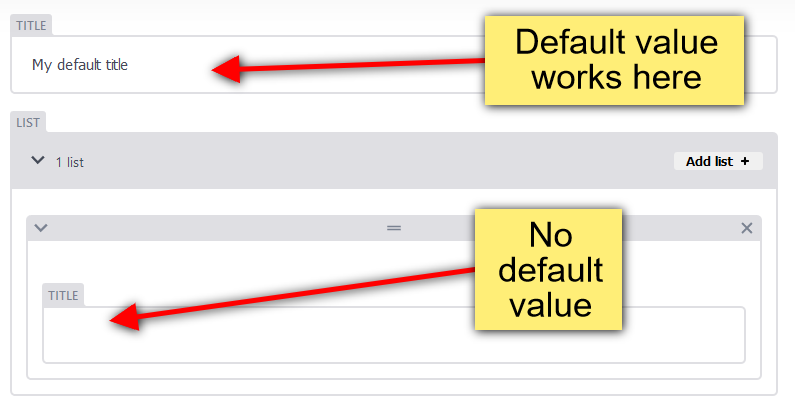
Applicable Versions:
- Netlify CMS version: 2.0.9
- Git provider: GitHub
- OS: Windows 10
- Browser version: Firefox 62.0b19, Chrome 68
CMS configuration
backend:
  name: git-gateway
  branch: master

media_folder: "public/uploads"
public_folder: "/uploads"

collections:
  - label: "Test"
    name: "test"
    folder: "content/test"
    create: "true"
    fields:
      - {label: "Title", name: "title", widget: "string", default: "My default title"}
      - label: "List"
        name: "list"
        widget: "list"
        fields:
          - {label: "Title", name: "Title", widget: "string", default: "My default title"}
Additional context
I've tested with boolean and string widgets, but I believe it applies to every type.
 Herohtar
All 9 comments
This might also relate to #1649. We expect all field values to also work even when the field is in a list, object, etc.
 MitchellCash
on 23 Aug 2018
MitchellCash
on 23 Aug 2018
Wow I did not know this was the case, thanks for reporting.
 erquhart
on 27 Aug 2018
erquhart
on 27 Aug 2018
We seem to be having the same issue with image widgets inside an object that is inside a list.
- label: "/resources/"
  name: "resources"
  file: "frontend/src/content/pages/resources.yml"
  fields:
    - label: "Resources Data"
      name: "resourcesData"
      widget: "list"
      fields:
        - label: "Images"
          name: "images"
          widget: "object"
          fields:
            - label: "Featured Logo"
              name: "feat_logo"
              widget: "image"
              default: "https://via.placeholder.com/480x320"
              required: false

Netlify-cms version: 2.9.0
 vai0
on 30 May 2019
vai0
on 30 May 2019
@vai0 default values only work for folder collections and show up while trying to create a new entry.
 barthc
on 30 May 2019
barthc
on 30 May 2019
@barthc Any specific reason it's only been implemented for folder collections? Find it quite a valuable feature for any collection and widget types.
 jonaseltes
on 1 Jun 2019
jonaseltes
on 1 Jun 2019
Default values only apply when you're creating a new entry through the CMS. File type collection entries can't be created through the CMS, by virtue of what they are - pointers to individual existing files.
Sent with GitHawk
erquhart
on 1 Jun 2019
@erquhart I was assuming it would apply for list children at least? The same way it's exemplified in the Docs over at https://www.netlifycms.org/docs/widgets/#list ? Probably I'm clearly misunderstanding something...
jonaseltes
on 1 Jun 2019
I can also confirm this issue, but specifically when adding new list items. See https://github.com/netlify/netlify-cms/issues/2291#issuecomment-497983785
 madikarizma
on 2 Jun 2019
madikarizma
on 2 Jun 2019
Ah, I see. It may be that we're not attempting to populate default values for new list items in any context - can you open a new issue for this? This issue is about defaults not working for lists at all (eg. initial items blank on new entry creation), which was fixed, and #2291 was not about list items.
erquhart
on 3 Jun 2019
Related issues
 Narno
·
3Comments
Narno
·
3Comments
 BerkeleyTrue
·
3Comments
BerkeleyTrue
·
3Comments
 emckay
·
3Comments
emckay
·
3Comments
 marcojakob
·
3Comments
marcojakob
·
3Comments
 papandreou
·
3Comments
papandreou
·
3Comments
Most helpful comment
@vai0 default values only work for
foldercollections and show up while trying to create a new entry.