Netlify-cms: Add more descriptive repo "Not Found" error.
- Do you want to request a feature or report a bug?
bug?
- What is the current behavior?
If backend.repo is set to a non-existent repo, a very unclear error message will be shown on login: "Not Found".
- If the current behavior is a bug, please provide the steps to reproduce.
- Set the
backend.repoin your config to a non-existent repo. - Try to login.
- What is the expected behavior?
A clearer error message, maybe "Repo Not Found".
- Please mention your node.js, and operating system version.
 tech4him1
All 10 comments
The reason this error is so unclear is because we are not actually checking if the repo exists or not, just trying to use it. That means the first time a missing repo error will show up is during authentication -- in the GitHub backend it shows up in hasWriteAccess: src/backends/github/API.js#L27. This should probably be entirely changed to actually check if a repo exists before we try to use it.
tech4him1
on 22 Aug 2017
Note: GitHub's API sends a 404 instead of a 401 for auth errors as a security measure.
 erquhart
on 9 Sep 2017
erquhart
on 9 Sep 2017
Would wrapping the error in another more specific error like
Netlify CMS could not find the repo {reponame}. This could mean the current user does not have permission to access the repo, or the reponame is incorrect. Please verify you are properly authenticated with Github, and verify the reponame in your config.yml
be an acceptable solution?
 dopry
on 11 Sep 2017
dopry
on 11 Sep 2017
@erquhart also suggested:
"Repo not found. If the repo is under a GitHub organization, make sure permission has been granted."
tech4him1
on 11 Sep 2017
so maybe something like
Repo Not Found. 1) Verify the repo and branch in your config.yml. 2) Verify that you're logged into Github with the proper user. 3) If the repo belongs to a Github organization, ensure the Organization has granted access to the application.
dopry
on 11 Sep 2017
Or maybe we should just link to a seperate doc. @erquhart Do you have any preference?
tech4him1
on 11 Sep 2017
I like the combination of more robust verbiage and moving said verbiage into the docs. We should probably start handling query string based error docs at some point for errors where a lot of troubleshooting may be required and text snippet won't cut it.
For now, let's just put @dopry's verbiage in the UI for this error.
erquhart
on 8 Dec 2017
@erquhart verifying that a repo exists should be pretty easy to integrate into the config examiner I've been working on on the side, particularly now that I've begun an async rewrite. I've dropped all dependencies except Lodash from the core examiner code, so it should be doable to use it both as a command line tool and have it integrated into the CMS itself.
 Benaiah
on 11 Dec 2017
Benaiah
on 11 Dec 2017
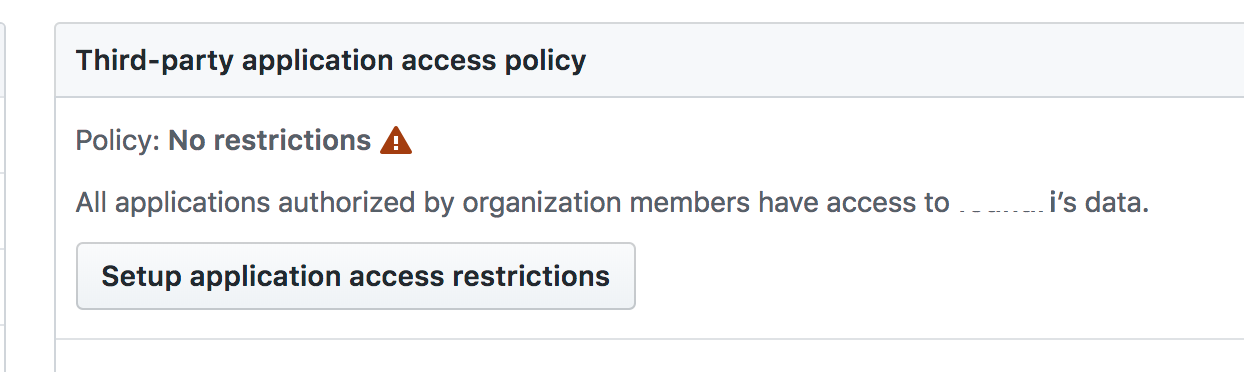
Another sufferer of the "Not Found" alert only to discover that my private repo within my Organization needed to have the default policy under "Third-party access" changed to "No restrictions". This might be obvious to others, but not me.
 bradledford
on 3 Oct 2018
bradledford
on 3 Oct 2018
Fix in #1831.
erquhart
on 24 Oct 2018
Related issues
 calavera
·
3Comments
calavera
·
3Comments
 TomPichaud
·
3Comments
TomPichaud
·
3Comments
 jake-101
·
3Comments
jake-101
·
3Comments
 chriskirknielsen
·
3Comments
chriskirknielsen
·
3Comments
 noelmace
·
3Comments
noelmace
·
3Comments
Most helpful comment
Another sufferer of the "Not Found" alert only to discover that my private repo within my Organization needed to have the default policy under "Third-party access" changed to "No restrictions". This might be obvious to others, but not me.
