Netlify-cms: content in subfolders…
it is not very obvious and maybe impossible, ist there a way to have collections with subdirectories?
currently I have a folder called products and in there several product folders with their index.md respectivly.
the title of the folder corresponds with the title in each index.md
├── products
│   ├── orange
│   │   └── index.md
│   ├── quitte
│   │   └── index.md
│   └── zwetschge
│       └── index.md
netlify-cms does not parse the subfolder and/or does not list any content.
the collection is configured using this folder: "src/pages/products/
is that even possible?
 kevinfoerster
All 75 comments
Netlify CMS doesn't currently support sub-folders. I think there has been some discussion around this though, and I'm sure it would be a welcome improvement.
If you want this final folder structure, I might suggest using metalsmith or gulp to create such a structure from a structure netlify-cms will work with. I'm currently using metalsmith, and here's what I get.
Starting Files:
├── posts
├── page1.md
├── page2.md
├── page3.md
├── page4.md
Finished Files:
├── posts
├── page1
│ └── index.html
├── page2
│ └── index.html
├── page3
│ └── index.html
├── page4
│ └── index.html
 tortilaman
on 5 Aug 2017
tortilaman
on 5 Aug 2017
ok…
kevinfoerster
on 6 Aug 2017
@kevinfoerster you can use a "file" type collection, and use the full path to each file. Here's an example: https://github.com/netlify/netlify-cms/blob/master/example/config.yml
Having to repeat the config for each file is not ideal, so @tortilaman's approach is ideal.
 erquhart
on 6 Aug 2017
erquhart
on 6 Aug 2017
Finding a way to support this is worthwhile, reopening.
erquhart
on 17 Aug 2017
Just to say from personal experience, indeed having a step which flattens the files works well at this stage.
While trying to figure this question myself, I also found this test which has folder_based_collection in the config. Maybe at some stage it was already an idea, but it's not implemented.
As I don't know how exactly the paths are parsed, just throwing ideas, maybe support for a regex or glob patterns in the existing configuration property could be an option.
 kalinchernev
on 17 Aug 2017
kalinchernev
on 17 Aug 2017
I'm wondering if we can resolve this with more advanced slug handling, maybe as a part of #445.
The idea would be to allow the "slug" property to optionally be a path, which would be appended to the folder collection's base path. So to serve @kevinfoerster's example, it could look like:
name: products
folder: products
slug: /{{slug}}/index.md
...
Thoughts?
cc/ @marksantoso
erquhart
on 7 Sep 2017
Hi @erquhart this would result in a collection with many items. Providing not much structure for the user.
E.g. Say you have a collection for 'pages', if you were to use the slug to manage subpages of pages you would end up with 1 collection with multiple pages, but no easy way to distinguish where they sit in the page hierarchy. subpages would sit in the same interface as their parent pages.
This would also mean all items in this pages collection would hold the same fields, not ideal if various pages need different fields.
Possibly another config type is required: Collections with subcollections?
 marksantoso
on 7 Sep 2017
marksantoso
on 7 Sep 2017
@marksantoso this is specifically for repeatable content - items that have the same general format and share the same field structure, e.g. blog posts. For distinct pages as you're describing, you'd still want to specify individual files.
erquhart
on 22 Sep 2017
Hi, trying out Netlify-cms for the first time and having the same issue. My build script (using Assmble.js 0.24.3) uses a source directory where all my content is organized hierarchically. This hierarchy determines the paths of the generated html files, and the navigation (with drop-downs, sidebars, etc.)
Prose.io seems to handle this quite well, showing a collection's files and directories and allowing the user to define the path right in the interface. I'm wondering what's preventing Netlify-cms from doing the same?
Having one flat directory for all my pages is a nonstarter. I'd love to have all the additional features this CMS provides (workflows, previews and most importantly authentication) but my whole way of building websites depends on using subfolders.
 criticalmash
on 27 Nov 2017
criticalmash
on 27 Nov 2017
@criticalmash Have you thought about making each folder it's own collection?
 tech4him1
on 27 Nov 2017
tech4him1
on 27 Nov 2017
@tech4him1 That might work! Thanks. It would mean creating a new collection every time the client wants a new directory. But in that case, I'd need to adjust the main nav anyway.
criticalmash
on 27 Nov 2017
Hey all, I was wondering if this also included images stored in sub-folders of your media_folder?
 ChrisChinchilla
on 2 Jan 2018
ChrisChinchilla
on 2 Jan 2018
I answered this in Gitter, but for posterity, assets need to be stored directly within the media folder. We do intend to allow multiple asset collections in the future.
erquhart
on 3 Jan 2018
Hi @erquhart, excellent work on Netlify CMS (and the entire Netlify team, as well) -
I can open a quick issue, but I think this is actually the same issue as @kevinfoerster.
We store our blog posts (and authors) in nested folders, like
src/
  posts/
    2017/
    2018/
    ...
and then inside of each folder, we use the slug title as a folder. We do this so we can easily add other data (images mostly, for now!) while keeping the underlying file structure pretty clean and organized. This leaves us a folder structure like:
2018/
  migrating-from-wordpress-to-markdown/
    index.md
As best as I can tell, I can not create this structure _currently_ with netlify-cms. I believe this is primarily because the folder attribute does not currently support templating like the slug attribute. For example, I tried the following, but the resulting folder structure is literally the path without the curly braces replaced.
collections:
  - name: blog
    label: Blog
    folder: "src/posts/{{year}}/{{slug}}"
    create: true
    extension: markdown
    format: frontmatter
    fields:
      - { name: author, label: author }
      - { name: category, label: category, widget: "select", options: ["JVM", "JavaScript", "Devops", "Company"] }
      - { name: date, label: Date, widget: date }
      - { name: title, label: title }
      - { name: "body", label: "Blog post content", widget: "markdown"}
Is this a feature that you think is worthwhile? If so, I'd love to chip in and help get this built out, but I'm not _quite_ sure where to start. Been perusing this repo in an attempt to start to get up to speed.
Any advice on that would be hugely appreciated!
Thanks for your time.
 DSchau
on 16 Jan 2018
DSchau
on 16 Jan 2018
@DSchau yep, that's a great point. Also, @marksantoso, I now see I misread what you meant.
Sounds like folder collections should be able to accept a collections field themselves. This is even more workable when you consider that YAML supports repeating nodes, so you can have reusable chunks of configuration when a site has a complex hierarchy of pages that are structurally similar.
That's the direction that makes the most sense at the moment. I'd love feedback from both of you in light of your own use cases.
cc/ @tech4him1 @Benaiah @talves @biilmann - especially interested in reasons not to go this route.
Note that I'd expect this to mostly affect the configuration and UI surfaces, the underlying collections model would remain flat.
erquhart
on 20 Jan 2018
I see two separate feature requests here (that I think should be split out into separate issues):
- Nesting collections in the UI.
- @marksantoso: https://github.com/netlify/netlify-cms/issues/513#issuecomment-327706475
- @erquhart: https://github.com/netlify/netlify-cms/issues/513#issuecomment-359151675
- Keeping each entry in a
/entry-slug/index.mdformat, instead of/entry-slug.md:
- @kevinfoerster: https://github.com/netlify/netlify-cms/issues/513#issue-248208990
- @erquhart: https://github.com/netlify/netlify-cms/issues/513#issuecomment-327696866
- @DSchau: https://github.com/netlify/netlify-cms/issues/513#issuecomment-358110045
tech4him1
on 20 Jan 2018
@tech4him1 agreed, we should split off "nesting collections in the UI". #1156 is in that vein, maybe we could expand that to cover the full nested collections concern.
Possible short term solution
Working on a solution for single level nested directories, it's shaping up like this:
folder: my/folder
slug: {{slug}}/whatever
Which would output something like my/folder/post-title/whatever.md.
folderworks as it currently doesslugcan now have a slash separating directory from file- more than one directory in slug, e.g.
{{slug}}/extra/index, will error out - leading and trailing slashes are ignored
- all current placeholders work throughout
slug, so you can do:
slug: {{slug}}/{{year}}-{{month}}-{{day}}-{{slug}}
Proposed long term solution
I'd like to see us simplify this whole thing down to a single path property, which accepts placeholders throughout:
# The most explicit approach would be defining a full path:
path: my/folder/{{slug}}/index.md

# But you can keep it simple and we'll give you a derived slug and default
# extension/format (markdown):
path: my/folder

# Types are inferred for recognized extensions
path: data/stuff.yaml

# One additional field, `format`, is accepted for unrecognized extensions or
# formats that don't match the extension:
path: data/stuff.myext
format: json

# Now you can do whatever you want:
path: nested/dir/{{slug}}/index.pt.md
Thoughts? Especially looking for reasons why these solutions might not work.
erquhart
on 4 Apr 2018
@erquhart As a technical description of how the path property would work, so it's easier to see any problems. Let me know if it doesn't match what you are thinking.
- Sanitize and replace all placeholders
nested/dir/{{slug}}/index.pt.md-->nested/dir/entry-title/index.pt.md
- Split into folder and filename at last slash.
nested/dir/entry-title/index.pt.md--> [nested/dir/entry-title,index.pt.md]
- Split filename into extension to infer format.
- This is the part I'm not sure about.
- What if you actually did want a file without an extension? We can't always assume that without an extension on the end, it's actually a folder name, not a file name (e.g.
my/{{slug}}). - What do we do in the case of multiple extensions (e.g
index.pt.md)? Do we just check the last extension and try to infer from that? Right now, with the explicitextensionproperty we force the user to set the format manually, but I think we can just infer from the last extension. @Benaiah?
- Use extension to filter directory.
- This is where we can't just use the last extension. If I have a directory of
en.mdandcr.mdfiles, I may only want one set to show up at a time.
- This is where we can't just use the last extension. If I have a directory of
tech4him1
on 10 Apr 2018
@erquhart Also, on the "simple" solution, what do you think about allowing placeholders in the folder property, instead of allowing the slug to contain a directory? I'm not saying it's necessarily better, just something to consider. As noted in #1254, all characters in the slug field are currently being sanitized, so this does change the behavior, albeit in a way most people wouldn't have a problem with. On the other hand, we are inserting placeholders directly in the folder setting, which some people may actually be using.
tech4him1
on 10 Apr 2018
That's possible too. The more I think about it the more it feels like we should just go straight for the path key solution toward v2.
erquhart
on 18 Apr 2018
I use year subfolders like @DSchau does.
 raniesantos
on 22 Apr 2018
raniesantos
on 22 Apr 2018
I like the path solution.
I also feel the need to mention cases for which I use this kind of content structure: localization and translations. Hugo allows this and works perfectly with this kind of structure from the box: https://gohugo.io/content-management/multilingual/#translate-your-content
It even supports cloning other files for each translation, so if you'd have
├── 2018-04-26-my-awesome-post
    ├── index.en.md
    ├── index.ru.md
    ├── my-image.png
it would handle this and would create both variants each having my-image.png available in its relative folder. So if there is a chance to allow saving files in the same content folder, it would be awesome (but that totally could be postponed to the future).
 kizu
on 26 Apr 2018
kizu
on 26 Apr 2018
@kizu this is definitely tied to i18n, so thanks for describing Hugo's requirements here. I'm not certain if we have an issue for saving images directly alongside entries in a nested structure like this, might be worth opening an issue for that specifically.
erquhart
on 26 Apr 2018
A single path with editable replacements would be great. Currently this CMS is unusable with many Gatsby starters that rely on date and/or slug in subfolder name.
Similarly, @kizu's relative image suggestion applies to multiple Gatsby starters.
 Destroy666x
on 27 Apr 2018
Destroy666x
on 27 Apr 2018
Hi everyone !
Cheers for the great work going on on Netlify CMS !
I've read this whole thread 3 times to try to understand what could prevent you to let the site admin freely organize all its content inside nested folders.. That's a really basic need !
And then i think that i've found what's the current problem is : that's because all the site's configuration now is static and reside inside this config.yaml file, and the way collections are currently defined as file or folder collections... with all the limitations this implies..
Well : that's the bummer ! It really prevents any site admin to create new content without the help of the clever developper that told him to use Netlify CMS because.. you know.. JAMStack, etc.. ;) !
So : just forget about these file or folder types for the collections !
(or, let's just say that these informations can at best provide default values), but the best thing is to forget them in v2.0 :
the config.yaml static file should just contain the _definitions of every available collections_ with their fieldsets and workflow rules...
Then, it's on the site admin to freely organize its content : the interface should provide a folders panel where the content tree is dispatched, and it should allow him to _create new folders_ and _add new content_ inside. When the admin wants to create a new blog entry inside a folder, the interface just ask first for the collection type of this entry, and then displays the appropriate dynamic form for the required fields..
Where do i got theses ideas ? Well.. everyone should really have a look at Statamic, a flat file CMS (YAML+Markdown) that has been around for quite a long time already. I _really_ believe it's the _best flat file CMS_ around there. So, read the doc, play with it : they have figured all these things around _pages_ and _collections_ a long time ago ! And it should help to establish a clear roadmap for Netlify CMS v2.0 features !! 😃
 zipang
on 7 Jun 2018
zipang
on 7 Jun 2018
Agreed, same principal as your comment in #1342, a modular approach to collection and field configuration makes a lot of sense.
erquhart
on 11 Jun 2018
@erquhart If you get a chance to reply to my questions here: https://github.com/netlify/netlify-cms/issues/513#issuecomment-380140096, that would be great!
tech4him1
on 12 Jun 2018
Hi @tech4him1 !
My recommandation is an alternative to the _path_ solution :
It states that :
_We should not store inside the collection definition any information regarding to where the content is supposed to be located_. Because any attempt in this direction would be a limitation, and could prevent a site admin (who should not have access to this static site configuration) to create a new folder to store a new product line or a new serie of posts.
Instead, i suggest that when adding a new page inside a tree structure, the widget ask to the content creator to which collection does this content belongs to. Then, this information is stored inside the yaml front matter in a _configurable_ way :
collections:
  - name: posts
    label: Blog entry
    fields: (...)
    collection_fieldname: 'template' # add {template: 'posts'} to every new item of the collection
This way, the information found in the front matter template: 'posts' (could be easily changed to : collection: 'posts' or _layout: 'posts') can be used by any static site generator to use the relevant template for the page, and can also be used to display the relevant fieldset.
If no collection_fieldname is passed, we should use 'collection' as the default field name.
What do you think of this proposition ?
Best regards and congrats for the great work anyway ! 😄
zipang
on 12 Jun 2018
@zipang Templates are a valid alternative, and definitely work well for some CMS' (such as Forestry and Statamic). We may need to go with a path solution for now, however, and add support for templates later, since file/folder collections are a basic part of how this CMS works so far. I think in the future implementing your solution (at least as an option) would make the CMS more flexible.
tech4him1
on 12 Jun 2018
I mentioned this in another issue, but the problem with what @zipang is suggesting is that we don't have examples of static site generators that work this way, and Netlify CMS is mostly focused on content management for static site generators.
@tech4him1 I totally missed your comment from April somehow, really sorry about that! I'm thinking:
- Maybe we still allow
extensionfor odd use cases (no extension may be the only one) - We still need
formatas an optional override - For filtering, we would use the full path. For example:
posts/{{slug}}/path/{{date}}/index.{{lang}}.md
With this path, we would:
- get all directories that are children of
posts - get all directories named
pathwithin those directories - get all directories that are children of the
pathdirectories - return files within those directories that would pass a regexp
^index\..+\.md
We don't actually need to use regex at all, just some method of filtering based on the filename template. Point being, the raw path itself serves as filter criteria. What do you think?
erquhart
on 12 Jun 2018
@erquhart No problem, thanks for addressing!
- Maybe we still allow
extensionfor odd use cases (no extension may be the only one)
I do wish there was a better way, but I think that may be our only safe option (unless we do something like requiring a slash at the end if it is a folder, which I don't like).
- We still need
formatas an optional override
Agreed, I think inferring from extension can be a separate subject.
- For filtering, we would use the full path. For example:
.......
We don't actually need to use regex at all, just some method of filtering based on the filename template. Point being, the raw path itself serves as filter criteria. What do you think?
I like this idea, but I think we need some way to override for more complex situations. I think that could be added by just expanding on the filter value to implement my suggestion in https://github.com/netlify/netlify-cms/issues/1245. We'd use what you described above as the default. Thoughts?
tech4him1
on 13 Jun 2018
Hi @erquhart !
I've seen you said in #1156
@zipang : this issue isn't about helping static site generators figure out which template to use, it's about the structure of the output. Netlify CMS is built to work with static site generators, and SSG's generally determine output placement based on the location of source files.
I more than agree with the fact that the content structure (folders and sub-folders) generally determine the pages URLs with a direct folder to URL mapping ! That just makes plain sense !
But i really wasn't talking about that.
What i was trying to demonstrate is that content belonging to a specific collection of data (aka : same fieldset + workflow) doesn't necessarily belong to specific locations in the content hierarchy !
In fact, it's pretty common to have use cases where content inside the same node of the hierarchy must be of mixed types, and can be created by different users (editorial workflow to attach to a collection).
Let's take as an example the news feed of a media company.
There will be various types of content created by different redactors, from different sources.
Examples of these contents can be : news, fact checking, event (like a concert or online event), job posting, media sharing (just for fun).
All these types of content have different fieldsets and _dedicated SEO microformats_ that requires the use of a very different template for each of them. And they are published and reviewed by different editors !
So, defining different collections for them is very relevant as they have different fieldset, different templates, and different editors..
But, they should be created and rendered in the same folder (or mounting point), ie : the news-feed/ path !
So... what we need is a way to let content creators freely create content inside their hierarchy as it makes sense for them.. (aka : a 'add news..', 'add fact checking..' button available on every node of the content tree for the users that are permitted to create this type of content).
Surely, what we can agree with is that _we could allow_ a way to specify that certain nodes in the hierarchy should only contain certain types of content (collection).
Like, news-feed/ should only contain news, fact checking, event, job posting, media sharing, but no product item. While the sub folders under products/ should only contain entries belonging to the product and line-of-product collections.
But, it's not even a requirement right now to move forward on this subject..
As i pointed already toward the Statamic documentation on these same concepts, here is what they have to say :
Collections can be anything. Blog posts, news articles, knock knock jokes, you name it. Other content management systems might call them “channels”, “structures”, or “post types”.
You can create as many collections as you’d like, each with its own default group of custom fields (called a “Fieldset”).
By their very nature, collections don’t determine their own full URLs. _To do so would limit their flexibility_. Instead, you can “mount” a collection onto any page (or pages) and then write a route to determine their URL structure. This opens many, many, many possibilities. That’s three (3) manys, in case you were counting.
Note : Statamic CMS generates flat files (Markdown+YAML) inside a content folder that can have as many sub folders as needed, and i have no problems to parse this hierarchy with my static site generator (Metalsmith).
Because the information regarding to which collection belongs a piece of content (a markdown file) is directly found inside the YAML front matter and not inside an external configuration (like your path that i would have some difficulties to understand anyway).
And this way it works pretty well..
zipang
on 13 Jun 2018
@tech4him1 clarifications:
- Extensions: just realizing files with no extension isn't a problem because
pathcan never just be a folder name, it has to be a complete path, including the filename (which may or may not be formed using variables) - Formats: I think we _should_ infer, just allow overrides via
format. - Filter: It might be good to drop filter and use include/exclude instead. I think the cases where they'll be needed will be rare, so the enhanced and more explicit control would be nice in those cases.
@zipang trying to boil down your thoughts for clarity. It sounds to me like collections _should_ be tied to a path (it works similarly to Statamic's concept of routing), but a collection should also be allowed to contain more than one "fieldset" or "content type". This arrangement would be helped by allowing fieldsets to be defined separately from collections.
Sound about right?
erquhart
on 13 Jun 2018
@erquhart
Extensions: just realizing files with no extension isn't a problem because
pathcan never just be a folder name, it has to be a complete path, including the filename (which may or may not be formed using variables)
I think that is probably the best way to do it, it just wasn't what you said in your original comment:
# But you can keep it simple and we'll give you a derived slug and default
# extension/format (markdown):
path: my/folder
Filter: It might be good to drop filter and use include/exclude instead. I think the cases where they'll be needed will be rare, so the enhanced and more explicit control would be nice in those cases.
Would you mind outlining that, maybe in https://github.com/netlify/netlify-cms/issues/1245?
tech4him1
on 14 Jun 2018
Totally forgot about that idea from before, you're right. It's tough, the simplicity of "just doing it" for people and only requiring a folder is nice, but doing so has also been a bit of a headache. We could continue supporting the current properties and just add path as the "advanced" option when more control is needed. But then that's more to support in our config API.
What do you think?
Regarding filtering, I missed that it's based on fields rather than filenames - maybe we leave that as is and satisfy #1245 with include/exclude separately.
erquhart
on 14 Jun 2018
In my opinion, explicit is often better unless otherwise proven. I don't think it is that hard to add {{slug}}.md to the end of every path, and then people actually know what to expect. We don't have to worry about breaking things if the filename is explicit.
tech4him1
on 15 Jun 2018
I don't see non-technical people filling a plain path field. It's easy to read but it's a minefield of typos and mistakes if it has to be written down manually.
The relationship widget looks like a good way to organise the content although it would benefit to have a "tree" view. Which again, would have a size limitation (if you have some dozen of contents).
For example, I could picture this — considering the parent is the name of a relationship field.
path: posts/{{ parent.slug }}/{{ slug }}.md
Otherwise, if the storage has to be flat, I can picture a hidden permalink being generated according to a similar pattern:
fields:
  - name: permalink
    type: hidden
    value: "{{ parent.slug }}/{{ slug }}/"
I 👍 on @kizu message related to translation. Which makes me think of this:
path: posts/{{ parent.slug }}/{{ slug }}.{{ lang }}.md
fields:
  - name: permalink
    type: hidden
    value: "{{ lang }}/{{ parent.slug }}/{{ slug }}/"
 oncletom
on 27 Jun 2018
oncletom
on 27 Jun 2018
Thanks for the feedback @oncletom!
I don't see non-technical people filling a plain path field
The field itself would only exist in the config. The slug will eventually be editable, but that's the only interaction an editor would have, the path is otherwise unknown to them.
Regarding the parent.slug concept, I think you're right about using relations to organize content, which makes "parents" seem superfluous. I can't think of a use case that really needs this, can you? I've checked a number of major e-commerce and news sites, for example, and they're all doable with the path concept (if it has access to the entry's fields) and relations. E.g. Walmart, Amazon, White House, The Guardian, they're all relatively flat, never deeply nested, and the nesting I do see is well represented via linked categories.
erquhart
on 28 Jun 2018
The field itself would only exist in the config. The slug will eventually be editable, but that's the only interaction an editor would have, the path is otherwise unknown to them.
Oh my bad. I misread the previous comments and thought it was intended to be user-facing. Forget what I wrote then 😅
I can't think of a use case that really needs this, can you?
I'm not sure to understand which use case you are refering to, the "parents" or relations + variable expansion ({{ <relationship_field>.<collection_field> }}, eg. {{ parent.slug }})?
oncletom
on 28 Jun 2018
So maybe we're talking about the same thing, parent hints at the CMS having insight into hierarchy, but if you really just mean the relationship field which _happens_ to be the parent, agreed. This just means the entry fields (and relation data) need to be available to path templates.
erquhart
on 28 Jun 2018
This just means the entry fields (and relation data) need to be available to path templates.
Yes exactly :-)
It's more generic than the sole concept of parent. You could then totally have a permalink composed with an author.slug if author is a relation.
The static generator then organises the files independently from the CMS thinking model.
oncletom
on 28 Jun 2018
As has been mentioned by various people above, I've openend an issue for Assets Relative to Content.
 marcojakob
on 29 Jun 2018
marcojakob
on 29 Jun 2018
Will this configuration work to show content in sub-directory?
collections:
  - name: "posts"
    label: "Posts"
    folder: "_posts/**"
 mittalyashu
on 3 Aug 2018
mittalyashu
on 3 Aug 2018
I agree fully with the need to be able to set Path dynamically based on a range of variable, and still have well-defined structure. For my own site where I'm the only author, I'm fine with just managing the /docs/ directory structure on my own, but even here I need to be able to define separate categories that maintain their own folders with identical structure. In the future, I would want each of my contributors to have their own root document folder with the same nested "Categories" structure. This way, individuals can migrate easily by simply cloning/dumping their own folder, or even have /docs/users maintain git submodules. Whatever.
To do either of these, I would need a way to inject more template tags than {{slug}} currently provides:
- string value from a Select Widget where an admin can define categories
- user attributes like User ID, Name, Homedir, etc., from Git Gateway
collections:
- label: 'Blog'
name: 'index.md'
folder: '{{user}}/{{name: 'category', widget: 'select', options: ['news', 'research', 'events']}}/posts/{{year}}/{{month}}/{{title}}'
create: true
fields:
...
 foxxxyben
on 11 Aug 2018
foxxxyben
on 11 Aug 2018
As mentioned in this comment https://github.com/netlify/netlify-cms/issues/513#issuecomment-359189140, about Nested collections in the UI.
I have few insight how it should work.
For example, if we have this folder structure in our repository, in our config.yml file we can create a collection for parent folder A and then write sub-directory: true to read the folders inside the parent directory A.
|-- A
      |-- AA
      |-- AB
           |-- ABA
|-- B
|-- C
And by clicking the directory or sub-directory only the content of that directory should show up.
mittalyashu
on 20 Aug 2018
Probably most SMB sites are small enough that you just have a handful of pages that don't fit in a flat collection like a blog or products. In the short-term, you don't need nesting in the UI, you just need a way to control the slug like you can when editing files in GitHub--you just put slashes in the filename and it creates the folder hierarchy as necessary:

Then for Netlify CMS to _find_ all the content for that collection, you'd allow file globs like mittalyashu suggested.
Simple, right? 😄What am I missing?
 jgarber
on 7 Sep 2018
jgarber
on 7 Sep 2018
 tomrutgers
on 7 Sep 2018
tomrutgers
on 7 Sep 2018
As discussed in the netlifyCMS community meeting.
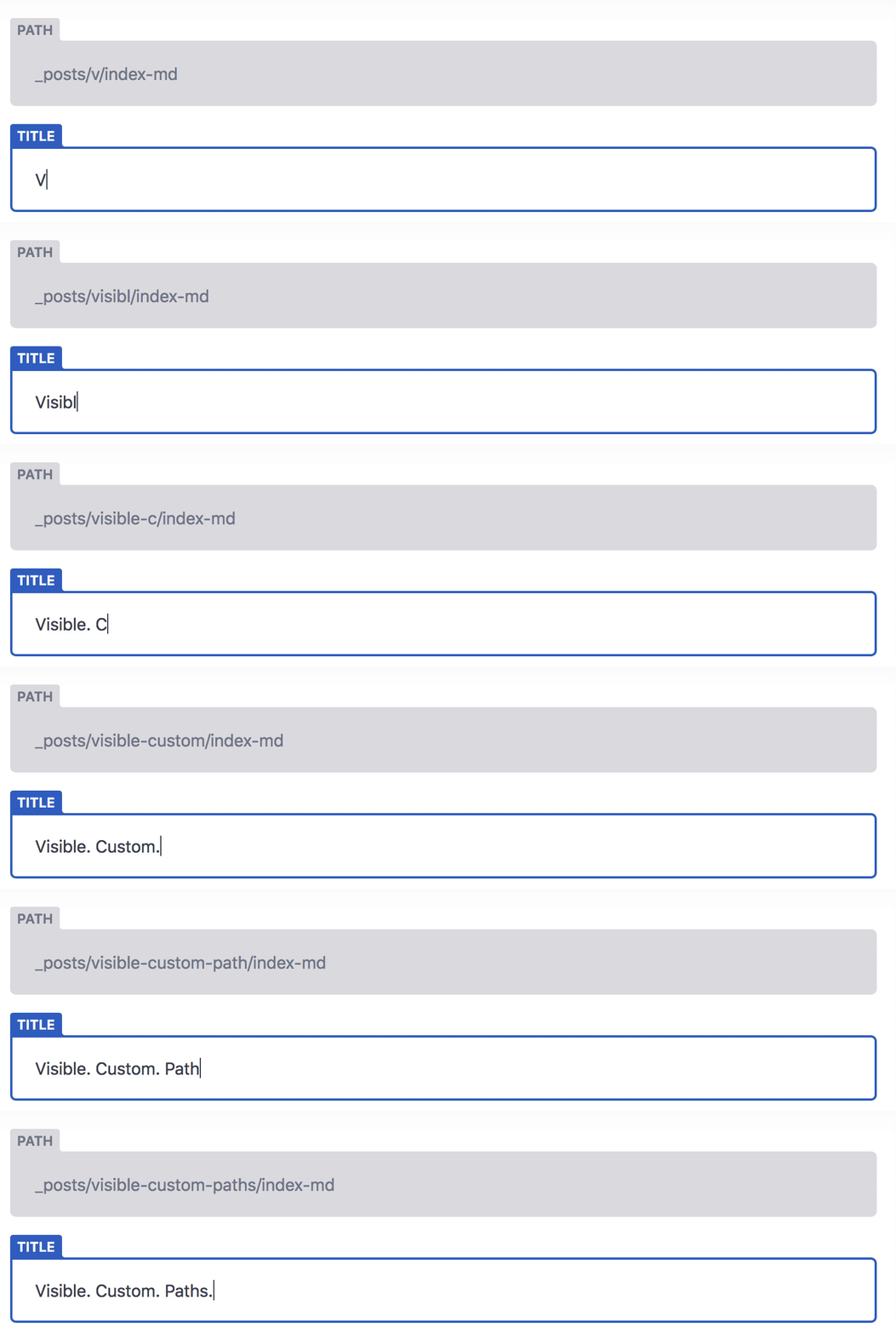
In the above image we are seeing that we are in the post directory and setting the title as visible-custom-paths and the file index.md will be added to the visible-custom-paths directory.
As NetlifyCMS is not able to read the content inside subdirectory, then how it will be able to read the file.
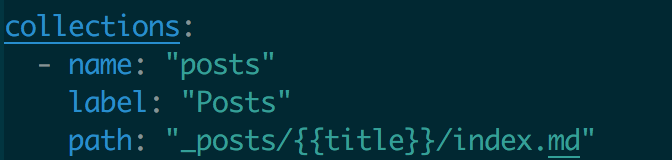
If we use paths to set the path to show the list of all the items inside the directory or subdirectory and when all the items are shown it will be total mess to see all the items mixed up.
mittalyashu
on 12 Sep 2018
Has this come to any resolution? I just discovered this same problem. Oftentimes rather than worrying with the edge-cases a simple solution will meet the needs of the majority. If a consensus around /{{slug}}/index.md makes sense it would be great to see that shipped and then improved upon in future iterations.
 dbhurley
on 11 Oct 2018
dbhurley
on 11 Oct 2018
/{{slug}}/index.md is good, for at least it will be OK for pico CMS.
 archcra
on 14 Oct 2018
archcra
on 14 Oct 2018
I'm leaning toward this as well from a speed of implementation standpoint. I'm not personally working on it atm, but anyone is welcome to take a shot.
erquhart
on 26 Oct 2018
We have a deep nested structure of documentation articles, e.g.
- v3
- Performance
- Article 1
- Article 2
- Security
- Article 3
- Performance
- v3
- Article 4
I've read the above thread, but it looks like getting this working in Netlify CMS might be tricky? The folders are added to all the time so it would need to be dynamic. Any thoughts?
 clarkd
on 6 Dec 2018
clarkd
on 6 Dec 2018
@erquhart If no one is working on this issue right now, maybe remove the claimed label.
mittalyashu
on 6 Dec 2018
@mittalyashu good point, done 👍
erquhart
on 11 Dec 2018
Hello,
I'm trying to set up a blog using the "Gatsby Starter Blog" template (https://github.com/gatsbyjs/gatsby-starter-blog/blob/master/gatsby-config.js) and publish posts through the netlify cms. the problem is that the template creates a folder with the post's name and in it is an index.md file, while netlifycsm uses the config.yml in which a static folder is created. What would be needed in the config.yml is something like this:
folder: "/src/pages/{{title of the post}}" # The path to the folder where the documents are stored
(in which the {title of the post} will become a folder. Is there a way to do this?
Thank you
 Nei-V
on 12 Jan 2019
Nei-V
on 12 Jan 2019
I have a use-case a lot like what @clarkd mentioned above.
A Documentation folder with an existing hierarchy and posts that can be edited and added at any place in that hierarchy.
 pavsaund
on 25 Mar 2019
pavsaund
on 25 Mar 2019
Is there any progress on an implementation for any of the above? We have a nested structured knowledgebase that needs something like path as described above, and I can't do it at present.
 designermonkey
on 29 Apr 2019
designermonkey
on 29 Apr 2019
Not yet, but it's definitely at the top of the list alongside related issue #1472.
erquhart
on 9 May 2019
I am also seeking this feature for a Wordpress blog I'm migrating to NetlifyCMS.
 denisnazarov
on 24 Oct 2019
denisnazarov
on 24 Oct 2019
@erquhart , this feature ({{slug}}/whatever) along with images relative to content would work really well with Gridsome too: storing collections in separate, self-contained subdirectories is a really nice way to organize a site with large collections. I could help with implementation if you point me in the right direction.
Thanks,
Ricardo
 jimmyangel
on 26 Oct 2019
jimmyangel
on 26 Oct 2019
Not intending to pile on. Google brought me here, and I thought it might be worth dropping in: I was very excited to fire up Netlify CMS, and then saw most of my posts missing. I prefer to use a structure like blog/{post-slug}/index.md (a Hugo site) and I always store post-specific assets alongside the post, in its folder.
I definitely understand how that makes media management and configuration a potential nightmare, but I'd looooooove the ability to do this.
I'll definitely have a look around and see if I have time to try to contribute something, if that's a welcome feature for Netlify CMS.
 tcg
on 29 Oct 2019
tcg
on 29 Oct 2019
Loud and clear. This is literally up next, hold tight.
Sent with GitHawk
erquhart
on 29 Oct 2019
I'm confused.. what's the status of this issue??
Is it currently possible or not to have .md files organized in sub-folders?
Atm I can only see .md files in my root folder..
 theBliz
on 11 Nov 2019
theBliz
on 11 Nov 2019
This is literally up next, hold tight.
@theBliz that's the status ☝️
 hacknug
on 12 Nov 2019
hacknug
on 12 Nov 2019
This is literally up next, hold tight.
@theBliz that's the status ☝️
I've seen it but "next" does not specify a timeframe. Are we talking about a week or a month?
More precisely, should I apply one of the workarounds suggested in the thread or should I wait a few days?
theBliz
on 12 Nov 2019
If I had to throw out a timeframe, I’d say a month. That’s an estimate, not a commitment.
Sent with GitHawk
erquhart
on 12 Nov 2019
thanks @erquhart 👍 I'll check some of the workarounds in the meantime
theBliz
on 16 Nov 2019
Just started using Netlify CMS, and this was literally the first thing I was trying to do
Kudos to everyone who was pushing for this feature :)
 MildTomato
on 11 Dec 2019
MildTomato
on 11 Dec 2019
@erquhart Heyo! I see this issue is fixed, any info on how we can get it and use it? Sorry for being annoying, but this is kinda urgent for me!
Edit: It's already in beta, switch to [email protected]
 omfgnuts
on 13 Dec 2019
omfgnuts
on 13 Dec 2019
@omfgnuts can we see how we can use this feature? a lot of discussion was so I'm a bit confused which one it is :) thanks!
 themre
on 19 Jan 2020
themre
on 19 Jan 2020
I think this feature is only compatible with the editorial workflow, or at least that's how I got it working.
 nonlinearcom
on 19 Jan 2020
nonlinearcom
on 19 Jan 2020
Hi @nonlinearcom with the latest version of the CMS this is also supported with the simple workflow.
 erezrokah
on 19 Jan 2020
erezrokah
on 19 Jan 2020
hi @erezrokah are there any docs about this? maybe would be nice also for others to see this. thanks!
themre
on 19 Jan 2020
Hi @themre docs are under the beta section https://www.netlifycms.org/docs/beta-features/#folder-collections-path
erezrokah
on 19 Jan 2020
For those who need fully recursive nested collections without a predefined limit on the level/path template, check out https://www.netlifycms.org/docs/beta-features/#nested-collections (thanks to @erezrokah once again!)
 lrq3000
on 20 Dec 2020
lrq3000
on 20 Dec 2020
Related issues
tech4him1
·
3Comments
 bkroggel
·
3Comments
bkroggel
·
3Comments
 papandreou
·
3Comments
papandreou
·
3Comments
 Narno
·
3Comments
papandreou
·
3Comments
Narno
·
3Comments
papandreou
·
3Comments
Most helpful comment
Hi @erquhart, excellent work on Netlify CMS (and the entire Netlify team, as well) -
I can open a quick issue, but I think this is actually the same issue as @kevinfoerster.
We store our blog posts (and authors) in nested folders, like
and then inside of each folder, we use the slug title as a folder. We do this so we can easily add other data (images mostly, for now!) while keeping the underlying file structure pretty clean and organized. This leaves us a folder structure like:
As best as I can tell, I can not create this structure _currently_ with netlify-cms. I believe this is primarily because the folder attribute does not currently support templating like the
slugattribute. For example, I tried the following, but the resulting folder structure is literally the path without the curly braces replaced.Is this a feature that you think is worthwhile? If so, I'd love to chip in and help get this built out, but I'm not _quite_ sure where to start. Been perusing this repo in an attempt to start to get up to speed.
Any advice on that would be hugely appreciated!
Thanks for your time.