Netbox: New LDAP Group Permissions failed
Environment
- Python version: 3.8.2
- NetBox version: 2.9.2
Steps to Reproduce
- Create a group on your AD (ex: g_netbox) and a user (ex: netbox)
- Under Netbox Administration, create a new group (g_netbox)
Under Netbox Administration, add a permission to this group (ex: dcim.view_site):

Try to logging as user 'netbox'
Expected Behavior
Logging established and only view Site is possible
Observed Behavior
Logging is OK, View Site is not allowed
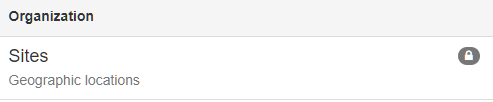
I have an old group (before the last upgrade (v2.8.0) and it's works.
To complete, if I manually attach the new user to the group in Netbox Administration, it's works :

and
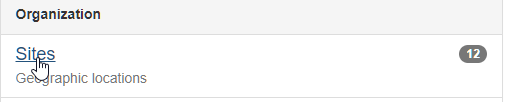
With my old group, it's not necessary to manually attach user to the group.
Regards
 thoms27
All 4 comments
I am seeing the exact same issue.
 abenedict
on 10 Sep 2020
abenedict
on 10 Sep 2020
Same issue on 2.9.4.
Anyone know of a fix ?
 crazyman143
on 6 Oct 2020
crazyman143
on 6 Oct 2020
Running into a similar issue in 2.9.9 as well
 michaelpair95
on 17 Nov 2020
michaelpair95
on 17 Nov 2020
I'm running v2.9.10 and have been tinkering with this as I was initially seeing some confusing behavior.
For the most part, everything seems to be working fine with the LDAP group permissions mapping - with the exception of scripts and reports. I can't seem to get a user with View/Add/Change/Delete rights on "scripts" and "reports to be able to access or run either. Both options are greyed out in the menu.
[edit] I'm continuing to look in to this, just putting this info here as notes on my findings/observations

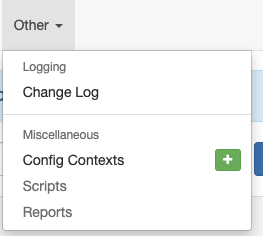
Edit 2:
The running reports & scripts issue was supposedly due to new "run" permissions being required, however adding "run" as described in the docs doesn't seem to be doing it.
 tyler-8
on 25 Nov 2020
tyler-8
on 25 Nov 2020
Related issues
 soer7022
·
3Comments
soer7022
·
3Comments
 candlerb
·
3Comments
candlerb
·
3Comments
 benjy44
·
3Comments
benjy44
·
3Comments
 billyzoellers
·
3Comments
billyzoellers
·
3Comments
 Ali-Yazdani
·
3Comments
Ali-Yazdani
·
3Comments
Most helpful comment
Running into a similar issue in 2.9.9 as well