Nest-cli: Error: Cannot find module '@nestjs/schematics/package.json'
I'm submitting a...
[ ] Regression
[x] Bug report
[ ] Feature request
[ ] Documentation issue or request
[ ] Support request => Please do not submit support request here, instead post your question on Stack Overflow.
Current behavior
I already global add nest/cli by yarn. But I exec nest new project-name, it throw an error.
16:24:53 › yarn global add @nestjs/cli
yarn global v1.22.4
[1/4] 🔍  Resolving packages...
[2/4] 🚚  Fetching packages...
[3/4] 🔗  Linking dependencies...
[4/4] 🔨  Building fresh packages...
success Installed "@nestjs/[email protected]" with binaries:
      - nest
✨  Done in 10.42s.
16:25:36 › nest new focus-server
⚡  We will scaffold your app in a few seconds..

Error: Cannot find module '@nestjs/schematics/package.json'
Require stack:
- /Users/innei/.config/yarn/global/node_modules/@angular-devkit/schematics/tools/node-module-engine-host.js
- /Users/innei/.config/yarn/global/node_modules/@angular-devkit/schematics/tools/workflow/node-workflow.js
- /Users/innei/.config/yarn/global/node_modules/@angular-devkit/schematics/tools/index.js
- /Users/innei/.config/yarn/global/node_modules/@angular-devkit/schematics-cli/bin/schematics.js
    at Function.Module._resolveFilename (internal/modules/cjs/loader.js:976:15)
    at Function.resolve (internal/modules/cjs/helpers.js:78:19)
    at NodeModulesEngineHost._resolveCollectionPath (/Users/innei/.config/yarn/global/node_modules/@angular-devkit/schematics/tools/node-module-engine-host.js:39:45)
    at NodeModulesEngineHost.createCollectionDescription (/Users/innei/.config/yarn/global/node_modules/@angular-devkit/schematics/tools/file-system-engine-host-base.js:109:27)
    at SchematicEngine._createCollectionDescription (/Users/innei/.config/yarn/global/node_modules/@angular-devkit/schematics/src/engine/engine.js:147:40)
    at SchematicEngine.createCollection (/Users/innei/.config/yarn/global/node_modules/@angular-devkit/schematics/src/engine/engine.js:140:43)
    at NodeWorkflow.execute (/Users/innei/.config/yarn/global/node_modules/@angular-devkit/schematics/src/workflow/base.js:100:41)
    at main (/Users/innei/.config/yarn/global/node_modules/@angular-devkit/schematics-cli/bin/schematics.js:224:24)
    at Object.<anonymous> (/Users/innei/.config/yarn/global/node_modules/@angular-devkit/schematics-cli/bin/schematics.js:315:5)
    at Module._compile (internal/modules/cjs/loader.js:1147:30)

Failed to execute command: "/Users/innei/.config/yarn/global/node_modules/@nestjs/cli/node_modules/.bin/schematics" @nestjs/schematics:application --name=focus-server --directory=undefined --no-dry-run --no-skip-git --package-manager=undefined --language="ts" --collection="@nestjs/schematics"
16:26:03 › nest -v
7.0.2
Expected behavior
Minimal reproduction of the problem with instructions
What is the motivation / use case for changing the behavior?
Environment
 Innei
Innei
All 32 comments
Please, provide a minimal repository which reproduces your issue.
I've just reproduced one for myself, and it perfectly created a new project.
[System Information]
OS Version     : macOS Catalina
NodeJS Version : v12.5.0
YARN Version    : 1.21.1

[Nest CLI]
Nest CLI Version : 7.0.2

[Nest Platform Information]
platform-express version : 7.0.0
common version           : 7.0.0
core version             : 7.0.0
 jeffminsungkim
on 19 Mar 2020
jeffminsungkim
on 19 Mar 2020
this is my info. I just add @nestjs/cli and exec nest new xx
[System Information]
OS Version     : macOS Catalina
NodeJS Version : v13.11.0
NPM Version    : 6.13.7

[Nest CLI]
Nest CLI Version : 7.0.2

[Nest Platform Information]
😼  cannot read your project package.json file, are you inside your project directory?
I used yarn to install cli, but this info shows npm version, not yarn. Is this problem caused?
innei at Inneis-MacBook-Pro.local in [~/GitHub/focus-server]  on git:master ✗
19:35:51 › which yarn
/Users/innei/.yarn/bin/yarn

innei at Inneis-MacBook-Pro.local in [~/GitHub/focus-server]  on git:master ✗
19:39:37 › yarn -v
1.22.4
I have the same problem
 gaelreyrol
on 21 Mar 2020
gaelreyrol
on 21 Mar 2020
@Innei @gaelreyrol
I had the same problem
For me it worked:
yarn cache clean
yarn global remove @nestjs/cli
yarn global add @nestjs/cli
 harlancleiton
on 21 Mar 2020
harlancleiton
on 21 Mar 2020
try
yarn global add @nestjs/schematics
 littcc
on 22 Mar 2020
littcc
on 22 Mar 2020
same here, use npm i -g @nestjs/cli is complete fine, but if uses yarn global add @nestjs/cli will cause this problem
edit: install with yarn add @nestjs/cli then run with yarn nest will not lead to this too
[System Information]
OS Version : Windows 10 1909 18363.720
NodeJS Version : v12.14.0s
NPM Version : 6.13.4
Yarn Version : 1.22.4
[Nest CLI]
Nest CLI Version : 7.0.2
 arnesacnussem
on 23 Mar 2020
arnesacnussem
on 23 Mar 2020
I can't reproduce your issue. I've used Docker (node:12 image) with preinstalled Yarn 1.22.0, script:
$ docker run -it --entrypoint /bin/sh node:12
After running yarn global add @nestjs/cli, I can generate a new application with nest new (as expected).
[System Information]
OS Version     : Linux 4.9
NodeJS Version : v12.16.1
NPM Version    : 6.13.4

[Nest CLI]
Nest CLI Version : 7.0.2
I can't reproduce it on my machine either (macOS Catalina, Node 12.13.0)
 kamilmysliwiec
on 23 Mar 2020
kamilmysliwiec
on 23 Mar 2020
try
yarn global add @nestjs/schematics
solved it for me
 PavolHlavaty
on 23 Mar 2020
PavolHlavaty
on 23 Mar 2020
TLDR: just run yarn global add @nestjs/schematics should fix this
I delved a bit deeper and found out that it was because @nestjs/schematics was placed under global/node_modules/@nestjs/cli during yarn global add @nestjs/cli, but when running in docker, it was placed under global/node_modules
And when runnig nest new a ,it call require.resolve(join(name, 'package.json'), { paths: this.paths }), this.paths only contains process.cwd() and global/node_modules/@angular-devkit/schematics-cli/bin when running, so it can't resolve that path on my env,but it can be resolved in docker env.
idk why that module being placed in wrong place...
arnesacnussem
on 23 Mar 2020
try
yarn global add @nestjs/schematics
this works for me, thanks
 afwilliams
on 25 Mar 2020
afwilliams
on 25 Mar 2020
I'm having the same error on WSL/2.
Fresh Ubuntu setup:
yarn global add @nestjs/cli
nest n newProject
cd newProject
nest g ng-app
 lampewebdev
on 31 Mar 2020
lampewebdev
on 31 Mar 2020
I can't generate angular-app
nest cli version: 7.1.2
yarn global add @nestjs/cli
yarn global add @nestjs/schematics
nest n myProject
cd myProject
nest g ng-app
error log
? Would you like to initialize Angular application? Yes
Error: Cannot find module '@schematics/angular/package.json'
Require stack:
- /Users/jimmy/Documents/3_Snapask/Work/web-qms1/node_modules/@angular-devkit/schematics/tools/node-module-engine-host.js
- /Users/jimmy/Documents/3_Snapask/Work/web-qms1/node_modules/@angular-devkit/schematics/tools/workflow/node-workflow.js
- /Users/jimmy/Documents/3_Snapask/Work/web-qms1/node_modules/@angular-devkit/schematics/tools/index.js
- /Users/jimmy/Documents/3_Snapask/Work/web-qms1/node_modules/@angular-devkit/schematics-cli/bin/schematics.js
    at Function.Module._resolveFilename (internal/modules/cjs/loader.js:625:15)
    at Function.resolve (internal/modules/cjs/helpers.js:21:19)
    at NodeModulesEngineHost._resolveCollectionPath (/Users/jimmy/Documents/3_Snapask/Work/web-qms1/node_modules/@angular-devkit/schematics/tools/node-module-engine-host.js:39:45)
    at NodeModulesEngineHost.createCollectionDescription (/Users/jimmy/Documents/3_Snapask/Work/web-qms1/node_modules/@angular-devkit/schematics/tools/file-system-engine-host-base.js:109:27)
    at SchematicEngine._createCollectionDescription (/Users/jimmy/Documents/3_Snapask/Work/web-qms1/node_modules/@angular-devkit/schematics/src/engine/engine.js:147:40)
    at SchematicEngine.createCollection (/Users/jimmy/Documents/3_Snapask/Work/web-qms1/node_modules/@angular-devkit/schematics/src/engine/engine.js:140:43)
    at /Users/jimmy/Documents/3_Snapask/Work/web-qms1/node_modules/@nestjs/schematics/node_modules/@angular-devkit/schematics/src/rules/schematic.js:23:43
    at MergeMapSubscriber.project (/Users/jimmy/Documents/3_Snapask/Work/web-qms1/node_modules/@nestjs/schematics/node_modules/@angular-devkit/schematics/src/rules/call.js:74:24)
    at MergeMapSubscriber._tryNext (/Users/jimmy/Documents/3_Snapask/Work/web-qms1/node_modules/@nestjs/schematics/node_modules/rxjs/internal/operators/mergeMap.js:69:27)
    at MergeMapSubscriber._next (/Users/jimmy/Documents/3_Snapask/Work/web-qms1/node_modules/@nestjs/schematics/node_modules/rxjs/internal/operators/mergeMap.js:59:18)

Failed to execute command: "/Users/jimmy/Documents/3_Snapask/Work/web-qms1/node_modules/@nestjs/cli/node_modules/.bin/schematics" @nestjs/schematics:angular-app --name=frontend --dry-run --collection="@nestjs/schematics" --language="ts" --sourceRoot="src" --spec
 jiaming0708
on 7 Apr 2020
jiaming0708
on 7 Apr 2020
@jiaming0708 I'd suggest not using ng-app schematic anymore. We'll deprecate it and remove soon. Please, use Angular CLI for this instead.
kamilmysliwiec
on 7 Apr 2020
@kamilmysliwiec I use the angular + universal with nest now, is it right?
jiaming0708
on 13 Apr 2020
try
yarn global add @nestjs/schematics
When I would run this after already installing the cli, the cli command was not available/removed (not sure why). Installing both at the same time solved it.
yarn global add @nestjs/cli @nestjs/schematics
 mikesimps
on 14 Jun 2020
mikesimps
on 14 Jun 2020
I don't know if it's possible to try/catch this particular code flow path, but if it were, adding a helpful error message would be great.
 ryanmr
on 30 Jul 2020
ryanmr
on 30 Jul 2020
try
yarn global add @nestjs/schematics
This worked for me!
node -v. => v13.14.0
nest -v => 7.4.1
 DespertaWeb
on 12 Aug 2020
DespertaWeb
on 12 Aug 2020
This worked for me!
npx @nestjs/cli new project-name
 Shav-webdev
on 16 Aug 2020
Shav-webdev
on 16 Aug 2020
nest cli bug 🐞
Error: Collection "@nestjs/schematics" cannot be resolved.
Error: Collection "@nestjs/schematics" cannot be resolved.
at NodeModulesEngineHost.resolve (/Users/xgqfrms-mbp/.config/yarn/global/node_modules/@angular-devkit/schematics/tools/node-module-engine-host.js:74:19)
at NodeModulesEngineHost._resolveCollectionPath (/Users/xgqfrms-mbp/.config/yarn/global/node_modules/@angular-devkit/schematics/tools/node-module-engine-host.js:79:37)
at NodeModulesEngineHost.createCollectionDescription (/Users/xgqfrms-mbp/.config/yarn/global/node_modules/@angular-devkit/schematics/tools/file-system-engine-host-base.js:109:27)
at SchematicEngine._createCollectionDescription (/Users/xgqfrms-mbp/.config/yarn/global/node_modules/@angular-devkit/schematics/src/engine/engine.js:147:40)
at SchematicEngine.createCollection (/Users/xgqfrms-mbp/.config/yarn/global/node_modules/@angular-devkit/schematics/src/engine/engine.js:140:43)
at NodeWorkflow.execute (/Users/xgqfrms-mbp/.config/yarn/global/node_modules/@angular-devkit/schematics/src/workflow/base.js:100:41)
at main (/Users/xgqfrms-mbp/.config/yarn/global/node_modules/@angular-devkit/schematics-cli/bin/schematics.js:224:24)
at Object.<anonymous> (/Users/xgqfrms-mbp/.config/yarn/global/node_modules/@angular-devkit/schematics-cli/bin/schematics.js:315:5)
at Module._compile (internal/modules/cjs/loader.js:778:30)
at Object.Module._extensions..js (internal/modules/cjs/loader.js:789:10)
👎 very bad development experience, why need developer manually install it, it should be the nest cli does things

$ yarn global add @nestjs/cli
$ nest new project-name

$ nest -v
# 7.5.1
#  cli bug 🐞
$ yarn global remove @nestjs/cli

$ yarn global add @nestjs/cli
# why need developer manually install it, it should be the nest cli does things
$ yarn global add @nestjs/schematics

 xgqfrms
on 14 Sep 2020
xgqfrms
on 14 Sep 2020
Spinning up a fresh Docker container, this isn't reproducible, which means a local config is more than likely the issue.
▶ docker run -it node:latest sh
# npm ls -g --depth=0
/usr/local/lib
-- [email protected]

$ yarn global list --depth=0
yarn global v1.22.5
Done in 0.05s.
$ npm i -g @nestjs/cli
npm WARN deprecated [email protected]: Please see https://github.com/lydell/urix#deprecated
npm WARN deprecated [email protected]: https://github.com/lydell/resolve-url#deprecated
npm WARN deprecated [email protected]: Chokidar 2 will break on node v14+. Upgrade to chokidar 3 with 15x less dependencies.
npm WARN deprecated [email protected]: fsevents 1 will break on node v14+ and could be using insecure binaries. Upgrade to fsevents 2.
/usr/local/bin/nest -> /usr/local/lib/node_modules/@nestjs/cli/bin/nest.js
npm WARN optional SKIPPING OPTIONAL DEPENDENCY: fsevents@~2.1.2 (node_modules/@nestjs/cli/node_modules/chokidar/node_modules/fsevents):
npm WARN notsup SKIPPING OPTIONAL DEPENDENCY: Unsupported platform for [email protected]: wanted {"os":"darwin","arch":"any"} (current: {"os":"linux","arch":"x64"})
npm WARN notsup Unsupported engine for [email protected]: wanted: {"node":"<8.10.0"} (current: {"node":"14.9.0","npm":"6.14.8"})
npm WARN notsup Not compatible with your version of node/npm: [email protected]
npm WARN optional SKIPPING OPTIONAL DEPENDENCY: fsevents@^1.2.7 (node_modules/@nestjs/cli/node_modules/watchpack-chokidar2/node_modules/chokidar/node_modules/fsevents):
npm WARN notsup SKIPPING OPTIONAL DEPENDENCY: Unsupported platform for [email protected]: wanted {"os":"darwin","arch":"any"} (current: {"os":"linux","arch":"x64"})

+ @nestjs/[email protected]
added 513 packages from 352 contributors in 39.743s

$ nest new test-cli
# Chose NPM here
⚡  We will scaffold your app in a few seconds..

CREATE test-cli/.eslintrc.js (663 bytes)
CREATE test-cli/.prettierrc (51 bytes)
CREATE test-cli/README.md (3370 bytes)
CREATE test-cli/nest-cli.json (64 bytes)
CREATE test-cli/package.json (1890 bytes)
CREATE test-cli/tsconfig.build.json (97 bytes)
CREATE test-cli/tsconfig.json (339 bytes)
CREATE test-cli/src/app.controller.spec.ts (617 bytes)
CREATE test-cli/src/app.controller.ts (274 bytes)
CREATE test-cli/src/app.module.ts (249 bytes)
CREATE test-cli/src/app.service.ts (142 bytes)
CREATE test-cli/src/main.ts (208 bytes)
CREATE test-cli/test/app.e2e-spec.ts (630 bytes)
CREATE test-cli/test/jest-e2e.json (183 bytes)

? Which package manager would you ❤️  to use? npm
✔ Installation in progress... ☕

🚀  Successfully created project test-cli
👉  Get started with the following commands:

# $ cd test-cli
# $ npm run start


                          Thanks for installing Nest 🙏
                 Please consider donating to our open collective
                        to help us maintain this package.


               🍷  Donate: https://opencollective.com/nest

$ npm ls -g --depth=0
/usr/local/lib
+-- @nestjs/[email protected]
-- [email protected]

$ npm uninstall -g @nestjs/cli

removed 513 packages in 5.67s
$ yarn global add @nestjs/cli
yarn global v1.22.5
[1/4] Resolving packages...
warning @nestjs/cli > webpack > watchpack > watchpack-chokidar2 > [email protected]: Chokidar 2 will break on node v14+. Upgrade to chokidar 3 with 15x less dependencies.
warning @nestjs/cli > webpack > watchpack > watchpack-chokidar2 > chokidar > [email protected]: fsevents 1 will break on node v14+ and could be using insecure binaries. Upgrade to fsevents 2.
warning @nestjs/cli > webpack > micromatch > snapdragon > source-map-resolve > [email protected]: https://github.com/lydell/resolve-url#deprecated
warning @nestjs/cli > webpack > micromatch > snapdragon > source-map-resolve > [email protected]: Please see https://github.com/lydell/urix#deprecated
[2/4] Fetching packages...
info [email protected]: The platform "linux" is incompatible with this module.
info "[email protected]" is an optional dependency and failed compatibility check. Excluding it from installation.
info [email protected]: The platform "linux" is incompatible with this module.
info "[email protected]" is an optional dependency and failed compatibility check. Excluding it from installation.
[3/4] Linking dependencies...
[4/4] Building fresh packages...
success Installed "@nestjs/[email protected]" with binaries:
      - nest
Done in 35.75s.
# Chose yarn here
$ nest new test-cli-yarn
⚡  We will scaffold your app in a few seconds..

CREATE test-cli-yarn/.eslintrc.js (663 bytes)
CREATE test-cli-yarn/.prettierrc (51 bytes)
CREATE test-cli-yarn/README.md (3370 bytes)
CREATE test-cli-yarn/nest-cli.json (64 bytes)
CREATE test-cli-yarn/package.json (1895 bytes)
CREATE test-cli-yarn/tsconfig.build.json (97 bytes)
CREATE test-cli-yarn/tsconfig.json (339 bytes)
CREATE test-cli-yarn/src/app.controller.spec.ts (617 bytes)
CREATE test-cli-yarn/src/app.controller.ts (274 bytes)
CREATE test-cli-yarn/src/app.module.ts (249 bytes)
CREATE test-cli-yarn/src/app.service.ts (142 bytes)
CREATE test-cli-yarn/src/main.ts (208 bytes)
CREATE test-cli-yarn/test/app.e2e-spec.ts (630 bytes)
CREATE test-cli-yarn/test/jest-e2e.json (183 bytes)

? Which package manager would you ❤️  to use? yarn
✔ Installation in progress... ☕

🚀  Successfully created project test-cli-yarn
👉  Get started with the following commands:

# $ cd test-cli-yarn
# $ yarn run start


                          Thanks for installing Nest 🙏
                 Please consider donating to our open collective
                        to help us maintain this package.


               🍷  Donate: https://opencollective.com/nest
 jmcdo29
on 14 Sep 2020
jmcdo29
on 14 Sep 2020
The behavior listed above is/was(?) 100% a bug. Upgrading the devDependency "@nestjs/schematics" seemed to have fixed it. I updated a few dependencies and things are now working. Nest.js configuration is extremely fragile but I love the framework. You just have to be careful, it is very customizable in most areas but in others, not at all and your project will fail to build and run.
Thanks for the bug fix (it looks like someone fixed it). <3
 peter-donovan
on 7 Nov 2020
peter-donovan
on 7 Nov 2020
try
yarn global add @nestjs/schematics
It worked, thanks
 BeckXun
on 24 Nov 2020
BeckXun
on 24 Nov 2020
I also ran into the same issue but the workarounds mentioned above didn't help. In my case the problem was, that I was running the command inside the project directory where package.json already existed but had no dependency on @nestjs/schematics.
When I ran the same command (nest new project-name) in a non project directory it executed without problems.
 dejanbanovic
on 9 Jan 2021
dejanbanovic
on 9 Jan 2021
I keep getting
Unable to resolve @nestjs/schematics:module.
Cannot find module '/<my path>/node_modules/@nestjs/schematics/dist/lib/module/module.factory#main'
 Bulletninja
on 26 Jan 2021
Bulletninja
on 26 Jan 2021
Sorry for the spam. But I get the same erro when using yarn.

Why don't we make a fix and make it just work please? It's been almost a year now.
This is not good, the nest scaffold asking us whether to use yarn or npm indicates that it supports yarn but when we install cli, it is just not working seamlessly.
 rhzs
on 30 Jan 2021
rhzs
on 30 Jan 2021
Sorry for the spam. But I get the same erro when using yarn.
Why don't we make a fix and make it just work please? It's been almost a year now.
This is irritating, the nest scaffold asking us whether to use
yarnornpmindicates that it supportsyarnbut when we installcli, it is just not working seamlessly.
@rhzs This is why. In a clean docker environment, the error isn't reproducible, so there's no way for us to know how to get the error you get. If you can tell us exactly what to do and show that it is indeed reproducible then we can look into it
jmcdo29
on 30 Jan 2021
@jmcdo29 I have tried the way you suggested using Docker with 2 different base images, one alpine and one buster. It works fine.
This seems only happened on MacOs, I use MacOS BigSur 11.1.
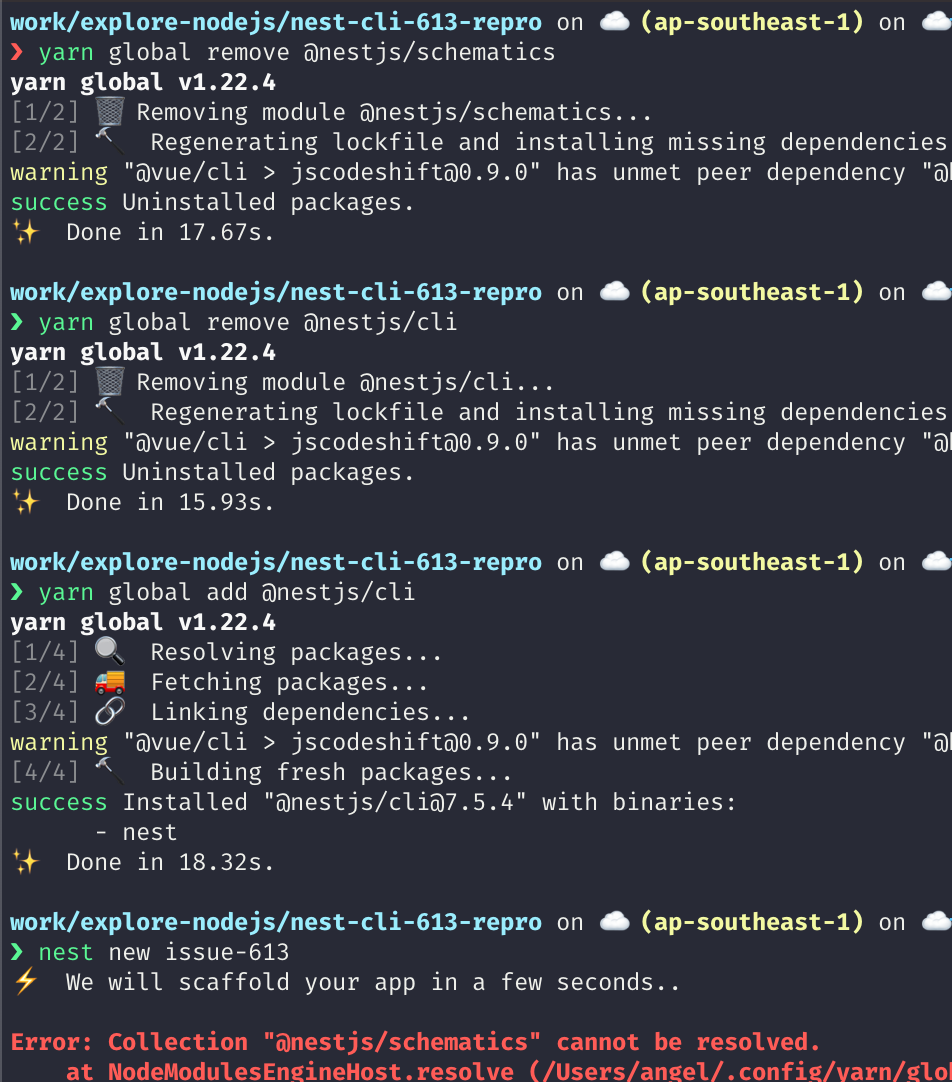
My yarn version 1.22.4
You can test using TravisCI (if you don't have Mac). And you may want to add Mac as environment as part of the NestJS CLI CI to ensure everything works well.
Thank you
rhzs
on 30 Jan 2021
@jmcdo29 it's reproducible in Docker for the latest node.js and yarn 2.
> docker run -it node:latest sh
# yarn set version berry
# yarn dlx -p @nestjs/cli nest new test-nest
 exarus
on 3 Feb 2021
exarus
on 3 Feb 2021
@jmcdo29 it's reproducible in Docker for the latest node.js and yarn 2.
> docker run -it node:latest sh
# yarn set version berry
# yarn dlx -p @nestjs/cli nest new test-nest
@exarus
This does indeed reproduce the error. It's weird though, as @nestjs/cli correctly sets its dependency on @nestjs/schematics so it seems something in the @angular-devkit/schematics-cli is having a problem resolving the schematic. I'll see if I can dig in more, it doesn't immediately look like this is a yarn berry issue (at least not yet). Though, seeing as only yarn berry causes this, I can't rule that out.
jmcdo29
on 3 Feb 2021
Looks like Angular's CLI (which Nest makes use of for nest new thanks to the shcematics builder) doesn't fully yet support yarn pnp, but it is in progress.
jmcdo29
on 3 Feb 2021
try
yarn global add @nestjs/schematics
thanks.
 SuperHuangXu
on 13 Mar 2021
SuperHuangXu
on 13 Mar 2021
Related issues
 METACEO
·
6Comments
METACEO
·
6Comments
 jylin
·
5Comments
jylin
·
5Comments
 rweisse
·
5Comments
rweisse
·
5Comments
 gustavorps
·
5Comments
gustavorps
·
5Comments
 128keaton
·
3Comments
128keaton
·
3Comments
Most helpful comment
try
yarn global add @nestjs/schematics