Nest-cli: [BUG] Nest-CLI Auto-Importer is Importing Files in incorrect place
I'm submitting a...
[ ] Regression
[x] Bug report
[ ] Feature request
[ ] Documentation issue or request
[ ] Support request => Please do not submit support request here, instead post your question on Stack Overflow.
Current behavior
Generator Errors
when i tried to run
$ nest g mo app/advertisement
the result of this command is OK!
CREATE /src/app/advertisement/advertisement.module.ts (90 bytes)
UPDATE /src/app/app.module.ts (1963 bytes)
But !
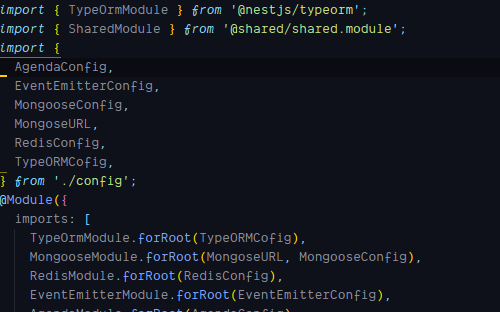
Before:
After:
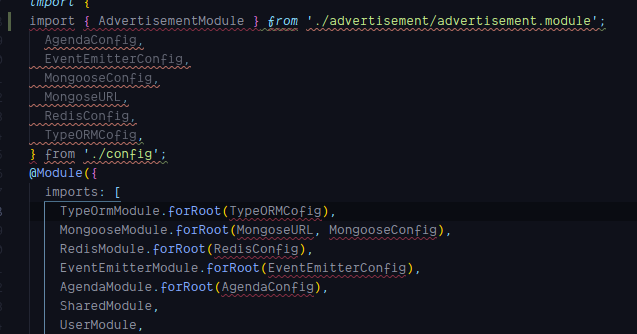
Expected behavior
To add imports in correct place.
Minimal reproduction of the problem with instructions
create a new nest project
add some imports in the file app.module.ts - _the root module_ - in that way
import {
    ModuleA,
    ModuleB,
    ModuleC
} from './modules'
then try to generate new module
What is the motivation / use case for changing the behavior?
I think the problem that nest-cli only matches the last import import {
and start adding the new import in the new line, but it should also matches the } at the end of that line and the new lines
Environment
$ nest info

[System Information]
OS Version     : Linux 4.18
NodeJS Version : v10.10.0
NPM Version    : 6.4.1
[Nest Information]
websockets version : 5.3.11
mongoose version   : 5.2.2
swagger version    : 2.5.1
typeorm version    : 5.2.2
common version     : 5.3.11
core version       : 5.3.11
 shekohex
All 6 comments
Hey @shekohex,
I'm trying to reproduce your issue. Do you still face this issue? (after latest updates)
 kamilmysliwiec
on 7 Nov 2018
kamilmysliwiec
on 7 Nov 2018
Hi Kamil,
unfortunately, Yes
$ nest g mo app/user-transactions2
CREATE /src/app/user-transactions2/user-transactions2.module.ts (94 bytes)
UPDATE /src/app/app.module.ts (2359 bytes)

nestjs/cli v5.6.2
$ nest info

[System Information]
OS Version     : Linux 4.18
NodeJS Version : v10.10.0
NPM Version    : 6.4.1
[Nest Information]
websockets version : 5.3.11
mongoose version   : 5.2.2
swagger version    : 2.5.1
typeorm version    : 5.2.2
common version     : 5.3.11
core version       : 5.3.11
Could you share a small repo so I can reproduce this issue locally?
kamilmysliwiec
on 7 Nov 2018
Here we go
https://github.com/shekohex/module-import-test
try to add new module
$ nest g mo module8
and see the main module
shekohex
on 7 Nov 2018
Thanks @shekohex. Looks like we have to update underlying @angular-devkit/schematics engine :) I'll do it soon
kamilmysliwiec
on 7 Nov 2018
Fixed in 5.7.0. Thanks for reporting! 💪
kamilmysliwiec
on 9 Dec 2018
Related issues
 bbenoist
·
4Comments
bbenoist
·
4Comments
 Juancoll
·
5Comments
Juancoll
·
5Comments
 gustavorps
·
5Comments
gustavorps
·
5Comments
 alexbuczynsky
·
5Comments
alexbuczynsky
·
5Comments
 rjoydip
·
5Comments
rjoydip
·
5Comments
Most helpful comment
Thanks @shekohex. Looks like we have to update underlying
@angular-devkit/schematicsengine :) I'll do it soon