Nerdtree: How to remove DIR arrows since NERDTreeDirArrows option has been removed?
How would you remove the DIR arrows now that the NERDTreeDirArrow option has been removed?
 cj
cj
All 23 comments
It's very weird, why you need to remove it? If the reason you want to remove arrows is messy code happened, I will suggest you to define the arrows in your .vimrc file:
`
let g:NERDTreeDirArrowExpandable = '+'
let g:NERDTreeDirArrowCollapsible = '~'
`
This may help you solve your problem better than delete DIR arrows code.
 datonli
on 23 Nov 2016
datonli
on 23 Nov 2016
You can use a non-breaking space to make the arrows appear to have been removed. Regular spaces won't work, as they causes keypresses on lower-level directories to not be recognized. Add these lines to your .vimrc:
let NERDTreeDirArrowExpandable = "\u00a0"
let NERDTreeDirArrowCollapsible = "\u00a0"
The resulting strings look like a single space, but they don't interfere with the keypresses on directories.
See the comment below for more important information.
 PhilRunninger
on 23 Nov 2016
PhilRunninger
on 23 Nov 2016
@PhilRunninger that did the trick. Thank you!.
@osDanielLee I don't need the arrows when using https://github.com/ryanoasis/vim-devicons
cj
on 2 Dec 2016
Weird, I get a ']' char in front of the filename when I use this option with the "
 taq
on 30 Jan 2018
taq
on 30 Jan 2018
@taq, I suspect this may be a font issue, although all modern fonts should have a non-breaking space in them. What value do you have for :set encoding? If I switch mine to latin1, then u00a0 shows up as a vertical bar. I'm not sure what else to suggest. Maybe someone else has an idea on this one.
PhilRunninger
on 31 Jan 2018
Hey @PhilRunninger ! Thanks for your answer!
I'm using utf-8 as encoding and a patched version of FiraCode. Will try to find what is happening there. :-)
Thanks again!
taq
on 31 Jan 2018
@taq Did you find out? I am now having the same problem with Fira Code.
Seems like it's not a font issue nor terminal. Changing them do nothing, it's still persist.
 kutsan
on 17 Feb 2018
kutsan
on 17 Feb 2018
@kutsan no, I just gave up since it was taking some time.
taq
on 18 Feb 2018
@taq I finally found the problem under vim-devicons source code. I don't know how, vim is unable to apply syntax match for that bracket here because their utility function returns non-breaking space character. Maybe since it's non-breaking space, the character after that (a.k.a. our beloved ]) isn't considering as a syntax item(?) and syntaxs conceal isn't applied. My solution is to remove artifactFix variable in this line, make it simply return symbol. Of course this is just a temporary solution, they need to update the code accordingly.
By the way, can you take a look @ryanoasis? You should add a couple of if has('gui_running') there.

kutsan
on 19 Feb 2018
@kutsan Ah yep that's a really great point on why sometimes people are seeing that closing bracket. :sweat_smile:
As for the artifactFix we are re-evaluating the need of it and at the very least it will be made configurable. See: https://github.com/ryanoasis/vim-devicons/issues/225#issuecomment-360335841
 ryanoasis
on 19 Feb 2018
ryanoasis
on 19 Feb 2018
@ryanoasis Did you know the reason why people are seeing that closing bracket before I told you? Because you should at least have added a flag there or add a question under FAQ; I was looking for the solution for hours, you should blush more! ><
kutsan
on 19 Feb 2018
@kutsan
Did you know the reason why people are seeing that closing bracket before I told you?
I was aware of the problem (a few reports about it) but I did _not_ know it was related to the artifactFix
Because you should at least have added a flag there or add a question under FAQ
If I would have known I definitely would have made it configurable in hindsight, it was a bit of a hacky/rushed fix. I really do try to put a lot into the Wiki and FAQ but it's been my experience it doesn't really help most new issues or even old issues not all will take the time to look.
I was looking for the solution for hours, you should blush more!
I really do understand that frustration and sorry you had to spend so much time figuring it out. Especially since it does sound like you did check the appropriate places (FAQ, etc.)
ryanoasis
on 19 Feb 2018
I really do understand that frustration and sorry you had to spend so much time figuring it out. Especially since it does sound like you did check the appropriate places (FAQ, etc.)
It's okay, I wasn't really that serious about blushing. Thanks for you answers and attention.
I really do try to put a lot into the Wiki and FAQ but it's been my experience it doesn't really help most new issues or even old issues not all will take the time to look.
Yeah, I feel you; but you did your job, it's their problem for not looking into your resources.
By the way, your See FAQ link is broken.
kutsan
on 19 Feb 2018
@kutsan Ah okay gotcha :smile: it can be hard to know online.
Thanks for heads up on the link, just fixed it :+1:
ryanoasis
on 20 Feb 2018
@PhilRunninger any ideas why I'm getting the following when trying to follow your advice from above?
I can't seem to find anything on Google about this issue.
Thank you very much in advance.
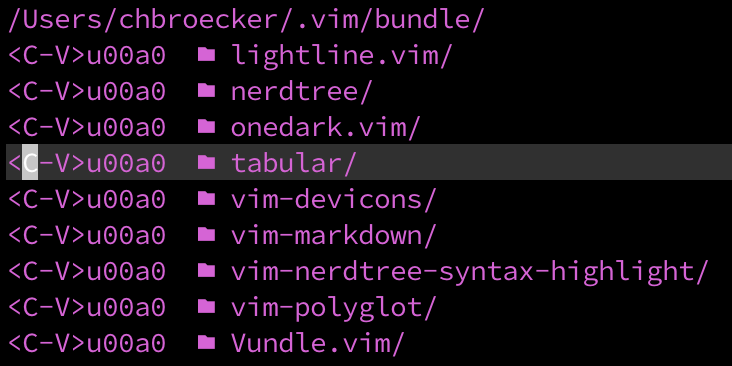
Also why is using that instead of the arrows turning everything purple from blue?
 chbroecker
on 20 Nov 2018
chbroecker
on 20 Nov 2018
@chbroecker We need to see your code first. Could you please collaborate on that?
kutsan
on 20 Nov 2018
Sorry here is my .vimrc:
https://github.com/chbroecker/dotfiles/blob/master/vim/.vimrc
If I uncomment lines 65 and 66 I get the behavior from the screenshot above.
chbroecker
on 20 Nov 2018
@chbroecker , My guess is you copied the text from my comment above, instead of typing it. Since then I've learned an easier way that doesn't involve using Ctrl+V.
let NERDTreeDirArrowExpandable = "\u00a0"
let NERDTreeDirArrowCollapsible = "\u00a0"
A recent pull request now also requires you to set another variable if you have the above settings. The non-breaking space is, by default, now used to surround the filename so it can be accurately parsed from the line of text. If you use "\u00a0" in place of your arrows, you need to use a different character for that delimiter. Also add this line to your vimrc:
let NERDTreeNodeDelimiter = "\x07"
I actually did type it out but missed the part about the keystrokes. I somehow thought the
Thank you very much though, now everything is working fine. :)
chbroecker
on 21 Nov 2018
How about the following settings
let g:NERDTreeDirArrowExpandable = "\u00a0"
let g:NERDTreeDirArrowCollapsible = " "
My vim no longer displays ].
I don't know why it works 😅
I am using neovim (v0.4.0-1071-ge28a7a366) on Mac OS (10.12.6)
 ray-lab
on 5 Jul 2019
ray-lab
on 5 Jul 2019
You can use a non-breaking space to make the arrows appear to have been removed.
Can we please reopen this issue, as while, arrows are not visible, they are not removed and still take entire column of space
 Dmitra
on 9 Sep 2019
Dmitra
on 9 Sep 2019
Please open a new issue. Reference this one, and provide all the information asked for in the issue template.
PhilRunninger
on 9 Sep 2019
If anyone is still following this, take a look at the latest version of NERDTree (6.6.0). Pull request #1085 added the ability to completely remove the arrows. If you use the following lines in your .vimrc, the entire tree will be shifted to the left two character positions.
let g:NERDTreeDirArrowExpandable = ''
let g:NERDTreeDirArrowCollapsible = ''
Related issues
 kyoz
·
4Comments
kyoz
·
4Comments
 yuanjianpeng
·
5Comments
yuanjianpeng
·
5Comments
 BigfootN
·
5Comments
BigfootN
·
5Comments
 fncll
·
4Comments
fncll
·
4Comments
 hrqmonteiro
·
3Comments
hrqmonteiro
·
3Comments
Most helpful comment
You can use a non-breaking space to make the arrows appear to have been removed. Regular spaces won't work, as they causes keypresses on lower-level directories to not be recognized. Add these lines to your .vimrc:
The resulting strings look like a single space, but they don't interfere with the keypresses on directories.
See the comment below for more important information.