Nerd-fonts: Iosevka Nerd Font works in polybar, but not in urxvt
🎯 Subject of the issue
I'm using Iosevka Nerd Font for my polybar config and in my urxvt terminal. It works like a charm in polybar but in urxvt, some symbols don't appear (but the same ones appear in polybar).
🔧 Your Setup
Iosevka Nerd Font(Iosevka Nerd Font Complete.ttf)urxvt- Linux - Ubuntu 18.04
★ Optional
My polybar config (the white dots is the symbol I want to display in urxvt)

font-0 = "Iosevka Nerd Font:pixelsize=13;3"
My urxvt
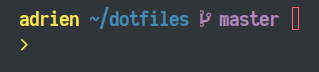
URxvt*font: xft:Ioveska Nerd Font:pixelsize=21
 adriencarbonaro
All 13 comments
urxvt256c-ml*font: xft:Iosevka\ Nerd\ Font:pixelsize=11
Works fine for me with the above in ~/.Xdefaults…
 kierun
on 7 Jan 2019
kierun
on 7 Jan 2019
I don't know why it doesn't work for me. And most of all I don't get why it works in polybar and not urxvt
adriencarbonaro
on 7 Jan 2019
Did you escape the spaces?
kierun
on 7 Jan 2019
Yes. Sadly it didn't do the trick. Plus the rest of the characters worked even without it.
adriencarbonaro
on 7 Jan 2019
Other Nerd fonts working in urxvt ?
 kajzersoze
on 7 Jan 2019
kajzersoze
on 7 Jan 2019
With Ubuntu Nerd Font the symbols work but the font itself is weird.

adriencarbonaro
on 7 Jan 2019
For me none of the Nerd fonts worked, font itself is ok but there are squares instead of symbols.
Until I found a patch which corrects that problem.
If you are using gentoo you can find the ebuild here:
https://github.com/kajzersoze/rxvt-unicode
You can find the same patch in the AUR for Arch.
For other distros I don't know the situation.
You can try it, there's a high chance that it would solve your problem.
kajzersoze
on 7 Jan 2019
Thank you but I'm not on Arch or Gentoo ...
But glad to know that worked for you.
Could someone check the Ioveska patch to solve this ? It doesn't work with SauceCodePro neither and same with InconsolataGo
adriencarbonaro
on 7 Jan 2019
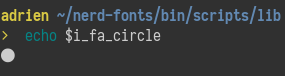
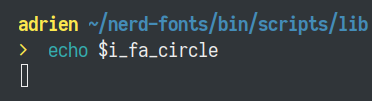
I just tried with Iosevka Nerd Font in terminator and everything works just fine. So I think the problem doesn't necessarily comes from the font but from URxvt.
terminator :
URxvt :
adriencarbonaro
on 7 Jan 2019
Could you try a true mono variant (one with a Mono suffix)?
Also URxvt I have had issues with ambiguous width charts. Refer to https://github.com/ryanoasis/nerd-fonts/wiki/Terminal-Emulators#urxvt
 ryanoasis
on 8 Jan 2019
ryanoasis
on 8 Jan 2019
I'll try this and let you know !
EDIT :
With Iosevka Term Nerd Font Complete Mono.ttf it works with the circle and most of the symbols that didn't work before. The symbols are kind of small but I can get over it as it works.
But still some icons appear as squares even with this one.
We can close this one for now as it works with most of them.
Thank you
adriencarbonaro
on 8 Jan 2019
This one worked for me:
URxvt.font: xft:Iosevka Term:style=Light:pixelsize=12:antialias=true:hinting=true
 davidsierradz
on 1 Feb 2019
davidsierradz
on 1 Feb 2019
Hi, sorry to necro but I struggled to get this working for a pretty long time, so posting what finally fixed this issue for me on Manjaro running i3wm, hope this can help anyone lurking. I'm using urxvt to start tmux, but you could leave out the -e tmux -u section below and probably get the same result.
Some context - I noticed adding the font to my .Xresources and xrdb ~/Xresources wouldn't work but when ran within a terminal urxvt -fn 'SauceCodePro NF' it would load any Nerd font without issues. Since I'm already using i3wm I had the $TERMINAL environment variable set, so I just needed to make some changes.
Fix -
In my .bashrc, I included these exports
export FONT='xft:InconsolataNerdFont'
export TERMINAL='urxvt -fn '$FONT' -e tmux -u'
This worked fine for me since this is my only font. For some reason editing the .Xresources wouldn't load the font, even though I checked fc-list for the correct names and reloaded with xrdb. Also, I struggled to get any font with spaces in the name to export correctly. I'd be interested in a better solution if anyone has one, but for now this works for me. This was a headache for a while, I was looking at ditching urxvt all together and got this to work, though it is a bit of a hack, I'll take it for the time being.
 shaunrd0
on 10 Oct 2019
shaunrd0
on 10 Oct 2019
Related issues
 math0ne
·
3Comments
math0ne
·
3Comments
 lilyball
·
5Comments
ryanoasis
·
6Comments
lilyball
·
5Comments
ryanoasis
·
6Comments
 sharkusk
·
5Comments
sharkusk
·
5Comments
 aswinmohanme
·
4Comments
aswinmohanme
·
4Comments
Most helpful comment
Could you try a true mono variant (one with a Mono suffix)?
Also URxvt I have had issues with ambiguous width charts. Refer to https://github.com/ryanoasis/nerd-fonts/wiki/Terminal-Emulators#urxvt