🗹 Requirements
- [ ] A brief but descriptive _title_ of your issue
- [ ] I have searched the issues for my issue and found nothing related and/or helpful
- [ ] I have read or scanned the FAQ
- [ ] I have read or scanned the Wiki
🎯 Subject of the issue
I want to customize my shell to add a 🍺icon at the begining of my prompt line like described in this article:
https://medium.freecodecamp.org/how-you-can-style-your-terminal-like-medium-freecodecamp-or-any-way-you-want-f499234d48bc
Unfortunately, when I use the code 1F37A, it doesn't work:
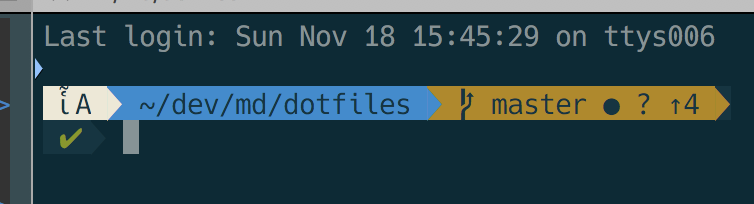
Do you handle this code?
🔧 Your Setup
- _Which font are you using (e.g.
Anonymice Powerline Nerd Font Complete.ttf)?_ 14pt Hack Regular Nerd Font Complete - _Which terminal emulator are you using (e.g.
iterm2,urxvt,gnome,konsole)?_ iTerm2 - _Are you using OS X, Linux or Windows? And which specific version or distribution?_ OSX
★ Optional
 MartinDelille
All 4 comments
Hah thanks @MartinDelille. I believe we need emojis
 ryanoasis
on 9 Feb 2019
ryanoasis
on 9 Feb 2019
Hi @ryanoasis any plans/timeline to actually include emojis? (there is absolutely no rush, I'm just asking to get an idea)
 petobens
on 24 Sep 2019
petobens
on 24 Sep 2019
Does Google allow patching on top of their noto fonts? That could be a good base, slap the specific font over that, then your extensions over that? (I really have no idea how this works, I'm just curious)
Adding to this: As a user, I want them all lol. Not to sound needy or anything. I would love a single monospaced font for my terminal that I could use cool powerline stuff, dev icons, and emojis all in one massive font. That sounds difficult because of colliding code points an I'm sure many other things I'm not familiar with but it seems like you guys have a solid handle on this already. Is there an example config somewhere or one you could provide me with so I can run this patch with layers like the following? It seems like your Nerd Font characters are hanging out nicely in private use sections of UTF-8 so they won't collide.
Say I'd like to use: DejaVuSansMono Nerd Font Mono, could that be compiled by the layering/overriding the following?
- Noto + Noto Emoji (the base default, every character has a symbol to the best of Google's ability)
- DejaVuSansMono - Override all characters that DejaVu Sans Mono provides
- [Various Nerd Font Add Ons] - Add on all the code points for the fun nerd font specific sets
Is that possible or does it get harrier than that?
Thanks for the great project!
EDIT: I tried to manually merge some, my word is this complicated.
 four43
on 14 Dec 2019
four43
on 14 Dec 2019
I found this inspiring script when I was trying to merge Noto Emoji into Bitstream Vera Sans Mono Nerd Font Complete Mono. I'm no expert about fonts and it's very unlikely that I've done everything right but the end result looks at least usable for now lol.
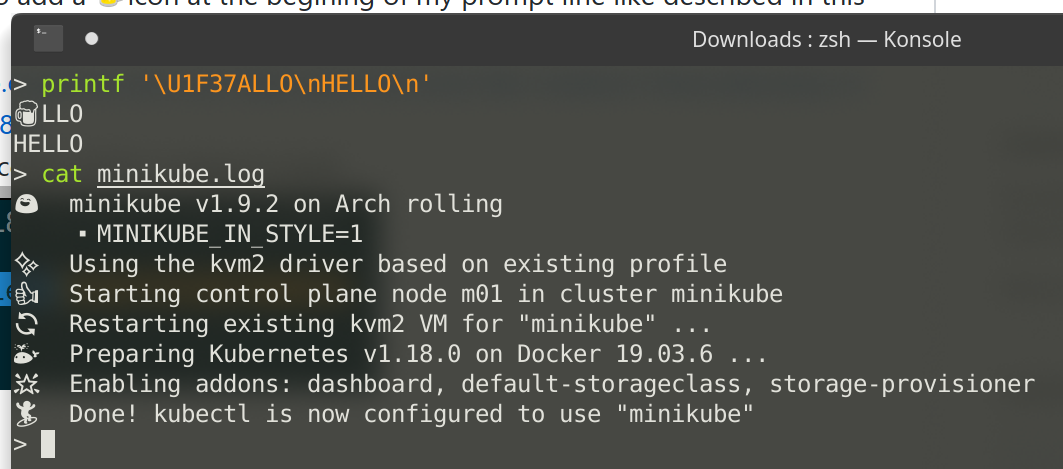
Here's my script if you guys wanna try it out.
#!/usr/bin/env python3

import fontforge
import io
import os
import psMat
import requests
import sys
import tempfile
import zipfile


def font_width(font: fontforge.font):
    # assume monospace
    return next(font.glyphs()).width


def new_font_name(font_name: str) -> str:
    return font_name.replace("Nerd Font", "Nerd Emoji Font").replace(
        "NerdFont", "NerdEmojiFont"
    )


NOTO_EMOJI_URL = (
    "https://noto-website-2.storage.googleapis.com/pkgs/NotoEmoji-unhinted.zip"
)

# base font path
path_bitstream = "Bitstream Vera Sans Mono Nerd Font Complete Mono.ttf"

print("Patching Bitstream font file {}".format(path_bitstream))

# download Noto Emoji
noto_zip = requests.get(NOTO_EMOJI_URL)
(handle_noto, path_noto) = tempfile.mkstemp(prefix="nerd-font-patch-")
with zipfile.ZipFile(io.BytesIO(noto_zip.content), "r") as zip_file:
    zip_info = zip_file.getinfo("NotoEmoji-Regular.ttf")
    zip_info.filename = os.path.basename(path_noto)
    zip_file.extract(zip_info, os.path.dirname(path_noto))

# open fonts
font_bitstream: fontforge.font = fontforge.open(path_bitstream, ("hidewindow",))
font_noto: fontforge.font = fontforge.open(path_noto, ("hidewindow",))

# scale noto
width_bitstream = font_width(font_bitstream)  # 1233
width_noto = font_width(font_noto)  # 2600
scale = psMat.scale(width_bitstream * 2 / width_noto, width_bitstream * 2 / width_noto)
glyph: fontforge.glyph
for glyph in font_noto.glyphs():
    #  print("Scaling glyph U+{:02x}".format(glyph.unicode))
    # scale glyph first
    glyph.transform(scale)
    # adjust bearing
    delta = width_bitstream * 2 - width_noto
    glyph.left_side_bearing += delta / 2
    glyph.right_side_bearing += delta - delta / 2
    glyph.width = width_bitstream * 2

font_bitstream.mergeFonts(font_noto, True)
attrs = [
    "familyname",
    "fontname",
    "fullname",
]
for attr in attrs:
    setattr(font_bitstream, attr, new_font_name(getattr(font_bitstream, attr)))
names = font_bitstream.sfnt_names
new_names = []
for name in names:
    name = [new_font_name(ele) for ele in name]
    new_names.append(tuple(name))
font_bitstream.sfnt_names = tuple(new_names)

font_bitstream.generate(
    "Bitstream Vera Sans Mono Nerd Emoji Font Complete Mono.ttf"
)
os.close(handle_noto)
os.remove(path_noto)
 Frederick888
on 29 Apr 2020
Frederick888
on 29 Apr 2020
Related issues
 laughedelic
·
5Comments
laughedelic
·
5Comments
 blueyed
·
6Comments
blueyed
·
6Comments
 brontosaurusrex
·
4Comments
brontosaurusrex
·
4Comments
 jinmel
·
6Comments
jinmel
·
6Comments
 ffernand
·
4Comments
ffernand
·
4Comments
Most helpful comment
Hi @ryanoasis any plans/timeline to actually include emojis? (there is absolutely no rush, I'm just asking to get an idea)