neovim-qt does not show vim-airline fonts properly when connected to a remote nvim
I have Ubuntu 18.04 where I run nvim as a server: nvim --listen <ip>:<port> --headless.
And MacOS Catalina where I run neovim-qt as a client: nvim-qt --server <IP>:<port>.
The top and bottom lines are presented incorrectly:

However, when I run neovim-qt locally they are fine.
Ubuntu:
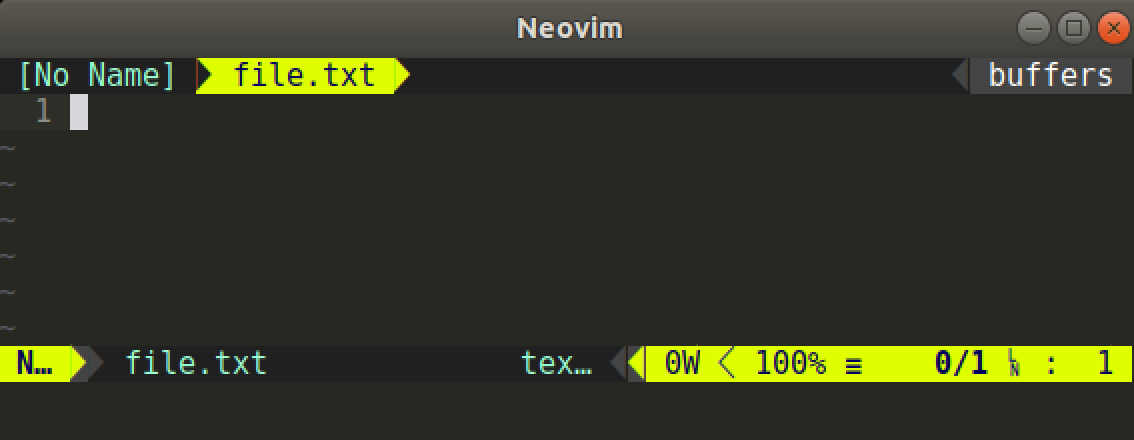
MacOS:

Both machines have the same .vimrc and ginit.vim:
"I want to see buffers on top of the screen
GuiTabline 0

"This is a good feature but unfortunately it is not good for the YCM
"Need to check from time to time if it works
GuiPopupmenu 0

Guifont Source Code Pro for Powerline:h16
colorscheme monokai

"Allows yanking to the local clipboard(even from remote!)
call GuiClipboard()
I went through help: nvim-gui-shim but did not find a command fixing the problem.
Could you please advise?
 f-squirrel
All 7 comments
What is the output of :GuiFont?
It probably displays something other than Source Code Pro for Powerline:h16.
You need to escape the spaces, same as guifont:
Guifont Source\ Code\ Pro\ for\ Powerline:h16
 jgehrig
on 27 Apr 2020
jgehrig
on 27 Apr 2020
Would you like to expand the documentation to include a note about this and an example?
I have seen this before and I think it would be useful to other users :)
jgehrig
on 27 Apr 2020
@jgehrig ,
Actually, :GuiFont returns the font defined in ginit.vim so I am not sure if it is reasonable to update the documentation.
Nevertheless, I've added the escape symbols but it did not help.
f-squirrel
on 28 Apr 2020
Sorry, I think I was confused as to what the issue was... What exactly is the problem?
Is this an issue with the coloring of the arrow-like vim-airline characters?
Notice the highlighted characters are white, not yellow:

jgehrig
on 28 Apr 2020
@jgehrig , the problem is that the highlighted characters are rendered differently when neovim-qt running at MacOS is connected to nvim running at Ubuntu and when neovim-qt is connected to a local nvim(for both MacOS and Ubuntu).
f-squirrel
on 28 Apr 2020
Perhaps it's because the termguicolors configuration for the remote nvim isn't working.
I had a similar problem with goneovim because I didn't set termguicolors at startup (See https://github.com/akiyosi/goneovim/issues/79#issuecomment-611001053).
 akiyosi
on 30 Apr 2020
akiyosi
on 30 Apr 2020
@akiyosi , adding set termguicolors to init.vim did solve the problem!
Thank you very much!
f-squirrel
on 30 Apr 2020
Related issues
 augustblizzard
·
6Comments
augustblizzard
·
6Comments
 stu0292
·
3Comments
stu0292
·
3Comments
 gwerbin
·
10Comments
gwerbin
·
10Comments
 gqqnbig
·
7Comments
gqqnbig
·
7Comments
 qwfy
·
3Comments
qwfy
·
3Comments
Most helpful comment
Perhaps it's because the termguicolors configuration for the remote nvim isn't working.
I had a similar problem with goneovim because I didn't set termguicolors at startup (See https://github.com/akiyosi/goneovim/issues/79#issuecomment-611001053).