Neovim-qt: Strange ui output on windows
Operating System: windows
binary build: a prebuild version download from neovim's release page (neovim is 0.2.1)
reproduce:
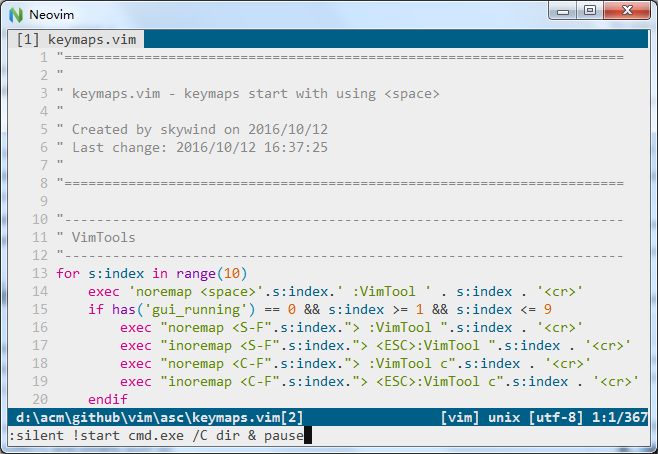
:silent !start cmd.exe /C dir & pause
before running the command:
after running the command:
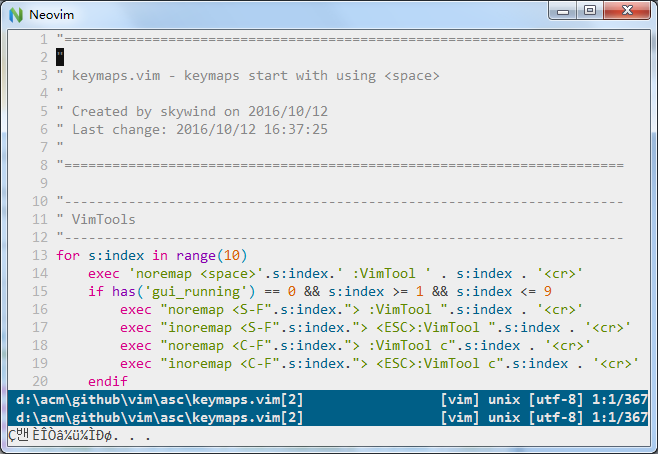
- strange output in the cmdline area
- tabline disappeared.
 skywind3000
All 7 comments
Very strange. Does it eventually get back to normal - e.g. if you :redraw?
 equalsraf
on 3 Jul 2017
equalsraf
on 3 Jul 2017
GUI restored after :redraw!,
But I am afraid there is an important bug like access an invalid memory area....
skywind3000
on 3 Jul 2017
Possible, but first we need to figure out if the issue is in the GUI or in Neovim. Usually the GUI just renders what nvim tells it.
It seems more likely that start is producing output that somehow causes that breakage in the display.
The disappearing tabline is not unexpected as the interface scrolls to show the command output. The issue here is the displayed text.
Does this also happen with other commands? like !echo hello
equalsraf
on 3 Jul 2017
neovim/neovim#5844 directly relates to this issue.
neovim-qt is fine. Neovim has issues parsing un-quoted parameters. I can definitely reproduce this in Windows using nvim 0.2.2.
Quoting the parameters to cmd.exe is a current workaround.
:silent !start cmd.exe "/C dir & pause"
 DustinVenegas
on 22 Apr 2018
DustinVenegas
on 22 Apr 2018
@DustinVenegas Nvim prerelease (0.3.0) has some improvement with quoting on Windows, e.g. https://github.com/neovim/neovim/pull/7343
 justinmk
on 22 Apr 2018
justinmk
on 22 Apr 2018
silent !start cmd.exe /c dir & pause
runs cmd.exe /c dir in a different window and runs pause after start. start <command> & pause where <command> is cmd.exe /c dir.
neovim/neovim#7343 doesn't affect that behaviour but @DustinVenegas workaround doesn't work now, because it doesn't work in a cmd.exe prompt.
I'd change that to silent !start cmd.exe /s/c "dir & pause" to mirror nvim's behaviour but /s is optional for this specific command. For reference, check s:execute() in https://github.com/junegunn/fzf/blob/master/plugin/fzf.vim for neovim and cygwin workarounds using cmd.exe start.
 janlazo
on 29 Apr 2018
janlazo
on 29 Apr 2018
This issue can be closed.
Quoting the parameters to cmd.exe is a current workaround
Even in cmd.exe _itself_, start cmd.exe /C dir & pause will behave as it behaves in Nvim. This is a case where Vim is training people to do weird things.
justinmk
on 1 May 2018
Related issues
 qwfy
·
3Comments
qwfy
·
3Comments
 gwerbin
·
10Comments
gwerbin
·
10Comments
 gagbo
·
6Comments
gagbo
·
6Comments
 stu0292
·
3Comments
stu0292
·
3Comments
 augustblizzard
·
6Comments
augustblizzard
·
6Comments
Most helpful comment
runs
cmd.exe /c dirin a different window and runspauseafterstart.start <command> & pausewhere<command>iscmd.exe /c dir.neovim/neovim#7343 doesn't affect that behaviour but @DustinVenegas workaround doesn't work now, because it doesn't work in a cmd.exe prompt.
I'd change that to
silent !start cmd.exe /s/c "dir & pause"to mirror nvim's behaviour but/sis optional for this specific command. For reference, checks:execute()in https://github.com/junegunn/fzf/blob/master/plugin/fzf.vim for neovim and cygwin workarounds using cmd.exestart.