The font rendering doesn't look quite clean on my system. I think this is due to (a lack of) subpixel rendering, as some colors look a lot better than others.
Different applications such as Firefox or Atom (Electron) match the crispness of my desktop environment. Here a comparison of Neovide (top) and nvim in xfce4-terminal (bottom):
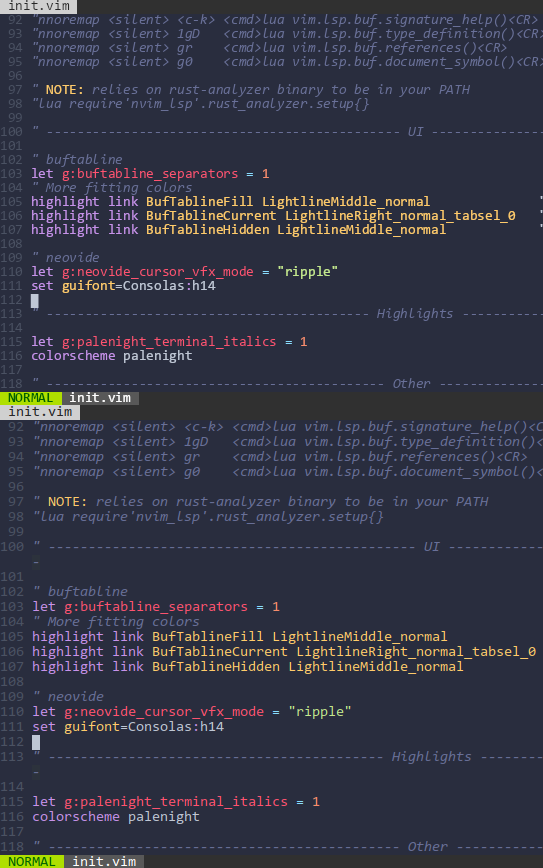
Notice how much better the actual shape of the glyphs is preserved in "ripple".
 adrian5
All 6 comments
Its an interesting point and I suspect it comes down to the various font settings for drawing text using skia.
We use the draw textblob call here: https://github.com/Kethku/neovide/blob/master/src/renderer/mod.rs#L138
And it is influenced by various settings on the paint object. I'm certainly not an expert and have not explored all of the text rendering options in skia, so any investigation would be greatly appreciated! Unfortunately its a bit low on my priority list for investigating myself as we are still constantly fighting fires with other bugs which are higher priority.
I'd be happy to answer any questions if you want to dig into it though! Theres a few of us often over here: https://gitter.im/neovide/community if you want to chat that way
 Kethku
on 11 May 2020
Kethku
on 11 May 2020
I took a look at this and it seems to properly enable subpixel rendering, some changes to rendering may be necessary.
Naively, we can enable supbixel rendering as follows.
diff --git a/src/renderer/fonts/utils.rs b/src/renderer/fonts/utils.rs
index e4a74cf..434f54b 100644
--- a/src/renderer/fonts/utils.rs
+++ b/src/renderer/fonts/utils.rs
@@ -9,8 +9,11 @@ pub fn build_skia_font_from_skribo_font(
     let font_data = skribo_font.font.copy_font_data()?;
     let skia_data = Data::new_copy(&font_data[..]);
     let typeface = Typeface::from_data(skia_data, None)?;
-
-    Some(SkiaFont::from_typeface(typeface, base_size))
+    let mut font = SkiaFont::from_typeface(typeface, base_size);
+    font.set_subpixel(true); // subpixel positioning of glyphs
+    font.set_hinting(skia_safe::FontHinting::None);
+    font.set_edging(skia_safe::font::Edging::SubpixelAntiAlias);
+    Some(font)
 }

 pub fn build_properties(bold: bool, italic: bool) -> Properties {
diff --git a/src/renderer/rendered_window.rs b/src/renderer/rendered_window.rs
index a5ed1d9..93378b1 100644
--- a/src/renderer/rendered_window.rs
+++ b/src/renderer/rendered_window.rs
@@ -1,5 +1,6 @@
 use std::collections::VecDeque;

+use skia_safe::{SurfaceProps, SurfacePropsFlags};
 use skulpin::skia_safe::canvas::{SaveLayerRec, SrcRectConstraint};
 use skulpin::skia_safe::gpu::SurfaceOrigin;
 use skulpin::skia_safe::{
@@ -28,13 +29,14 @@ fn build_window_surface(
         parent_image_info.color_space(),
     );
     let surface_origin = SurfaceOrigin::TopLeft;
+    let props = SurfaceProps::new(SurfacePropsFlags::default(), skia_safe::PixelGeometry::BGRH); // subpixel layout (should be configurable/obtained from fontconfig)
     Surface::new_render_target(
         &mut context,
         budgeted,
         &image_info,
         None,
         surface_origin,
-        None,
+        Some(&props),
         None,
     )
     .expect("Could not create surface")
But this does not lead to correct subpixel antialiasing:
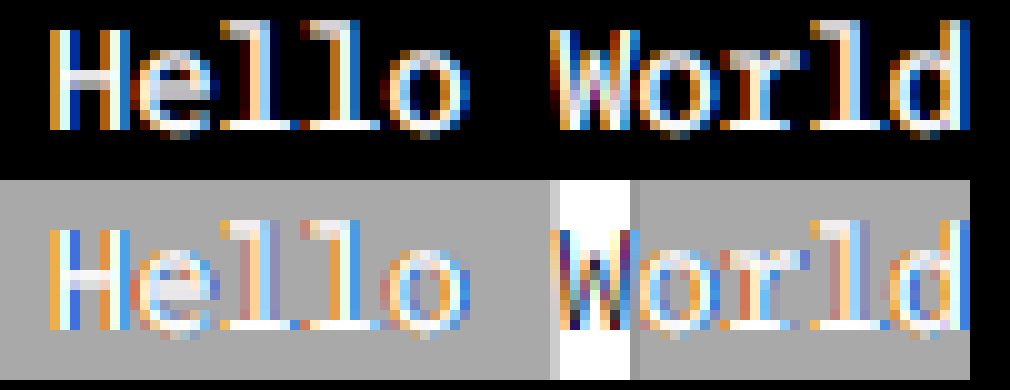
When drawing black on white the color fringes should be the other way around than when drawing white on black. Note that I am using the BGR layout instead of the more common RGB.
I think neovide just draws the text on a transparent canvas and composits that over a background canvas. But this way skia does not know which colors to choose for subpixel antialiasing.
I believe this would not happen when rendering the text on the same canvas as the background without transparent compositing.
 DorianRudolph
on 20 Mar 2021
DorianRudolph
on 20 Mar 2021
@DorianRudolph this is awesome details I didn't have before. So the problem with subpixel rendering at the moment is that the rendering of the text itself is done to it's own surface rather than to the main canvas, so it doesn't know what color to blend the subpixels with.
I'm going to go do a walk through of the code to get a handle of each of the steps in the render. Then I should be able to see how we can condense the steps into a single canvas (if possible)
Kethku
on 21 Mar 2021
@DorianRudolph rather than build the writeup for the current rendering (which I may still do), I just ended up fixing the problem. I created a PR here: https://github.com/Kethku/neovide/pull/502 which removes the split between foreground and background surfaces and just draws them both to one surface. This has the added benefit of cutting the render cost approximately in half for just moving windows around, which is nice.
Can you give the PR a try and let me know what issues you find?
Kethku
on 21 Mar 2021
Note, because the text is stored in an image, its possible that the subpixels become invalid when translated. I don't know enough about font rendering technology to know if that is a problem.
If thats the case, then we may have to optimize the renderer more so that we can rerender every frame. However that feels pretty inefficient.
Kethku
on 21 Mar 2021
Subpixels are still valid when translated (as long as they are rendered at integer positions).
The background rendering seems to be correct now, but the cursor is still wrong.

The issue is that the PixelGeometry configured in build_window_surface does not apply to the root window, where the cursor is rendered (this is not a blending issue, it looks the same even with vertical subpixels).
Unfortunately, there seems no way to do this with skulpin: https://github.com/aclysma/skulpin/blob/9b02a01f589f36bbf1e0e7400baccbe164e9c735/skulpin-renderer/src/skia_support.rs#L134
I think skulpin should allow passing SurfaceProps. I'm sure this can be added as a pull request.
Also, I think you can remove
self.paint.set_blend_mode(BlendMode::SrcOver);
let transparent = Color::from_argb(0, 0, 0, 0);
self.paint.set_color(transparent);
canvas.draw_rect(region, &self.paint);
from draw_foreground since drawing alpha 0 with BlendMode::SrcOver does not do anything.
DorianRudolph
on 21 Mar 2021
Related issues
 Connor-Frank
·
6Comments
Connor-Frank
·
6Comments
 georgebushfourtwenty
·
7Comments
georgebushfourtwenty
·
7Comments
 jberryman
·
4Comments
jberryman
·
4Comments
 Vui-Chee
·
6Comments
Vui-Chee
·
6Comments
 noelzubin
·
6Comments
noelzubin
·
6Comments
Most helpful comment
Its an interesting point and I suspect it comes down to the various font settings for drawing text using skia.
We use the draw textblob call here: https://github.com/Kethku/neovide/blob/master/src/renderer/mod.rs#L138
And it is influenced by various settings on the paint object. I'm certainly not an expert and have not explored all of the text rendering options in skia, so any investigation would be greatly appreciated! Unfortunately its a bit low on my priority list for investigating myself as we are still constantly fighting fires with other bugs which are higher priority.
I'd be happy to answer any questions if you want to dig into it though! Theres a few of us often over here: https://gitter.im/neovide/community if you want to chat that way