Neos-ui: Feature request: insertion-anchor with mode-preselection
I often see that editors click on the +-icon to insert a content-node as child to a content-collection-node but they end up inserting not a child but a sibling to the clicked content node because they dont realize that the default insert-mode is "insert below".
We have quite a lot of content nodetypes that are also content-collections where the editor most of the time wants to insert a child and not a sibling.
I wish there would be an option to set the default-mode (globally or even better per node type) so the insert dialog could look like this right after clicking the +-icon:
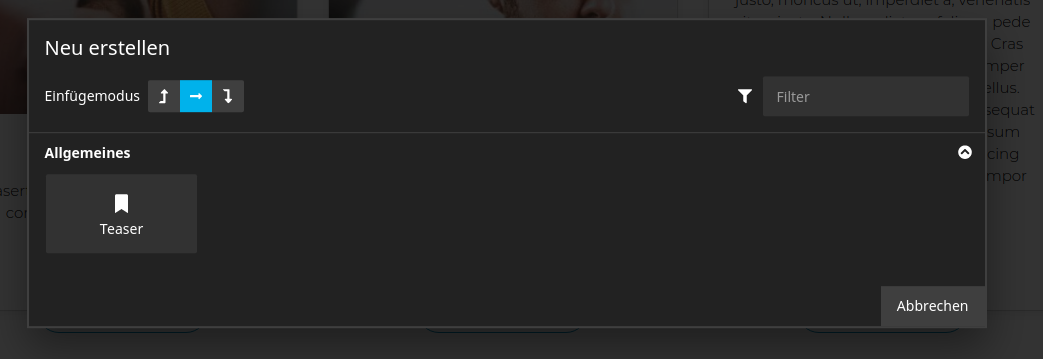
I could imagine to configure that via NodeTypes.yaml or as value for the data attribute data-__neos-insertion-anchor.
If anyone is up to implement this, I would be open to help sponsoring it.
 DrillSergeant
All 13 comments
I believe the default should be the insert-into mode if it's available. I'd just make it the default, instead of making it configurable (don't like having configs if it's avoidable).
Wdyt @bwaidelich @kitsunet?
 dimaip
on 14 Sep 2020
dimaip
on 14 Sep 2020
I believe the default should be the insert-into mode if it's available
+1
 bwaidelich
on 14 Sep 2020
bwaidelich
on 14 Sep 2020
I just tested with the demo-package. Here are the steps to reproduce the behaviour:
- Create a content-nodetype that is also a content-collection:
'Neos.Demo:Content.Test':
  superTypes:
    'Neos.Neos:Content': true
    'Neos.Neos:ContentCollection': true
  ui:
    label: i18n
    icon: 'icon-file-text'
- Fusion-Object for rendering (not needed to reproduce, just to make the example complete)
prototype(Neos.Demo:Content.Test) < prototype(Neos.Neos:ContentComponent) {

    content = Neos.Neos:ContentCollectionRenderer

    renderer = afx`
        <div>
            {props.content}
        </div>
    `
}
- Insert the a content node of the new type somewhere
- Click the +-icon of the inserted content-element
Expected result
You end up in the insert-dialog with mode = insert into
Actual result
You end up in the insert-dialog with mode = insert after
DrillSergeant
on 28 Sep 2020
Makes sense, will adjust, but I doubt this can go in as a bugfix, it will target master.
dimaip
on 28 Sep 2020
Would be fine with me
DrillSergeant
on 28 Sep 2020
@dimaip Do you have resources to look at this soonish? I guess there will be new UI-Release soon (beacuse quite some issues where solved) and it would nice to have this one included.
I had already multiple customer-supportcases where they tried to insert a child-element but ended up inserting a sibling and thought they discoverd a bug. I explained them the insert-mode selector so they could continue to work. But I think more of the editors will be confused soonish.
You can add the time to the sponsored work you did already in the other tickets. (except it is way more than 1 or 2 hours).
DrillSergeant
on 7 Oct 2020
@DrillSergeant yes, was on my list, will try to take care tomorrow. Thanks!
dimaip
on 7 Oct 2020
Do you think we can do this as a bugfix and ship it with 4.0? It kinda feels that that's the way it was meant to be from the beginning... /cc @bwaidelich @kitsunet?
dimaip
on 8 Oct 2020
I think too that it's the better default, but I'm not sure we should change the default behaviour for 4.x.
 Sebobo
on 8 Oct 2020
Sebobo
on 8 Oct 2020
I agree to what @Sebobo wrote: It's probably the better default, but IMO it should be properly announced with a new feature release. As much as I like this change in behavior I would not "smuggle" it into a patchlevel release..
Next version is just 6 weeks away :)
bwaidelich
on 8 Oct 2020
Thanks guys for the participation. Understood the point and 6 weeks is not far way.
Although I was hoping to have it even ealier as our current project (where we massivly use content nodetypes that are also content-collections) will be filled with content by lots of (> 20) editors starting end of next week. We already got "bugreports" as mentioned before in my recent comment. I will make sure those editors will be briefed more about the insert-mode selection.
DrillSergeant
on 8 Oct 2020
Agreed.
@DrillSergeant you could cherry-pick/beard it to your project.
dimaip
on 8 Oct 2020
https://github.com/cweagans/composer-patches might help there..
bwaidelich
on 8 Oct 2020
Related issues
bwaidelich
·
9Comments
 pduersteler
·
8Comments
pduersteler
·
8Comments
 markusguenther
·
4Comments
markusguenther
·
4Comments
 ComiR
·
5Comments
dimaip
·
5Comments
ComiR
·
5Comments
dimaip
·
5Comments
Most helpful comment
Makes sense, will adjust, but I doubt this can go in as a bugfix, it will target master.