Neofetch: Adding Ubuntu Flavors: Fix whitespaces
When adding or using an Ubuntu Flavor, all the logos don't have whitespaces. If anything they have just white in them. To see the full logos and everything actually accurate, visit https://ubuntu.com/download/flavours.
The following logos are incorrect and need whitespace fixes asap. I'd love to SRU this to backport this into Ubuntu 20.04 Focal LTS and it'd be great!
Lubuntu
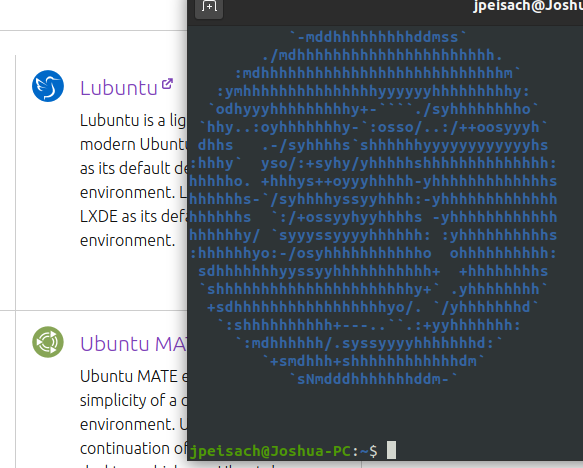
Sidenote: As I go along the list-Ubuntu Budgie's colors are inverted (Gray/White to White/Gray). Might've been due to terminal colors but you might want to flip it. Your choice.
Sidenote #2: You need to add support for Ubuntu Kylin (I'll probably PR)
Ubuntu MATE
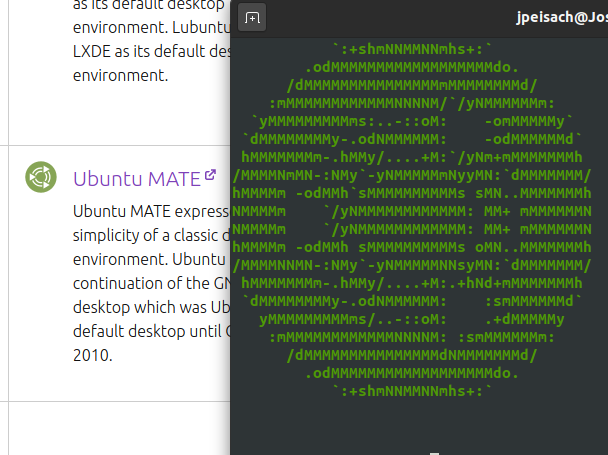
Xubuntu
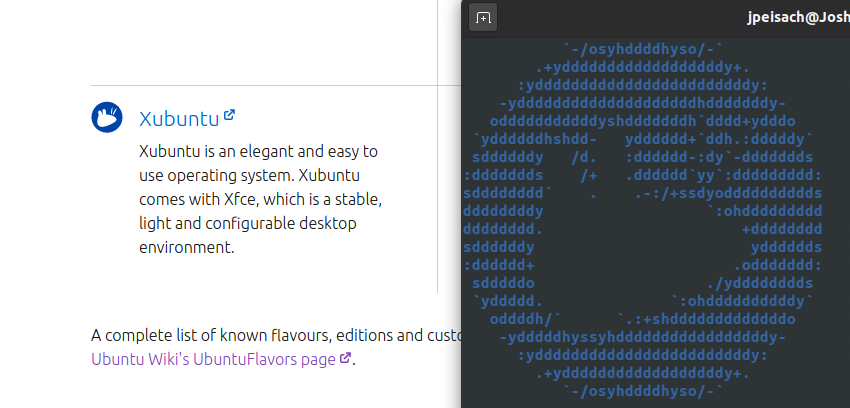
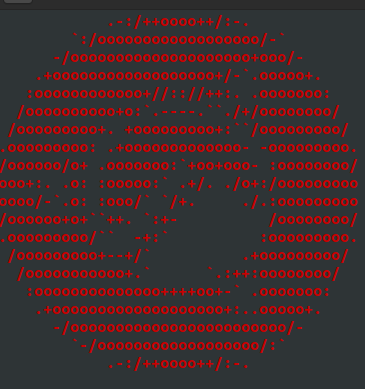
Ubuntu Cinnamon Remix
You get the point of the image-it's not on the flavor site so I can't show you the logo comparison but I can show you the issue.
 ItzSwirlz
All 21 comments
I'm happy to accept PRs for this change. :+1:
 dylanaraps
on 2 Aug 2020
dylanaraps
on 2 Aug 2020
Yeah. Just wish I knew how to deal with ASCII.
ItzSwirlz
on 2 Aug 2020
It should simply be a matter of filling the space with some kind of character, surrounding each instance on each line with the needed color formatting variables. What's the deadline on these changes (for Ubuntu)? If there's still adequate time left, I'll take a look. :+1:
dylanaraps
on 2 Aug 2020
Ubuntu deadline let's see... well the MOTUs aren't doing any work with my Cinnamon patch requests but I may be able to push someone for neofetch.
The white spaces: on plain Ubuntu they are filled in white. All you need to do is fix the blank spaces by filling them white-take the letters of the classic Ubuntu/Ubuntu Budgie for example
ItzSwirlz
on 2 Aug 2020
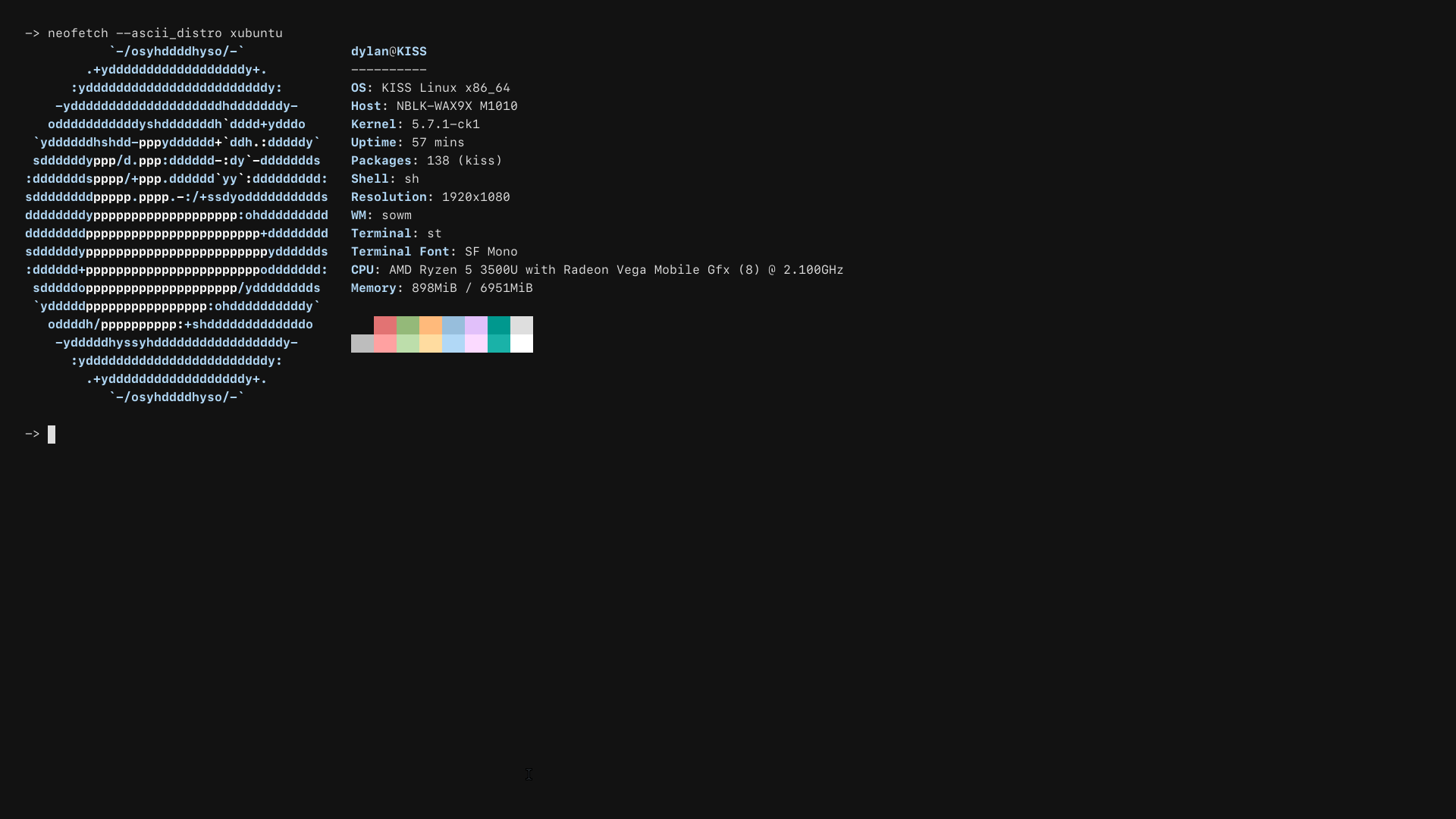
Here's Xubuntu, thoughts?
dylanaraps
on 2 Aug 2020
Much better. There are a few white spots but you got the right idea, keep going you're doing gr8 m8
ItzSwirlz
on 2 Aug 2020
I`ve also tried xubuntu, seemed the easiest one. ;)

 arisinfenix
on 2 Aug 2020
arisinfenix
on 2 Aug 2020
The code is
        "Xubuntu"*)
            set_colors 4 7 1
            read -rd '' ascii_data <<'EOF'
${c1}           `-/osyhddddhyso/-`
        .+yddddddddddddddddddy+.
      :yddddddddddddddddddddddddy:
    :ydddddddddddddddddddhhdddddddy:
  `oddddddddddd${c2}hhh${c1}ddddddd${c2}hh${c1}ddd${c2}hh${c1}ddddo`
 `ydddddd${c2}hhh${c1}dd${c2}hhhhh${c1}ddddd${c2}hhh${c1}dd${c2}hhh${c1}dddddy`
 sdddddd${c2}hhhhh${c1}d${c2}hhhhh${c1}ddddd${c2}hhh${c1}d${c2}hhh${c1}ddddddds
:ddddddd${c2}hhhhhhhhhhh${c1}ddddd${c2}hh${c1}d${c2}hhh${c1}ddddddddd:
ydddddddd${c2}hhhhhhhhhhhhhhhhhhhh${c1}ddddddddddy
dddddddd${c2}hhhhhhhhhhhhhhhhhhhhhhh${c1}ddddddddh
hddddddd${c2}hhhhhhhhhhhhhhhhhhhhhhhh${c1}dddddddh
ydddddd${c2}hhhhhhhhhhhhhhhhhhhhhhhhhh${c1}ddddddy
:dddddd${c2}hhhhhhhhhhhhhhhhhhhhhhhhh${c1}ddddddd:
 sddddd${c2}hhhhhhhhhhhhhhhhhhhhhhh${c1}dddddddds
 `yddddd${c2}hhhhhhhhhhhhhhhhhhh${c1}ddddddddddy`
  `oddddd${c2}hhhhhhhhhhhhhh${c1}dddddddddddddo`
    :yddddd${c2}hhhhhh${c1}dddddddddddddddddy:
      :yddddddddddddddddddddddddy:
        .+yddddddddddddddddddy+.
           `-/osyhhddhhyso/-`
EOF
        ;;
I'll see if I can play around and fix stuff via PR
ItzSwirlz
on 3 Aug 2020
Anddd as the people say, I can't. I'm just not experienced enough. I could do it but I would likely not be 100% correct, up to you
However, I think the colors are a bit off for gnome-terminal-especially for UCR-the colors I suggest for it are "130 7" (set_colors 130 7)
ItzSwirlz
on 3 Aug 2020
For the colors: check out #1517
Whitespaces will still have to be fixed-but colors being more serious and accurate will help.
ItzSwirlz
on 3 Aug 2020
I reworked Xubuntu and Lubuntu, see #1518
arisinfenix
on 3 Aug 2020
For Cinnamon see #1521
arisinfenix
on 4 Aug 2020
For Mate see #1522
arisinfenix
on 4 Aug 2020
What about budgie? Currently it is white with spaces.
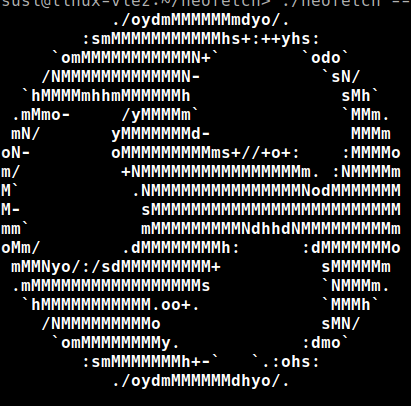
Should it be converted to dark-grey with white filling to better match the logo shown here?
https://ubuntu.com/download/flavours
arisinfenix
on 4 Aug 2020
Budgie terminal by default I believe (tilix) theme is gray. That should be fine but you might want to color in the blank spaces with gray. Not 100% sure
ItzSwirlz
on 4 Aug 2020
Ok, then I think it's ok to leave it as is for now. :)
arisinfenix
on 4 Aug 2020
If you find the original logo you want, open it with GIMP, scale image to 20x40(HxW) so it scales properly for letters being taller than wide. Save image as a .xmp file. You can open this with nano or other text editor, and have the ASCII art done for you. You will have to go in and manually add the coloring barrier sections though: "${c#}" ...
Or, take a look at what letters/symbols GIMP's .xmp file used for the whitespaces, and just add those into neofetch default ASCII code. Not too hard, but semi-time consuming.
Either way you go about getting some symbol in place of whitespace, you may need to add another ${c#} color number in set_colors, and inline, if you are adding a new symbol that wasn't there to begin with. For set_colors, just test random numbers in that spot til you find what you like. I ran 0-99 and saw the majority of colors. Can't find Orange or light brown yet, so good luck getting what you need...
 Im-catfood
on 5 Aug 2020
Im-catfood
on 5 Aug 2020
If you find the original logo you want, open it with GIMP, scale image to 20x40(HxW) so it scales properly for letters being taller than wide. Save image as a .xmp file. You can open this with nano or other text editor, and have the ASCII art done for you. You will have to go in and manually add the coloring barrier sections though: "${c#}" ...
Or, take a look at what letters/symbols GIMP's .xmp file used for the whitespaces, and just add those into neofetch default ASCII code. Not too hard, but semi-time consuming.
Either way you go about getting some symbol in place of whitespace, you may need to add another ${c#} color number in set_colors, and inline, if you are adding a new symbol that wasn't there to begin with. For set_colors, just test random numbers in that spot til you find what you like. I ran 0-99 and saw the majority of colors. Can't find Orange or light brown yet, so good luck getting what you need...
The only way to find a correct color or tune one is to change the terminal theme. Easier said then done and nobody wants a distro specific terminal color, espesially for a DE
ItzSwirlz
on 5 Aug 2020
Thanks, that's about where I'm stuck at... .Xresources and dkeger fix ascii, but I really don't want tux colors for terminal, lol.
Im-catfood
on 9 Aug 2020
Hold on-we are leaving this on hold-I think we are
1) Leaving budgie the way it is
2) Keeping UCR colors the same as Ubuntu but lighter-the one we currently have
I think this issue has been solved, so I'll close this issue. Thanks guys!
ItzSwirlz
on 11 Aug 2020
Related issues
 rudylorren
·
8Comments
rudylorren
·
8Comments
 xstreamx
·
4Comments
xstreamx
·
4Comments
 Monty
·
4Comments
Monty
·
4Comments
 shawniac
·
4Comments
shawniac
·
4Comments
 KevinParnell
·
9Comments
KevinParnell
·
9Comments
Most helpful comment
I`ve also tried xubuntu, seemed the easiest one. ;)