Neofetch: Can't Find a Way To Make Neofetch Follow Terminal Colours
If this is already a feature, I'm very sorry but I did have a really good look before posting this, I could only find ways to change individual colors, which is a huge hassle for me. What I want is to be able to have neofetch follow the standard terminal colors set through the settings of the terminal.
If it's not, can I request this as a feature please? Thanks for your time!
 GalacticHog
All 12 comments
Neofetch uses your terminal colors and only tour terminal colors. I don't understand.
 dylanaraps
on 9 Jun 2018
dylanaraps
on 9 Jun 2018
So what I mean is I currently use screenfetch and I'm wanting to switch. I have Tux displayed in my terminal, the details of my system on the right in blue, and the categories of information on the left in yellow. When I try to use Neofetch all of the text becomes blue, including the Tux penguin on the left of the terminal.
GalacticHog
on 10 Jun 2018
You can customise the colors using the config file or the runtime arguments
dylanaraps
on 10 Jun 2018
I know and I was doing that, but I still ended up with a blue Tux penguin, I couldn't get it to just match the colours of my terminal naturally. That's the request here.
GalacticHog
on 10 Jun 2018
I don't understand as well. Can you make a screenshot and post it here?
 robertwolter
on 14 Jun 2018
robertwolter
on 14 Jun 2018
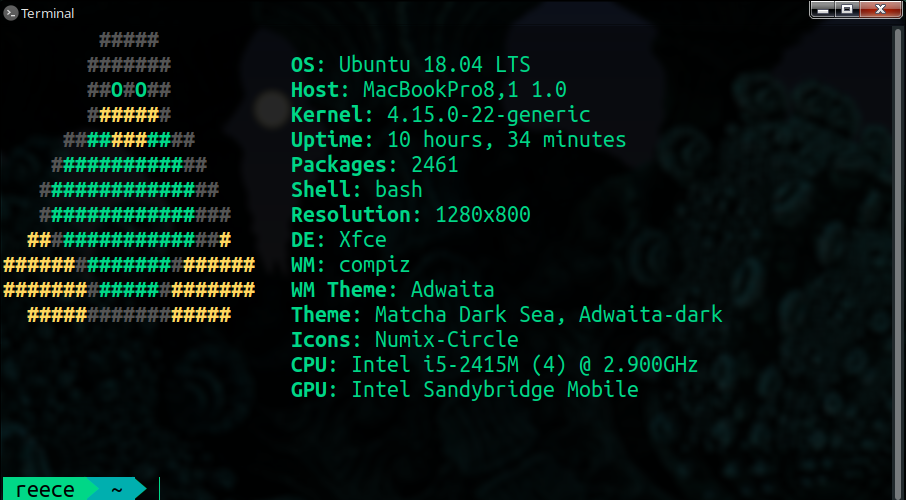
This first image is screenfetch and the look I'm trying to replicate:

This second image is what shows in neofetch, with colours set to "distro" in the config file:
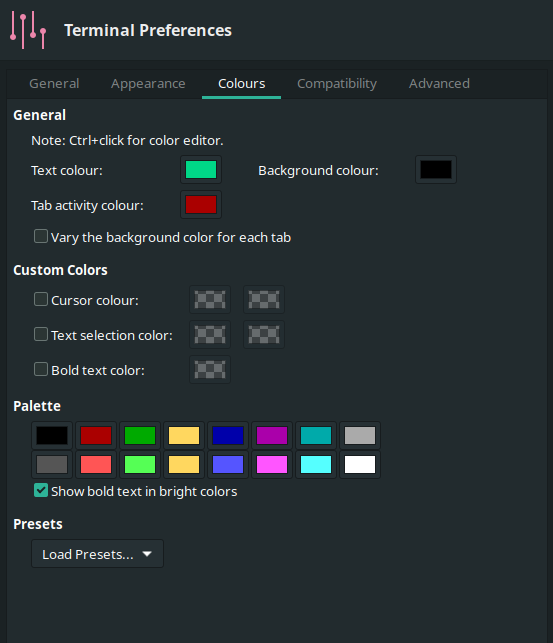
This third image is the colours I have chosen in terminal preferences:
GalacticHog
on 17 Jun 2018
This works for me. The same changes can be made to your config file.
neofetch --ascii_distro linux --ascii distro --colors 11 2 11 11 --ascii_colors 15 8 11
Where do I apply the "--ascii distro -- colors 11 2 11 11" within the config file?
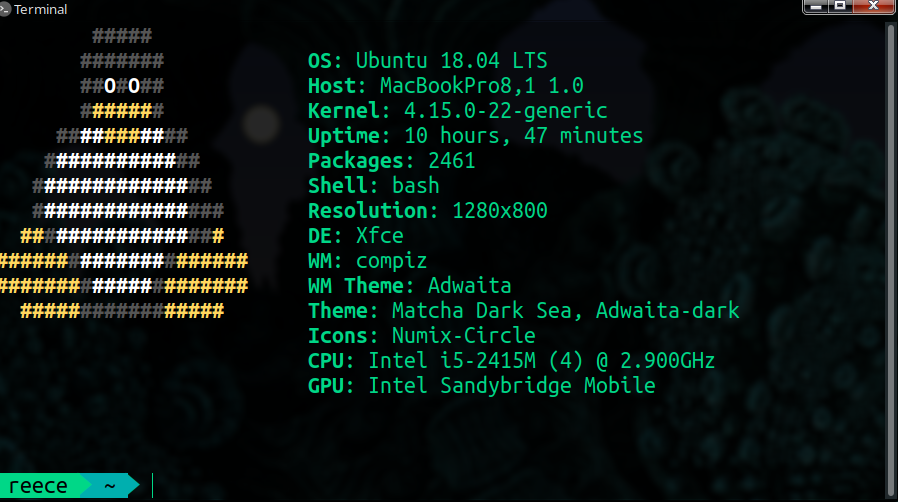
I've applied the "--ascii_colors" value and I'm definitely closer!
GalacticHog
on 17 Jun 2018
# Ascii distro
# Which distro's ascii art to display.
#
# Default: 'auto'
# Values:  'auto', 'distro_name'
# Flag:    --ascii_distro
#
# NOTE: Arch and Ubuntu have 'old' logo variants.
#       Change this to 'arch_old' or 'ubuntu_old' to use the old logos.
# NOTE: Ubuntu has flavor variants.
#       Change this to 'Lubuntu', 'Xubuntu', 'Ubuntu-GNOME' or 'Ubuntu-Budgie' to use the flavors.
# NOTE: Arch, Crux and Gentoo have a smaller logo variant.
#       Change this to 'arch_small', 'crux_small' or 'gentoo_small' to use the small logos.
ascii_distro="auto"

# Ascii Colors
#
# Default:  'distro'
# Values:   'distro', 'num' 'num' 'num' 'num' 'num' 'num'
# Flag:     --ascii_colors
#
# Example:
# ascii_colors=(distro)      - Ascii is colored based on Distro colors.
# ascii_colors=(4 6 1 8 8 6) - Ascii is colored using these colors.
ascii_colors=(1 2 3 4 5 6 7)
There's only one entry for colors, "ascii_colors="
I can't apply any colours within "ascii_distro="
GalacticHog
on 17 Jun 2018
Send me your config file.
dylanaraps
on 17 Jun 2018
Thank you by the way
GalacticHog
on 17 Jun 2018
Related issues
dylanaraps
·
8Comments
 e-caste
·
7Comments
e-caste
·
7Comments
 ghost
·
5Comments
ghost
·
5Comments
 KevinParnell
·
9Comments
KevinParnell
·
9Comments
 Neil-seu
·
9Comments
Neil-seu
·
9Comments
Most helpful comment
This works for me. The same changes can be made to your config file.