Nemo: "Run in terminal" fails if path contains spaces
```
- Nemo version 3.6.5
- windowed nemo
- Distribution - Ubuntu 16.04
- 64 bit
```
Issue
If the path to an executable script contains spaces, "Run in terminal" does not handle spaces and bash tries to execute the path only up to the first space, resulting in a "file not found" error message.
Steps to reproduce
- Make sure Nemo is configured to ask which action to take for executable files
- Create bash script inside a folder with spaces in its path, e.g. ~/space name/script.sh
- Mark script.sh executable
- Double click script.sh in Nemo and select "Run in terminal"
Expected behaviour
script.sh is run in terminal.
 HifeFish
All 11 comments
Current version of Nemo is 4.6.5 ---
However, the problem still stands:-
/home/jeremy/Desktop/temperature based cpu throttler.sh [normally run elsewhere and with some underscores]
When I attempted to run it from nemo window, I'm offered the usual choice of run in terminal, display, etc
If I tell it to run in terminal it outputs
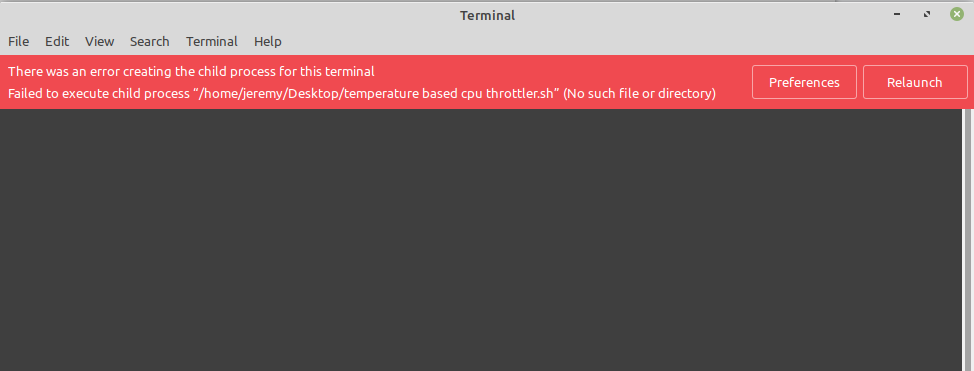
However, if I attempt to display the script, it works fine.
 Jeremy7701
on 2 Sep 2020
Jeremy7701
on 2 Sep 2020
It's your bash scripts that are broken not nemo.
Use
/home/jeremy/Desktop/'temperature based cpu throttler.sh'
or
'/home/jeremy/Desktop/temperature based cpu throttler.sh'
or
/home/jeremy/Desktop/temperature\ based\ cpu\ throttler.sh
 leigh123linux
on 2 Sep 2020
leigh123linux
on 2 Sep 2020
I never normally put spaces in scripts - but if I do, nemo should handle the issue in the same way as it does for opening the same file in a text editor.
This is not an issue for me since I have no difficult names in any scripts. ;)
Jeremy7701
on 2 Sep 2020
 NikoKrause
on 2 Sep 2020
NikoKrause
on 2 Sep 2020
Sorry about the old version, my bad.
@Jeremy7701 Thank you for looking into it on the newest version.
@leigh123linux The problem is not a line inside the script (even an empty script file produces the error), the problem is the path that nemo hands to the terminal. This path is generated by nemo, so the user has no way of adding quotes or escaping spaces as you suggest.
HifeFish
on 3 Sep 2020
I agree with @HifeFish, this is a bug indeed.
 clefebvre
on 4 Sep 2020
clefebvre
on 4 Sep 2020
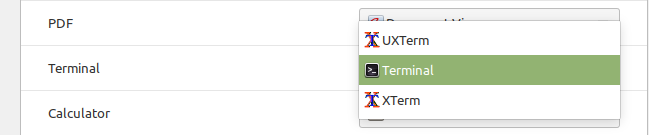
@HifeFish @Jeremy7701 what is Terminal set to in Preferred Applications?
 icarter09
on 14 Nov 2020
icarter09
on 14 Nov 2020
I presume its set to gnome-terminal - at least that's what is run from the LMDE4 menu.
Jeremy7701
on 14 Nov 2020
Yeah it is. There looks to be a couple of factors driving this issue and that setting looks to be one on them. Thanks.
icarter09
on 14 Nov 2020
@Jeremy7701 @HifeFish can either you try running
gsettings set org.cinnamon.desktop.default-applications.terminal exec-arg -- Thanks.
icarter09
on 14 Nov 2020
I made the gsettings change and no error messages are now generated.
(I checked the change had occurred with the GUI dconf).
A bash script (document 1.sh) which simply creates a file in /tmp was successfully 'run in terminal' from nemo.
Jeremy7701
on 15 Nov 2020
Related issues
 Hairybiker
·
5Comments
Hairybiker
·
5Comments
 jean-christophe-manciot
·
5Comments
jean-christophe-manciot
·
5Comments
 Enkouyami
·
7Comments
Enkouyami
·
7Comments
 gothicVI
·
5Comments
gothicVI
·
5Comments
 blueray453
·
5Comments
blueray453
·
5Comments
Most helpful comment