Nebular: Datepicker eror: date.getMonth is not a function
Issue type
I'm submitting a ... (check one with "x")
- [x] bug report
- [ ] feature request
Issue description
Current behavior:
I am using the DatePicker component and it returns:
NbCalendarViewModeComponent.html:2 ERROR TypeError: date.getMonth is not a function
    at NbNativeDateService.getMonthName (index.js?b4ac:5532)
    at NbCalendarViewModeComponent.getText (index.js?b4ac:4972)
    at Object.eval [as updateRenderer] (NbCalendarViewModeComponent.html:2)
    at Object.debugUpdateRenderer [as updateRenderer] (core.js?f18e:46485)
    at checkAndUpdateView (core.js?f18e:45467)
    at callViewAction (core.js?f18e:45827)
    at execComponentViewsAction (core.js?f18e:45755)
    at checkAndUpdateView (core.js?f18e:45468)
    at callViewAction (core.js?f18e:45827)
    at execEmbeddedViewsAction (core.js?f18e:45784)
I think it is the same error that the calendar component has #2250
 alexsintoni
All 8 comments
If it's the same than #2250, it has a PR https://github.com/akveo/nebular/pull/2330 to fix it (it's waiting for some attention...)
 tonivj5
on 22 Jul 2020
tonivj5
on 22 Jul 2020
Any updates on this?
 abhi40308
on 9 Aug 2020
abhi40308
on 9 Aug 2020
Not sure if it's fixed by #2330 as in the original issue posting the error appears in the NbCalendarViewModeComponent and #2330 fixes errors coming from the NbCalendarDayCellComponent. If someone still facing the issue from NbCalendarViewModeComponent, please check the value of the date property on NbCalendarViewModeComponent. To do this:
- Open the picker
- Make error appear in the console
- On the
Elementstab in the dev tools find thenb-calendar-view-modeelement and click on it, so it becomes selected - Go to the
Consoletab and typeng.getComponent($0).date - Post steps to reproduce and a screenshot of the value of the
dateproperty from the console here.

 yggg
on 1 Oct 2020
yggg
on 1 Oct 2020
Hi @yggg ,
yes, I still have the same issue even after updating the Nebular Framework to the last available version
    "@nebular/bootstrap": "^6.2.1",
    "@nebular/eva-icons": "^6.2.1",
    "@nebular/theme": "^6.2.1",
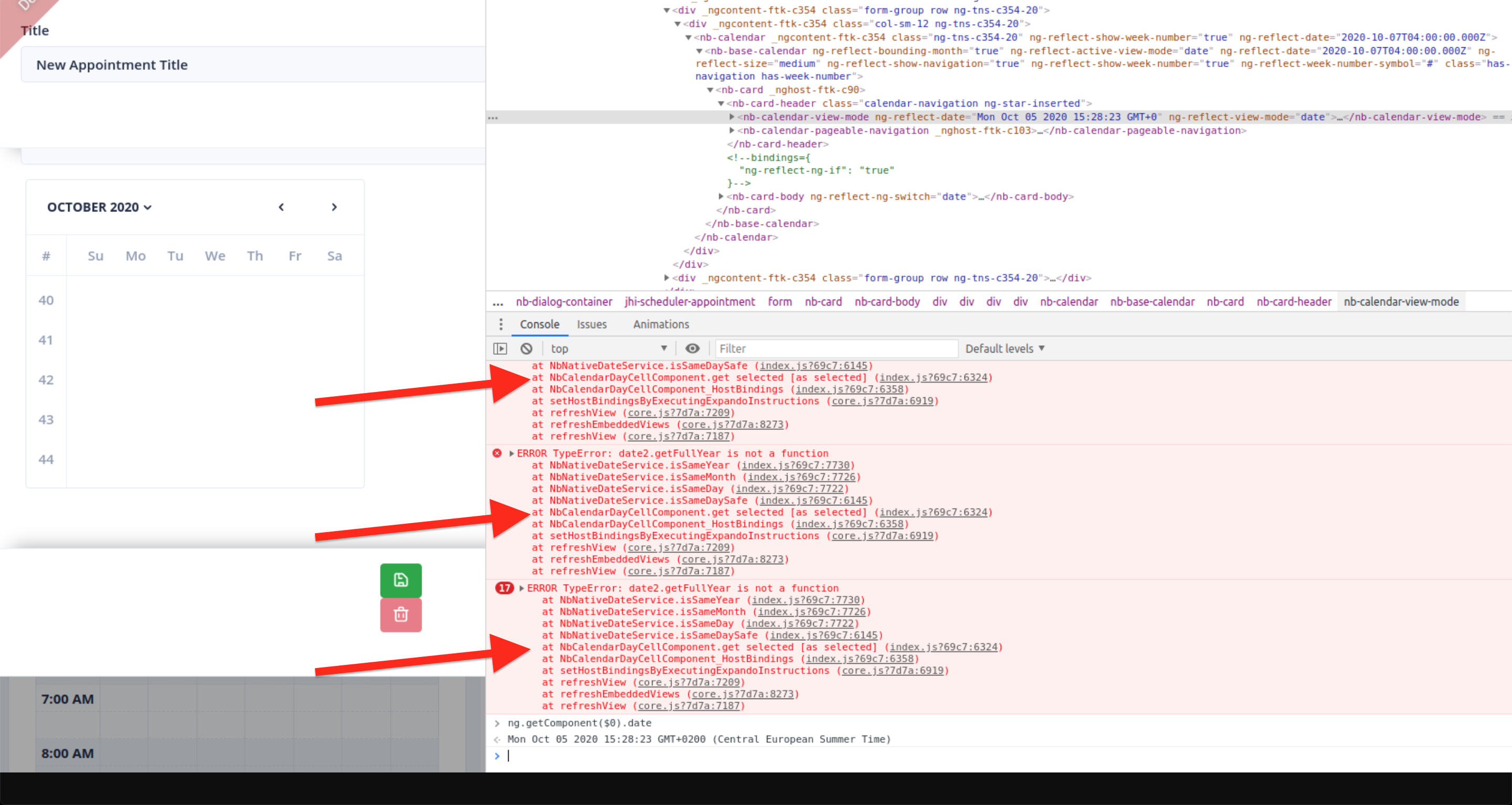
I followed your steps and this is the result:

Moreover, this is my code:
<nb-calendar [showWeekNumber]="true" [date]="appointmentDate" (dateChange)="onDateChange($event)">
</nb-calendar>
but appointmentDate is 07/10/2020 at 07:30 and in the console I see the wrong date which is today:
ng.getComponent($0).date
Mon Oct 05 2020 15:28:23 GMT+0200 (Central European Summer Time)
So, it seems I cannot tell to nb-calendar a different date than today.
alexsintoni
on 5 Oct 2020
Hi @alexsintoni! Thanks for getting back.
According to a stack trace, there is a different issue comparing with the original posting.
Now the error comes from NbCalendarDayCellComponent.
Could you repeat steps from my https://github.com/akveo/nebular/issues/2338#issuecomment-702117173, but on step 3 instead of nb-calendar-view-mode search for nb-calendar-day-cell. And on step 4 in addition to ng.getComponent($0).date also print the value of ng.getComponent($0).selectedValue.
And you use nb-calendar as a standalone component without nbDatepicker, right?
but appointmentDate is 07/10/2020 at 07:30 and in the console I see the wrong date which is today:
NbCalendarViewModeComponent.date property is set to visibleDate property from the calendar component. And if visibleDate isn't set on nb-calendar explicitly it's defaults to new Date which is current time at the moment of execution. If you add [visibleDate]="appointmentDate" to the your code:
<nb-calendar [showWeekNumber]="true" [date]="appointmentDate" [visibleDate]="appointmentDate" (dateChange)="onDateChange($event)">
</nb-calendar>
NbCalendarViewModeComponent.date value should be equal to appointmentDate.
yggg
on 5 Oct 2020
Hi @yggg
I just followed your new instructions and here the result:
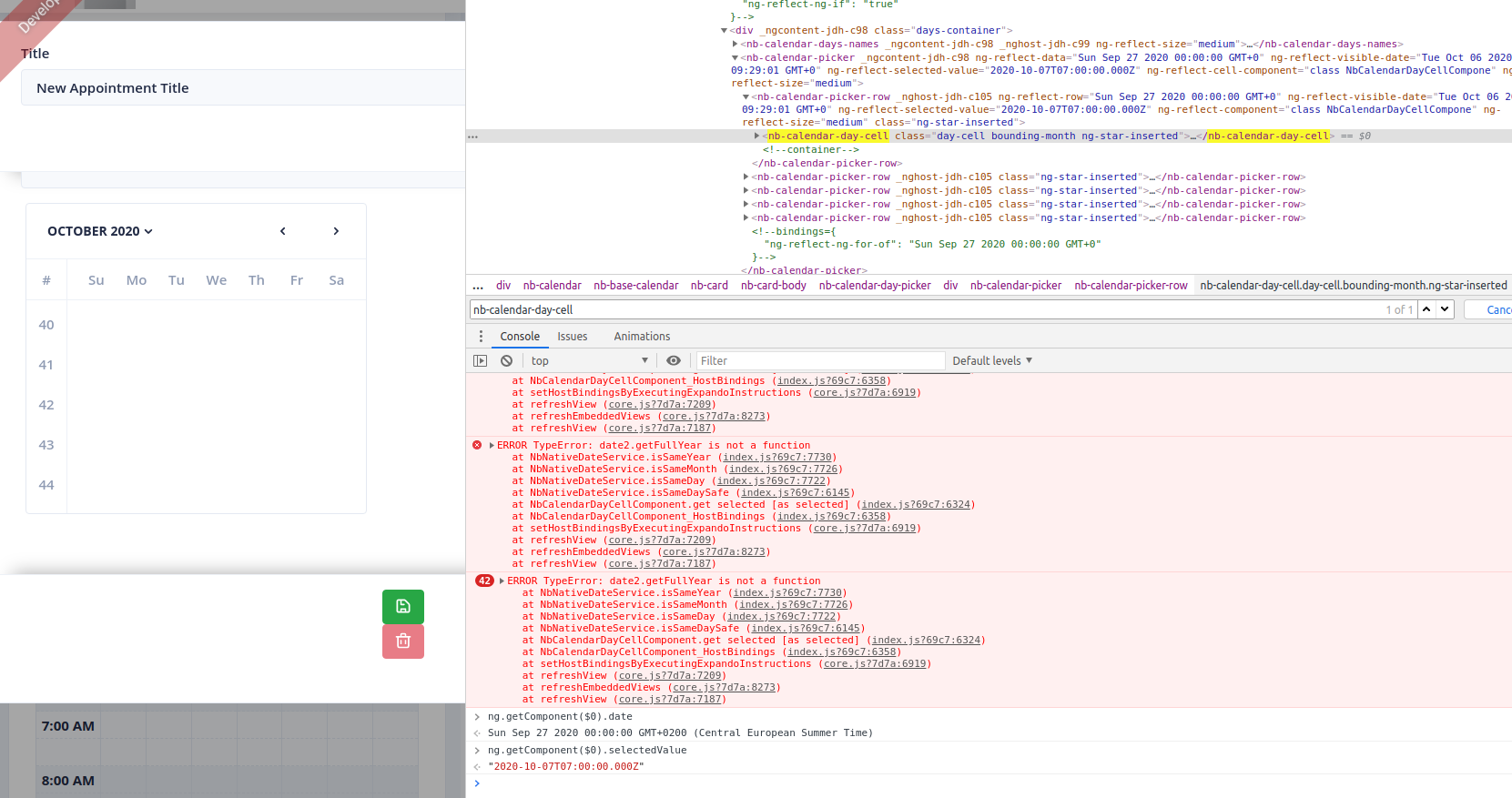
As you mentioned ng.getComponent($0).selectedValue returned the correct passed parameter.
I use nb-calendar as a standalone component without nbDatepicker and my code is pretty simple, just taken from the example in the Nebular documentation at Calendar Overview.
Here the code from the HTML template:
<nb-calendar [showWeekNumber]="true" [date]="appointmentDate" (dateChange)="onDateChange($event)">
</nb-calendar>
Where appointmentDate is an Angular Date type passed by another component.
I suspect that this error is similar to the issue #2250 which was fixed for Datepicker (issue #2338) but not for the Calendar component.
Do you think you can fix it quickly for Calendar component as well after you already fix it for Datepicker?
alexsintoni
on 6 Oct 2020
I suspect that this error is similar to the issue #2250 which was fixed for Datepicker (issue #2338) but not for the Calendar component.
Datepicker uses nb-calendar under the hood, and the fix for the #2250 was affecting one of the calendar components, fixing the issue for standalone nb-calendar users as well.
Where appointmentDate is an Angular Date type passed by another component.
According to the screenshot, the selectedValue property value is a string, but it should be a Date object (or a moment object if you use the NbMomentDateModule). NbCalendarDayCellComponent.selectedValue property gets its value from the date input of the nb-calendar component which also expects Date object as a value. It looks like appointmentDate is a string. If so, you need to parse a string into a Date object before passing it to the nb-calendars date input.
yggg
on 6 Oct 2020
hi @yggg
you were right, now it works therefore I close this ticket.
I was quite sure to pass a Date and not a string :(
alexsintoni
on 7 Oct 2020
Related issues
 mmezian
·
3Comments
mmezian
·
3Comments
 andredatsch
·
3Comments
andredatsch
·
3Comments
 jackyxhb
·
3Comments
jackyxhb
·
3Comments
 suku-h
·
3Comments
suku-h
·
3Comments
 bnbs
·
4Comments
bnbs
·
4Comments
Most helpful comment
hi @yggg
you were right, now it works therefore I close this ticket.
I was quite sure to pass a Date and not a string :(