Issue type
I'm submitting a ... (check one with "x")
- [X ] bug report
- [ ] feature request
Issue description
Current behavior:
Trying to upgrade to Angular 9
Expected behavior:
Everything compiles
Steps to reproduce:
Follow online steps to upgrade to Angular 9 from Angular 8
Related code:
ERROR in node_modules/@nebular/theme/schematics/util/ast.d.ts:2:34 - error TS2307: Cannot find module '@angular-devkit/core/src/experimental/workspace'.
2 import { WorkspaceProject } from '@angular-devkit/core/src/experimental/workspace';
~~~~~~~~~~~~~
node_modules/@nebular/theme/schematics/util/project.d.ts:2:34 - error TS2307: Cannot find module '@angular-devkit/core/src/experimental/workspace'.
2 import { WorkspaceProject } from '@angular-devkit/core/src/experimental/workspace';
~~~~~~~~~~~~~
 pdashford
All 13 comments
Similar issue is also with smart tables and angular 9.
 Pietrox
on 14 Feb 2020
Pietrox
on 14 Feb 2020
same
 BobCashStory
on 16 Feb 2020
pdashford
on 21 Feb 2020
BobCashStory
on 16 Feb 2020
pdashford
on 21 Feb 2020
We released 5.0.0-beta.8 with https://github.com/akveo/nebular/pull/2236 (Angular 9 + Ivy). You can install it via npm install @nebular/theme@next. Expecting to release a stable version later this week.
Please, report here if you see any issues.
 yggg
on 2 Mar 2020
yggg
on 2 Mar 2020
With the latest version I get this on compile:
Compiling @nebular/theme : es2015 as esm2015
ERROR in node_modules/@nebular/theme/components/stepper/stepper.component.d.ts:114:9 - error TS2380: 'get' and 'set' accessor must have the same type.
114 get selected(): NbStepComponent | undefined;
~~~~
node_modules/@nebular/theme/components/datepicker/datepicker.directive.d.ts:54:18 - error TS2380: 'get' and 'set' accessor must have the same type.
54 abstract get value(): T | undefined;
~
node_modules/@nebular/theme/components/datepicker/datepicker.directive.d.ts:55:18 - error TS2380: 'get' and 'set' accessor must have the same type.
55 abstract set value(value: T);
~
node_modules/@nebular/theme/components/datepicker/datepicker.component.d.ts:250:9 - error TS2380: 'get' and 'set' accessor must have the same type.
250 get value(): T | undefined;
....
 F0rt1s
on 9 Mar 2020
F0rt1s
on 9 Mar 2020
I upgraded Angular 9 and installed 5.0.0-beta.8. My application is working perfectly except for the following error at runtime (previously it was not appearing):
core.js:5871 ERROR TypeError: Cannot read property 'nativeElement' of undefined
at NbLayoutComponent.getScrollPosition (index.js:8072)
at NbLayoutComponent.scroll (index.js:8093)
at SafeSubscriber._next (index.js:7944)
at SafeSubscriber.__tryOrUnsub (Subscriber.js:183)
at SafeSubscriber.next (Subscriber.js:122)
at Subscriber._next (Subscriber.js:72)
at Subscriber.next (Subscriber.js:49)
at TakeUntilSubscriber._next (Subscriber.js:72)
at TakeUntilSubscriber.next (Subscriber.js:49)
at FilterSubscriber._next (filter.js:33)
It seems the failure is in the following function
/**
* Returns scroll position of current scroll container.
*
* IfwithScroll= true, returns scroll position of the.scrollable-containerelement,
* otherwise - of the scrollable element of the window (which may be different depending of a browser)
*
* @returns {NbScrollPosition}
*/
getScrollPosition() {
if (!isPlatformBrowser(this.platformId)) {
return { x: 0, y: 0 };
}
if (this.withScrollValue) {
__ _const container = this.scrollableContainerRef.nativeElement;_ __
return { x: container.scrollLeft, y: container.scrollTop };
}
const documentRect = this.document.documentElement.getBoundingClientRect();
const x = -documentRect.left || this.document.body.scrollLeft || this.window.scrollX ||
this.document.documentElement.scrollLeft || 0;
const y = -documentRect.top || this.document.body.scrollTop || this.window.scrollY ||
this.document.documentElement.scrollTop || 0;
return { x, y };
}
 miguelllop
on 10 Mar 2020
miguelllop
on 10 Mar 2020
I have the same issue
I upgraded Angular 9 and installed 5.0.0-beta.8. My application is working perfectly except for the following error at runtime (previously it was not appearing):
core.js:5871 ERROR TypeError: Cannot read property 'nativeElement' of undefined
at NbLayoutComponent.getScrollPosition (index.js:8072)
at NbLayoutComponent.scroll (index.js:8093)
at SafeSubscriber._next (index.js:7944)
at SafeSubscriber.__tryOrUnsub (Subscriber.js:183)
at SafeSubscriber.next (Subscriber.js:122)
at Subscriber._next (Subscriber.js:72)
at Subscriber.next (Subscriber.js:49)
at TakeUntilSubscriber._next (Subscriber.js:72)
at TakeUntilSubscriber.next (Subscriber.js:49)
at FilterSubscriber._next (filter.js:33)It seems the failure is in the following function
/**
- Returns scroll position of current scroll container.
*- If
withScroll= true, returns scroll position of the.scrollable-containerelement,- otherwise - of the scrollable element of the window (which may be different depending of a browser)
*- @returns {NbScrollPosition}
*/
getScrollPosition() {
if (!isPlatformBrowser(this.platformId)) {
return { x: 0, y: 0 };
}
if (this.withScrollValue) {
__ _const container = this.scrollableContainerRef.nativeElement;_ __
return { x: container.scrollLeft, y: container.scrollTop };
}
const documentRect = this.document.documentElement.getBoundingClientRect();
const x = -documentRect.left || this.document.body.scrollLeft || this.window.scrollX ||
this.document.documentElement.scrollLeft || 0;
const y = -documentRect.top || this.document.body.scrollTop || this.window.scrollY ||
this.document.documentElement.scrollTop || 0;
return { x, y };
}
 jarbitlira
on 10 Mar 2020
jarbitlira
on 10 Mar 2020
I have exactly the same issue as @miguelllop
 bboydflo
on 11 Mar 2020
bboydflo
on 11 Mar 2020
I have exactly the same issue as @miguelllop
And I fixed it by removing windowMode from <nb-layout>. Seems to work with "@nebular/theme": "^5.0.0-beta.8"
bboydflo
on 11 Mar 2020
https://github.com/akveo/nebular/issues/2221#issuecomment-596414306 fixed by #2273.
https://github.com/akveo/nebular/issues/2221#issuecomment-597208682, https://github.com/akveo/nebular/issues/2221#issuecomment-597239060, https://github.com/akveo/nebular/issues/2221#issuecomment-597684855 fixed by #2249.
All fixes included in the 5.0.0 release, so closing this issue. If you found some other problems related to Angular 9, please, open a separate issue.
yggg
on 16 Mar 2020
Still get the same error after upgrading to angular 9 as reported first in this thread.
pdashford
on 25 Mar 2020
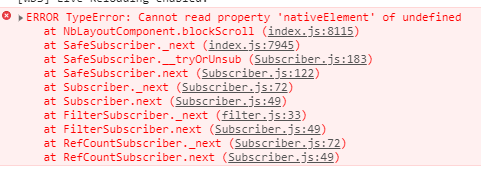
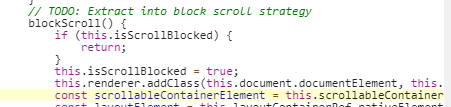
Still got error after upgrading nebular to 5.1.0. @yggg
 jyzbamboo
on 16 Jul 2020
jyzbamboo
on 16 Jul 2020
I have exactly the same issue as @miguelllop
And I fixed it by removing
windowModefrom<nb-layout>. Seems to work with"@nebular/theme": "^5.0.0-beta.8"
It solved the problem for me, thx :)
 alexroussel
on 28 Oct 2020
alexroussel
on 28 Oct 2020
Related issues
 aqsdc1
·
3Comments
aqsdc1
·
3Comments
 jackyxhb
·
3Comments
jackyxhb
·
3Comments
 nnixaa
·
4Comments
nnixaa
·
4Comments
 dragonbane0
·
3Comments
dragonbane0
·
3Comments
 muysewinkel
·
4Comments
muysewinkel
·
4Comments
Most helpful comment
We released
5.0.0-beta.8with https://github.com/akveo/nebular/pull/2236 (Angular 9 + Ivy). You can install it vianpm install @nebular/theme@next. Expecting to release a stable version later this week.Please, report here if you see any issues.