Nebular: nb-select not setting default value
Sorry for my english.
I'm making an edit profile page, loading user info from a mysql database. Everything works fine except the nbselect tha must show the current user role (admin, user etc...), instead nothing is selected. The nbselect is filled correctly with the roles stored in the database, but the actual user role is not selected as default.
Here are my codes:
edit-profile.component.html
<div style="margin-top: 5px">
      Rol: {{bd_user.role}}
      <nb-select placeholder="Rol" status="info" [(selected)]="bd_user.role">
        <nb-option *ngFor="let role of roles" [value]="rol.id">{{role.role}}</nb-option>
      </nb-select>
    </div>
edit-profile.component.ts
import { Component, OnInit } from '@angular/core';
import { NbAuthJWTToken, NbAuthService } from '@nebular/auth';
import { UserService } from '../../services/user.service';
//import { User } from '../../@core/data/users';
import { User } from '../../models/User';
@Component({
  selector: 'edit-profile',
  templateUrl: './edit-profile.component.html',
  styleUrls: ['./edit-profile.component.scss'],
})
export class EditProfileComponent implements OnInit {

  user = {name: '', picture: '', id: 0, role: ''};
  bd_user: User = {
    id: 0,
    user: '',
    fullname: '',
    pass: '',
    role: 0,
    email: '',
    picture: '',
  };
  roles = [];
  constructor(private authService: NbAuthService, private userService: UserService) {
    this.authService.getToken().subscribe((token: NbAuthJWTToken) => {
      this.user = token.getPayload();
      this.userService.getUser(this.user.id).subscribe(
        res => {
          this.bd_user = res as User;
          this.userService.getRoles().subscribe(
            res => {
              this.roles = res as [];
              //console.log(res);
            },
          );
        },
      );
    });
   }

  ngOnInit() {

  }

}
thanks for any help
 RoWEN-FCUB
All 16 comments
Hi,
I'm also making an edit modal that contains a list of users. Each of them has a nb-select containing a list of authorizations.
Add many authorizations works fine for me and the result is stored in database.
However, I encounter several problems when I want to get these authorizations to preselect them in multiple nb-select.
Authorizations are preselected but I can't select or unselect options anymore in order to edit data.
HTML code :
<nb-list>
<nb-list-item *ngFor="let user of selectedUsers">
<div class="row">
<div class="col-6 col-md-6">
{{user.lastname + ' ' + user.firstname}}
</div>
<div class="col-4 col-md-4">
<nb-select multiple placeholder="Lecteur seule" [selected]="selectedItemsAuthorizations(user.id)">
<nb-option *ngFor="let item of authorizations.items" [value]="item.type" (selectionChange)="addAuthorizations(user.id, item)">
{{item.name}}
</nb-option>
</nb-select>
</div>
<div class="col-1 col-md-1">
<nb-action icon="close-outline" (click)="deleteSelectedUsers(user)"></nb-action>
</div>
</div>
</nb-list-item>
</nb-list>
Component code - method to get authorizations for users by its type and userId :
selectedItemsAuthorizations(userId: number): AuthorizationDashboardTypeEnum[] {
return this.dashboard.authorizations.find(a => a.user.id === userId).authorizations.map(au => au.type);
}
However, if I remove *ngFor and replace it by list of options like this, it works :
HTML code, 2nd version :
<nb-list-item *ngFor="let user of selectedUsers">
<div class="row">
<div class="col-6 col-md-6">
{{user.lastname + ' ' + user.firstname}}
</div>
<div class="col-4 col-md-4">
<nb-select multiple placeholder="Lecture seule" [selected]="[authorizationDashboardTypeEnum.WRITE]">
<nb-option [value]="authorizationDashboardTypeEnum.WRITE">Option 1</nb-option>
<nb-option [value]="authorizationDashboardTypeEnum.SHARE">Option 2</nb-option>
</nb-select>
</div>
<div class="col-1 col-md-1">
<nb-action icon="close-outline" (click)="deleteSelectedUsers(user)"></nb-action>
</div>
</div>
</nb-list-item>
</nb-list>
In this case, i preselect values not using the function in my component, but by values itself [authorizationDashboardTypeEnum.WRITE].
Because if i keep the called function selectedItemsAuthorizations(user.id) in nb-select, then i can't select or unselect options again like in my first case.
Is there any method to make it work properly ?
Thanks in advance.
 smerliere
on 22 Aug 2019
smerliere
on 22 Aug 2019
Same problem here.
I have found a related bug to this post.
It only occurs when a dynamic list is bound to the select.
I am using nebular 4 & angular 8
Any updates?
 Daraciel
on 26 Aug 2019
Daraciel
on 26 Aug 2019
Also have problem with setting default value to nb-select. Only way is to put code where i setting value into setTimeout, so its no ideal solution.
 BranislavCulak
on 3 Oct 2019
BranislavCulak
on 3 Oct 2019
Same here. Not the best solution but this is the only way for the moment.
 jthin
on 8 Oct 2019
jthin
on 8 Oct 2019
I have the same problem.
Due to roles is loaded after bd_user.role so nb-select doesn't set true default value.
A workaround is to try set values for bd_user.role and roles at the same time.
for example:
this.userService.getUser(this.user.id).subscribe(
res => {
this.bd_user = res as User;
this.userService.getRoles().subscribe(
res => {
this.roles = res as [];
this.bd_user.role = ADMIN;
},
);
},
);
 bkstorm
on 12 Oct 2019
bkstorm
on 12 Oct 2019
Ah sorry, my mistake, everything is ok :D
bkstorm
on 13 Oct 2019
Found my way using the same attribute on [(selected)] property and on the [(value)] inside the option list.
I think the bug is related to using different object attributes in order to display a different information by the one used to bind the nb-select element.
<nb-select *ngIf="report.assignedto" [(selected)]="report.assignedto">
<nb-option
*ngFor="let item of operatorList"
(selectionChange)="assignActivity(report.activityid, item.operatorid)"
[(value)]="item.operatorname">
{{ item.operatorname }}
</nb-option>
</nb-select>
It works.
 backciro
on 7 Nov 2019
backciro
on 7 Nov 2019
hello,
I found a salution for my own. do this for your cas:
after line
this.roles = res as [];
//console.log(res);
You must redefined value of bd_user.role
 nivekalara237
on 15 Nov 2019
nivekalara237
on 15 Nov 2019
you can set default value with the help of form control, No need of [(selected)]
data = [
    {
        name: 'xyz', value: 'xyz'
    },
    {
        name: 'abc', value: 'abc'
    }
];
Set value with the help of formcontrolName or ngModel
this.formName.controls.fieldName.setValue(this.data[0].value);
 rbrijesh
on 25 Feb 2020
rbrijesh
on 25 Feb 2020
Hi,
I'm facing a similar issue. The default value is working properly as soon as the option as not updated. During the first request to fill in the options, I managed to set a selected value, however in a second request, when my options are updated, the selected value is assigned however is displayed as not.
<nb-select formControlName="unidade" placeholder="Unidade">
<nb-option *ngFor="let unidade of getKeys(unidades)" [value]="unidade">
{{ unidade }}
</nb-option>
</nb-select>
I'm setting the selected value as:
this.tarefaForm.controls.unidade.setValue(MYDEFAULTVALUE);
 dantascaio
on 6 Apr 2020
dantascaio
on 6 Apr 2020
In order to add some info that might help the understanding:
On 1st request to load the options, they (options A, B, C) are loaded and the selected is (A);
On a 2nd request, if the options are the same (A, B, C) it works fine, however if they have changed (opting now are D, E, F). Despite the selected value is (D), none selected value is displayed.
On a 3rd request, if the options remain ( D, E, F ), than 'D' is displayed.
dantascaio
on 6 Apr 2020
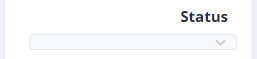
This issue still happens even in the latest version 5.0.
Dynamic list will be displayed like below when no default option:
 redplane
on 1 Jun 2020
redplane
on 1 Jun 2020
Its actually very simple
we all have be doing it in all along our project
just use ngModel, and assign its fixed value where you are recieving its api
this.http.get(environment.api_url + this.apiType + '/state').subscribe(res => {
console.log(res);
this.showData = res['result'];
this.selectedValue = res['result'][0]
},err => {
console.log(err);
})
also keep in mind if you have your nbSelect within formgroup and there are formControlName you can either make ngModel standalone : true
or if that doesn't works set formControlname value by
this.formName.controls.fieldName.setValue(this.data[0].value);
shout out to :tada:
@rbrijesh
 kavishsoam
on 26 Jun 2020
kavishsoam
on 26 Jun 2020
dont work for me,
<nb-select
outline
fullWidth
(ngModelChange)=onModelChange($event)
[(ngModel)]="data"
[disabled]=disabled>
<nb-option *ngFor="let data of datas" [value]=data>{{data.nome}} </nb-option>
</nb-select>
I have the same object in [(ngModel)] and in [value],
but dont work
 dev-alexandre
on 10 Jul 2020
dev-alexandre
on 10 Jul 2020
you can do it like this way:
HTML:
<nb-select [selected]="provinceDrpSelected">
<nb-option *ngFor="let province of provinces" [value]="province">
{{province.title}}
</nb-option>
</nb-select>
ts:
this.http.get('url').subscribe(res => {
this.provinces = res;
this.provinceDrpSelected = this.provinces[0];
},err => {
console.log(err);
})
 akyvn
on 28 Jul 2020
akyvn
on 28 Jul 2020
The only workaround that worked for me is using the protected member selectOption which takes an instance of NbOptionComponent object, look at the following example:
this.ddlCoutry.selectOption(this.ddlCoutry.options.find(
(item, _index, _options) => {
return item.value.id === this.shop.country.id;
},
));
this will work for both single and multiple select as follows:
this.shop.classifications.forEach((classification) => {
this.ddlClassification.selectOption(this.ddlClassification.options.find(
(item, _index, _options) => {
return item.value.id === classification.id;
},
));});
The weirdest thing is that the only working function is protected!
 shireefadel
on 13 Dec 2020
shireefadel
on 13 Dec 2020
Related issues
 mobarokhossain
·
4Comments
mobarokhossain
·
4Comments
 jackyxhb
·
3Comments
jackyxhb
·
3Comments
 VictorSchleumer
·
4Comments
VictorSchleumer
·
4Comments
 henry74
·
3Comments
henry74
·
3Comments
 rhajizadeh
·
3Comments
rhajizadeh
·
3Comments
Most helpful comment
you can set default value with the help of form control, No need of [(selected)]
data = [
    {
        name: 'xyz', value: 'xyz'
    },
    {
        name: 'abc', value: 'abc'
    }
];
Set value with the help of formcontrolName or ngModel
this.formName.controls.fieldName.setValue(this.data[0].value);