Hello,
When I run nbconvert with or without commands, I get the following message:
jupyter-nbconvert.exe
failed to create process.
I've tried reinstalling and I still get the same issue.
 achapkowski
All 35 comments
Weird. Can you send a screenshot to show exactly how you're invoking it? Do other Jupyter commands run (e.g. jupyter notebook)? How are you (re)installing it?
 takluyver
on 15 Mar 2017
takluyver
on 15 Mar 2017
Weird. Can you send a screenshot to show exactly how you're invoking it? Do other Jupyter commands run (e.g. jupyter notebook)? How are you (re)installing it?
ping @achapkowski, can you provide the requested info?
 damianavila
on 1 Jun 2017
damianavila
on 1 Jun 2017
Will close this one since we did not have any updates in months.
@achapkowski feel free to re-open if you still see this and have the information requested.
damianavila
on 7 Jun 2017
I seem to be seeing this same thing:
$ jupyter nbconvert
failed to create process.
I can run jupyter notebook perfectly and notebooks run with no issues. Is there any other info that's needed?
 jwood803
on 24 Aug 2017
jwood803
on 24 Aug 2017
The jupyter command runs subcommands by looking for an executable called (for instance) jupyter-nbconvert. Do you see the same error running it with the hyphen?
takluyver
on 24 Aug 2017
Yep, same error:
$ jupyter-nbconvert
failed to create process.
I did a conda list to see if it was there and I don't see it listed.

Does it need to be installed separately?
jwood803
on 24 Aug 2017
It is a separate package, but I'd expect a different error if it wasn't there. The conda package is nbconvert.
If that's present, what does which jupyter-nbconvert give you?
takluyver
on 24 Aug 2017
Looks like it's able to find it with the which command.
$ which jupyter-nbconvert
/c/Program Files/Anaconda3/Scripts/jupyter-nbconvert
Oh, hang on, is that a Windows executable used in something like WSL? If you're using the Windows 10 Linux system, you need to install a Linux version of Python inside that.
takluyver
on 24 Aug 2017
I was just using bash from Cmder. In PowerShell, I get this:
CommandType     Name                                               Version    Source
-----------     ----                                               -------    ------
Application     jupyter-nbconvert.exe                              0.0.0.0    C:\Program Files\Anaconda3\Scripts\jupyter-nbconvert.exe
Interesting that version is all zeros...
jwood803
on 24 Aug 2017
Windows has some mechanism for embedding a version number header into exe files, which Python programs don't generally use.
Does running nbconvert from powershell work?
takluyver
on 24 Aug 2017
Unfortunately, it gives the same error. :(
From: Thomas Kluyver notifications@github.com
Sent: Thursday, August 24, 2017 9:36:34 AM
To: jupyter/nbconvert
Cc: Jon Wood; Comment
Subject: Re: [jupyter/nbconvert] Converting to slides (#546)
Windows has some mechanism for embedding a version number header into exe files, which Python programs don't generally use.
Does running nbconvert from powershell work?
—
You are receiving this because you commented.
Reply to this email directly, view it on GitHubhttps://github.com/jupyter/nbconvert/issues/546#issuecomment-324637099, or mute the threadhttps://github.com/notifications/unsubscribe-auth/ABgUsBvO_yysujCglEDsmgebunxjyPixks5sbXxigaJpZM4MZXOo.
jwood803
on 24 Aug 2017
Try uninstalling nbconvert with conda and installing it again?
takluyver
on 24 Aug 2017
Uninstalled nbconvert and even notebook, but no luck.
I can get around this by just using the "Download as" option in the UI. 😃
jwood803
on 24 Aug 2017
Weird. It's possible that conda has cached a corrupt copy of the file which comes back even when you remove it. Or there could be an issue with the conda package. Try uninstalling it with conda and then installing it using pip.
takluyver
on 24 Aug 2017
Same problem here. Anaconda navigator says version 5.2.1. Windows 10. Running the script natively and not in WSL.
PS C:\WINDOWS\system32> jupyter-nbconvert.exe
failed to create process.
 erihanse
on 7 Sep 2017
erihanse
on 7 Sep 2017
Hey, if you are going to claim to support Windows, then do some basic testing assuming a Windows mindset.
I was able to run jupyter nbconvert on the Windows command line by doing this
python "long path to the files that includes characters LINUX doesn't likejupyter-nbconvert-script.py" whateverparameters
then you should get it to work.
Pay attention to spaces, they are ALL OVER windows and forcing your product to only run on systems that don't include spaces in the filename/file path is dumb/arrogant (pick your adjective).
 Jeff-Winchell
on 9 Dec 2017
Jeff-Winchell
on 9 Dec 2017
@Jeff-Winchell, we do test on Windows, and do our best to ensure that all the Jupyter tools work as well as possible on Windows. Overall on the team we have more Linux/macOS expertise, but we actively try to provide a robust Windows experience, within our abilities.
In this case, the problem is that we're not 100% sure what is going on here. On a currently up-to-date version of Windows 10 with an updated Anaconda install, I get the following:
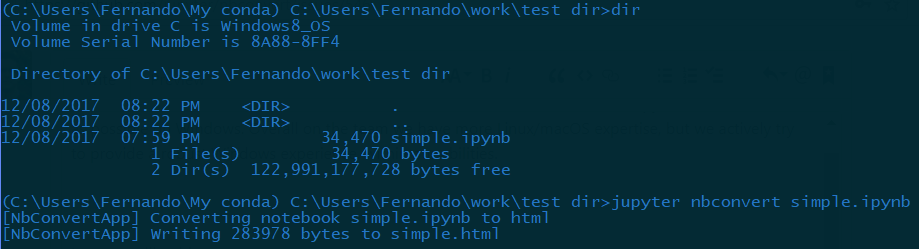
This test was conducted with both a conda instlalled into a path with spaces in it, and with a notebook also living in a directory with spaces in it. We use Python's subprocess machinery to ensure that paths with spaces in them work as well as possible.
Evidently the issue that @erihanse and others are reporting is real, but we don't understand its root cause yet. If we can better understand the installation conditions that are leading to them seeing this problem, we'll be happy to fix it, if it's on the nbconvert or jupyter wrapper side. Until then, given that in our tests it's working fine, we can't make much progress.
However, language like this:
Pay attention to spaces, they are ALL OVER windows and forcing your product to only run on systems that don't include spaces in the filename/file path is dumb/arrogant (pick your adjective).
is both a very unproductive way to engage a developer team, and completely unwelcome in our repositories and community.
I recommend that you read Bret Cannon's excellent post, on why this harms the long-term health of open source communities.
 fperez
on 9 Dec 2017
fperez
on 9 Dec 2017
As Ward Cunningham has told me, do the simplest thing that could possibly
work. I don't think that's the case here (or in the vast majority of
software I see).
My guess is by relying on all sorts of complex things, finding the cause of
this bug will not be easy.
On Fri, Dec 8, 2017 at 11:29 PM, Fernando Perez notifications@github.com
wrote:
@Jeff-Winchell https://github.com/jeff-winchell, we do test on Windows,
and do our best to ensure that all the Jupyter tools work as well as
possible on Windows. Overall on the team we have more Linux/macOS
expertise, but we actively try to provide a robust Windows experience,
within our abilities.In this case, the problem is that we're not 100% sure what is going on
here. On a currently up-to-date version of Windows 10 with an updated
Anaconda install, I get the following:[image: image]
https://user-images.githubusercontent.com/57394/33792477-c4c071f2-dc55-11e7-8710-2d2bb4dbc285.pngThis test was conducted with both a conda instlalled into a path with
spaces in it, and with a notebook also living in a directory with
spaces in it. We use Python's subprocess machinery to ensure that paths
with spaces in them work as well as possible.Evidently the issue that @erihanse https://github.com/erihanse and
others are reporting is real, but we don't understand its root cause yet.
If we can better understand the installation conditions that are leading to
them seeing this problem, we'll be happy to fix it, if it's on the
nbconvert or jupyter wrapper side. Until then, given that in our tests it's
working fine, we can't make much progress.However, language like this:
Pay attention to spaces, they are ALL OVER windows and forcing your
product to only run on systems that don't include spaces in the
filename/file path is dumb/arrogant (pick your adjective).is both a very unproductive way to engage a developer team, and completely
unwelcome in our repositories and community.I recommend that you read Bret Cannon's excellent post
https://nothingbutsnark.silvrback.com/why-i-took-october-off-from-oss-volunteering,
on why this harms the long-term health of open source communities.—
You are receiving this because you were mentioned.
Reply to this email directly, view it on GitHub
https://github.com/jupyter/nbconvert/issues/546#issuecomment-350423088,
or mute the thread
https://github.com/notifications/unsubscribe-auth/AHBeg2LOSmW5WKcGXjhlD3NR9d3eiT23ks5s-gyfgaJpZM4MZXOo
.
Jeff-Winchell
on 9 Dec 2017
Well, at least you have the workaround I provided so people who also
experience this bug can make use of the various other switches you have
that aren't available when you just download a notebook from within jupyter.
On Fri, Dec 8, 2017 at 11:29 PM, Fernando Perez notifications@github.com
wrote:
@Jeff-Winchell https://github.com/jeff-winchell, we do test on Windows,
and do our best to ensure that all the Jupyter tools work as well as
possible on Windows. Overall on the team we have more Linux/macOS
expertise, but we actively try to provide a robust Windows experience,
within our abilities.In this case, the problem is that we're not 100% sure what is going on
here. On a currently up-to-date version of Windows 10 with an updated
Anaconda install, I get the following:[image: image]
https://user-images.githubusercontent.com/57394/33792477-c4c071f2-dc55-11e7-8710-2d2bb4dbc285.pngThis test was conducted with both a conda instlalled into a path with
spaces in it, and with a notebook also living in a directory with
spaces in it. We use Python's subprocess machinery to ensure that paths
with spaces in them work as well as possible.Evidently the issue that @erihanse https://github.com/erihanse and
others are reporting is real, but we don't understand its root cause yet.
If we can better understand the installation conditions that are leading to
them seeing this problem, we'll be happy to fix it, if it's on the
nbconvert or jupyter wrapper side. Until then, given that in our tests it's
working fine, we can't make much progress.However, language like this:
Pay attention to spaces, they are ALL OVER windows and forcing your
product to only run on systems that don't include spaces in the
filename/file path is dumb/arrogant (pick your adjective).is both a very unproductive way to engage a developer team, and completely
unwelcome in our repositories and community.I recommend that you read Bret Cannon's excellent post
https://nothingbutsnark.silvrback.com/why-i-took-october-off-from-oss-volunteering,
on why this harms the long-term health of open source communities.—
You are receiving this because you were mentioned.
Reply to this email directly, view it on GitHub
https://github.com/jupyter/nbconvert/issues/546#issuecomment-350423088,
or mute the thread
https://github.com/notifications/unsubscribe-auth/AHBeg2LOSmW5WKcGXjhlD3NR9d3eiT23ks5s-gyfgaJpZM4MZXOo
.
Jeff-Winchell
on 9 Dec 2017
As Ward Cunningham has told me, do the simplest thing that could possibly work. I don't think that's the case here (or in the vast majority of software I see).
As Kurt Vonnegut wrote: "_Hello, babies. Welcome to Earth. It's hot in the summer and cold in the winter. It's round and wet and crowded. At the outside, babies, you've got a hundred years here. There's only one rule that I know of, babies - God damn it, you've got to be kind."_
and I don't think that's the case with your behavior here.
Well, at least you have the workaround I provided so people who also experience this bug can make use of the various other switches you have that aren't available when you just download a notebook from within jupyter.
I disagree. If the workarounds provided come at the cost of a hostile environment (your "dumb/arrogant" remark, for example) , they are not worth the price.
 ivanov
on 9 Dec 2017
ivanov
on 9 Dec 2017
Your behaviour Jeff doesn't really adhere to the philosophy of open source. Maybe try a more neutral/supportive approach in the future, we all want the same thing here.
erihanse
on 9 Dec 2017
I find it ironic when people criticize people for critizing people.
On Sat, Dec 9, 2017 at 12:39 AM, Erik Aaron Hansen <[email protected]
wrote:
Your behaviour Jeff doesn't really adhere to the philosophy of open
source. Maybe try a more neutral/supportive approach in the future, we all
want the same thing here.—
You are receiving this because you were mentioned.
Reply to this email directly, view it on GitHub
https://github.com/jupyter/nbconvert/issues/546#issuecomment-350425839,
or mute the thread
https://github.com/notifications/unsubscribe-auth/AHBeg8ztTzJA8YJgQMJK-bk5_1SQ7v0Nks5s-h0TgaJpZM4MZXOo
.
Jeff-Winchell
on 9 Dec 2017
Well there's constructive criticism and there's inconstructive. You will achieve better results by following a few easy social norms. The same norms that apply outside the open source community for that matter. You can do it, I know you can :)
Why is this marked as closed by the way? Is it fixed, do I need to update?
erihanse
on 9 Dec 2017
It was closed some time ago because the original reporter didn't provide further info, and at the time it looked like it was a one-off. We should have reopened it when it was clear that other people were experiencing the error, but the notifications we get for comments are the same regardless of its state, so I probably overlooked that it had been closed.
takluyver
on 9 Dec 2017
If you're using nbconvert installed by conda, can you try uninstalling it with conda and installing it again with pip?
takluyver
on 9 Dec 2017
I was able to reproduce the failed to create process bug using nbconvert 5.2.1 from the default conda channel. However, all of the following combinations worked:
conda install -c defaults nbconvert=5.3.1
conda install -c conda-forge nbconvert=5.2.1
conda install -c conda-forge nbconvert=5.3.1
 blink1073
on 9 Dec 2017
blink1073
on 9 Dec 2017
Note that moving forward, the default conda packages are based on the conda-forge recipes if possible.
blink1073
on 9 Dec 2017
@Jeff-Winchell, please be civil and refrain from calling the folks that offer you the sweat of their labor for free dumb and arrogant. Open source only works because of people.
blink1073
on 9 Dec 2017
Anyone else seeing this, can you check your nbconvert version, and try updating if it's not the latest. If it's limited to a conda package that has already been superseded, we can close this.
takluyver
on 9 Dec 2017
It looks like reinstalling nbconvert worked for me like @blink1073 mentioned above.
Appreciate all the help @takluyver! Apologies I didn't follow up back in August.
jwood803
on 9 Dec 2017
Oddly enough, even with
conda install -c defaults nbconvert=5.2.1
I can't replicate the problem, the conversion runs fine for me.
But it appears clear that this was an issue with some combination of conda recipes and perhaps other packages, which as best we can tell, is solved by updating. Also, since the bug doesn't appear to be in nbconvert itself, let's close this. We can reopen or create a new issue if anyone sees the process creation problem again.
fperez
on 9 Dec 2017
I run the anaconda distribution of python that comes bundled with SQL Server 2017. Updating python to some version not officially supported by Microsoft SQL Server 2017 is not tested by Microsoft and therefore not recommended.
Jeff-Winchell
on 9 Dec 2017
@Jeff-Winchell, I'd recommend opening an issue on https://github.com/ContinuumIO/anaconda-issues.
blink1073
on 10 Dec 2017
Changed title to Conversion fails on win because this was not related to the slides and describes better the discussion.
damianavila
on 21 Jan 2018
Related issues
 joelostblom
·
3Comments
joelostblom
·
3Comments
 zelite
·
5Comments
zelite
·
5Comments
 bharathgs
·
5Comments
bharathgs
·
5Comments
 milliams
·
4Comments
milliams
·
4Comments
 yangchzh5
·
3Comments
yangchzh5
·
3Comments
Most helpful comment
@Jeff-Winchell, we do test on Windows, and do our best to ensure that all the Jupyter tools work as well as possible on Windows. Overall on the team we have more Linux/macOS expertise, but we actively try to provide a robust Windows experience, within our abilities.
In this case, the problem is that we're not 100% sure what is going on here. On a currently up-to-date version of Windows 10 with an updated Anaconda install, I get the following:
This test was conducted with both a conda instlalled into a path with spaces in it, and with a notebook also living in a directory with spaces in it. We use Python's subprocess machinery to ensure that paths with spaces in them work as well as possible.
Evidently the issue that @erihanse and others are reporting is real, but we don't understand its root cause yet. If we can better understand the installation conditions that are leading to them seeing this problem, we'll be happy to fix it, if it's on the nbconvert or jupyter wrapper side. Until then, given that in our tests it's working fine, we can't make much progress.
However, language like this:
is both a very unproductive way to engage a developer team, and completely unwelcome in our repositories and community.
I recommend that you read Bret Cannon's excellent post, on why this harms the long-term health of open source communities.