Navidrome: DSub max bandwidth setting not triggering transcoding
I've just deployed a Navidrome server via Docker image using the provided compose file, and I'm having an issue with automatic transcoding not occurring based on the client's max bandwidth setting. I'm using DSub (5.4.4) as the client, and I have it set to unlimited bandwidth on local network and 320kbps on mobile network. Here is the log entry from the Navidrome server when playing a song while connected via mobile network:
time="2020-06-14T02:32:58Z" level=info msg="Streaming file" artist="ミラクルミュージカル" bitRate=0 cached=false format=raw originalBitRate=899 originalFormat=flac title="Isle Unto Thyself" transcoding=false user=xion
I am certain that it is recognizing the network correctly as it is also set to only buffer 2 songs on mobile, which it is doing. I've also done a packet capture on the request for the song, and the URL does include a "maxBitRate=320" parameter:
GET /rest/stream.view?u=xion&p=[...]&v=1.2.0&c=DSub&id=92533410d46fb6018ce1b0678a3b53ae&maxBitRate=320 HTTP/1.1
With debug logging on, I notice that the server does recognize that requestBitrate=320, but then it goes on to just stream the raw file anyway. I have done some messing with the transcoders, but I have confirmed that it works if I manually specify a transcoder on the player in the Navidrome settings. Currently the only change from default is that the "-b:a %bk" in mp3 audio is replaced with "-q:a 0".
 InfinityTotality
All 19 comments
After looking through more logs with transcoders assigned and unassigned, I'm starting to suspect my expectation for how transcoding should be applied and the way the server is designed are not entirely aligned. My expectation would be that if the max bitrate is not set or higher than the bitrate of the file, no transcoding will be applied. The way it seems to work is that if a transcoder is assigned to a player, it will always run, and if none is assigned, it will never run. Is this the intended behavior? If so, can I formally request a feature be added to bypass transcoding if the bitrate does not need to be reduced?
InfinityTotality
on 14 Jun 2020
What you are describing is called _downsampling_. I didn't implement it because I personally don't have a use case for it. The main focus for the current implementation is being able to force transcoding to happen for a specific client, as some clients do not have support for transcoding options and can't play all formats.
Please go ahead and create a feature request for it, describing your use case.
 deluan
on 14 Jun 2020
deluan
on 14 Jun 2020
By that, you mean create a new, more appropriately titled issue?
InfinityTotality
on 14 Jun 2020
Oh, nvm. I thought that's what you meant by "If so, can I formally request a feature be added to bypass transcoding if the bitrate does not need to be reduced?". But no worries, we can use this issue to track this.
I will give some thought to this and will come back here to discuss some solutions
deluan
on 14 Jun 2020
Cool, thanks! Enjoying the server so far otherwise. Will likely be using this over Airsonic going forward
InfinityTotality
on 14 Jun 2020
Are there any news on downsampling? 🙂
 slavmetal
on 19 Jul 2020
slavmetal
on 19 Jul 2020
Hey @slavmetal, can you describe what is your need / use case for downsampling? I'm asking because I need to come up with a flexible way to cater for various disparate use cases.
deluan
on 20 Jul 2020
Hey @deluan, for example it would be nice to reduce mobile data usage
slavmetal
on 20 Jul 2020
Yes, but that is already possible with the current transcoding support. I'd like to understand what are the use cases not supported by the current transcoding implementation
deluan
on 20 Jul 2020
If I didn't already describe this, my use case is that I use the same phone/player both at home and when I leave home. When at home and on wifi, I would like to just play the raw files (lossless, 1mbps+) for maximum quality and to avoid doing the extra work on the server to needlessly transcode them. When I'm not at home, cell data speeds mean that I can't reliably stream those raw files, so I need them to be trascoded down to 300kbps or so in order to actually stream them. There is no way currently for me to do both of those things without logging in to the web interface and manually changing the transcoding settings any time I change locations.
InfinityTotality
on 20 Jul 2020
@InfinityTotality yeah I understand your needs, just wanted more example use cases to be sure I cover all (or most) of everyone's needs.
For your use case, I'm thinking of introducing a "force" flag to the player transcoding set, that would mimic the current behaviour. But when the flag is turned off, it would only transcode if the requested bitrate is smaller than the actual file bitrate. What do you think?
I've been thinking about rewriting the whole transcoding activation logic, that's why I'm taking so much time to implement this, but maybe the change I described above is enough for now.
deluan
on 21 Jul 2020
That sounds like a perfect solution for me. I don't know how universal it is among players to have an option to request a particular bandwidth, so there maybe be some other triggers for the conditional transcoding that could be useful to other people, but I don't know enough about the ecosystem to know what those would be or how widespread they are.
InfinityTotality
on 21 Jul 2020
Just chiming in that this would suit my usecase too, I have struggled with getting ND_ENABLEDOWNSAMPLING, ND_MAXBITRATE and ND_DOWNSAMPLECOMMAND to work
 amil-m
on 1 Aug 2020
amil-m
on 1 Aug 2020
Hey @amil-m these options are not available anymore, they were used before the final transcoding feature was in place.
To configure transcoding in the newer versions, you go to the _Players_ view (in the UI), find the player you want to enable transcoding for, click on it and configure it:
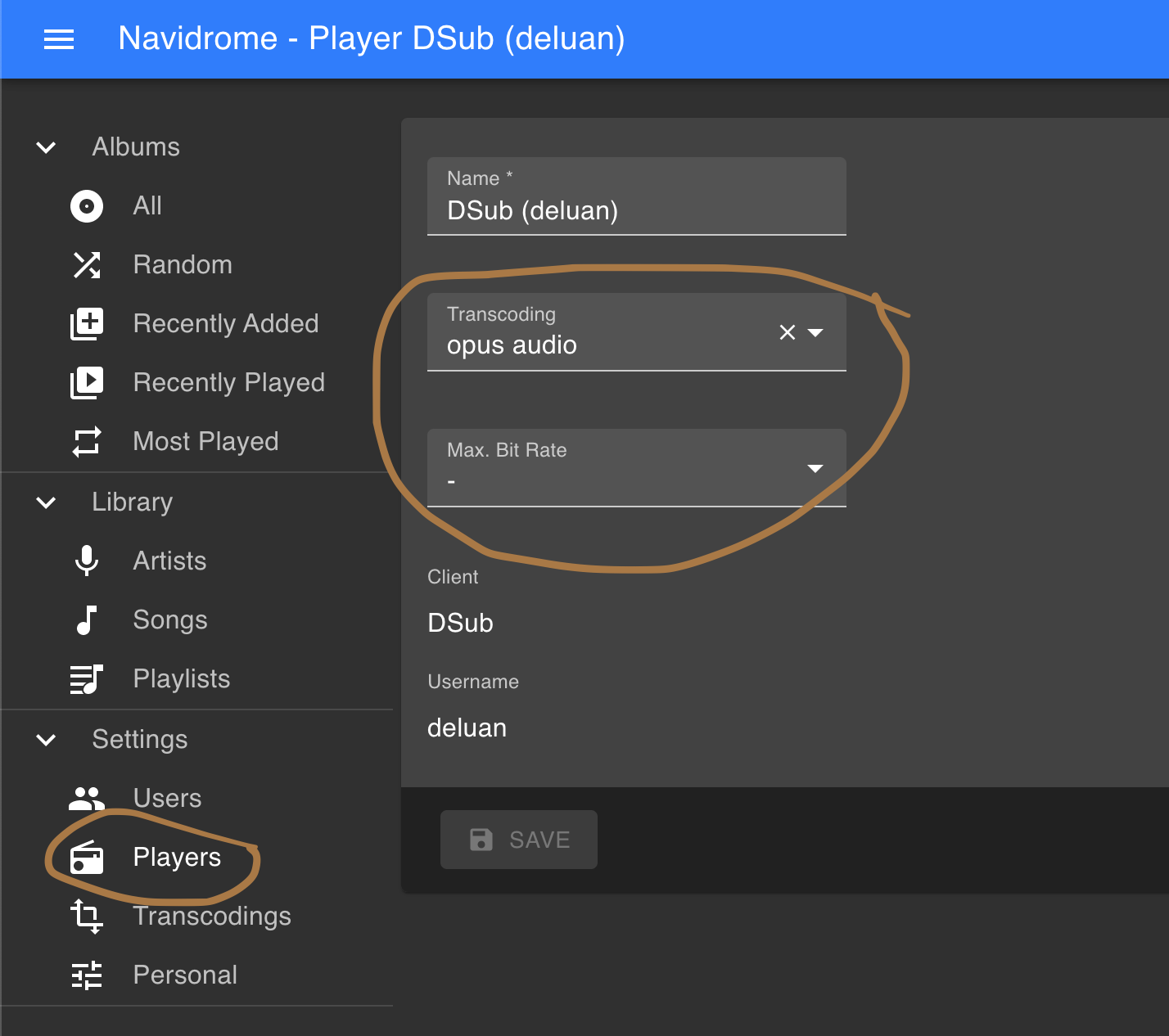
deluan
on 2 Aug 2020
Thanks @deluan, I must admit, I overlooked this page!
amil-m
on 2 Aug 2020
Another use-case:
I have most of my music in a lossless archive format (flac), and want to transcode it to something lossy (opus) when I am out of the house.
But some of the albums I own were only ever released in lossy (mp3). When I am out of the house, I would not want to transcode these albums, as lossy -> lossy just means compounding/generational losses.
Airsonic lets you choose, for each transcode profile, a whitelist of file extensions you want the profile to transcode (eg. .flac, .wav, .ape, .alac)
PS. love Navidrome, great software
 WeekendWarrior1
on 8 Aug 2020
WeekendWarrior1
on 8 Aug 2020
It would also be useful to be able to set default transcoding settings for any new clients added. So for example any new client would transcode to mp3 at 320 kbps.
Perhaps it should also be possible to limit the transcoding options available to a user, for example if I created a guest account for my library I could limit them to only <=320 kbps streams.
 kolmone
on 17 Sep 2020
kolmone
on 17 Sep 2020
But when the flag is turned off, it would only transcode if the bitrate of the song is smaller then the client's requested or the actual file bitrate, whichever is smaller. What do you think?
I'm not sure I follow this. Would this ever increase the bitrate? If so, I don't think increasing the bitrate does anything. I would think that once the song was encoded with a low bitrate, the quality cannot be improved.
 charleslaw
on 29 Sep 2020
charleslaw
on 29 Sep 2020
@charleslaw, sorry the text was confusing. I fixed it:
But when the flag is turned off, it would only transcode if the requested bitrate is smaller than the actual file bitrate.
deluan
on 29 Sep 2020
Related issues
 yarg-kane
·
5Comments
yarg-kane
·
5Comments
 r0arkin
·
5Comments
r0arkin
·
5Comments
 certuna
·
6Comments
certuna
·
6Comments
 ElleshaHackett
·
6Comments
ElleshaHackett
·
6Comments
 axllent
·
8Comments
axllent
·
8Comments
Most helpful comment
It would also be useful to be able to set default transcoding settings for any new clients added. So for example any new client would transcode to mp3 at 320 kbps.
Perhaps it should also be possible to limit the transcoding options available to a user, for example if I created a guest account for my library I could limit them to only <=320 kbps streams.