Navcontainerhelper: Creating container using v19 insider artifacts results in unhealthy container
PLEASE DO NOT INCLUDE ANY PASSWORDS OR TOKENS IN YOUR ISSUE!!!
Describe the issue
Creating container using v19 insider artifacts causes container to be unhealthy almost immediately.
Scripts used to create container and cause the issue
$credential = New-Object -TypeName "System.Management.Automation.PSCredential" -ArgumentList admin, (ConvertTo-SecureString -String 'pass@word1' -AsPlainText -Force)
$sasToken = '<insert token here>'
$artifactUrl = Get-BCArtifactUrl -type Sandbox -country us -select Latest -storageAccount bcinsider -sasToken $sasToken

New-BCContainer -containerName mytest `
        -accept_eula `
        -accept_outdated `
        -auth NavUserPassword `
        -Credential $credential `
        -artifactUrl $artifactUrl `
        -shortcuts Desktop `
        -updateHosts `
        -memoryLimit 12G
Full output of scripts
BcContainerHelper version 2.0.11
BcContainerHelper is version 2.0.11
BcContainerHelper is running as administrator
Host is Microsoft Windows 10 Pro - 20H2
Docker Client Version is 20.10.6
Docker Server Version is 20.10.6
Removing mytest from container hosts file
Removing mytest-* from container hosts file
Removing C:\ProgramData\BcContainerHelper\Extensions\mytest
Fetching all docker images
Fetching all docker volumes
Using image mcr.microsoft.com/businesscentral:10.0.19042.928
Creating Container mytest
Version: 19.0.25503.0-US
Style: sandbox
Multitenant: Yes
Platform: 18.0.25462.0
Generic Tag: 1.0.1.6
Container OS Version: 10.0.19042.928 (20H2)
Host OS Version: 10.0.19042.985 (20H2)
Using hyperv isolation
Using locale en-US
Disabling the standard eventlog dump to container log every 2 seconds (use -dumpEventLog to enable)
Files in C:\ProgramData\BcContainerHelper\Extensions\mytest\my:
- AdditionalOutput.ps1
- MainLoop.ps1
- SetupVariables.ps1
- updatehosts.ps1
Creating container mytest from image mcr.microsoft.com/businesscentral:10.0.19042.928
bc63874daaa10a61fd2c6b743114a481c6a807059fb83ddc3d973c519a5fa27f
Waiting for container mytest to be ready
Using artifactUrl https://bcinsider.azureedge.net/sandbox/19.0.25503.0/us
Using installer from C:\Run\150-new
Installing Business Central
Installing from artifacts
Starting Local SQL Server
Starting Internet Information Server
Copying Service Tier Files
c:\dl\sandbox\19.0.25503.0\platform\ServiceTier\Program Files
c:\dl\sandbox\19.0.25503.0\platform\ServiceTier\System64Folder
Copying PowerShell Scripts
c:\dl\sandbox\19.0.25503.0\platform\WindowsPowerShellScripts\Cloud\NAVAdministration
c:\dl\sandbox\19.0.25503.0\platform\WindowsPowerShellScripts\WebSearch
Copying dependencies
Copying ReportBuilder
Importing PowerShell Modules
Determining Database Collation from c:\dl\sandbox\19.0.25503.0\us\BusinessCentral-US.bak
Restoring CRONUS Demo Database
Setting CompatibilityLevel for tenant on localhost\SQLEXPRESS
Exporting Application to CRONUS
Removing Application from tenant
Modifying Business Central Service Tier Config File for Docker
Creating Business Central Service Tier
Installing SIP crypto provider: 'C:\Windows\System32\NavSip.dll'
Copying Web Client Files
c:\dl\sandbox\19.0.25503.0\platform\WebClient\Microsoft Dynamics NAV
Copying Client Files
c:\dl\sandbox\19.0.25503.0\platform\LegacyDlls\program files\Microsoft Dynamics NAV
c:\dl\sandbox\19.0.25503.0\platform\LegacyDlls\program files\Microsoft Dynamics NAV
c:\dl\sandbox\19.0.25503.0\platform\LegacyDlls\systemFolder
Copying ModernDev Files
c:\dl\sandbox\19.0.25503.0\platform
c:\dl\sandbox\19.0.25503.0\platform\ModernDev\program files\Microsoft Dynamics NAV
Copying additional files
Copying ConfigurationPackages
C:\dl\sandbox\19.0.25503.0\platform\ConfigurationPackages
Copying Test Assemblies
C:\dl\sandbox\19.0.25503.0\platform\Test Assemblies
Copying Extensions
C:\dl\sandbox\19.0.25503.0\us\Extensions
Copying Applications
C:\dl\sandbox\19.0.25503.0\platform\Applications
Copying Applications.US
C:\dl\sandbox\19.0.25503.0\us\Applications.US
Starting Business Central Service Tier
Importing license file
Copying Database on localhost\SQLEXPRESS from tenant to default
Taking database tenant offline
Copying database files
Attaching files as new Database default
Putting database tenant back online
Mounting tenant database
Mounting Database for default on server localhost\SQLEXPRESS with AllowAppDatabaseWrite = False
Sync'ing Tenant
Tenant is Operational
Stopping Business Central Service Tier
Installation took 222 seconds
Installation complete
Initializing...
Setting host.docker.internal to 192.168.1.173 in container hosts file (copy from host hosts file)
Setting gateway.docker.internal to 192.168.1.173 in container hosts file (copy from host hosts file)
Setting kubernetes.docker.internal to 127.0.0.1 in container hosts file (copy from host hosts file)
Setting host.containerhelper.internal to 172.27.32.1 in container hosts file
Starting Container
Hostname is mytest
PublicDnsName is mytest
Using NavUserPassword Authentication
Creating Self Signed Certificate
Self Signed Certificate Thumbprint F9452F9377F46579305A3839B088EAB8F1FD8D3B
Modifying Service Tier Config File with Instance Specific Settings
Starting Service Tier
Registering event sources
Creating DotNetCore Web Server Instance
Enabling Financials User Experience
Enabling rewrite rule: Don't rewrite system files
Enabling rewrite rule: Already have tenant specified
Enabling rewrite rule: Hostname (without port) to tenant
Dismounting Tenant
Mounting Tenant
Mounting Database for default on server localhost\SQLEXPRESS with AllowAppDatabaseWrite = False
Sync'ing Tenant
Tenant is Operational
Creating http download site
Setting SA Password and enabling SA
Creating admin as SQL User and add to sysadmin
Creating SUPER user
WARNING: The password that you entered does not meet the minimum requirements.
It should be at least 8 characters long and contain at least one uppercase
letter, one lowercase letter, and one number.
Container IP Address: 172.27.33.179
Container Hostname  : mytest
Container Dns Name  : mytest
Web Client          : http://mytest/BC/?tenant=default
Dev. Server         : http://mytest
Dev. ServerInstance : BC
Dev. Server Tenant  : default
Setting mytest to 172.27.33.179 in host hosts file
Setting mytest-default to 172.27.33.179 in host hosts file
Setting mytest-default to 172.27.33.179 in container hosts file

Files:
http://mytest:8080/ALLanguage.vsix

Container Total Physical Memory is 12.5Gb
Container Free Physical Memory is 10.1Gb

Initialization took 35 seconds
Ready for connections!
Reading CustomSettings.config from mytest
Creating Desktop Shortcuts for mytest
Container mytest successfully created
...
Screenshots
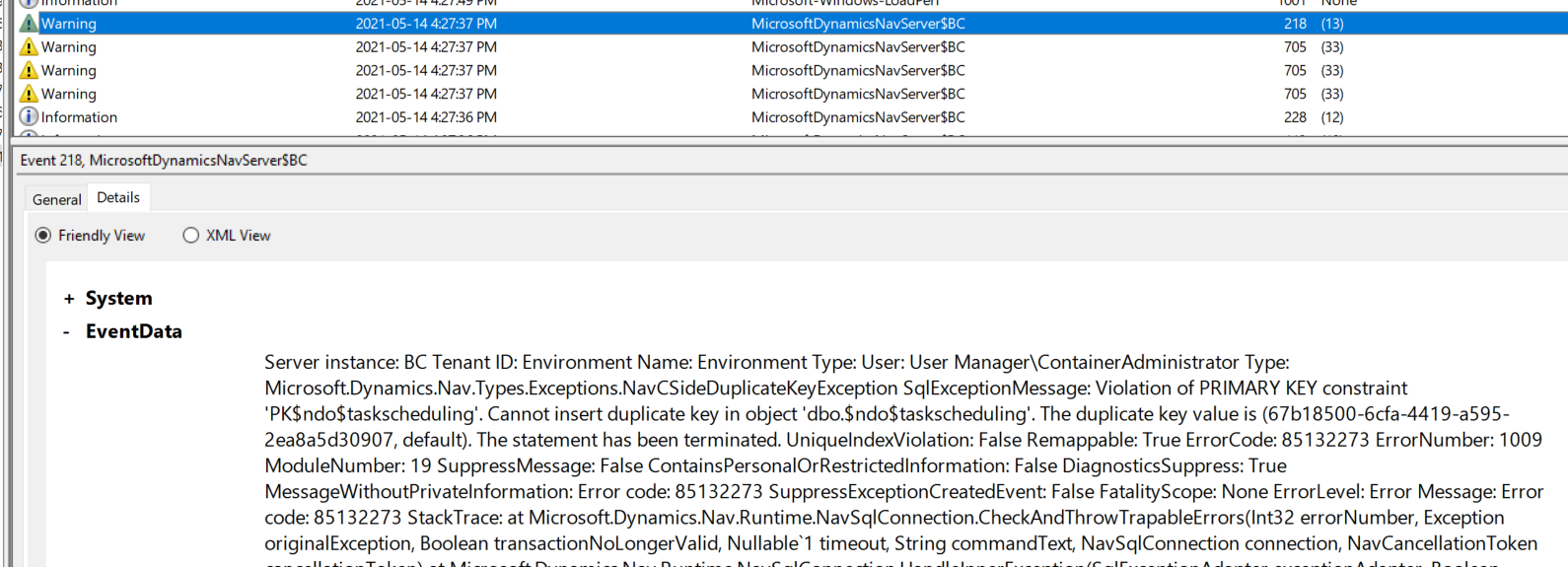
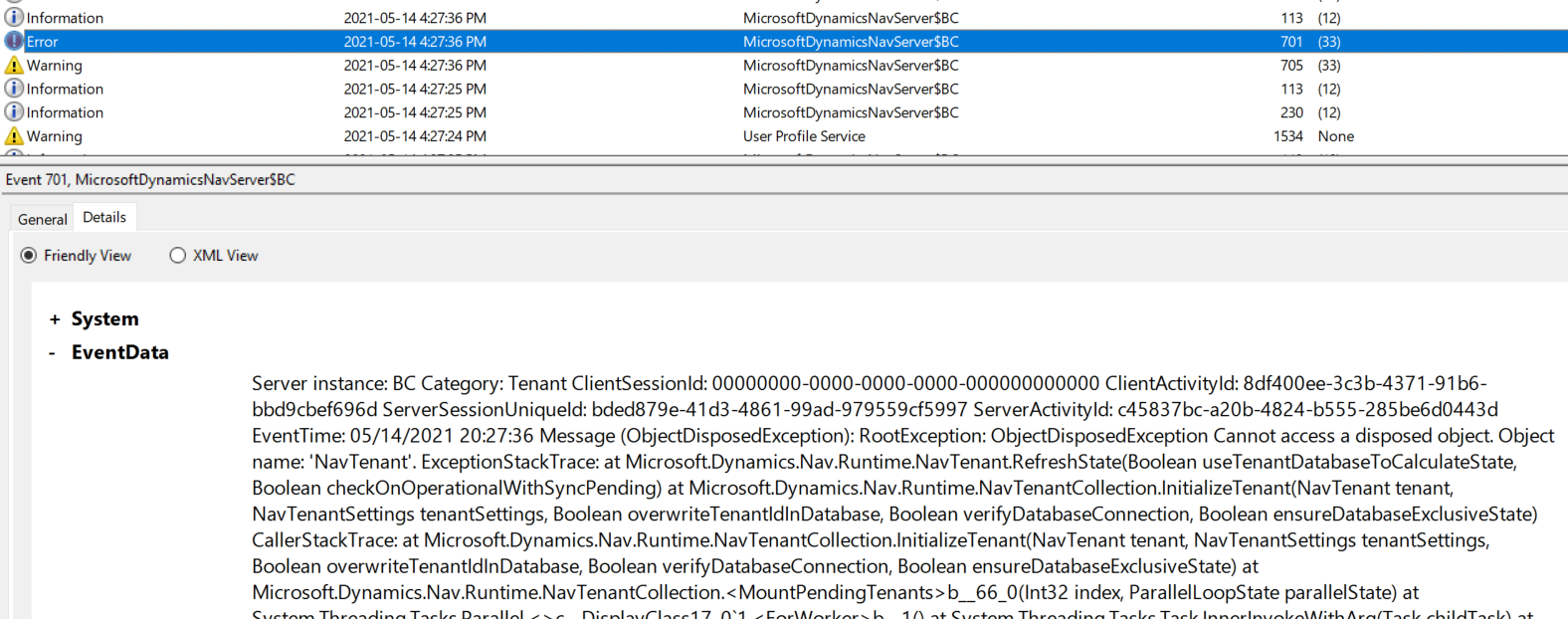
Here are some screenshots form the container event log that show some duplicate key warnings as well as an error. I've also included the full event log for additional reference if needed.
Additional context
- This is happening on multiple machines, running various versions of Windows 10 and Windows Server. I did have a v19 container working a few weeks ago on my local machine so at some point those artifacts did work ok.
- Initially upon script completion the container was healthy, however after roughly 4 minutes it became unhealthy and no amount of restarting (container/host machine) seems to make it healthy again.
Full container event log:
mytest 2021-05-14 16.33.15.zip
 MikeGlue
All 20 comments
More information I've discovered....
It doesn't seem consistent but after just rebooting and trying to start the 'mytest' container I created with the script above, I get this error:

I do have 3 other containers on my machine that were all stopped at the time I tried to start the new one and those 3 containers still start fine.
I also was able to find the last successful v19 artifact version that I was able to use. This is one of the other containers on my system that I didn't realize I still had and it still functions just fine:

MikeGlue
on 14 May 2021
One final note before I shut down for the day............I rebuilt a new container using build 19.0.24689.0 and my container is fine and stable. Something's gone haywire since that build.
MikeGlue
on 14 May 2021
The last issue (requested resource is in use) - I also get that right now constantly when using hyperv.
Your host was recently updated (.985) and the container os wasn't updated yet (.928) - which is why ContainerHelper defaults to hyperv. Maybe that is the problem.
You can try to add -isolation process.
 freddydk
on 15 May 2021
freddydk
on 15 May 2021
BTW - I can see that the new servercore images for May updates are out now - I expect generic images to be updated during the day...
freddydk
on 15 May 2021
We have the same problem with BC 19 insider build 19.0.25519.0. In our case container OS and host OS version are the same: 10.0.17763.1935 (ltsc2019) and use process isolation by default.
The current cloud sandbox (and all other images) work as expected.
New-NavContainer `
  -accept_eula `
  -containername test-bc18 `
  -artifactUrl "https://bcartifacts.azureedge.net/sandbox/18.1.24822.25509/de" `
  -PublicDnsName dockerhub.somecompany.com `
  -useSSL `
  -useTraefik `
  -shortcuts None `
  -auth NavUserPassword `
  -additionalParameters @("--volume C:\ProgramData\company\dockerBakFiles\:c:\bak", "--volume C:\ProgramData\company\dockerAddIns:c:\addins") `
  -assignPremiumPlan `
  -licenseFile "C:\ProgramData\company\dockerLicenseFiles\2021-04-06_company_BC.flf"
BcContainerHelper version 2.0.11
BcContainerHelper is version 2.0.11
BcContainerHelper is running as administrator
Host is Microsoft Windows Server 2019 Standard - ltsc2019
Docker Client Version is 19.03.5
Docker Server Version is 19.03.5
Fetching all docker images
Fetching all docker volumes
Enabling SSL as otherwise all clients will see mixed HTTP / HTTPS request, which will cause problems e.g. on the mobile and modern windows clients
Using image mcr.microsoft.com/businesscentral:10.0.17763.1935
PublicDnsName is dockerhub.somecompany.com
Creating Container test-bc18
Version: 18.1.24822.25509-DE
Style: sandbox
Multitenant: Yes
Platform: 18.0.24800.25497
Generic Tag: 1.0.1.6
Container OS Version: 10.0.17763.1935 (ltsc2019)
Host OS Version: 10.0.17763.1935 (ltsc2019)
Using process isolation
Using locale de-DE
Adding special CheckHealth.ps1 to enable Traefik support
Disabling the standard eventlog dump to container log every 2 seconds (use -dumpEventLog to enable)
Using license file C:\ProgramData\company\dockerLicenseFiles\2021-04-06_company_BC.flf
Additional Parameters:
--volume C:\ProgramData\company\dockerBakFiles\:c:\bak
--volume C:\ProgramData\company\dockerAddIns:c:\addins
-e webserverinstance=test-bc18
-e publicdnsname=dockerhub.somecompany.com
-l "traefik.protocol=https"
-l "traefik.web.frontend.rule=PathPrefix:/test-bc18"
-l "traefik.web.port=443"
-l "traefik.soap.frontend.rule=PathPrefix:/test-bc18soap;ReplacePathRegex: ^/test-bc18soap(.*) /BC$1"
-l "traefik.soap.port=7047"
-l "traefik.rest.frontend.rule=PathPrefix:/test-bc18rest;ReplacePathRegex: ^/test-bc18rest(.*) /BC$1"
-l "traefik.rest.port=7048"
-l "traefik.dev.frontend.rule=PathPrefix:/test-bc18dev;ReplacePathRegex: ^/test-bc18dev(.*) /BC$1"
-l "traefik.dev.port=7049"
-l "traefik.snap.frontend.rule=PathPrefix:/test-bc18snap;ReplacePathRegex: ^/test-bc18snap(.*) /BC$1"
-l "traefik.snap.port=7083"
-l "traefik.dl.frontend.rule=PathPrefixStrip:/test-bc18dl"
-l "traefik.dl.port=8080"
-l "traefik.dl.protocol=http"
-l "traefik.enable=true"
-l "traefik.frontend.entryPoints=https"
--env customNavSettings=PublicODataBaseUrl=https://dockerhub.somecompany.com/test-bc18rest/odata,PublicSOAPBaseUrl=https://dockerhub.somecompany.com/test-bc18soap/ws,PublicWebBaseUrl=https://dockerhub.somecompany.com/test-bc
18
Files in C:\ProgramData\BcContainerHelper\Extensions\test-bc18\my:
- AdditionalOutput.ps1
- CheckHealth.ps1
- license.flf
- MainLoop.ps1
- SetupNavUsers.ps1
- SetupVariables.ps1
- updatecontainerhosts.ps1
Creating container test-bc18 from image mcr.microsoft.com/businesscentral:10.0.17763.1935
1f507e235ed3ef31eb48c9981a4d3526d66604b22b5a52593d32892bcec43bc7
Waiting for container test-bc18 to be ready
Using artifactUrl https://bcartifacts.azureedge.net/sandbox/18.1.24822.25509/de
Using installer from C:\Run\150-new
Installing Business Central
Installing from artifacts
Starting Local SQL Server
Starting Internet Information Server
Copying Service Tier Files
c:\dl\sandbox\18.1.24822.25509\platform\ServiceTier\Program Files
c:\dl\sandbox\18.1.24822.25509\platform\ServiceTier\System64Folder
Copying PowerShell Scripts
c:\dl\sandbox\18.1.24822.25509\platform\WindowsPowerShellScripts\Cloud\NAVAdministration
c:\dl\sandbox\18.1.24822.25509\platform\WindowsPowerShellScripts\WebSearch
Copying dependencies
Copying ReportBuilder
Importing PowerShell Modules
Determining Database Collation from c:\dl\sandbox\18.1.24822.25509\de\BusinessCentral-DE.bak
Restoring CRONUS Demo Database
Setting CompatibilityLevel for tenant on localhost\SQLEXPRESS
Exporting Application to CRONUS
Removing Application from tenant
Modifying Business Central Service Tier Config File for Docker
Creating Business Central Service Tier
Installing SIP crypto provider: 'C:\Windows\System32\NavSip.dll'
Copying Web Client Files
c:\dl\sandbox\18.1.24822.25509\platform\WebClient\Microsoft Dynamics NAV
Copying Client Files
c:\dl\sandbox\18.1.24822.25509\platform\LegacyDlls\program files\Microsoft Dynamics NAV
c:\dl\sandbox\18.1.24822.25509\platform\LegacyDlls\program files\Microsoft Dynamics NAV
c:\dl\sandbox\18.1.24822.25509\platform\LegacyDlls\systemFolder
Copying ModernDev Files
c:\dl\sandbox\18.1.24822.25509\platform
c:\dl\sandbox\18.1.24822.25509\platform\ModernDev\program files\Microsoft Dynamics NAV
Copying additional files
Copying ConfigurationPackages
C:\dl\sandbox\18.1.24822.25509\platform\ConfigurationPackages
Copying Test Assemblies
C:\dl\sandbox\18.1.24822.25509\platform\Test Assemblies
Copying Extensions
C:\dl\sandbox\18.1.24822.25509\de\Extensions
Copying Applications
C:\dl\sandbox\18.1.24822.25509\platform\Applications
Copying Applications.DE
C:\dl\sandbox\18.1.24822.25509\de\Applications.DE
Starting Business Central Service Tier
Importing license file
Copying Database on localhost\SQLEXPRESS from tenant to default
Taking database tenant offline
Copying database files
Attaching files as new Database default
Putting database tenant back online
Mounting tenant database
Mounting Database for default on server localhost\SQLEXPRESS with AllowAppDatabaseWrite = False
Sync'ing Tenant
Tenant is Operational
Stopping Business Central Service Tier
Installation took 380 seconds
Installation complete
Initializing...
Setting host.containerhelper.internal to 172.18.192.1 in container hosts file
Starting Container
Hostname is test-bc18
PublicDnsName is dockerhub.somecompany.com
Using NavUserPassword Authentication
Certificate File Thumbprint 6ACA6C1529F27493A8915CD0215D9DA9339EB27E
Import Certificate to LocalMachine\my
Modifying Service Tier Config File with Instance Specific Settings
Modifying Service Tier Config File with settings from environment variable
Setting PublicODataBaseUrl to https://dockerhub.somecompany.com/test-bc18rest/odata
Setting PublicSOAPBaseUrl to https://dockerhub.somecompany.com/test-bc18soap/ws
Setting PublicWebBaseUrl to https://dockerhub.somecompany.com/test-bc18
Starting Service Tier
Registering event sources
Creating DotNetCore Web Server Instance
Enabling Financials User Experience
Enabling rewrite rule: Don't rewrite system files
Enabling rewrite rule: Already have tenant specified
Enabling rewrite rule: Hostname (without port) to tenant
Using license file 'c:\run\my\license.flf'
Import License
Dismounting Tenant
Mounting Tenant
Mounting Database for default on server localhost\SQLEXPRESS with AllowAppDatabaseWrite = False
Sync'ing Tenant
Tenant is Operational
Creating http download site
Setting SA Password and enabling SA
Creating admin as SQL User and add to sysadmin
Creating SUPER user
Assign Premium plan for ADMIN
Container IP Address: 172.18.197.116
Container Hostname  : test-bc18
Container Dns Name  : dockerhub.somecompany.com
Web Client          : https://dockerhub.somecompany.com/test-bc18/?tenant=default
Dev. Server         : https://dockerhub.somecompany.com
Dev. ServerInstance : BC
Dev. Server Tenant  : default
Setting test-bc18-default to 127.0.0.1 in container hosts file

Files:
http://dockerhub.somecompany.com:8080/ALLanguage.vsix

Container Total Physical Memory is 255.9Gb
Container Free Physical Memory is 86.6Gb

Initialization took 71 seconds
Ready for connections!
Reading CustomSettings.config from test-bc18
Set SQL Server memory limit to 1024 MB
Container test-bc18 successfully created
Because of Traefik, the following URLs need to be used when accessing the container from outside your Docker host:
Web Client:        https://dockerhub.somecompany.com/test-bc18
SOAP WebServices:  https://dockerhub.somecompany.com/test-bc18soap
OData WebServices: https://dockerhub.somecompany.com/test-bc18rest
Dev Service:       https://dockerhub.somecompany.com/test-bc18dev
Snapshot Service:  https://dockerhub.somecompany.com/test-bc18snap
File downloads:    https://dockerhub.somecompany.com/test-bc18dl

Use:
Get-BcContainerEventLog -containerName test-bc18 to retrieve a snapshot of the event log from the container
Get-BcContainerDebugInfo -containerName test-bc18 to get debug information about the container
Enter-BcContainer -containerName test-bc18 to open a PowerShell prompt inside the container
Remove-BcContainer -containerName test-bc18 to remove the container again
docker logs test-bc18 to retrieve information about URL's again
The insider build of BC 19 is unhealthy and unattainable with traefik.
New-NavContainer `
  - accept_eula `
  - containername test-bc19 `
  - artifactUrl "https://bcinsider.azureedge.net/sandbox/19.0.25519.0/de?[..]" `
  - PublicDnsName dockerhub.somecompany.com `
  - useSSL `
  - useTraefik `
  - shortcuts None `
  - auth NavUserPassword `
  - additionalParameters @("--volume C:\ProgramData\company\dockerBakFiles\:c:\bak", "--volume C:\ProgramData\company\dockerAddIns:c:\addins") `
  - assignPremiumPlan `
  - licenseFile "C:\ProgramData\company\dockerLicenseFiles\2021-04-06_company_BC.flf"
BcContainerHelper version 2.0.11
BcContainerHelper is version 2.0.11
BcContainerHelper is running as administrator
Host is Microsoft Windows Server 2019 Standard - ltsc2019
Docker Client Version is 19.03.5
Docker Server Version is 19.03.5
Removing container test-bc19
Removing C:\ProgramData\BcContainerHelper\Extensions\test-bc19
Fetching all docker images
Fetching all docker volumes
Enabling SSL as otherwise all clients will see mixed HTTP / HTTPS request, which will cause problems e.g. on the mobile and modern windows clients
Using image mcr.microsoft.com/businesscentral:10.0.17763.1935
PublicDnsName is dockerhub.somecompany.com
Creating Container test-bc19
Version: 19.0.25519.0-DE
Style: sandbox
Multitenant: Yes
Platform: 18.0.25462.0
Generic Tag: 1.0.1.6
Container OS Version: 10.0.17763.1935 (ltsc2019)
Host OS Version: 10.0.17763.1935 (ltsc2019)
Using process isolation
Using locale de-DE
Adding special CheckHealth.ps1 to enable Traefik support
Disabling the standard eventlog dump to container log every 2 seconds (use -dumpEventLog to enable)
Using license file C:\ProgramData\company\dockerLicenseFiles\2021-04-06_company_BC.flf
Additional Parameters:
--volume C:\ProgramData\company\dockerBakFiles\:c:\bak
--volume C:\ProgramData\company\dockerAddIns:c:\addins
-e webserverinstance=test-bc19
-e publicdnsname=dockerhub.somecompany.com
-l "traefik.protocol=https"
-l "traefik.web.frontend.rule=PathPrefix:/test-bc19"
-l "traefik.web.port=443"
-l "traefik.soap.frontend.rule=PathPrefix:/test-bc19soap;ReplacePathRegex: ^/test-bc19soap(.*) /BC$1"
-l "traefik.soap.port=7047"
-l "traefik.rest.frontend.rule=PathPrefix:/test-bc19rest;ReplacePathRegex: ^/test-bc19rest(.*) /BC$1"
-l "traefik.rest.port=7048"
-l "traefik.dev.frontend.rule=PathPrefix:/test-bc19dev;ReplacePathRegex: ^/test-bc19dev(.*) /BC$1"
-l "traefik.dev.port=7049"
-l "traefik.snap.frontend.rule=PathPrefix:/test-bc19snap;ReplacePathRegex: ^/test-bc19snap(.*) /BC$1"
-l "traefik.snap.port=7083"
-l "traefik.dl.frontend.rule=PathPrefixStrip:/test-bc19dl"
-l "traefik.dl.port=8080"
-l "traefik.dl.protocol=http"
-l "traefik.enable=true"
-l "traefik.frontend.entryPoints=https"
--env customNavSettings=PublicODataBaseUrl=https://dockerhub.somecompany.com/test-bc19rest/odata,PublicSOAPBaseUrl=https://dockerhub.somecompany.com/test-bc19soap/ws,PublicWebBaseUrl=https://dockerhub.somecompany.com/test-bc
19
Files in C:\ProgramData\BcContainerHelper\Extensions\test-bc19\my:
- AdditionalOutput.ps1
- CheckHealth.ps1
- license.flf
- MainLoop.ps1
- SetupNavUsers.ps1
- SetupVariables.ps1
- updatecontainerhosts.ps1
Creating container test-bc19 from image mcr.microsoft.com/businesscentral:10.0.17763.1935
f6a447b7f5e97c1017b519fe0d7c48b626567c9aabae48c67e0ccd3b017983e9
Waiting for container test-bc19 to be ready
Using artifactUrl https://bcinsider.azureedge.net/sandbox/19.0.25519.0/de
Using installer from C:\Run\150-new
Installing Business Central
Installing from artifacts
Starting Local SQL Server
Starting Internet Information Server
Copying Service Tier Files
c:\dl\sandbox\19.0.25519.0\platform\ServiceTier\Program Files
c:\dl\sandbox\19.0.25519.0\platform\ServiceTier\System64Folder
Copying PowerShell Scripts
c:\dl\sandbox\19.0.25519.0\platform\WindowsPowerShellScripts\Cloud\NAVAdministration
c:\dl\sandbox\19.0.25519.0\platform\WindowsPowerShellScripts\WebSearch
Copying dependencies
Copying ReportBuilder
Importing PowerShell Modules
Determining Database Collation from c:\dl\sandbox\19.0.25519.0\de\BusinessCentral-DE.bak
Restoring CRONUS Demo Database
Setting CompatibilityLevel for tenant on localhost\SQLEXPRESS
Exporting Application to CRONUS
Removing Application from tenant
Modifying Business Central Service Tier Config File for Docker
Creating Business Central Service Tier
Installing SIP crypto provider: 'C:\Windows\System32\NavSip.dll'
Copying Web Client Files
c:\dl\sandbox\19.0.25519.0\platform\WebClient\Microsoft Dynamics NAV
Copying Client Files
c:\dl\sandbox\19.0.25519.0\platform\LegacyDlls\program files\Microsoft Dynamics NAV
c:\dl\sandbox\19.0.25519.0\platform\LegacyDlls\program files\Microsoft Dynamics NAV
c:\dl\sandbox\19.0.25519.0\platform\LegacyDlls\systemFolder
Copying ModernDev Files
c:\dl\sandbox\19.0.25519.0\platform
c:\dl\sandbox\19.0.25519.0\platform\ModernDev\program files\Microsoft Dynamics NAV
Copying additional files
Copying ConfigurationPackages
C:\dl\sandbox\19.0.25519.0\platform\ConfigurationPackages
Copying Test Assemblies
C:\dl\sandbox\19.0.25519.0\platform\Test Assemblies
Copying Extensions
C:\dl\sandbox\19.0.25519.0\de\Extensions
Copying Applications
C:\dl\sandbox\19.0.25519.0\platform\Applications
Copying Applications.DE
C:\dl\sandbox\19.0.25519.0\de\Applications.DE
Starting Business Central Service Tier
Importing license file
Copying Database on localhost\SQLEXPRESS from tenant to default
Taking database tenant offline
Copying database files
Attaching files as new Database default
Putting database tenant back online
Mounting tenant database
Mounting Database for default on server localhost\SQLEXPRESS with AllowAppDatabaseWrite = False
Sync'ing Tenant
Tenant is Operational
Stopping Business Central Service Tier
Installation took 283 seconds
Installation complete
Initializing...
Setting host.containerhelper.internal to 172.18.192.1 in container hosts file
Starting Container
Hostname is test-bc19
PublicDnsName is dockerhub.somecompany.com
Using NavUserPassword Authentication
Certificate File Thumbprint 6ACA6C1529F27493A8915CD0215D9DA9339EB27E
Import Certificate to LocalMachine\my
Modifying Service Tier Config File with Instance Specific Settings
Modifying Service Tier Config File with settings from environment variable
Setting PublicODataBaseUrl to https://dockerhub.somecompany.com/test-bc19rest/odata
Setting PublicSOAPBaseUrl to https://dockerhub.somecompany.com/test-bc19soap/ws
Setting PublicWebBaseUrl to https://dockerhub.somecompany.com/test-bc19
Starting Service Tier
Registering event sources
Creating DotNetCore Web Server Instance
Enabling Financials User Experience
Enabling rewrite rule: Don't rewrite system files
Enabling rewrite rule: Already have tenant specified
Enabling rewrite rule: Hostname (without port) to tenant
Using license file 'c:\run\my\license.flf'
Import License
Dismounting Tenant
Mounting Tenant
Mounting Database for default on server localhost\SQLEXPRESS with AllowAppDatabaseWrite = False
Sync'ing Tenant
Tenant is Operational
Creating http download site
Setting SA Password and enabling SA
Creating admin as SQL User and add to sysadmin
Creating SUPER user
Assign Premium plan for ADMIN
Container IP Address: 172.18.195.61
Container Hostname  : test-bc19
Container Dns Name  : dockerhub.somecompany.com
Web Client          : https://dockerhub.somecompany.com/test-bc19/?tenant=default
Dev. Server         : https://dockerhub.somecompany.com
Dev. ServerInstance : BC
Dev. Server Tenant  : default
Setting test-bc19-default to 127.0.0.1 in container hosts file

Files:
http://dockerhub.somecompany.com:8080/ALLanguage.vsix

Container Total Physical Memory is 255.9Gb
Container Free Physical Memory is 86.4Gb

Initialization took 73 seconds
Ready for connections!
Reading CustomSettings.config from test-bc19
Set SQL Server memory limit to 1024 MB
Container test-bc19 successfully created
Because of Traefik, the following URLs need to be used when accessing the container from outside your Docker host:
Web Client:        https://dockerhub.somecompany.com/test-bc19
SOAP WebServices:  https://dockerhub.somecompany.com/test-bc19soap
OData WebServices: https://dockerhub.somecompany.com/test-bc19rest
Dev Service:       https://dockerhub.somecompany.com/test-bc19dev
Snapshot Service:  https://dockerhub.somecompany.com/test-bc19snap
File downloads:    https://dockerhub.somecompany.com/test-bc19dl

Use:
Get-BcContainerEventLog -containerName test-bc19 to retrieve a snapshot of the event log from the container
Get-BcContainerDebugInfo -containerName test-bc19 to get debug information about the container
Enter-BcContainer -containerName test-bc19 to open a PowerShell prompt inside the container
Remove-BcContainer -containerName test-bc19 to remove the container again
docker logs test-bc19 to retrieve information about URL's againin
 DanielGoehler
on 16 May 2021
DanielGoehler
on 16 May 2021
Next Minor (18.2.25524.0) also works.
DanielGoehler
on 16 May 2021
Got it, I can repro.
The problem is the Web Client.
After starting the container, I tried http://bcserver:7047/BC/WS/Services to see whether the Service Tier was operational - and that works.
The Web Client however isn't working.
Will investigate.
freddydk
on 17 May 2021
Is it possible that this is happening with all the containers created today?
I'm trying to create with this script and I'm getting an error when creating
$artifactUrl = Get-BCArtifactUrl -country "es" -version 16.0.11240.12085 -type onprem
$License = "C:\Temp\License.flf"
$containerName = "prueba"
$auth = "NavUserPassword"
$params = @{ "includeAL" = $true }
$additionalParameters = @('--env RemovePasswordKeyFile=N',
'--volume C:\Temp:C:\Temp',
'--env bakfile="C:\Temp\backup.bak"')
$params += @{ "assignPremiumPlan" = $true }
$additionalParameters += @('--env CustomNavSettings=EnableTaskScheduler=true')
$credential = New-Object pscredential 'Admin', (ConvertTo-SecureString -String 'password' -AsPlainText -Force)
New-BcContainer -accept_eula -accept_outdated @Params -containerName $containerName -AlwaysPull -updateHosts -auth $Auth -additionalParameters $additionalParameters -licensefile $License -doNotCheckHealth -artifactUrl $artifactUrl -Credential $Credential -dns "8.8.8.8" -isolation hyperv -imageName docker
 npablo-suitech
on 17 May 2021
npablo-suitech
on 17 May 2021
@npablo-suitech that is almost certainly not the same issue.
Please create a new issue and include full output of your command.
freddydk
on 17 May 2021
Oks @freddydk
npablo-suitech
on 17 May 2021
BC 19 uses a new dotnet core version, which was not present in generic image 1.0.1.6
All images are being updated to 1.0.1.7, which includes this new dotnetcore version.
This issue should be solved within the next few hours (dependeing on what version of windows you are using)
10.0.19042.985 has already been updated...
newest versions are updated first.
freddydk
on 17 May 2021
Great thanks Freddy!
MikeGlue
on 17 May 2021
Generic image 1.0.1.7 has shipped.
Re-run your scripts should cause this to download and be used.
freddydk
on 18 May 2021
Hi @freddydk,
is there anything else to do? I tried to create a docker with BC 19.0.25691.0, still unhealthy, while BC 18.2.25689.0 works.
BcContainerHelper version 2.0.11
BcContainerHelper is version 2.0.11
BcContainerHelper is running as administrator
Host is Microsoft Windows Server 2019 Standard - ltsc2019
Docker Client Version is 19.03.5
Docker Server Version is 19.03.5
Downloading application artifact /sandbox/19.0.25691.0/de
Downloading C:\Windows\TEMP\493ff747-31b3-41a9-b941-3be1283a8e81.zip
Unpacking application artifact to tmp folder
using Expand-Archive
Downloading platform artifact /sandbox/19.0.25691.0/platform
Downloading C:\Windows\TEMP\b36c38b3-435f-4820-a721-6d85a42ddbb0.zip
Could not download from https://bcinsider.azureedge.net/..., retrying from https://bcinsider.blob.core.windows.net/...
Unpacking platform artifact to tmp folder
using Expand-Archive
Downloading Prerequisite Components
Downloading c:\bcartifacts.cache\sandbox\19.0.25691.0\platform\Prerequisite Components\Open XML SDK 2.5 for Microsoft Office\OpenXMLSDKv25.msi
Downloading c:\bcartifacts.cache\sandbox\19.0.25691.0\platform\Prerequisite Components\IIS URL Rewrite Module\rewrite_2.0_rtw_x64.msi
Downloading c:\bcartifacts.cache\sandbox\19.0.25691.0\platform\Prerequisite Components\DotNetCore\DotNetCore.1.0.4_1.1.1-WindowsHosting.exe
Fetching all docker images
Fetching all docker volumes
Enabling SSL as otherwise all clients will see mixed HTTP / HTTPS request, which will cause problems e.g. on the mobile and modern windows clients
Using image mcr.microsoft.com/businesscentral:10.0.17763.1935
PublicDnsName is dockerhub.somecompany.com
Creating Container test-bc19
Version: 19.0.25691.0-DE
Style: sandbox
Multitenant: Yes
Platform: 18.0.25504.0
Generic Tag: 1.0.1.6
Container OS Version: 10.0.17763.1935 (ltsc2019)
Host OS Version: 10.0.17763.1935 (ltsc2019)
Using process isolation
Using locale de-DE
Adding special CheckHealth.ps1 to enable Traefik support
Disabling the standard eventlog dump to container log every 2 seconds (use -dumpEventLog to enable)
Using license file C:\ProgramData\company\dockerLicenseFiles\2021-04-06_company_BC.flf
Additional Parameters:
--volume C:\ProgramData\company\dockerBakFiles\:c:\bak
--volume C:\ProgramData\company\dockerAddIns:c:\addins
-e webserverinstance=test-bc19
-e publicdnsname=dockerhub.somecompany.com
-l "traefik.protocol=https"
-l "traefik.web.frontend.rule=PathPrefix:/test-bc19"
-l "traefik.web.port=443"
-l "traefik.soap.frontend.rule=PathPrefix:/test-bc19soap;ReplacePathRegex: ^/test-bc19soap(.*) /BC$1"
-l "traefik.soap.port=7047"
-l "traefik.rest.frontend.rule=PathPrefix:/test-bc19rest;ReplacePathRegex: ^/test-bc19rest(.*) /BC$1"
-l "traefik.rest.port=7048"
-l "traefik.dev.frontend.rule=PathPrefix:/test-bc19dev;ReplacePathRegex: ^/test-bc19dev(.*) /BC$1"
-l "traefik.dev.port=7049"
-l "traefik.snap.frontend.rule=PathPrefix:/test-bc19snap;ReplacePathRegex: ^/test-bc19snap(.*) /BC$1"
-l "traefik.snap.port=7083"
-l "traefik.dl.frontend.rule=PathPrefixStrip:/test-bc19dl"
-l "traefik.dl.port=8080"
-l "traefik.dl.protocol=http"
-l "traefik.enable=true"
-l "traefik.frontend.entryPoints=https"
--env customNavSettings=PublicODataBaseUrl=https://dockerhub.somecompany.com/test-bc19rest/odata,PublicSOAPBaseUrl=https://dockerhub.somecompany.com/test-bc19soap/ws,PublicWebBaseUrl=https://dockerhub.somecompany.com/test-bc19
Files in C:\ProgramData\BcContainerHelper\Extensions\test-bc19\my:
- AdditionalOutput.ps1
- CheckHealth.ps1
- license.flf
- MainLoop.ps1
- companySSL2020.PFX
- SetupCertificate.ps1
- SetupNavUsers.ps1
- SetupVariables.ps1
- updatecontainerhosts.ps1
Creating container test-bc19 from image mcr.microsoft.com/businesscentral:10.0.17763.1935
c9508e6073d2dd01bbe3e2defd14a76a980138664c49805d7ff8bd2517672550
Waiting for container test-bc19 to be ready
Using artifactUrl https://bcinsider.azureedge.net/sandbox/19.0.25691.0/de
Using installer from C:\Run\150-new
Installing Business Central
Installing from artifacts
Starting Local SQL Server

Starting Internet Information Server
Copying Service Tier Files
c:\dl\sandbox\19.0.25691.0\platform\ServiceTier\Program Files
sc:\dl\sandbox\19.0.25691.0\platform\ServiceTier\System64Folder
Copying PowerShell Scripts
c:\dl\sandbox\19.0.25691.0\platform\WindowsPowerShellScripts\Cloud\NAVAdministration
c:\dl\sandbox\19.0.25691.0\platform\WindowsPowerShellScripts\WebSearch
Copying dependencies
Copying ReportBuilder
Importing PowerShell Modules

Determining Database Collation from c:\dl\sandbox\19.0.25691.0\de\BusinessCentral-DE.bak
Restoring CRONUS Demo Database

Setting CompatibilityLevel for tenant on localhost\SQLEXPRESS

Exporting Application to CRONUS

Removing Application from tenant

Modifying Business Central Service Tier Config File for Docker
Creating Business Central Service Tier
Installing SIP crypto provider: 'C:\Windows\System32\NavSip.dll'
Copying Web Client Files
c:\dl\sandbox\19.0.25691.0\platform\WebClient\Microsoft Dynamics NAV
Copying Client Files
c:\dl\sandbox\19.0.25691.0\platform\LegacyDlls\program files\Microsoft Dynamics NAV
c:\dl\sandbox\19.0.25691.0\platform\LegacyDlls\program files\Microsoft Dynamics NAV
c:\dl\sandbox\19.0.25691.0\platform\LegacyDlls\systemFolder
Copying ModernDev Files
c:\dl\sandbox\19.0.25691.0\platform
c:\dl\sandbox\19.0.25691.0\platform\ModernDev\program files\Microsoft Dynamics NAV
Copying additional files
Copying ConfigurationPackages
C:\dl\sandbox\19.0.25691.0\de\ConfigurationPackages
Copying Test Assemblies
C:\dl\sandbox\19.0.25691.0\platform\Test Assemblies
Copying Extensions
C:\dl\sandbox\19.0.25691.0\de\Extensions
Copying Applications
C:\dl\sandbox\19.0.25691.0\platform\Applications
Copying Applications.DE
C:\dl\sandbox\19.0.25691.0\de\Applications.DE
Starting Business Central Service Tier

Importing license file
Copying Database on localhost\SQLEXPRESS from tenant to default

Taking database tenant offline
Copying database files

Attaching files as new Database default
Putting database tenant back online

Mounting tenant database
Mounting Database for default on server localhost\SQLEXPRESS with AllowAppDatabaseWrite = False

Sync'ing Tenant
Tenant is Operational
Stopping Business Central Service Tier
Installation took 292 seconds
Installation complete
Initializing...
Setting host.containerhelper.internal to 172.18.192.1 in container hosts file
Starting Container
Hostname is test-bc19
PublicDnsName is dockerhub.somecompany.com
Using NavUserPassword Authentication
Certificate File Thumbprint 6ACA6C1529F27493A8915CD0215D9DA9339EB27E
Import Certificate to LocalMachine\my
Modifying Service Tier Config File with Instance Specific Settings
Modifying Service Tier Config File with settings from environment variable
Setting PublicODataBaseUrl to https://dockerhub.somecompany.com/test-bc19rest/odata
Setting PublicSOAPBaseUrl to https://dockerhub.somecompany.com/test-bc19soap/ws
Setting PublicWebBaseUrl to https://dockerhub.somecompany.com/test-bc19

Starting Service Tier

Registering event sources
Creating DotNetCore Web Server Instance
Enabling Financials User Experience
Enabling rewrite rule: Don't rewrite system files
Enabling rewrite rule: Already have tenant specified
Enabling rewrite rule: Hostname (without port) to tenant
Using license file 'c:\run\my\license.flf'
Import License

Dismounting Tenant
Mounting Tenant
Mounting Database for default on server localhost\SQLEXPRESS with AllowAppDatabaseWrite = False

Sync'ing Tenant
Tenant is Operational
Creating http download site

Setting SA Password and enabling SA
Creating admin as SQL User and add to sysadmin
Creating SUPER user

Assign Premium plan for ADMIN
Container IP Address: 172.18.192.198
Container Hostname  : test-bc19
Container Dns Name  : dockerhub.somecompany.com
Web Client          : https://dockerhub.somecompany.com/test-bc19/?tenant=default
Dev. Server         : https://dockerhub.somecompany.com
Dev. ServerInstance : BC
Dev. Server Tenant  : default
Setting test-bc19-default to 127.0.0.1 in container hosts file

Files:
http://dockerhub.somecompany.com:8080/ALLanguage.vsix

Container Total Physical Memory is 255.9Gb
Container Free Physical Memory is 168.3Gb

Initialization took 66 seconds
Ready for connections!

Reading CustomSettings.config from test-bc19
Set SQL Server memory limit to 1024 MB
Container test-bc19 successfully created
Because of Traefik, the following URLs need to be used when accessing the container from outside your Docker host:
Web Client:        https://dockerhub.somecompany.com/test-bc19
SOAP WebServices:  https://dockerhub.somecompany.com/test-bc19soap
OData WebServices: https://dockerhub.somecompany.com/test-bc19rest
Dev Service:       https://dockerhub.somecompany.com/test-bc19dev
Snapshot Service:  https://dockerhub.somecompany.com/test-bc19snap
File downloads:    https://dockerhub.somecompany.com/test-bc19dl

Use:
Get-BcContainerEventLog -containerName test-bc19
 to retrieve a snapshot of the event log from the container
Get-BcContainerDebugInfo -containerName test-bc19
 to get debug information about the container
Enter-BcContainer -containerName test-bc19
 to open a PowerShell prompt inside the container
Remove-BcContainer -containerName test-bc19
 to remove the container again
docker logs test-bc19
 to retrieve information about URL's again
The issue is this line:
Generic Tag: 1.0.1.6
That is the old generic image.
You could try to add -alwaysPull to your new-bccontainer call - or you can do a
docker pull mcr.microsoft.com/businesscentral:10.0.17763.1935
then it should force download a new generic.
freddydk
on 19 May 2021
The -allwaysPull container was for a short time healthy after creation, but I couldn't login and now it is unhealthy.
BcContainerHelper is version 2.0.11
BcContainerHelper is running as administrator
Host is Microsoft Windows Server 2019 Standard - ltsc2019
Docker Client Version is 19.03.5
Docker Server Version is 19.03.5
Fetching all docker images
Fetching all docker volumes
Enabling SSL as otherwise all clients will see mixed HTTP / HTTPS request, which will cause problems e.g. on the mobile and modern windows clients
Pulling image mcr.microsoft.com/businesscentral:10.0.17763.1935
10.0.17763.1935: Pulling from businesscentral
4612f6d0b889: Already exists
8116de3c91c3: Already exists
a55fe24e012a: Already exists
783adcee721e: Already exists
36b8e0a5c441: Already exists
cc51f244721b: Already exists
1b31e6ce2197: Already exists
255201f6b821: Already exists
e7143863034c: Already exists
a497ae99d2a3: Already exists
e650e28dae61: Already exists
f9501d857e44: Already exists
d2fe609159f4: Already exists
4d9e9086423b: Already exists
32ed773b8b2b: Already exists
aa2292a773cf: Pulling fs layer
4b4f14a0f05e: Pulling fs layer
7b700e825bc7: Pulling fs layer
7b700e825bc7: Verifying Checksum
7b700e825bc7: Download complete
aa2292a773cf: Verifying Checksum
aa2292a773cf: Download complete
aa2292a773cf: Pull complete
4b4f14a0f05e: Verifying Checksum
4b4f14a0f05e: Download complete
4b4f14a0f05e: Pull complete
7b700e825bc7: Pull complete
Digest: sha256:fac203f876f87ace14986b5afbe338dea7abb7c211fad94262e83c5628ac6e4f
Status: Downloaded newer image for mcr.microsoft.com/businesscentral:10.0.17763.1935
Using image mcr.microsoft.com/businesscentral:10.0.17763.1935
PublicDnsName is dockerhub.somecompany.com
Creating Container test-bc19
Version: 19.0.25691.0-DE
Style: sandbox
Multitenant: Yes
Platform: 18.0.25504.0
Generic Tag: 1.0.1.7
Container OS Version: 10.0.17763.1935 (ltsc2019)
Host OS Version: 10.0.17763.1935 (ltsc2019)
Using process isolation
Using locale de-DE
Adding special CheckHealth.ps1 to enable Traefik support
Disabling the standard eventlog dump to container log every 2 seconds (use -dumpEventLog to enable)
Using license file C:\ProgramData\company\dockerLicenseFiles\2021-04-06_company_BC.flf
Additional Parameters:
--volume C:\ProgramData\company\dockerBakFiles\:c:\bak
--volume C:\ProgramData\company\dockerAddIns:c:\addins
-e webserverinstance=test-bc19
-e publicdnsname=dockerhub.somecompany.com
-l "traefik.protocol=https"
-l "traefik.web.frontend.rule=PathPrefix:/test-bc19"
-l "traefik.web.port=443"
-l "traefik.soap.frontend.rule=PathPrefix:/test-bc19soap;ReplacePathRegex: ^/test-bc19soap(.*) /BC$1"
-l "traefik.soap.port=7047"
-l "traefik.rest.frontend.rule=PathPrefix:/test-bc19rest;ReplacePathRegex: ^/test-bc19rest(.*) /BC$1"
-l "traefik.rest.port=7048"
-l "traefik.dev.frontend.rule=PathPrefix:/test-bc19dev;ReplacePathRegex: ^/test-bc19dev(.*) /BC$1"
-l "traefik.dev.port=7049"
-l "traefik.snap.frontend.rule=PathPrefix:/test-bc19snap;ReplacePathRegex: ^/test-bc19snap(.*) /BC$1"
-l "traefik.snap.port=7083"
-l "traefik.dl.frontend.rule=PathPrefixStrip:/test-bc19dl"
-l "traefik.dl.port=8080"
-l "traefik.dl.protocol=http"
-l "traefik.enable=true"
-l "traefik.frontend.entryPoints=https"
--env customNavSettings=PublicODataBaseUrl=https://dockerhub.somecompany.com/test-bc19rest/odata,PublicSOAPBaseUrl=https://dockerhub.somecompany.com/test-bc19soap/ws,PublicWebBaseUrl=https://dockerhub.somecompany.com/test-bc
19
Files in C:\ProgramData\BcContainerHelper\Extensions\test-bc19\my:
- AdditionalOutput.ps1
- CheckHealth.ps1
- license.flf
- MainLoop.ps1
- companySSL2020.PFX
- SetupCertificate.ps1
- SetupNavUsers.ps1
- SetupVariables.ps1
- updatecontainerhosts.ps1
Creating container test-bc19 from image mcr.microsoft.com/businesscentral:10.0.17763.1935
c51559f3526bc69dedce2a94f0d18f922f15994b4556e646157267f4f24fe66e
Waiting for container test-bc19 to be ready
Using artifactUrl https://bcinsider.azureedge.net/sandbox/19.0.25691.0/de
Using installer from C:\Run\150-new
Installing Business Central
Installing from artifacts
Starting Local SQL Server
Starting Internet Information Server
Copying Service Tier Files
c:\dl\sandbox\19.0.25691.0\platform\ServiceTier\Program Files
c:\dl\sandbox\19.0.25691.0\platform\ServiceTier\System64Folder
Copying PowerShell Scripts
c:\dl\sandbox\19.0.25691.0\platform\WindowsPowerShellScripts\Cloud\NAVAdministration
c:\dl\sandbox\19.0.25691.0\platform\WindowsPowerShellScripts\WebSearch
Copying dependencies
Copying ReportBuilder
Importing PowerShell Modules
Determining Database Collation from c:\dl\sandbox\19.0.25691.0\de\BusinessCentral-DE.bak
Restoring CRONUS Demo Database
Setting CompatibilityLevel for tenant on localhost\SQLEXPRESS
Exporting Application to CRONUS
Removing Application from tenant
Modifying Business Central Service Tier Config File for Docker
Creating Business Central Service Tier
Installing SIP crypto provider: 'C:\Windows\System32\NavSip.dll'
Copying Web Client Files
c:\dl\sandbox\19.0.25691.0\platform\WebClient\Microsoft Dynamics NAV
Copying Client Files
c:\dl\sandbox\19.0.25691.0\platform\LegacyDlls\program files\Microsoft Dynamics NAV
c:\dl\sandbox\19.0.25691.0\platform\LegacyDlls\program files\Microsoft Dynamics NAV
c:\dl\sandbox\19.0.25691.0\platform\LegacyDlls\systemFolder
Copying ModernDev Files
c:\dl\sandbox\19.0.25691.0\platform
c:\dl\sandbox\19.0.25691.0\platform\ModernDev\program files\Microsoft Dynamics NAV
Copying additional files
Copying ConfigurationPackages
C:\dl\sandbox\19.0.25691.0\de\ConfigurationPackages
Copying Test Assemblies
C:\dl\sandbox\19.0.25691.0\platform\Test Assemblies
Copying Extensions
C:\dl\sandbox\19.0.25691.0\de\Extensions
Copying Applications
C:\dl\sandbox\19.0.25691.0\platform\Applications
Copying Applications.DE
C:\dl\sandbox\19.0.25691.0\de\Applications.DE
Starting Business Central Service Tier
Importing license file
Copying Database on localhost\SQLEXPRESS from tenant to default
Taking database tenant offline
Copying database files
Attaching files as new Database default
Putting database tenant back online
Mounting tenant database
Mounting Database for default on server localhost\SQLEXPRESS with AllowAppDatabaseWrite = False
Sync'ing Tenant
Tenant is Operational
Stopping Business Central Service Tier
Installation took 256 seconds
Installation complete
Initializing...
Setting host.containerhelper.internal to 172.18.192.1 in container hosts file
Starting Container
Hostname is test-bc19
PublicDnsName is dockerhub.somecompany.com
Using NavUserPassword Authentication
Certificate File Thumbprint 6ACA6C1529F27493A8915CD0215D9DA9339EB27E
Import Certificate to LocalMachine\my
Modifying Service Tier Config File with Instance Specific Settings
Modifying Service Tier Config File with settings from environment variable
Setting PublicODataBaseUrl to https://dockerhub.somecompany.com/test-bc19rest/odata
Setting PublicSOAPBaseUrl to https://dockerhub.somecompany.com/test-bc19soap/ws
Setting PublicWebBaseUrl to https://dockerhub.somecompany.com/test-bc19
Starting Service Tier
Registering event sources
Creating DotNetCore Web Server Instance
Enabling Financials User Experience
Enabling rewrite rule: Don't rewrite system files
Enabling rewrite rule: Already have tenant specified
Enabling rewrite rule: Hostname (without port) to tenant
Using license file 'c:\run\my\license.flf'
Import License
Dismounting Tenant
Mounting Tenant
Mounting Database for default on server localhost\SQLEXPRESS with AllowAppDatabaseWrite = False
Sync'ing Tenant
Tenant is Operational
Creating http download site
Setting SA Password and enabling SA
Creating admin as SQL User and add to sysadmin
Creating SUPER user
Assign Premium plan for ADMIN
Container IP Address: 172.18.192.160
Container Hostname  : test-bc19
Container Dns Name  : dockerhub.somecompany.com
Web Client          : https://dockerhub.somecompany.com/test-bc19/?tenant=default
Dev. Server         : https://dockerhub.somecompany.com
Dev. ServerInstance : BC
Dev. Server Tenant  : default
Setting test-bc19-default to 127.0.0.1 in container hosts file

Files:
http://dockerhub.somecompany.com:8080/ALLanguage.vsix

Container Total Physical Memory is 255.9Gb
Container Free Physical Memory is 164.3Gb

Initialization took 70 seconds
Ready for connections!
Reading CustomSettings.config from test-bc19
Set SQL Server memory limit to 1024 MB
Container test-bc19 successfully created
Because of Traefik, the following URLs need to be used when accessing the container from outside your Docker host:
Web Client:        https://dockerhub.somecompany.com/test-bc19
SOAP WebServices:  https://dockerhub.somecompany.com/test-bc19soap
OData WebServices: https://dockerhub.somecompany.com/test-bc19rest
Dev Service:       https://dockerhub.somecompany.com/test-bc19dev
Snapshot Service:  https://dockerhub.somecompany.com/test-bc19snap
File downloads:    https://dockerhub.somecompany.com/test-bc19dl

Use:
Get-BcContainerEventLog -containerName test-bc19 to retrieve a snapshot of the event log from the container
Get-BcContainerDebugInfo -containerName test-bc19 to get debug information about the container
Enter-BcContainer -containerName test-bc19 to open a PowerShell prompt inside the container
Remove-BcContainer -containerName test-bc19 to remove the container again
docker logs test-bc19 to retrieve information about URL's again
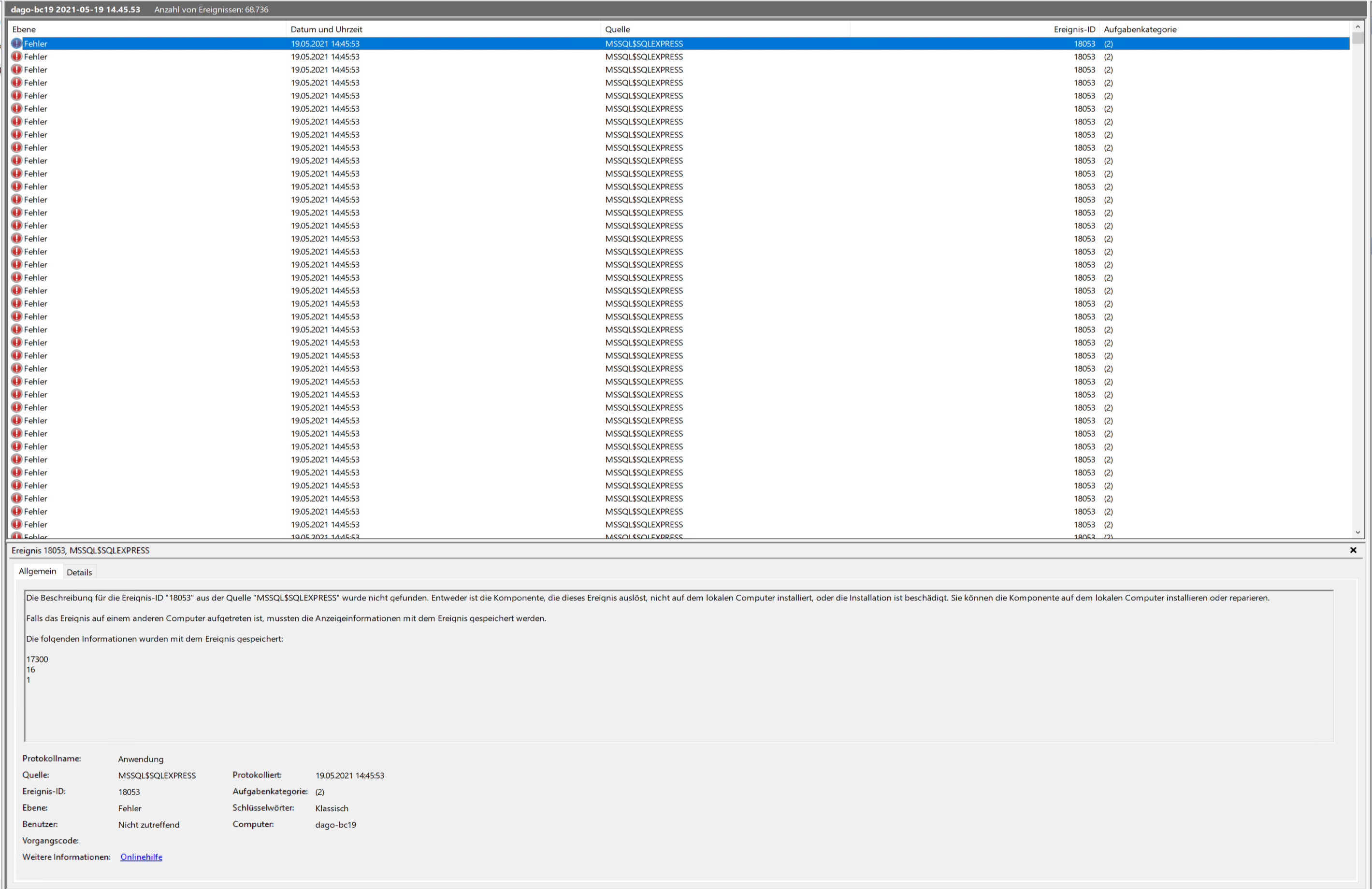
The Eventlog is full of this error of MSSQL$SQLEXPRESS:
16
1
DanielGoehler
on 19 May 2021
This is a different problem than the first.
The first was v19 isn't working - that should be fixed with 1.0.1.7
Not sure if this one is due to traefik or using your own database?
Could you maybe try to remove a number of your parameters and see when this happens - and then create a new issue with this?
Thanks
freddydk
on 19 May 2021
Sure.
DanielGoehler
on 19 May 2021
Just to let you know that I don't think it's just the generic images, build 19.0.25691.0 seems to have issues as well. We are using Traefik, but not a custom or external database. When testing with the current build 19.0.25706.0 everything works fine. Many thanks to you!
DanielGoehler
on 19 May 2021
Related issues
 lvanvugt
·
5Comments
lvanvugt
·
5Comments
 ashik-ivor
·
4Comments
lvanvugt
·
3Comments
ashik-ivor
·
4Comments
lvanvugt
·
3Comments
 ichladil
·
5Comments
ichladil
·
5Comments
 mattiasboustedt
·
5Comments
mattiasboustedt
·
5Comments
Most helpful comment
BC 19 uses a new dotnet core version, which was not present in generic image 1.0.1.6
All images are being updated to 1.0.1.7, which includes this new dotnetcore version.
This issue should be solved within the next few hours (dependeing on what version of windows you are using)
10.0.19042.985 has already been updated...
newest versions are updated first.