Navcontainerhelper: Trojan detected in NavConainerHelper
Just updated today NavContainerHelper to 0.6.5.7.
After, when I run my script to create New-NavContainer I have this message :
Exception lors de l'appel de « ReadAllBytes » avec « 1 » argument(s) : « Impossible de terminer l’opération, car le fichier contient un virus ou un logiciel potentiellement indésirable.
Au caractère C:\Program Files\WindowsPowerShell\Modules\navcontainerhelper\0.6.5.7\ContainerHandling\New-NavContainer.ps1:1343 : 9
+         New-DesktopShortcut -Name "$containerName Command Prompt" -Ta ...
+         ~~~~~~~~~~~~~~~~~~~~~~~~~~~~~~~~~~~~~~~~~~~~~~~~~~~~~~~~~~~~~
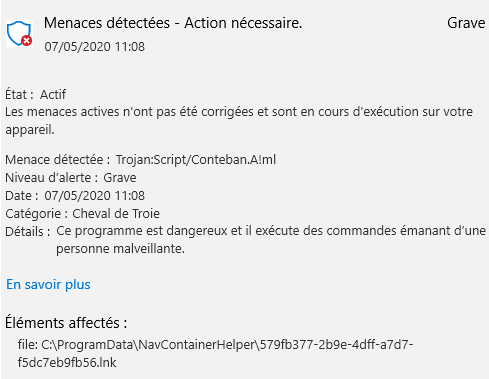
When I look in Windows Defender :
Scripts used to create container and cause the issue
New-NavContainer arguments : -Accept_Eula -Accept_Outdated -doNotCheckHealth -containerName CAGPG160-Dev -imageName mcr.microsoft.com/businesscentral/onprem:2004-fr -auth UserPassword -updateHosts -includeCSide:False -memoryLimit 8G -doNotExportObjectsToText:True -enableSymbolLoading:False -includeTestToolkit:True -includeTestLibrariesOnly:True -doNotUseRuntimePackages:True -includeAL:True -assignPremiumPlan:True -isolation process -useBestContainerOS -licensefile "D:\Sources\DevOps\Git\D365BC CALLIOPACKS\CAGPG\Configs\NAV-DEV-License.flf" -additionalParameters @("--volume "D:\Sources\DevOps\Git\D365BC CALLIOPACKS\CAGPG:C:\Source"")
Full output of scripts
Removing container CAGPG160-Dev
Removing CAGPG160-Dev from host hosts file
Removing C:\ProgramData\NavContainerHelper\Extensions\CAGPG160-Dev
Creating container CAGPG160-Dev...
NavContainerHelper is version 0.6.5.7
NavContainerHelper is running as administrator
Host is Microsoft  - 1909
Docker Client Version is 19.03.8
Docker Server Version is 19.03.8
Using image mcr.microsoft.com/businesscentral/onprem:2004-fr-ltsc2019
Disabling Health Check (always report healthy)
Creating Container CAGPG160-Dev
Version: 16.0.11240.12076-fr
Style: onprem
Platform: 16.0.11233.12061
Generic Tag: 0.0.9.99
Container OS Version: 10.0.17763.973 (ltsc2019)
Host OS Version: 10.0.18363.815 (1909)
A better Generic Container OS exists for your host (mcr.microsoft.com/dynamicsnav:10.0.18363.778-generic)
Using generic image mcr.microsoft.com/dynamicsnav:10.0.18363.778-generic
Generic Container OS Version: 10.0.18363.778 (1909)
Generic Tag of better generic: 0.0.9.100
Using locale fr-FR
Using process isolation
Disabling the standard eventlog dump to container log every 2 seconds (use -dumpEventLog to enable)
Using license file D:\Sources\DevOps\Git\D365BC CALLIOPACKS\CAGPG\Configs\NAV-DEV-License.flf
Files in C:\ProgramData\NavContainerHelper\Extensions\CAGPG160-Dev\my:
- AdditionalOutput.ps1
- license.flf
- MainLoop.ps1
- SetupNavUsers.ps1
- SetupVariables.ps1
- updatehosts.ps1
Creating container CAGPG160-Dev from image mcr.microsoft.com/dynamicsnav:10.0.18363.778-generic
c8c3a269b78131e2bbf09c271e94ebf68e7ce66a09fd24c1413e689f586d0776
Waiting for container CAGPG160-Dev to be ready
Installing Business Central
Installing Url Rewrite
Installing OpenXML
Installing DotNetCore
Starting Local SQL Server
Starting Internet Information Server
Copying Service Tier Files
Copying Web Client Files
Copying Client Files
Copying ModernDev Files
Copying PowerShell Scripts
Copying Test Assemblies
Copying Applications
Copying ReportBuilder
Changing Database Server Collation to French_100_CI_AS
SQL Server 2017 transmits information about your installation experience, as well as other usage and performance data, to Microsoft to help improve the product. To learn more about SQL Server 2017 data processing and privacy controls, please see the Privacy Statement.
Copying Cronus database
Modifying Business Central Service Tier Config File for Docker
Creating Business Central Service Tier
Installing SIP crypto provider: 'C:\Windows\System32\NavSip.dll'
Starting Business Central Service Tier
Installation took 206 seconds
Installation complete
Stopping Business Central Service Tier
Initializing...
Setting host.docker.internal to  in container hosts file (copy from host hosts file)
Setting gateway.docker.internal to  in container hosts file (copy from host hosts file)
Setting host.docker.internal to 192.168.1.32 in container hosts file (copy from host hosts file)
Setting gateway.docker.internal to 192.168.1.32 in container hosts file (copy from host hosts file)
Setting kubernetes.docker.internal to 127.0.0.1 in container hosts file (copy from host hosts file)
Setting host.containerhelper.internal to 172.18.0.1 in container hosts file
Starting Container
Hostname is CAGPG160-Dev
PublicDnsName is CAGPG160-Dev
Using NavUserPassword Authentication
Creating Self Signed Certificate
Self Signed Certificate Thumbprint EDECD2A327D7B20AEBFA0093761FD2EEACEA57F1
Modifying Service Tier Config File with Instance Specific Settings
Starting Service Tier
Registering event sources
Creating DotNetCore Web Server Instance
Using license file 'c:\run\my\license.flf'
Import License
Creating http download site
Setting SA Password and enabling SA
Creating sa as SQL User and add to sysadmin
Creating SUPER user
WARNING: The password that you entered does not meet the minimum requirements.
It should be at least 8 characters long and contain at least one uppercase
letter, one lowercase letter, and one number.
Assign Premium plan for SA
Container IP Address: 172.18.7.132
Container Hostname  : CAGPG160-Dev
Container Dns Name  : CAGPG160-Dev
Web Client          : http://CAGPG160-Dev/BC/
Dev. Server         : http://CAGPG160-Dev
Dev. ServerInstance : BC
Setting CAGPG160-Dev to 172.18.7.132 in host hosts file

Files:
http://CAGPG160-Dev:8080/ALLanguage.vsix

Initialization took 64 seconds
Ready for connections!
Reading CustomSettings.config from CAGPG160-Dev
Creating Desktop Shortcuts for CAGPG160-Dev
Exception lors de l'appel de « ReadAllBytes » avec « 1 » argument(s) : « Impossible de terminer l’opération, car le fichier contient un virus ou un logiciel potentiellement indésirable.
 »
Au caractère C:\Program Files\WindowsPowerShell\Modules\navcontainerhelper\0.6.5.7\ContainerHandling\New-NavContainer.ps1:1343 : 9
+         New-DesktopShortcut -Name "$containerName Command Prompt" -Ta ...
+         ~~~~~~~~~~~~~~~~~~~~~~~~~~~~~~~~~~~~~~~~~~~~~~~~~~~~~~~~~~~~~
Additional context
- does it happen all the time? Yes
- did it use to work? Yes
 pmatsconsulting
All 9 comments
it looks like this happens when creating the shortcuts on the desktop.
There is definitely no trojan in containerhelper and the script to create the shortcut just creates a shortcut.
If you uninstall 0.6.5.7 and install 0.6.5.6 you will probably see exactly the same problem, this hasn't changed.
Somehow your virus scanner detects this and gives the error. You can add -shortcuts None to avoid the shortcuts and the error.
 freddydk
on 7 May 2020
freddydk
on 7 May 2020
Thank you for your rapid feedback!
Would like to be sure that package was not infected on NuGet.
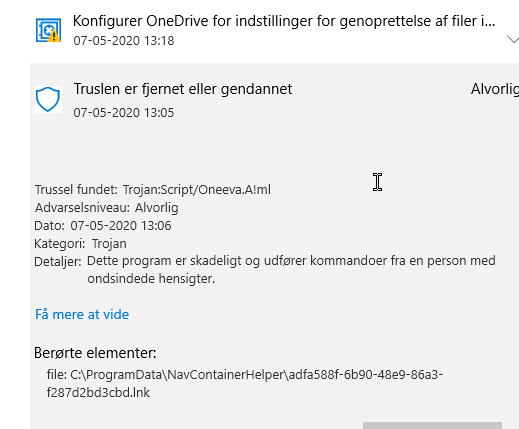
Maybe its the result of Windows Defender Security update which interprets a bad new trojan signature in the temp link generated by NavContainerHelper in C:\ProgramData\NavContainerHelper
pmatsconsulting
on 7 May 2020
The build machines, which builds and publishes navcontatinerhelper are not accessible by anybody (also not me) - there has never been a login on that machine.
Also - PowerShellGallery performs checks when we publish.
Third - I have run this on several machines with updated defender bits, which doesn't give me any issues.
I cannot say that you don't have Win32/Conteban.A!ml - but if you have, I cannot imagine that it is caused by NavContainerHelper.
The way containerhelper creates the links on the desktop is to create a .lnk file in the containerhelper folder and move it onto the desktop.
freddydk
on 7 May 2020
Same warning with me today allthough different virus. Hopefully Defender false positive of sorts but annoying.
 ohlfsen
on 7 May 2020
ohlfsen
on 7 May 2020
I have a repro now, from old versions of containerhelper as well.
Apparently, newest Windows Defender will react on the fact that I add an IconLocation to an .ico file inside the navcontainerhelper - I will have to fix that in the containerhelper to use a different icon.
In the meantime, you can modify
C:\Program Files\WindowsPowerShell\Modules\navcontainerhelper\<your version>\ContainerHandling\New-NavContainer.ps1
Search for -IconLocation $dockerIco - and remove that parameter (both -IconLocation and $dockerIco)
Restart the PowerShell session.
freddydk
on 7 May 2020
Worked great, thanks Freddy! I wonder why it started failing for us in the evening when was building fine all day...
 yrest
on 7 May 2020
yrest
on 7 May 2020
I see you already fixed and merged to master. I'am just curious how long does it normally take until its available in the psgallery?
 marknitek
on 7 May 2020
marknitek
on 7 May 2020
Looking at the pipeline - another 15 minutes (unless something fails)
freddydk
on 7 May 2020
NavContainerHelper 0.6.5.8 is released with a fix for this.
freddydk
on 7 May 2020
Related issues
 dkorinets
·
3Comments
dkorinets
·
3Comments
 mattiasboustedt
·
5Comments
mattiasboustedt
·
5Comments
 lvanvugt
·
3Comments
lvanvugt
·
3Comments
 DanielGoehler
·
4Comments
lvanvugt
·
5Comments
DanielGoehler
·
4Comments
lvanvugt
·
5Comments
Most helpful comment
I have a repro now, from old versions of containerhelper as well.
Apparently, newest Windows Defender will react on the fact that I add an IconLocation to an .ico file inside the navcontainerhelper - I will have to fix that in the containerhelper to use a different icon.
In the meantime, you can modify
Search for -IconLocation $dockerIco - and remove that parameter (both -IconLocation and $dockerIco)
Restart the PowerShell session.