Navcontainerhelper: Timestamp server appears to be down
Hi, we are experiencing problems with the app signing step in our CI Pipeline.
It says that the timestamp server could not be reached:
SignTool Error: The specified timestamp server either could not be reached or
at <ScriptBlock>, <No file>: line 27
##[error]SignTool Error: The specified timestamp server either could not be reached or
In C:\Program
Files\WindowsPowerShell\Modules\navcontainerhelper\0.6.5.3\ContainerHandling\Invoke-ScriptInNavContainer.ps1:37
Zeichen:13
+             Invoke-Command -Session $session -ScriptBlock $scriptbloc ...
+             ~~~~~~~~~~~~~~~~~~~~~~~~~~~~~~~~~~~~~~~~~~~~~~~~~~~~~~~~~
    + CategoryInfo          : NotSpecified: (SignTool Error:...t be reached or:String) [], RemoteException
    + FullyQualifiedErrorId : NativeCommandError
    + PSComputerName        : 3059936c1dc70381731a8807dda691321208dda89112b55a3c828f8f37358e19
##[error]PowerShell wurde beendet mit dem Code "1".
I noticed that this issue was addressed by @freddydk 8 days ago #918 when the old timestamp server was switched for a different one.
The pipeline is using the navcontainerhelper version 0.6.5.3 and therefore tried to reach the server 'http://timestamp.digicert.com?alg=sha1' but failed doing so and I was wondering if anybody else was experiencing similar problems.
Best regards
 staedter
All 21 comments
I will investigate - if you can switch back to 0.6.5.2 for the time being then I will find a solution to this.
 freddydk
on 3 Apr 2020
freddydk
on 3 Apr 2020
We experience the same Problem
 marknitek
on 6 Apr 2020
marknitek
on 6 Apr 2020
Just published a new version, which reverted the change in 0.6.5.3 - should be working again.
Sorry
freddydk
on 6 Apr 2020
0.6.5.4 is the new version
freddydk
on 6 Apr 2020
I don't have a code signing cert. right now, so I cannot test this, but is Daniel right that it doesn't work here https://github.com/microsoft/navcontainerhelper/issues/930
freddydk
on 7 Apr 2020
We have just checked it now and although the pipeline step now completes without error our .apps appear also not to be signed. We also have no "Digital Signatures"-Tab under properties so Daniel seems to be right about this issue #930
staedter
on 7 Apr 2020
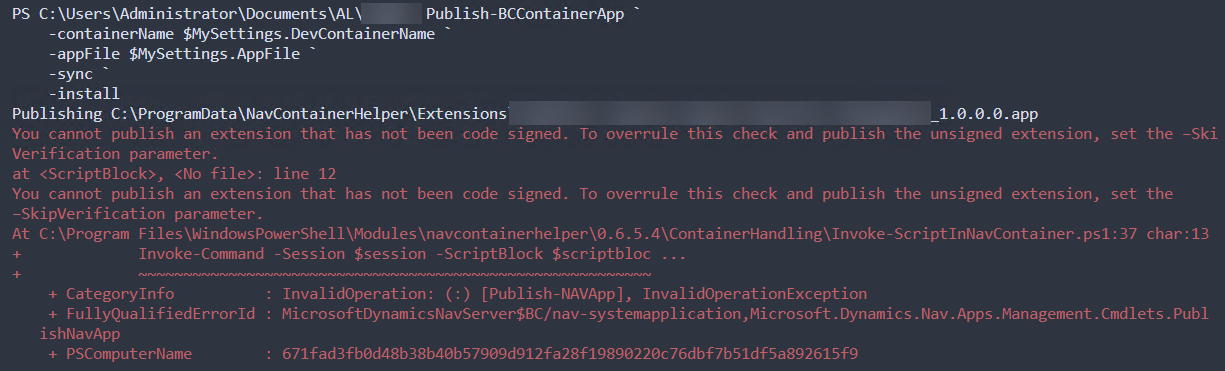
And if you publish the app without -skipverification - then it fails?
freddydk
on 7 Apr 2020
Before signing:
After signing:

I even recreated the container to wipe out any trace of the signed app file. Looks like the file was signed after all, but the signature is hidden somehow.
 TheDenSter
on 7 Apr 2020
TheDenSter
on 7 Apr 2020
That's what I mean - I don't think app signing updates the executable signing properties.
freddydk
on 7 Apr 2020
It doesn't change properties, it adds a digital signature, which you're supposed to see in the file's properties. It's how I've been checking to verify whether the app has been signed over the past two years. The very script that I ran to sign the file today added the digital signature to the file not two weeks ago. Unfortunately I don't have a copy of the file anymore so I can't show you proof, but not seeing the digital signature in the file properties is new.
I have Googled "how do you tell when an app is code signed" and the only response that I can find is "it's a tab in File properties". How else do you verify that an app file is signed?
TheDenSter
on 7 Apr 2020
Alright, signtool can do it:

Would be nice to have a navcontainerhelper Cmdlet to verify the signature
TheDenSter
on 7 Apr 2020
by the way @staedter I just realized I've posted all these replies in your topic. Sorry about that.
TheDenSter
on 7 Apr 2020
As far as I know - the NAVSIPCryptoProvider is responsible for signing the .app file and I don't think it has ever updated the files properties.
The crypto provider for signing .exe files does this, yes, but not the one for .app files.
Anyway, I think we have discovered that the cmdlet works, thanks.
Will consider the check function.
freddydk
on 8 Apr 2020
I must have false memories of the hundreds of times that I verified the signatures of app files by looking at the file properties:

I sent this screenshot to my client less than a month ago when I first started using the Sign-NavContainerApp Cmdlet, a screenshot of their .app file WITH a digital signature in the file properties.
TheDenSter
on 8 Apr 2020
Shipped in 0.6.5.6
freddydk
on 8 Apr 2020
And if you publish the app without -skipverification - then it fails?
Actually, no. With -skipverification:$false it published the app just fine. I am still a little confused why there is no digital signature visible but everything else seems to be working as it should.
This issue can be closed as far as I'm concerned. Thanks @freddydk :)
edit: sorry for posting here. my browser had an old version still cached. also i thought I was posting in my Issue. sorry ¯\_(ツ)_/¯
staedter
on 8 Apr 2020
Hi, right now I'm having issues with the current url (http://timestamp.verisign.com/scripts/timestamp.dll).
It seems that this url is not always up and running.
According to this site, there are several options:
https://gist.github.com/Manouchehri/fd754e402d98430243455713efada710
And according to this site (https://knowledge.digicert.com/solution/SO912.html), a valid and working alternative is: http://timestamp.digicert.com.
I've tried this one and it is working.
Anyone else having this issue?
 ricardopaiva
on 19 Nov 2020
ricardopaiva
on 19 Nov 2020
So you have modified the code to use
"http://timestamp.digicert.com"
instead of
"http://timestamp.verisign.com/scripts/timestamp.dll"
on your machine - and you can sign and publish the app without skipverification?
freddydk
on 19 Nov 2020
I did run the SignTool manually, using "http://timestamp.digicert.com".
I didn't try to publish the app without the skipverification. I'll try it to let you know if the file has been correctly signed.
In the meanwhile I've just tried the old url and it is working again. I believe they might been doing some kind of maintenance on the server. From what I've read in a few forums, it seems that this url not always is up and running.
ricardopaiva
on 19 Nov 2020
I will move the url to become a parameter in the sign-appincontainer function with a default value
freddydk
on 19 Nov 2020
I've just tried to publish the app signed with url "http://timestamp.digicert.com" and I was able to publish the app without errors.
Yes, having that as a parameter, just in case, would be awesome. Thanks and keep the good work!
ricardopaiva
on 19 Nov 2020
Related issues
 Rukkulakki
·
5Comments
Rukkulakki
·
5Comments
 mattiasboustedt
·
5Comments
mattiasboustedt
·
5Comments
 ashikivor
·
4Comments
ashikivor
·
4Comments
 kine
·
3Comments
kine
·
3Comments
 MODUSCarstenScholling
·
5Comments
MODUSCarstenScholling
·
5Comments
Most helpful comment
I will investigate - if you can switch back to 0.6.5.2 for the time being then I will find a solution to this.