Navcontainerhelper: Cannot be started due to the following error: Cannot start service MicrosoftDynamicsNavServer$BC on computer '.'.
When trying to create a new insider container on a Windows10 Host, I'm getting the above error.
It works when I add "-isolation 'HyperV'".. . Current images (like "mcr.microsoft.com/businesscentral/onprem:be") work fine. Only insider images have this problem.
Full output - I added the "*" message to see what the actual docker command was ...:
NavContainerHelper is version 0.6.4.20
NavContainerHelper is not running as administrator
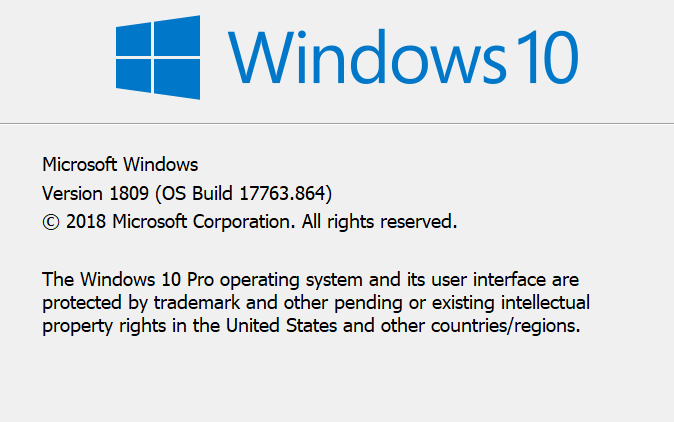
Host is Microsoft Windows 10 Pro - ltsc2019
Docker Client Version is 18.09.1
Docker Server Version is 18.09.1
VERBOSE: Perform operation 'Enumerate CimInstances' with following parameters, ''namespaceName' = root\cimv2,'className' = Win32_OperatingSystem'.
VERBOSE: Operation 'Enumerate CimInstances' complete.
Pulling image bcinsider.azurecr.io/bcsandbox-master:be-ltsc2019
*** Docker run: pull  bcinsider.azurecr.io/bcsandbox-master:be-ltsc2019
be-ltsc2019: Pulling from bcsandbox-master
Using image bcinsider.azurecr.io/bcsandbox-master:be-ltsc2019
Removing container bcdaily
Removing bcdaily from host hosts file
Removing C:\ProgramData\NavContainerHelper\Extensions\bcdaily
Creating Container bcdaily
Version: 16.0.10541.0-be
Style: sandbox
Platform: 15.0.38209.0
Generic Tag: 0.0.9.96
Container OS Version: 10.0.17763.805 (ltsc2019)
Host OS Version: 10.0.17763.864 (ltsc2019)
WARNING: The container operating system matches the host operating system, but the revision is different.
If you encounter issues, you might want to specify -isolation hyperv
Using locale nl-BE
Using process isolation
Disabling the standard eventlog dump to container log every 2 seconds (use -dumpEventLog to enable)
Files in C:\ProgramData\NavContainerHelper\Extensions\bcdaily\my:
- AdditionalOutput.ps1
- MainLoop.ps1
- SetupVariables.ps1
- SetupWebClient.ps1
- updatehosts.ps1
Creating container bcdaily from image bcinsider.azurecr.io/bcsandbox-master:be-ltsc2019
*** Docker run: run --env licenseFile="" --name bcdaily --hostname bcdaily --env auth=NavUserPassword --env username="waldo" --env ExitOnError=N --env locale=nl-BE --env databaseServer="" --env databaseInstance="" --volume "C:\ProgramData\NavContainerHelper:C:\ProgramData\NavContainerHelper" --volume "C:\ProgramData\NavContainerHelper\Extensions\bcdaily\my:C:\Run\my" --isolation process --restart unless-stopped --memory 8G --env enableApiServices=Y --env useSSL=N --volume "c:\windows\system32\drivers\etc:C:\driversetc" --env securePassword=76492d1116743f0423413b16050a5345MgB8AFkAeABVAGQAdgBaADIARQA2AG0AbQBDAEEATABaAHUAaQBMADEATwB6AGcAPQA9AHwAMQAyADMANwBjAGEAMQA1ADkAMQAzADYAMgA0ADQANwA0ADkAMgAwAGIAOQBjADkAZQAwAGQAZgA3ADgANABlAGUAMgA2ADkAYQBjADgAYQA2AGMAOAAyADcAMgA5ADUAYQAxADkANwBkADkAMAAyAGIAYgA2ADEANgA0ADgANAA= --env passwordKeyFile="c:\run\my\aes.key" --env removePasswordKeyFile=Y --cpu-count 8 --dns=8.8.8.8 --env accept_eula=Y --env accept_outdated=Y --detach bcinsider.azurecr.io/bcsandbox-master:be-ltsc2019
d676734d4b30ce874c8353fa4b152ef4a930760c3be6d8f387fdfea1ca5e7720
Waiting for container bcdaily to be ready
Initializing...
Setting host.docker.internal to  in container hosts file (copy from host hosts file)
Setting gateway.docker.internal to  in container hosts file (copy from host hosts file)
Setting host.containerhelper.internal to 172.26.80.1 in container hosts file
Starting Container
Hostname is
PublicDnsName is bcdaily
Using NavUserPassword Authentication
Starting Local SQL Server
Starting Internet Information Server
Creating Self Signed Certificate
Self Signed Certificate Thumbprint 09E4F1C023552E77D81612C8312453CEBFAE3361
Modifying Service Tier Config File with Instance Specific Settings
Starting Service Tier
Service 'Dynamics 365 Business Central Server [BC] (MicrosoftDynamicsNavServer$BC)' cannot be started due to the following error: Cannot start service MicrosoftDynamicsNavServer$BC on computer '.'.
at <ScriptBlock>, C:\Run\navstart.ps1: line 142
at <ScriptBlock>, C:\Run\start.ps1: line 121
at <ScriptBlock>, <No file>: line 1Error
Initializing...
Setting host.docker.internal to  in container hosts file (copy from host hosts file)
Setting gateway.docker.internal to  in container hosts file (copy from host hosts file)
Setting host.containerhelper.internal to 172.26.80.1 in container hosts file
Starting Container
Hostname is
PublicDnsName is bcdaily
Using NavUserPassword Authentication
Starting Local SQL Server
Starting Internet Information Server
Creating Self Signed Certificate
Self Signed Certificate Thumbprint 09E4F1C023552E77D81612C8312453CEBFAE3361
Modifying Service Tier Config File with Instance Specific Settings
Starting Service Tier
Service 'Dynamics 365 Business Central Server [BC] (MicrosoftDynamicsNavServer$BC)' cannot be started due to the following error: Cannot start service MicrosoftDynamicsNavServer$BC on computer '.'.
at <ScriptBlock>, C:\Run\navstart.ps1: line 142
at <ScriptBlock>, C:\Run\start.ps1: line 121
at <ScriptBlock>, <No file>: line 1
Initialization of container bcdaily failed
At C:\Users\ericw\Documents\WindowsPowerShell\Modules\navcontainerhelper\0.6.4.20\ContainerHandling\Wait-NavContainerReady.ps1:44 char:17
+ ...             throw "Initialization of container $containerName failed" ...
+                 ~~~~~~~~~~~~~~~~~~~~~~~~~~~~~~~~~~~~~~~~~~~~~~~~~~~~~~~~~
    + CategoryInfo          : OperationStopped: (Initialization ... bcdaily failed:String) [], RuntimeException
    + FullyQualifiedErrorId : Initialization of container bcdaily failed
This is the script I'm running:
New-NavContainer
-containerName 'bcdaily'
-imageName 'bcinsider.azurecr.io/bcsandbox-master:be'
-accept_eula
-additionalParameters '--cpu-count 8 --dns=8.8.8.8'
-alwaysPull:True
-Credential $MyCredential
-updateHosts
-auth NavUserPassword
-enableSymbolLoading:False
-assignPremiumPlan:False
-useBestContainerOS
-includeTestToolkit:False
-includeTestLibrariesOnly:False
-Verbose
-memoryLimit 8G
-accept_outdated
-includeAL
These are the logs:
PS > docker logs bcdaily
Initializing...
Setting host.docker.internal to  in container hosts file (copy from host hosts file)
Setting gateway.docker.internal to  in container hosts file (copy from host hosts file)
Setting host.containerhelper.internal to 172.26.80.1 in container hosts file
Starting Container
Hostname is
PublicDnsName is bcdaily
Using NavUserPassword Authentication
Starting Local SQL Server
Starting Internet Information Server
Creating Self Signed Certificate
Self Signed Certificate Thumbprint 09E4F1C023552E77D81612C8312453CEBFAE3361
Modifying Service Tier Config File with Instance Specific Settings
Starting Service Tier
Service 'Dynamics 365 Business Central Server [BC] (MicrosoftDynamicsNavServer$BC)' cannot be started due to the following error: Cannot start service MicrosoftDynamicsNavServer$BC on computer '.'.
at <ScriptBlock>, C:\Run\navstart.ps1: line 142
at <ScriptBlock>, C:\Run\start.ps1: line 121
at <ScriptBlock>, <No file>: line 1
and the docker inspect:
PS > docker inspect bcdaily
[
    {
        "Id": "d676734d4b30ce874c8353fa4b152ef4a930760c3be6d8f387fdfea1ca5e7720",
        "Created": "2019-12-02T08:08:22.4055229Z",
        "Path": "powershell -Command $ErrorActionPreference = 'Stop'; $ProgressPreference = 'SilentlyContinue'; .\\Run\\start.ps1",
        "Args": [],
        "State": {
            "Status": "running",
            "Running": true,
            "Paused": false,
            "Restarting": false,
            "OOMKilled": false,
            "Dead": false,
            "Pid": 9352,
            "ExitCode": 0,
            "Error": "",
            "StartedAt": "2019-12-02T08:08:23.890526Z",
            "FinishedAt": "0001-01-01T00:00:00Z",
            "Health": {
                "Status": "unhealthy",
                "FailingStreak": 9,
                "Log": [
                    {
                        "Start": "2019-12-02T09:10:55.8391547+01:00",
                        "End": "2019-12-02T09:10:56.1861434+01:00",
                        "ExitCode": 1,
                        "Output": ""
                    },
                    {
                        "Start": "2019-12-02T09:11:26.2008018+01:00",
                        "End": "2019-12-02T09:11:26.6028216+01:00",
                        "ExitCode": 1,
                        "Output": ""
                    },
                    {
                        "Start": "2019-12-02T09:11:56.6150951+01:00",
                        "End": "2019-12-02T09:11:56.9736955+01:00",
                        "ExitCode": 1,
                        "Output": ""
                    },
                    {
                        "Start": "2019-12-02T09:12:26.9923214+01:00",
                        "End": "2019-12-02T09:12:27.3472679+01:00",
                        "ExitCode": 1,
                        "Output": ""
                    },
                    {
                        "Start": "2019-12-02T09:12:57.3601246+01:00",
                        "End": "2019-12-02T09:12:57.7246739+01:00",
                        "ExitCode": 1,
                        "Output": ""
                    }
                ]
            }
        },
        "Image": "sha256:67bfd1bf57e45f38f55d2800782893e219e25a01a0b46df52f177c4e804c06b7",
        "ResolvConfPath": "",
        "HostnamePath": "",
        "HostsPath": "",
        "LogPath": "C:\\ProgramData\\Docker\\containers\\d676734d4b30ce874c8353fa4b152ef4a930760c3be6d8f387fdfea1ca5e7720\\d676734d4b30ce874c8353fa4b152ef4a930760c3be6d8f387fdfea1ca5e7720-json.log",
        "Name": "/bcdaily",
        "RestartCount": 0,
        "Driver": "windowsfilter",
        "Platform": "windows",
        "MountLabel": "",
        "ProcessLabel": "",
        "AppArmorProfile": "",
        "ExecIDs": null,
        "HostConfig": {
            "Binds": [
                "C:\\ProgramData\\NavContainerHelper:C:\\ProgramData\\NavContainerHelper",
                "C:\\ProgramData\\NavContainerHelper\\Extensions\\bcdaily\\my:C:\\Run\\my",
                "c:\\windows\\system32\\drivers\\etc:C:\\driversetc"
            ],
            "ContainerIDFile": "",
            "LogConfig": {
                "Type": "json-file",
                "Config": {}
            },
            "NetworkMode": "default",
            "PortBindings": {},
            "RestartPolicy": {
                "Name": "unless-stopped",
                "MaximumRetryCount": 0
            },
            "AutoRemove": false,
            "VolumeDriver": "",
            "VolumesFrom": null,
            "CapAdd": null,
            "CapDrop": null,
            "Dns": [
                "8.8.8.8"
            ],
            "DnsOptions": [],
            "DnsSearch": [],
            "ExtraHosts": null,
            "GroupAdd": null,
            "IpcMode": "",
            "Cgroup": "",
            "Links": null,
            "OomScoreAdj": 0,
            "PidMode": "",
            "Privileged": false,
            "PublishAllPorts": false,
            "ReadonlyRootfs": false,
            "SecurityOpt": null,
            "UTSMode": "",
            "UsernsMode": "",
            "ShmSize": 0,
            "ConsoleSize": [
                0,
                0
            ],
            "Isolation": "process",
            "CpuShares": 0,
            "Memory": 8589934592,
            "NanoCpus": 0,
            "CgroupParent": "",
            "BlkioWeight": 0,
            "BlkioWeightDevice": [],
            "BlkioDeviceReadBps": null,
            "BlkioDeviceWriteBps": null,
            "BlkioDeviceReadIOps": null,
            "BlkioDeviceWriteIOps": null,
            "CpuPeriod": 0,
            "CpuQuota": 0,
            "CpuRealtimePeriod": 0,
            "CpuRealtimeRuntime": 0,
            "CpusetCpus": "",
            "CpusetMems": "",
            "Devices": [],
            "DeviceCgroupRules": null,
            "DiskQuota": 0,
            "KernelMemory": 0,
            "MemoryReservation": 0,
            "MemorySwap": 0,
            "MemorySwappiness": null,
            "OomKillDisable": false,
            "PidsLimit": 0,
            "Ulimits": null,
            "CpuCount": 8,
            "CpuPercent": 0,
            "IOMaximumIOps": 0,
            "IOMaximumBandwidth": 0,
            "MaskedPaths": null,
            "ReadonlyPaths": null
        },
        "GraphDriver": {
            "Data": {
                "dir": "C:\\ProgramData\\Docker\\windowsfilter\\d676734d4b30ce874c8353fa4b152ef4a930760c3be6d8f387fdfea1ca5e7720"
            },
            "Name": "windowsfilter"
        },
        "Mounts": [
            {
                "Type": "bind",
                "Source": "c:\\programdata\\navcontainerhelper",
                "Destination": "c:\\programdata\\navcontainerhelper",
                "Mode": "",
                "RW": true,
                "Propagation": ""
            },
            {
                "Type": "bind",
                "Source": "c:\\programdata\\navcontainerhelper\\extensions\\bcdaily\\my",
                "Destination": "c:\\run\\my",
                "Mode": "",
                "RW": true,
                "Propagation": ""
            },
            {
                "Type": "bind",
                "Source": "c:\\windows\\system32\\drivers\\etc",
                "Destination": "c:\\driversetc",
                "Mode": "",
                "RW": true,
                "Propagation": ""
            }
        ],
        "Config": {
            "Hostname": "bcdaily",
            "Domainname": "",
            "User": "",
            "AttachStdin": false,
            "AttachStdout": false,
            "AttachStderr": false,
            "ExposedPorts": {
                "1433/tcp": {},
                "443/tcp": {},
                "7045/tcp": {},
                "7046/tcp": {},
                "7047/tcp": {},
                "7048/tcp": {},
                "7049/tcp": {},
                "80/tcp": {},
                "8080/tcp": {}
            },
            "Tty": false,
            "OpenStdin": false,
            "StdinOnce": false,
            "Env": [
                "removePasswordKeyFile=Y",
                "auth=NavUserPassword",
                "locale=nl-BE",
                "enableApiServices=Y",
                "licenseFile=",
                "databaseInstance=",
                "accept_outdated=Y",
                "username=waldo",
                "useSSL=N",
                "securePassword=76492d1116743f0423413b16050a5345MgB8AFkAeABVAGQAdgBaADIARQA2AG0AbQBDAEEATABaAHUAaQBMADEATwB6AGcAPQA9AHwAMQAyADMANwBjAGEAMQA1ADkAMQAzADYAMgA0ADQANwA0ADkAMgAwAGIAOQBjADkAZQAwAGQAZgA3ADgANABlAGUAMgA2ADkAYQBjADgAYQA2AGMAOAAyADcAMgA5ADUAYQAxADkANwBkADkAMAAyAGIAYgA2ADEANgA0ADgANAA=",
                "accept_eula=Y",
                "ExitOnError=N",
                "databaseServer=",
                "passwordKeyFile=c:\\run\\my\\aes.key",
                "COMPLUS_NGenProtectedProcess_FeatureEnabled=0",
                "DatabaseName=Financialsbe",
                "NAVDVDURL=https://dockerbuildqueue.blob.core.windows.net/dvd/879afb46-0354-4c97-a6b2-53bd29f098d1",
                "VSIXURL=https://dockerbuildqueue.blob.core.windows.net/dvd/al-5.0.200795.vsix",
                "IsBcSandbox=Y",
                "CountryCode=be",
                "DEVPREVIEWURL=https://dockerbuildqueue.blob.core.windows.net/dvd/6f67af23-e0a4-4591-a638-727ed6e3fa92"
            ],
            "Cmd": [
                "powershell -Command $ErrorActionPreference = 'Stop'; $ProgressPreference = 'SilentlyContinue'; .\\Run\\start.ps1"
            ],
            "Healthcheck": {
                "Test": [
                    "CMD",
                    "powershell",
                    ".\\Run\\HealthCheck.ps1"
                ],
                "Interval": 30000000000,
                "Timeout": 10000000000
            },
            "ArgsEscaped": true,
            "Image": "bcinsider.azurecr.io/bcsandbox-master:be-ltsc2019",
            "Volumes": null,
            "WorkingDir": "",
            "Entrypoint": null,
            "OnBuild": null,
            "Labels": {
                "country": "be",
                "created": "201911260722",
                "cu": "",
                "eula": "https://go.microsoft.com/fwlink/?linkid=861843",
                "legal": "http://go.microsoft.com/fwlink/?LinkId=837447",
                "maintainer": "Dynamics SMB",
                "nav": "",
                "osversion": "10.0.17763.805",
                "platform": "15.0.38209.0",
                "tag": "0.0.9.96",
                "version": "16.0.10541.0"
            }
        },
        "NetworkSettings": {
            "Bridge": "",
            "SandboxID": "d676734d4b30ce874c8353fa4b152ef4a930760c3be6d8f387fdfea1ca5e7720",
            "HairpinMode": false,
            "LinkLocalIPv6Address": "",
            "LinkLocalIPv6PrefixLen": 0,
            "Ports": {
                "1433/tcp": null,
                "443/tcp": null,
                "7045/tcp": null,
                "7046/tcp": null,
                "7047/tcp": null,
                "7048/tcp": null,
                "7049/tcp": null,
                "80/tcp": null,
                "8080/tcp": null
            },
            "SandboxKey": "d676734d4b30ce874c8353fa4b152ef4a930760c3be6d8f387fdfea1ca5e7720",
            "SecondaryIPAddresses": null,
            "SecondaryIPv6Addresses": null,
            "EndpointID": "",
            "Gateway": "",
            "GlobalIPv6Address": "",
            "GlobalIPv6PrefixLen": 0,
            "IPAddress": "",
            "IPPrefixLen": 0,
            "IPv6Gateway": "",
            "MacAddress": "",
            "Networks": {
                "nat": {
                    "IPAMConfig": null,
                    "Links": null,
                    "Aliases": null,
                    "NetworkID": "d8f0eec6271ff5ea95b69b2ac0fe7bad2c80031e29469dc003cbcb5d18196781",
                    "EndpointID": "915cc8d3fcb6f9bf8412a4952f81fda8348ed53854e155b4faa2c75fc1616d45",
                    "Gateway": "172.26.80.1",
                    "IPAddress": "172.26.82.96",
                    "IPPrefixLen": 16,
                    "IPv6Gateway": "",
                    "GlobalIPv6Address": "",
                    "GlobalIPv6PrefixLen": 0,
                    "MacAddress": "00:15:5d:ea:f7:13",
                    "DriverOpts": null
                }
            }
        }
    }
]
My host version:
 waldo1001
All 64 comments
FYI:
New-BCContainer
-accept_eula
-imageName _bcinsider.azurecr.io/bcsandbox-master:gb_
-auth UserPassword
-Credential $credential
-containerName $dev15containerName
-licenseFile $licenseFile
-updateHosts
-useBestContainerOS `
-includeAL
on
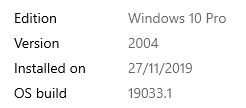
works just fine.
 yrest
on 2 Dec 2019
yrest
on 2 Dec 2019
Thanks @waldo1001 - will spin up a similar machine and test.
Thanks @yrest - in your case you will be running hyperv isolation, which is what Waldo says solves the problem.
 freddydk
on 2 Dec 2019
freddydk
on 2 Dec 2019
Cheers Freddy! You don't happen to have a blog on how do you troubleshoot this kind of stuff?
yrest
on 2 Dec 2019
Hmm. Even though BE image downloads and runs on my machine, when trying to login into sandbox, am getting "An error has occurred".
Digest: sha256:227dfe762ccbe68372315e0cf9188e9a3d5e1e1271e5fbba32283dd037f5f1eb
Status: Downloaded newer image for bcinsider.azurecr.io/bcsandbox-master:be-ltsc2019
bcinsider.azurecr.io/bcsandbox-master:be-ltsc2019
Using image bcinsider.azurecr.io/bcsandbox-master:be-ltsc2019
Creating Container bcinsider
Version: 16.0.10541.0-be
Style: sandbox
Platform: 15.0.38209.0
Generic Tag: 0.0.9.96
Container OS Version: 10.0.17763.805 (ltsc2019)
Host OS Version: 10.0.19033.1 (Unknown/Insider build)
yrest
on 2 Dec 2019
I do not have any description, sorry.
I always look at the command and the output and try to do a repro.
I have tried running the master:be on Windows Server 2019 (17763.864) using process isolation - that works - and I have tried running it on Windows 10 1909 - both works fine.
It might be hard for me to find a Windows 10 1809 (without 1903 and 1909 updates) like the one Waldo is using.
@yrest - if you want me to look at this issue, you should open a new issue and include full command and full output. It doesn't look to be the same issue as Waldo.
@waldo1001 - since this is the servicetier not starting, there should be something in the event log.
Could you use get-navcontainereventlog and send or attach the .evtx
Thanks
freddydk
on 2 Dec 2019
Here you go!
I couldn't find anything, actually .. . Only a bunch of warnings on an older date (which I assume was at creation-time of the docker image).
waldo1001
on 2 Dec 2019
The only strange thing in the event log is 25 occurances of InvokeOpenCompany which all takes more than 1 second.
Haven't seen that before.
freddydk
on 2 Dec 2019
Yes, but as I said - that's on the 26th of November .. so I guess that's from "within" the image.. ? Don't know..
I'll create one with hyperv-isolation, and check for the eventlog...
waldo1001
on 2 Dec 2019
You are of course right, these are from image building.
freddydk
on 2 Dec 2019
Just fyi, this is a successful container (with hyperv isolation):
waldo1001
on 2 Dec 2019
Do you have .net 4.8 on the host?
freddydk
on 2 Dec 2019
On November 20th we shifted master to .net 4.8 - the container is up-to-date - but when running process isolation it will use your windows - and that is probably the reason
freddydk
on 2 Dec 2019
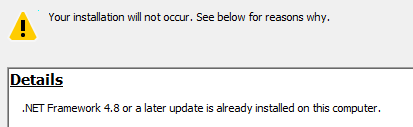
Well .. not sure. When I check the registry, it seems not:
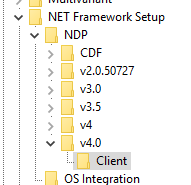
but when I try to install 4.8, I get this:
And when I check with msbuild.exe:

waldo1001
on 2 Dec 2019
Hmm - ok - I am spinning up a Windows 10 Pro with your version now.
freddydk
on 2 Dec 2019
It appears that I can spin up that exact version of Windows 10 on Azure - and yes, I can repro the problem.
Will do some more investigations.
Thanks
freddydk
on 2 Dec 2019
It also fails after installing v4.8 on my VM.
freddydk
on 2 Dec 2019
Currently, these 16.0 versions are available - they all fail...
16.0.10321.0-be-ltsc2019
16.0.10335.0-be-ltsc2019
16.0.10343.0-be-ltsc2019
16.0.10359.0-be-ltsc2019
16.0.10367.0-be-ltsc2019
16.0.10375.0-be-ltsc2019
16.0.10385.0-be-ltsc2019
16.0.10391.0-be-ltsc2019
16.0.10406.0-be-ltsc2019
16.0.10411.0-be-ltsc2019
16.0.10422.0-be-ltsc2019
16.0.10437.0-be-ltsc2019
16.0.10441.0-be-ltsc2019
16.0.10452.0-be-ltsc2019
16.0.10455.0-be-ltsc2019
16.0.10459.0-be-ltsc2019
16.0.10467.0-be-ltsc2019
16.0.10473.0-be-ltsc2019
16.0.10484.0-be-ltsc2019
16.0.10495.0-be-ltsc2019
16.0.10496.0-be-ltsc2019
16.0.10499.0-be-ltsc2019
16.0.10507.0-be-ltsc2019
16.0.10513.0-be-ltsc2019
16.0.10516.0-be-ltsc2019
16.0.10524.0-be-ltsc2019
16.0.10534.0-be-ltsc2019
16.0.10541.0-be-ltsc2019
I also tried
bcinsider.azurecr.io/bcsandbox:15.1.37413.0-be-ltsc2019
which is from October 22nd - it works.
And when I tried the newest from mcr.microsoft.com/businesscentral/sandbox:be-ltsc2019 from November 27th (latest generic) - it works perfectly.
You have been running insider builds in process isolation on that machine up until you reported this error right?
I am really puzzled
freddydk
on 2 Dec 2019
Well, I haven't run insider builds for a while. It has nothing to do with the date I reported this. I didn't run an insider since wave2, to be honest.
waldo1001
on 2 Dec 2019
But indeed, I always use process isolation. It still works with all 15.x images. Just not the 16.x ones.
Can't it be something related to a platform change in BC? Which is not compatible with current version of Windows10?
Just thinking out loud... .
waldo1001
on 2 Dec 2019
did you try the latest bcinsider.azurecr.io/bcsandbox:be-ltsc2019 - that also fails for me?
freddydk
on 2 Dec 2019
Doing as we speak ... will report back
waldo1001
on 2 Dec 2019
No, doesn't work without hyperv isolation:
Login Succeeded
New-NavContainer
-containerName 'bcdaily'
-imageName 'bcinsider.azurecr.io/bcsandbox:be-ltsc2019'
-accept_eula
-additionalParameters '--cpu-count 8 --dns=8.8.8.8'
-alwaysPull:'True'
-Credential 'System.Management.Automation.PSCredential'
-updateHosts
-auth NavUserPassword
-enableSymbolLoading:False
-assignPremiumPlan:False
-useBestContainerOS
-includeTestToolkit:False
-includeTestLibrariesOnly:False
-Verbose
-memoryLimit 8G
-accept_outdated
-includeAL
-shortcuts 'None' #'None' for no shortcuts (or 'Desktop')
This is the output:
Login Succeeded
New-NavContainer
-containerName 'bcdaily'
-imageName 'bcinsider.azurecr.io/bcsandbox:be-ltsc2019'
-accept_eula
-additionalParameters '--cpu-count 8 --dns=8.8.8.8'
-alwaysPull:'True'
-Credential 'System.Management.Automation.PSCredential'
-updateHosts
-auth NavUserPassword
-enableSymbolLoading:False
-assignPremiumPlan:False
-useBestContainerOS
-includeTestToolkit:False
-includeTestLibrariesOnly:False
-Verbose
-memoryLimit 8G
-accept_outdated
-includeAL
-shortcuts 'None' #'None' for no shortcuts (or 'Desktop')
VERBOSE: Perform operation 'Enumerate CimInstances' with following parameters, ''namespaceName' = root\cimv2,'className' = Win32_OperatingSystem'.
VERBOSE: Operation 'Enumerate CimInstances' complete.
NavContainerHelper is version 0.6.4.15
Host is Microsoft Windows 10 Pro - ltsc2019
Docker Client Version is 18.09.1
Docker Server Version is 18.09.1
Pulling image bcinsider.azurecr.io/bcsandbox:be-ltsc2019
be-ltsc2019: Pulling from bcsandbox
Using image bcinsider.azurecr.io/bcsandbox:be-ltsc2019
Removing container bcdaily
Removing bcdaily from hosts
Removing C:\ProgramData\NavContainerHelper\Extensions\bcdaily
Creating Container bcdaily
Version: 15.2.38451.0-be
Style: sandbox
Platform: 15.0.38362.0
Generic Tag: 0.0.9.96
Container OS Version: 10.0.17763.805 (ltsc2019)
Host OS Version: 10.0.17763.864 (ltsc2019)
WARNING: The container operating system matches the host operating system, but the revision is different.
If you encounter issues, you might want to specify -isolation hyperv
Using locale nl-BE
Using process isolation
Disabling the standard eventlog dump to container log every 2 seconds (use -dumpEventLog to enable)
Files in C:\ProgramData\NavContainerHelper\Extensions\bcdaily\my:
- AdditionalOutput.ps1
- MainLoop.ps1
- updatehosts.ps1
Creating container bcdaily from image bcinsider.azurecr.io/bcsandbox:be-ltsc2019
ad94e1f10e950a7ae866e3ac65b5f3451abe935a01d36c75ecbd344d431a62d3
Waiting for container bcdaily to be ready
Using NavUserPassword Authentication
Starting Local SQL Server
Starting Internet Information Server
Creating Self Signed Certificate
Self Signed Certificate Thumbprint 1ACC56F7E79B482AB04FD8F675EE06C21EB46F7F
Modifying Service Tier Config File with Instance Specific Settings
Starting Service Tier
Service 'Dynamics 365 Business Central Server [BC] (MicrosoftDynamicsNavServer$BC)' cannot be started due to the following error: Cannot start service MicrosoftDynamicsNavServer$BC on computer '.'.
at <ScriptBlock>, C:\Run\navstart.ps1: line 142
at <ScriptBlock>, C:\Run\start.ps1: line 121
at <ScriptBlock>, <No file>: line 1Error
Using NavUserPassword Authentication
Starting Local SQL Server
Starting Internet Information Server
Creating Self Signed Certificate
Self Signed Certificate Thumbprint 1ACC56F7E79B482AB04FD8F675EE06C21EB46F7F
Modifying Service Tier Config File with Instance Specific Settings
Starting Service Tier
Service 'Dynamics 365 Business Central Server [BC] (MicrosoftDynamicsNavServer$BC)' cannot be started due to the following error: Cannot start service MicrosoftDynamicsNavServer$BC on computer '.'.
at <ScriptBlock>, C:\Run\navstart.ps1: line 142
at <ScriptBlock>, C:\Run\start.ps1: line 121
at <ScriptBlock>, <No file>: line 1
Initialization of container bcdaily failed
At C:\Program Files\WindowsPowerShell\Modules\navcontainerhelper\0.6.4.15\ContainerHandling\Wait-NavContainerReady.ps1:44 char:17
+ ... throw "Initialization of container $containerName failed" ...
+ ~~~~~~~~~~~~~~~~~~~~~~~~~~~~~~~~~~~~~~~~~~~~~~~~~~~~~~~~~
+ CategoryInfo : OperationStopped: (Initialization ... bcdaily failed:String) [], RuntimeException
+ FullyQualifiedErrorId : Initialization of container bcdaily failed
Waldo delete the first line.. Userid/password is only for partners..
 NAVspecialist
on 2 Dec 2019
NAVspecialist
on 2 Dec 2019
Please remember that docker login only needs to run once - it doesn't have to be part of any scripts.
freddydk
on 2 Dec 2019
isn't "bcinsider.azurecr.io/bcsandbox-master:be" not the right one to use?
NAVspecialist
on 2 Dec 2019
You only login to the registry
Both repositories in this registry are accessible (and both fails)
freddydk
on 2 Dec 2019
The reason for this is that the service tier service takes a very very long time to startup and the default service startup timeout is 30 seconds.
The question is of course why?
freddydk
on 2 Dec 2019
Were you able to get it started eventually?
waldo1001
on 2 Dec 2019
@waldo1001 do you have any other containers already running?
yrest
on 2 Dec 2019
@yrest - nope..
waldo1001
on 2 Dec 2019
Hijacking a bit: On my Windows 10 Pro machine bcinsider.azurecr.io/bcsandbox-master:be" works with Isolation HyperV
NAVspecialist
on 2 Dec 2019
Yep, isolation hyperv 'solves' it, but it should work in process isolation, I guess.. .
waldo1001
on 2 Dec 2019
It appears that I can spin up that exact version of Windows 10 on Azure - and yes, I can repro the problem.
@freddydk Which image are you using on Azure?
 tfenster
on 2 Dec 2019
tfenster
on 2 Dec 2019

freddydk
on 3 Dec 2019
@waldo1001 - yes, but it is a GIANT hack...
I thought, that if nothing was in the event log, then maybe the service tier never knew that anything was wrong - so I decided to try and increase the service start timeout value.
Problem is, that this requires a reboot and a reboot makes the container think that it is restarting (which it is).
HACK START:
Add this parameter
    -myscripts @( @{ "SetupVariables.ps1" = 'if (Get-ItemProperty -Path "HKLM:\system\CurrentControlSet\control" | Select-Object -ExpandProperty "ServicesPipeTimeout" -ErrorAction SilentlyContinue) {
    Write-host "ServicesPipeTimeout already set"
    $restartingInstance = $false
    $newPublicDnsName = $true
    . "c:\run\SetupVariables.ps1"
}
else {
    Write-host "Set ServicesPipeTimeout and restart"
    Set-ItemProperty -Path "HKLM:\system\CurrentControlSet\control" -name "ServicesPipeTimeout" -Value 2000000 -Type DWORD -Force
    Restart-computer
    Start-Sleep -seconds 10000
}' })
to New-navcontainer - then it will set the allowed timeout and redo initialization.
HACK END!
It isn't a solution - a lot of things might still be wrong - but it tells me that there isn't anything wrong in the container - for some reason, it just takes a million years to start the service tier.
which then is what I need to find out...
freddydk
on 3 Dec 2019
Which raises the question - is there something changed in the service tier in regards of compatibility with my Windows 10 version .. ? I'd be interested how a normal installation from dvd would act..
waldo1001
on 3 Dec 2019
That is a good idea.
Was thinking how in earth I could get closer to the issue here.
I will install a DVD on the machine i created and test that.
freddydk
on 4 Dec 2019
What is the naming convention for windows services on NST? Should the service name be BC160?
On 4 Dec 2019, at 13:36, Freddy Kristiansen notifications@github.com wrote:
Installing the DVD doesn't seem to yield the same problems...starting the service in about 20 seconds.
—
You are receiving this because you were mentioned.
Reply to this email directly, view it on GitHub, or unsubscribe.
yrest
on 4 Dec 2019
@yrest, Please don't hijack an existing thread for something completely different.
NAVspecialist
on 4 Dec 2019
Very meaningful reply, thank you.
My question was related to Freddys reply with below screenshot and the question meant to bring attention if it was correct image

yrest
on 4 Dec 2019
Did they perhaps change something in the image regarding the SQL Server?
I am also trying to investigate it on a 1809 Windows Pro AzureVM and just started one Container with Freddy's Hack and looked at it for a while at around noon. Then I switch the whole VM off and just now restarted it. When I tried to restart the NST inside the running container, It failed with the exact same message as waldo reported. I looked around and realized the SQL Server was not running at all.
After I started the SQL Service manually the NST came back up again. No problem.
Now I am not sure if that is relevant but I will try to reproduce this behaviour
Edit:
Just FYI that is not the Problem. I just replaced the Container with a new one without the hack and after it failed with the reported error I entered it, and the SQL server was running inside.
 staedter
on 4 Dec 2019
staedter
on 4 Dec 2019
@yrest - I removed that post again because it was me installing 15.0 which worked (as it also did in docker, so proving nothing)
Installing 16.0 now
freddydk
on 4 Dec 2019
Thanks @staedter - yes, all images are using the same generic layer - both images that works and images that doesn't - and SQL is part of that layer.
freddydk
on 4 Dec 2019
I am at a loss as to why this is happening. I looked at the system and application event logs of the latest BC15 image, of a container with and a container without the hack and the only real difference seems to be the timinig with which some of the windows services start and/or fail. These services include the Background Intelligent Transport Service (BITS) and the Update Orchestrator Service, but i really don't see how any of this could impact the starting time of the NST-Service
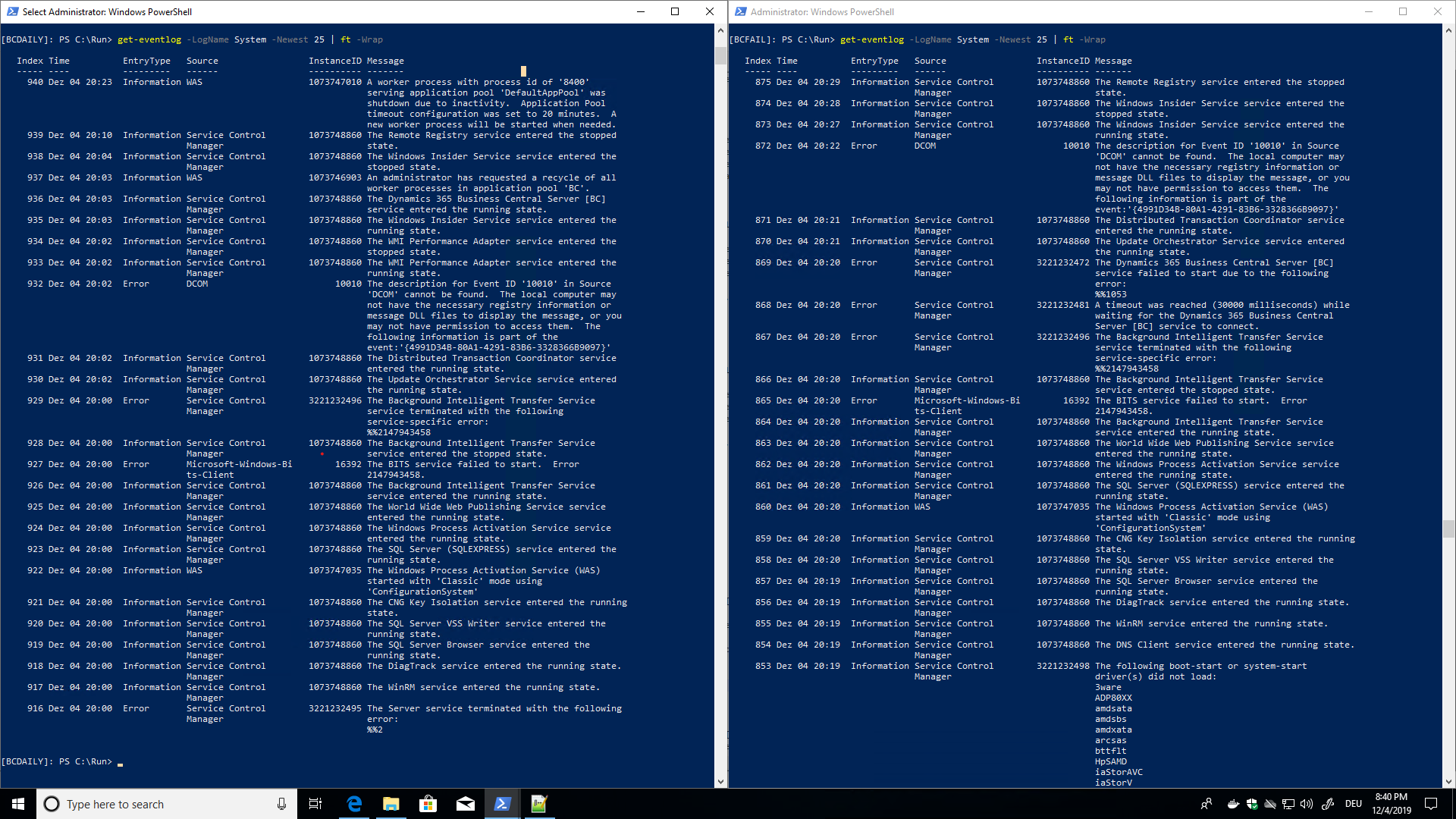
The application log of the BCFail Container just suddenly stops without much apparently usefull information.
I uploaded the three system logs, maybe someone else can figure out something more from them.
Will continue to look into it when I got the time.
staedter
on 5 Dec 2019
Thanks @staedter - BTW, the hack from above should be like this:
-myscripts @( @{ "SetupVariables.ps1" = 'if (Get-ItemProperty -Path "HKLM:\system\CurrentControlSet\control" | Select-Object -ExpandProperty "ServicesPipeTimeout" -ErrorAction SilentlyContinue) {
Write-host "ServicesPipeTimeout already set"
. "c:\run\SetupVariables.ps1"
}
else {
Write-host "Set ServicesPipeTimeout and restart"
Set-ItemProperty -Path "HKLM:\system\CurrentControlSet\control" -name "ServicesPipeTimeout" -Value 2000000 -Type DWORD -Force
Restart-computer
Start-Sleep -seconds 10000
}' })
in order to support restarts of the container.
freddydk
on 5 Dec 2019
I also tried to insert a 5 minute wait statement before starting the BC service - to see if some other pieces wasn't done initializing and that would then cause the service tier to be slow - but that didn't help either.
freddydk
on 5 Dec 2019
just FYI, I looked at the Docker daemon debug output and can't see anything relevant there
tfenster
on 5 Dec 2019
I will try to build a private generic image with servercore 10.0.17763.864 - and run using that.
freddydk
on 5 Dec 2019
That didn't work.
Next thing I will try is to place the database on the host to see whether it works if the database is ready to roll when the service tier starts....
freddydk
on 5 Dec 2019
That also made no difference.
I also tried to remove virus scanner and all protection - doesn't work.
freddydk
on 5 Dec 2019
I just wanted to add some findings as well, since I am running into the same problem. While it is true that - for me - using HyperV isolation gets me through the New-NAVContainer process, it does fail installing test libraries.
It doesn't matter, if I include that in the New command or if I do that differently. It always fails at the same extension and that is the Microsoft_Tests-ERM_16.0.10601.0.app. It stops with a timeout and then the service tier is not running anymore.
 pzentner
on 6 Dec 2019
pzentner
on 6 Dec 2019
@pzentner how did you establish that?
yrest
on 6 Dec 2019
@yrest When I create an insider build container using the following command:
New-NavContainer -accept_eula -accept_outdated -containerName xxx-imageName "bcinsider.azurecr.io/bcsandbox-master:us" -licenseFile 'license.flf' -Credential (Get-Credential) -updateHosts -enableTaskScheduler:$false -alwaysPull -useBestContainerOS -auth NavUserPassword -isolation "HyperV" -memoryLimit 15G
it goes through without a problem. Leaving -isolation off, it doesn't work. I even tried to add more memory, thinking this could be an issue, but it hasn't been.
Now, if I use
Import-TestToolkitToBCContainer -containerName xxx -credential (Get-Credential)
it fails publishing the ERM extension. If I add "-includeTestLibraries" to the container creation, it fails at the same extension.
I actually found one more thing, since I tried publishing the extension manually - it also fails and it fails due to not being able to compile the extension. It almost seems like this one was not updated for 16 yet - or I actually grabbed the wrong one...
pzentner
on 6 Dec 2019
@pzentner - the test issue is a different issue.
The original issue in this thread is the incompatibility with process isolation on Windows 10 1809.
I tested your script and it works in build 10634, so I assume that this is an instability in the insider builds which will occur now and then.
I might remove the comments on this thread about the test issue - in order to keep this issue to the point when I get back to it.
freddydk
on 10 Dec 2019
This is happening in the new 15.2 sandbox images (Version: 15.2.39040.39399-us).
The most interesting error out of the system log that I could find:
The Dynamics 365 Business Central Server [BC] service failed to start due to Manager the following error: %%1053
 eknraw
on 31 Dec 2019
eknraw
on 31 Dec 2019
@freddydk, I use this script, my question can make you smile, but I am a novice and I would have liked to have the confirmation to know where to place the additional script… thank you.
`install-module navcontainerhelper -force
$accept_eula = $true
$containername = "DemoBC15Sandbox"
$navdockerimage = "mcr.microsoft.com/businesscentral/sandbox:fr"
$appbacpacuri = ""
$tenantbacpacuri = ""
$additionalParameters = @("--cpu-count 4") #Works with 4CPU to fix debugging issue
if ($appbacpacuri -ne '' -and $tenantbacpacuri -ne '') {
$additionalParameters = @("--env appbacpac=""$appbacpacuri""","--env tenantBacpac=""$tenantbacpacuri""")
}
#-----------should i copy / paste here your script------------------------------
if ($navdockerimage -like "bcinsider"){
$insiderSecure = Get-Credential -Message "Please provide your BC Insider credentials:"
$bstr = [System.Runtime.InteropServices.Marshal]::SecureStringToBSTR($insiderSecure.Password)
$pwd = [System.Runtime.InteropServices.Marshal]::PtrToStringAuto($bstr)
Write-Output $pwd | docker login "bcinsider.azurecr.io" -u $insiderSecure.UserName --password-stdin
}
$credential = get-credential -UserName $env:USERNAME -Message "Using Windows Authentication. Please enter your Windows credentials."
New-NavContainer -accept_eula:$accept_eula "
-containername $containername "
-auth NavUserPassword "
-Credential $credential "
-alwaysPull "
-doNotExportObjectsToText "
-usessl:$false "
-updateHosts "
-assignPremiumPlan "
-shortcuts Desktop "
-imageName $navdockerimage "
-additionalParameters $additionalParameters "
-licenseFile "xxxxxxxxxxxxxxx:-)" "
Setup-NavContainerTestUsers -containerName $containername -password $credential.Password`
 dicesare
on 8 Jan 2020
dicesare
on 8 Jan 2020
Try this:
$accept_eula = $true
$containername = "DemoBC15Sandbox"
$navdockerimage = "mcr.microsoft.com/businesscentral/sandbox:fr"
$appbacpacuri = ""
$tenantbacpacuri = ""
$additionalParameters = @("--cpu-count 4") #Works with 4CPU to fix debugging issue
if ($appbacpacuri -ne '' -and $tenantbacpacuri -ne '') {
$additionalParameters = @("--env appbacpac=""$appbacpacuri""", "--env tenantBacpac=""$tenantbacpacuri""")
}
if ($navdockerimage -like "bcinsider") {
$insiderSecure = Get-Credential -Message "Please provide your BC Insider credentials:"
$bstr = [System.Runtime.InteropServices.Marshal]::SecureStringToBSTR($insiderSecure.Password)
$pwd = [System.Runtime.InteropServices.Marshal]::PtrToStringAuto($bstr)
Write-Output $pwd | docker login "bcinsider.azurecr.io" -u $insiderSecure.UserName --password-stdin
}
$credential = get-credential -UserName $env:USERNAME -Message "Using Windows Authentication. Please enter your Windows credentials."
New-NavContainer -accept_eula:$accept_eula `
-containername $containername `
-auth NavUserPassword `
-Credential $credential `
-alwaysPull `
-doNotExportObjectsToText `
-usessl:$false `
-updateHosts `
-assignPremiumPlan `
-shortcuts Desktop `
-imageName $navdockerimage `
-additionalParameters $additionalParameters `
-licenseFile 'xxxxxxxxxxxxxxx' `
    -myscripts @( @{ "SetupVariables.ps1" = 'if (Get-ItemProperty -Path "HKLM:\system\CurrentControlSet\control" | Select-Object -ExpandProperty "ServicesPipeTimeout" -ErrorAction SilentlyContinue) {
    Write-host "ServicesPipeTimeout already set"
    $restartingInstance = $false
    $newPublicDnsName = $true
    . "c:\run\SetupVariables.ps1"
}
else {
    Write-host "Set ServicesPipeTimeout and restart"
    Set-ItemProperty -Path "HKLM:\system\CurrentControlSet\control" -name "ServicesPipeTimeout" -Value 2000000 -Type DWORD -Force
    Restart-computer
    Start-Sleep -seconds 10000
}' })
Setup-NavContainerTestUsers -containerName $containername -password $credential.Password
thank fully @waldo1001 for quick answer and @freddydk for the solution:
result PS> Container DemoBC15Sandbox successfully created
dicesare
on 8 Jan 2020
EDIT 22/01: Issue below was caused by internal errors (apparently, adding SystemId to query object kills the server - removing SystemID from said queries seems to have fixed the issue)
I am getting the exact same error in following scenario:
- Windows 10 1909
- Process isolation
- container created from sandbox:nz with no errors
- container became unresponsive after a while and attempted restart
- when restarting container, process fails with:
Service 'Dynamics 365 Business Central Server [BC] (MicrosoftDynamicsNavServer$BC)' cannot be started due to the following error:
Cannot start service MicrosoftDynamicsNavServer$BC on computer '.'.
at, C:Runnavstart.ps1: line 142
at, C:Runstart.ps1: line 121
at, : line 1
This happened twice today & ended up recreating container just to be able to work
 JuricaB
on 10 Jan 2020
JuricaB
on 10 Jan 2020
Try this:
$accept_eula = $true

$containername = "DemoBC15Sandbox"
$navdockerimage = "mcr.microsoft.com/businesscentral/sandbox:fr"

$appbacpacuri = ""
$tenantbacpacuri = ""

$additionalParameters = @("--cpu-count 4") #Works with 4CPU to fix debugging issue
if ($appbacpacuri -ne '' -and $tenantbacpacuri -ne '') {
    $additionalParameters = @("--env appbacpac=""$appbacpacuri""", "--env tenantBacpac=""$tenantbacpacuri""")
}

if ($navdockerimage -like "bcinsider") {
    $insiderSecure = Get-Credential -Message "Please provide your BC Insider credentials:"

    $bstr = [System.Runtime.InteropServices.Marshal]::SecureStringToBSTR($insiderSecure.Password)
    $pwd = [System.Runtime.InteropServices.Marshal]::PtrToStringAuto($bstr)


    Write-Output $pwd | docker login "bcinsider.azurecr.io" -u $insiderSecure.UserName --password-stdin
}

$credential = get-credential -UserName $env:USERNAME -Message "Using Windows Authentication. Please enter your Windows credentials."
New-NavContainer -accept_eula:$accept_eula `
    -containername $containername `
    -auth NavUserPassword `
    -Credential $credential `
    -alwaysPull `
    -doNotExportObjectsToText `
    -usessl:$false `
    -updateHosts `
    -assignPremiumPlan `
    -shortcuts Desktop `
    -imageName $navdockerimage `
    -additionalParameters $additionalParameters `
    -licenseFile 'xxxxxxxxxxxxxxx' `
    -myscripts @( @{ "SetupVariables.ps1" = 'if (Get-ItemProperty -Path "HKLM:\system\CurrentControlSet\control" | Select-Object -ExpandProperty "ServicesPipeTimeout" -ErrorAction SilentlyContinue) {
        Write-host "ServicesPipeTimeout already set"
        $restartingInstance = $false
        $newPublicDnsName = $true
        . "c:\run\SetupVariables.ps1"
        }
        else {
        Write-host "Set ServicesPipeTimeout and restart"
        Set-ItemProperty -Path "HKLM:\system\CurrentControlSet\control" -name "ServicesPipeTimeout" -Value 2000000 -Type DWORD -Force
        Restart-computer
        Start-Sleep -seconds 10000
        }'
    })


Setup-NavContainerTestUsers -containerName $containername -password $credential.Password
I had this issue also and this script worked for me. Thanks guys
 tinfister
on 18 Jan 2020
tinfister
on 18 Jan 2020
Try this:
...
Setup-NavContainerTestUsers -containerName $containername -password $credential.Password
```
I guess I celebrated to early.
Do you have any idea why would container be unhealthy day after it is created with this script?
I can create it and use it no problem, but when I try to use it next day, It's unhealthy and it doesn't work.
I wouldn't use this script but "normal" script still gives me error described in this thread. I use Docker EE
tinfister
on 5 Feb 2020
This issue was very specifically about a situation where it failed starting the service tier upon creation of the container. I have only seen this in very very special occasions, and I don't think it is common.
There might be a lot of reasons why the service tier doesn't start, typically you can get the eventlog from the container using Get-NavContainerEventlog and see why.
Please open new issues instead of continuing this issue and remember to include the eventlog if you have issues that resembles, but doesn't match the original issue.
And please only use the SetupVariables hack if you have the original issue.
freddydk
on 6 Feb 2020
Closing this one as artifacts should make sure that this doesn't happen.
freddydk
on 30 Jun 2020
Related issues
 ichladil
·
5Comments
ichladil
·
5Comments
 lvanvugt
·
5Comments
lvanvugt
·
5Comments
 nudelwerfer
·
3Comments
nudelwerfer
·
3Comments
 Spycoclown
·
4Comments
Spycoclown
·
4Comments
 ashik-ivor
·
4Comments
ashik-ivor
·
4Comments
Most helpful comment
@waldo1001 - yes, but it is a GIANT hack...
I thought, that if nothing was in the event log, then maybe the service tier never knew that anything was wrong - so I decided to try and increase the service start timeout value.
Problem is, that this requires a reboot and a reboot makes the container think that it is restarting (which it is).
HACK START:
Add this parameter
to New-navcontainer - then it will set the allowed timeout and redo initialization.
HACK END!
It isn't a solution - a lot of things might still be wrong - but it tells me that there isn't anything wrong in the container - for some reason, it just takes a million years to start the service tier.
which then is what I need to find out...