Navcontainerhelper: Run-TestsInNavContainer fails
Run-TestsInNavContainer -containerName $containerName -credential $credential -testSuite "CCO-TEST" -AzureDevOps warning

CommunicationError : Error while copying content to a stream.
ClientSession in Error
at AwaitState, C:\ProgramData\NavContainerHelper\Extensions\build-agent\PsTestTool-2\ClientContext.ps1: line 106
at InvokeInteraction, C:\ProgramData\NavContainerHelper\Extensions\build-agent\PsTestTool-2\ClientContext.ps1: line 119
at InvokeInteractionAndCatchForm, C:\ProgramData\NavContainerHelper\Extensions\build-agent\PsTestTool-2\ClientContext.ps1: line 128
at OpenForm, C:\ProgramData\NavContainerHelper\Extensions\build-agent\PsTestTool-2\ClientContext.ps1: line 143
at Run-Tests, C:\ProgramData\NavContainerHelper\Extensions\build-agent\PsTestTool-2\PsTestFunctions.ps1: line 167
at <ScriptBlock>, <No file>: line 46
ClientSession in Error
In C:\Program Files\WindowsPowerShell\Modules\navcontainerhelper\0.6.3.1\ContainerHandling\Invoke-ScriptInNavContainer.ps1:37 Zeichen:13
+             Invoke-Command -Session $session -ScriptBlock $scriptbloc ...
+             ~~~~~~~~~~~~~~~~~~~~~~~~~~~~~~~~~~~~~~~~~~~~~~~~~~~~~~~~~
    + CategoryInfo          : OperationStopped: (ClientSession in Error:String) [], RuntimeException
    + FullyQualifiedErrorId : ClientSession in Error
NavContainerHelper: 0.6.3.1
Get-NavContainerDebugInfo build-agent
{
"container.logs": [
"Initializing...",
"Starting Container",
"Hostname is build-agent",
"PublicDnsName is build-agent",
"WARNING: DNS resolution not working from within the container.",
"WARNING: Container starts with TimeZone = Mitteleuropäische Zeit, which is not recognized in the list of TimeZones.",
"Using NavUserPassword Authentication",
"Starting Local SQL Server",
"Starting Internet Information Server",
"Creating Self Signed Certificate",
"Self Signed Certificate Thumbprint 8C759BCB5CF5A23E2974D6457D35829AED64C5DF",
"Modifying Service Tier Config File with Instance Specific Settings",
"Starting Service Tier",
"Registering event sources",
"Creating DotNetCore Web Server Instance",
"Using license file \u0027c:\\run\\my\\license.flf\u0027",
"Import License",
"Creating http download site",
"Setting SA Password and enabling SA",
"Creating cosmo as SQL User and add to sysadmin",
"Creating SUPER user",
"WARNING: The password that you entered does not meet the minimum requirements. ",
"It should be at least 8 characters long and contain at least one uppercase ",
"letter, one lowercase letter, and one number.",
"Container IP Address: 172.22.95.102",
"Container Hostname : build-agent",
"Container Dns Name : build-agent",
"Web Client : http://build-agent/NAV/",
"Dev. Server : http://build-agent",
"Dev. ServerInstance : NAV",
"",
"Files:",
"http://build-agent:8080/al-3.0.154634.vsix",
"",
"Initialization took 136 seconds",
"Ready for connections!"
],
"docker.info": [
"Client:",
" Debug Mode: false",
"",
"Server:",
" Containers: 1",
" Running: 1",
" Paused: 0",
" Stopped: 0",
" Images: 1",
" Server Version: 19.03.1",
" Storage Driver: windowsfilter",
" Windows: ",
" Logging Driver: json-file",
" Plugins:",
" Volume: local",
" Network: ics l2bridge l2tunnel nat null overlay transparent",
" Log: awslogs etwlogs fluentd gcplogs gelf json-file local logentries splunk syslog",
" Swarm: inactive",
" Default Isolation: hyperv",
" Kernel Version: 10.0 18362 (18362.1.amd64fre.19h1_release.190318-1202)",
" Operating System: Windows 10 Pro Version 1903 (OS Build 18362.239)",
" OSType: windows",
" Architecture: x86_64",
" CPUs: 8",
" Total Memory: 15.82GiB",
" Name: drs12mm02065nb1",
" ID: L6ZT:EG2H:BOYY:WF5W:Y2DV:QC2P:7EY4:XRNM:3ZXG:TGHC:H3WC:4D2A",
" Docker Root Dir: C:\\ProgramData\\Docker",
" Debug Mode: true",
" File Descriptors: -1",
" Goroutines: 36",
" System Time: 2019-08-28T15:10:51.8883592+02:00",
" EventsListeners: 1",
" Registry: https://index.docker.io/v1/",
" Labels:",
" Experimental: false",
" Insecure Registries:",
" 127.0.0.0/8",
" Live Restore Enabled: false",
" Product License: Community Engine",
""
],
"container.labels": {
"country": "W1",
"created": "201908271128",
"cu": "cu3",
"eula": "https://go.microsoft.com/fwlink/?linkid=861843",
"legal": "http://go.microsoft.com/fwlink/?LinkId=837447",
"maintainer": "Dynamics SMB",
"nav": "",
"osversion": "10.0.17763.678",
"platform": "14.0.35570.0",
"tag": "0.0.9.92",
"version": "14.4.35602.0"
},
"container.ping": "Ping-Anforderung konnte Host \"build-agent\" nicht finden. šberprfen Sie den Namen, und versuchen Sie es erneut.",
"container.env": [
"username=cosmo",
"ExitOnError=N",
"securePassword=\u003cspecified\u003e",
"useSSL=N",
"passwordKeyFile=c:\\run\\my\\aes.key",
"accept_eula=Y",
"auth=NAVUserPassword",
"locale=en-US",
"enableApiServices=Y",
"databaseInstance=",
"httpSite=Y",
"WebClient=Y",
"accept_outdated=Y",
"licenseFile=\u003cspecified\u003e",
"databaseServer=",
"removePasswordKeyFile=Y",
"COMPLUS_NGenProtectedProcess_FeatureEnabled=0",
"DatabaseName=CRONUS",
"NAVDVDURL=\u003cspecified\u003e",
"VSIXURL=\u003cspecified\u003e",
"IsBcSandbox=N"
]
}
 megel
megel
All 44 comments
Does the eventlog reveal anything?
 freddydk
on 28 Aug 2019
freddydk
on 28 Aug 2019
Maybe :)
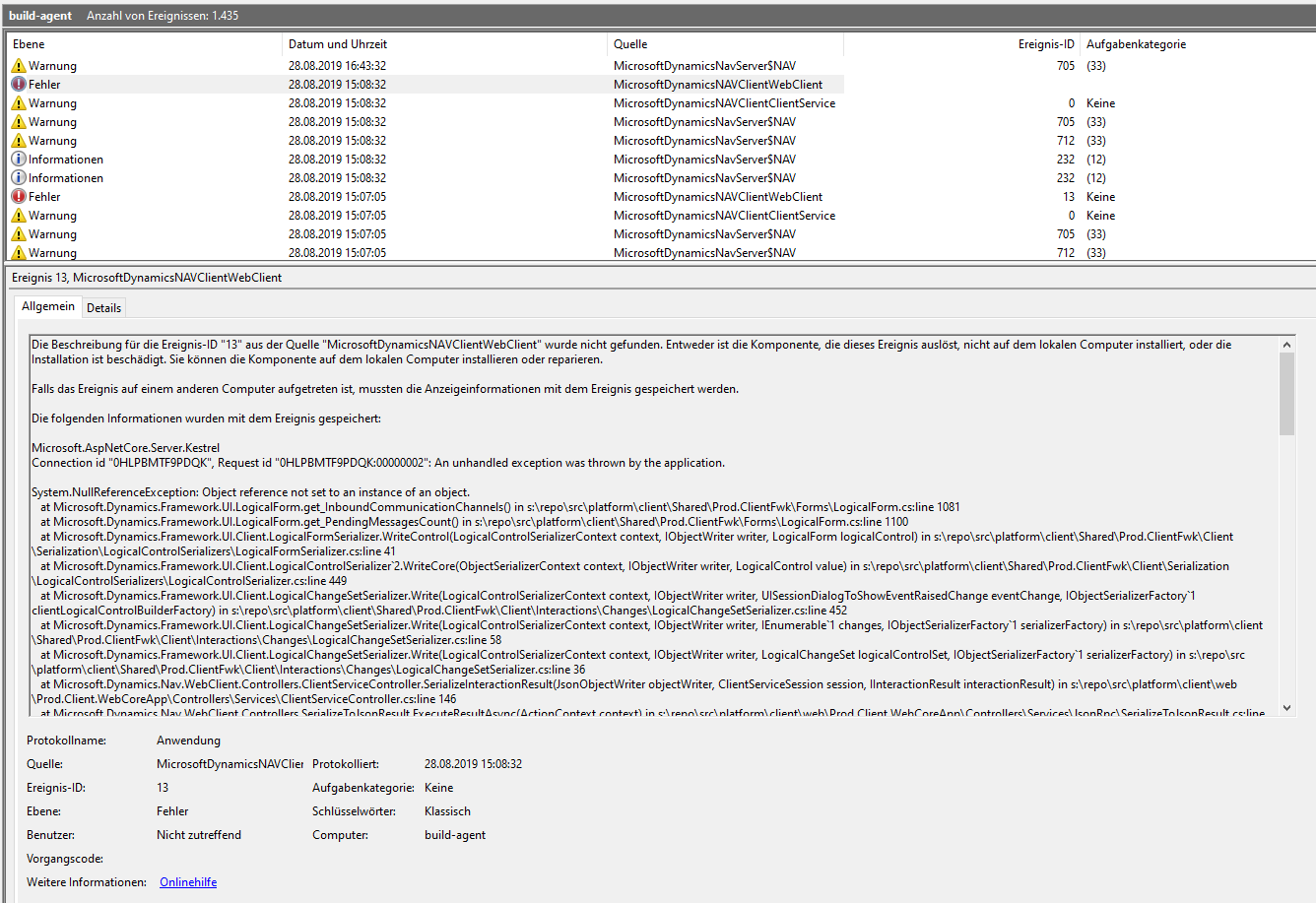
Event-Log:
build-agent.zip
megel
on 28 Aug 2019
Having the exact same at the moment:
NavContainerHelper version: 0.6.3.1
DockerImage: mcr.microsoft.com/businesscentral/sandbox:14.1.33107.0-base-ltsc2019
 richardrobberse
on 28 Aug 2019
richardrobberse
on 28 Aug 2019
Does it fail every time?
Is the error related to 0.6.3.1 - or does it also fail on 0.6.2.95?
freddydk
on 28 Aug 2019
No, right now checked. I got the same issue :(
````
Create container build-agent for Image: mcr.microsoft.com/businesscentral/onprem:w1
NavContainerHelper is version 0.6.2.95
Host is Microsoft Windows 10 Pro - 1903
Docker Client Version is 19.03.1
Docker Server Version is 19.03.1
...
Objects successfully imported
CommunicationError : Error while copying content to a stream.
ClientSession in Error
at AwaitState, C:\ProgramData\NavContainerHelper\Extensions\build-agent\PsTestTool-1\ClientContext.ps1: line 106
at InvokeInteraction, C:\ProgramData\NavContainerHelper\Extensions\build-agent\PsTestTool-1\ClientContext.ps1: line 119
at InvokeInteractionAndCatchForm, C:\ProgramData\NavContainerHelper\Extensions\build-agent\PsTestTool-1\ClientContext.ps1: line 128
at OpenForm, C:\ProgramData\NavContainerHelper\Extensions\build-agent\PsTestTool-1\ClientContext.ps1: line 143
at Run-Tests, C:\ProgramData\NavContainerHelper\Extensions\build-agent\PsTestTool-1\PsTestFunctions.ps1: line 146
at
Keep container build-agent
Build Process: 317.443755 sec
fobcompiled appcompiled testcompiled testexecuted
False True True False
```
megel
on 29 Aug 2019
Michael - do you have a machine with this problem?
Could we do a screen share session?
freddydk
on 29 Aug 2019
yes
megel
on 29 Aug 2019
Did you guys manage to find anything in the meantime?
In case there's anything I can do, let me know.
richardrobberse
on 2 Sep 2019
I have checked in some changes with a parameter called -debugmode which should cause some more info to be printed in this case.
No module published with this yet - but it is checked in.
freddydk
on 2 Sep 2019
Just published - 0.6.3.4 - could you add -debugmode to your run-tests and see if you can repro and email me the full output?
Thanks
freddydk
on 2 Sep 2019
Will do in the next hour.
richardrobberse
on 4 Sep 2019
If possible, please override clientcontext with this. (more debug info)
ClientContext.ps1.txt
freddydk
on 4 Sep 2019
I've replaced the ClientContext with your one but this is all I get (please note that I'm using AAD authentication, could also be because of that, a repro with NavUserPassword auth would be cleaner)
CommunicationError : Error while copying content to a stream.
ClientSession in Error
at AwaitState, C:\ProgramData\NavContainerHelper\Extensions\navserver\PsTestTool-3\ClientContext.ps1: line 148
at InvokeInteraction, C:\ProgramData\NavContainerHelper\Extensions\navserver\PsTestTool-3\ClientContext.ps1: line 161
at InvokeInteractionAndCatchForm, C:\ProgramData\NavContainerHelper\Extensions\navserver\PsTestTool-3\ClientContext.ps1: line 170
at OpenForm, C:\ProgramData\NavContainerHelper\Extensions\navserver\PsTestTool-3\ClientContext.ps1: line 185
at Run-Tests, C:\ProgramData\NavContainerHelper\Extensions\navserver\PsTestTool-3\PsTestFunctions.ps1: line 187
at
ClientSession in Error
At C:\Program Files\WindowsPowerShell\Modules\navcontainerhelper\0.6.3.4\ContainerHandling\Invoke-ScriptInNavContainer.ps1:37 char:13
- Invoke-Command -Session $session -ScriptBlock $scriptbloc ...
~~~~~~~~~~~~~
- CategoryInfo : OperationStopped: (ClientSession in Error:String) [], RuntimeException
- FullyQualifiedErrorId : ClientSession in Error
richardrobberse
on 4 Sep 2019
This seems like the same problem as Michael Megel.
It never actually gets to open the test page - something goes wrong before then.
I am desperately looking for a repro of this, which I can run on my own machine.
freddydk
on 4 Sep 2019
Did you by any chance change the web client port?
https://github.com/microsoft/navcontainerhelper/issues/617#event-2633537838
freddydk
on 13 Sep 2019
Just received this again. The InnerException from v0.6.4.2 gave some more information. But it didn't really help me understand what's going on, but maybe @freddydk will get a step closer to a solution with this?
The additional message is _System.IO.IOException: Unable to read data from the transport connection: An existing connection was forcibly closed by the remote host. ---> System.Net.Sockets.SocketException: An existing connection was forcibly closed by the remote host_
I reran my pipeline with the debugMode flag set, but this time it worked. I just hate "dancing errors".
Full error:
CommunicationError : Error while copying content to a stream.
CommunicationError InnerException : System.Net.Http.HttpRequestException: Error while copying content to a stream. ---> System.IO.IOException: Unable to read data from the transport connection: An existing connection was forcibly closed by the remote host. ---> System.Net.Sockets.SocketException: An existing connection was forcibly closed by the remote host
   at System.Net.Sockets.Socket.EndReceive(IAsyncResult asyncResult)
   at System.Net.Sockets.NetworkStream.EndRead(IAsyncResult asyncResult)
   --- End of inner exception stack trace ---
   at System.Net.ConnectStream.EndRead(IAsyncResult asyncResult)
   at System.Net.Http.HttpClientHandler.WebExceptionWrapperStream.EndRead(IAsyncResult asyncResult)
   at System.Net.Http.StreamToStreamCopy.BufferReadCallback(IAsyncResult ar)
   --- End of inner exception stack trace ---
   at System.Runtime.ExceptionServices.ExceptionDispatchInfo.Throw()
   at System.Runtime.CompilerServices.TaskAwaiter.HandleNonSuccessAndDebuggerNotification(Task task)
   at Microsoft.Dynamics.Framework.UI.Client.JsonHttpClient.<>c__DisplayClass15_0.<EndInvokeInteractions>b__0() in s:\repo\src\Platform\Client\ClientService\Prod.Client.ClientService.Client\Service\ServiceClients\JsonHttpClient\JsonHttpClient.cs:line 299
   at Microsoft.Dynamics.Framework.UI.Client.JsonHttpClient.ConvertExceptions[T](Func`1 action) in s:\repo\src\Platform\Client\ClientService\Prod.Client.ClientService.Client\Service\ServiceClients\JsonHttpClient\JsonHttpClient.cs:line 182
ClientSession in Error
at AwaitState, C:\ProgramData\NavContainerHelper\Extensions\CI-bld12\PsTestTool-3\ClientContext.ps1: line 157
at InvokeInteraction, C:\ProgramData\NavContainerHelper\Extensions\CI-bld12\PsTestTool-3\ClientContext.ps1: line 170
at InvokeInteractionAndCatchForm, C:\ProgramData\NavContainerHelper\Extensions\CI-bld12\PsTestTool-3\ClientContext.ps1: line 179
at OpenForm, C:\ProgramData\NavContainerHelper\Extensions\CI-bld12\PsTestTool-3\ClientContext.ps1: line 194
at Get-Tests, C:\ProgramData\NavContainerHelper\Extensions\CI-bld12\PsTestTool-3\PsTestFunctions.ps1: line 99
at <ScriptBlock>, <No file>: line 36
##[error]ClientSession in Error
##[error]At C:\Program Files\WindowsPowerShell\Modules\navcontainerhelper\0.6.4.2\ContainerHandling\Invoke-ScriptInNavContainer.
ps1:37 char:13
+             Invoke-Command -Session $session -ScriptBlock $scriptbloc ...
+             ~~~~~~~~~~~~~~~~~~~~~~~~~~~~~~~~~~~~~~~~~~~~~~~~~~~~~~~~~
    + CategoryInfo          : OperationStopped: (ClientSession in Error:String) [], RuntimeException

##[error]    + FullyQualifiedErrorId : ClientSession in Error
##[error]
 jwikman
on 20 Sep 2019
jwikman
on 20 Sep 2019
Also getting this issue with navcontainerhelper 0.6.4.3.
Created container with
New-NavContainer `
    -containerName $containerName `
    -accept_eula `
    -imageName mcr.microsoft.com/businesscentral/onprem:dk `
    -includeCSide `
    -includeTestToolkit `
    -doNotExportObjectsToText `
    -updateHosts `
    -auth NavUserPassword `
    -licenseFile c:\dev\dev.flf `
    -dns 8.8.8.8 `
    -Credential $credential
CommunicationError : Error while copying content to a stream.
CommunicationError InnerException : System.Net.Http.HttpRequestException: Error while copying content to a stream. ---> System.IO.IOException: Unable to read data from the transport connectio
n: An existing connection was forcibly closed by the remote host. ---> System.Net.Sockets.SocketException: An existing connection was forcibly closed by the remote host
   at System.Net.Sockets.Socket.EndReceive(IAsyncResult asyncResult)
   at System.Net.Sockets.NetworkStream.EndRead(IAsyncResult asyncResult)
   --- End of inner exception stack trace ---
   at System.Net.ConnectStream.EndRead(IAsyncResult asyncResult)
   at System.Net.Http.HttpClientHandler.WebExceptionWrapperStream.EndRead(IAsyncResult asyncResult)
   at System.Net.Http.StreamToStreamCopy.BufferReadCallback(IAsyncResult ar)
   --- End of inner exception stack trace ---
   at System.Runtime.ExceptionServices.ExceptionDispatchInfo.Throw()
   at System.Runtime.CompilerServices.TaskAwaiter.HandleNonSuccessAndDebuggerNotification(Task task)
   at Microsoft.Dynamics.Framework.UI.Client.JsonHttpClient.<>c__DisplayClass15_0.<EndInvokeInteractions>b__0() in s:\repo\src\Platform\Client\ClientService\Prod.Client.ClientService.Client\S
ervice\ServiceClients\JsonHttpClient\JsonHttpClient.cs:line 298
   at Microsoft.Dynamics.Framework.UI.Client.JsonHttpClient.ConvertExceptions[T](Func`1 action) in s:\repo\src\Platform\Client\ClientService\Prod.Client.ClientService.Client\Service\ServiceCl
ients\JsonHttpClient\JsonHttpClient.cs:line 181
ClientSession in Error
at AwaitState, C:\ProgramData\NavContainerHelper\Extensions\TEMP\PsTestTool-3\ClientContext.ps1: line 157
at InvokeInteraction, C:\ProgramData\NavContainerHelper\Extensions\TEMP\PsTestTool-3\ClientContext.ps1: line 170
at InvokeInteractionAndCatchForm, C:\ProgramData\NavContainerHelper\Extensions\TEMP\PsTestTool-3\ClientContext.ps1: line 179
at OpenForm, C:\ProgramData\NavContainerHelper\Extensions\TEMP\PsTestTool-3\ClientContext.ps1: line 194
at Run-Tests, C:\ProgramData\NavContainerHelper\Extensions\TEMP\PsTestTool-3\PsTestFunctions.ps1: line 189
at <ScriptBlock>, <No file>: line 41
ClientSession in Error
At C:\Program Files\WindowsPowerShell\Modules\navcontainerhelper\0.6.4.3\AppHandling\Run-TestsInNavContainer.ps1:237 char:17
+                 throw $_.Exception.Message
+                 ~~~~~~~~~~~~~~~~~~~~~~~~~~
    + CategoryInfo          : OperationStopped: (ClientSession in Error:String) [], RuntimeException
    + FullyQualifiedErrorId : ClientSession in Error
 kfuglsang
on 25 Sep 2019
kfuglsang
on 25 Sep 2019
I think this means that the service tier has crashed - and there is no good way of continuing the test run.
I am working on a more recillient way of running tests like this:
$tests = Get-TestsFromBCContainer -containerName $containerName -credential $credential -ignoreGroups
$rerunTests = $()
$failedTests = $()
$first = $true
$tests | % {
    if (-not (Run-TestsInBcContainer -containerName $containerName `
                                     -credential $credential `
                                     -XUnitResultFileName 'c:\programdata\navcontainerhelper\results.xml' `
                                     -AppendToXUnitResultFile:(!$first) `
                                     -testCodeunit $_.Id `
                                     -returnTrueIfAllPassed `
                                     -restartContainerAndRetry)) { $rerunTests += $($_) }
    $first = $false
}
if ($rerunTests.Count -gt 0) {
    Restart-BCContainer -containerName $containername
    $rerunTests | % {
        if (-not (Run-TestsInBcContainer -containerName $containerName `
                                         -credential $credential `
                                         -XUnitResultFileName 'c:\programdata\navcontainerhelper\results.xml' `
                                         -AppendToXUnitResultFile:(!$first) `
                                         -testCodeunit $_.Id `
                                         -returnTrueIfAllPassed `
                                         -restartContainerAndRetry)) { $failedTests += @($_) }
        $first = $false
    }
}
Which basically will spawn a new session per codeunit - and restart the service tier and retry of the failure is due to memory or other issues.
freddydk
on 25 Sep 2019
Alright.
I also get the error when I simply try to fetch tests from the container
Get-TestsFromNavContainer -containerName $containerName -credential $credential
Service tier seems to run fine. I can continue to work in the web client.
kfuglsang
on 25 Sep 2019
Ok, then the new script wont change anything (in your bug, you don't mention whether you managed to run some tests)
freddydk
on 25 Sep 2019
Fair enough.
I am able to run the tests manually from within the test page in the webclient.
I haven't been able to get/run any tests using navcontainerhelper.
kfuglsang
on 25 Sep 2019
I received this error from Get-TestsFromNavContainer as well.
I ended up using a try/catch and gave it another shot if it fails the first time, not elegant but I haven't seen the problem since I did that.
try {
    $tests = Get-TestsFromBCContainer -containerName $containerName -credential $credential -testSuite $testSuite -debugMode:$debugMode -testPage $testPage -ignoreGroups
}
catch {
    Write-Host "Something went wrong when fetching tests, retrying. Error message: $($_.Exception.Message)" -ForegroundColor Red
    $tests = Get-TestsFromBCContainer -containerName $containerName -credential $credential -testSuite $testSuite -debugMode:$debugMode -testPage $testPage -ignoreGroups
}
Mine fails repeatedly unfortunately. Tried recreating the container several times as well.
kfuglsang
on 25 Sep 2019
Could you share the full script, which fails and the full output.
If you do not like to do that here, then email it to me.
freddydk
on 25 Sep 2019
My full script is:
$credential = New-Object pscredential 'admin', (ConvertTo-SecureString -String 'P@ssword1' -AsPlainText -Force)
$containerName = "TEMP"
$imageName = "mcr.microsoft.com/businesscentral/onprem:dk"
$debugMode = $true
$testSuite = "DEFAULT"

New-NavContainer `
    -containerName $containerName `
    -accept_eula `
    -imageName $imageName `
    -includeCSide `
    -includeTestToolkit `
    -doNotExportObjectsToText `
    -updateHosts `
    -auth NavUserPassword `
    -licenseFile c:\dev\dev.flf `
    -dns 8.8.8.8 `
    -Credential $credential

try {
    $tests = Get-TestsFromBCContainer -containerName $containerName -credential $credential -testSuite $testSuite -debugMode:$debugMode -testPage $testPage -ignoreGroups
}
catch {
    Write-Host "Something went wrong when fetching tests, retrying. Error message: $($_.Exception.Message)" -ForegroundColor Red
    $tests = Get-TestsFromBCContainer -containerName $containerName -credential $credential -testSuite $testSuite -debugMode:$debugMode -testPage $testPage -ignoreGroups
}
The output is like so:
NavContainerHelper is version 0.6.4.3
Host is Microsoft Windows 10 Pro - 1903
Docker Client Version is 19.03.2
Docker Server Version is 19.03.2
Using image mcr.microsoft.com/businesscentral/onprem:dk-ltsc2019
Removing container TEMP
Removing TEMP from hosts
Removing C:\ProgramData\NavContainerHelper\Extensions\TEMP
Creating Container TEMP
Version: 14.5.35970.0-dk
Style: onprem
Platform: 14.0.35916.0
Generic Tag: 0.0.9.94
Container OS Version: 10.0.17763.678 (ltsc2019)
Host OS Version: 10.0.18362.356 (1903)
The container operating system does not match the host operating system, forcing hyperv isolation.
Using locale da-DK
Using hyperv isolation
Disabling the standard eventlog dump to container log every 2 seconds (use -dumpEventLog to enable)
Using license file c:\dev\dev.flf
Files in C:\ProgramData\NavContainerHelper\Extensions\TEMP\my:
- AdditionalOutput.ps1
- AdditionalSetup.ps1
- license.flf
- MainLoop.ps1
- updatehosts.ps1
Creating container TEMP from image mcr.microsoft.com/businesscentral/onprem:dk-ltsc2019
bb31105335135afcea9ca4af0d32fcae4d8e575d6f54640d07531292af33b689
Waiting for container TEMP to be ready
Initializing...
Starting Container
Hostname is TEMP
PublicDnsName is TEMP
WARNING: Container starts with TimeZone = Rom, normaltid, which is not recognized in the list of TimeZones.
Using NavUserPassword Authentication
Starting Local SQL Server
Starting Internet Information Server
Creating Self Signed Certificate
Self Signed Certificate Thumbprint 0A20BCD4F5AC72E33846CDA7DCA86C7206AAB0D9
Modifying Service Tier Config File with Instance Specific Settings
Starting Service Tier
Registering event sources
Creating DotNetCore Web Server Instance
Using license file 'c:\run\my\license.flf'
Import License
Creating http download site
Setting SA Password and enabling SA
Creating admin as SQL User and add to sysadmin
Creating SUPER user
Container IP Address: 172.22.213.136
Container Hostname  : TEMP
Container Dns Name  : TEMP
Web Client          : http://TEMP/NAV/
Dev. Server         : http://TEMP
Dev. ServerInstance : NAV

Files:
http://TEMP:8080/al-3.0.154634.vsix

Initialization took 153 seconds
Ready for connections!
Reading CustomSettings.config from TEMP
Creating Desktop Shortcuts for TEMP
Importing Objects from C:\TestToolKit\CALTestCodeunits.DK.fob (container path)
Importing Objects from C:\TestToolKit\CALTestLibraries.DK.fob (container path)
Importing Objects from C:\TestToolKit\CALTestRunner.fob (container path)
TestToolkit successfully imported
Container TEMP successfully created

Importing Objects from C:\ProgramData\NavContainerHelper\Extensions\TEMP\PsTestTool-3\PSTestToolPage.fob (container path)
Objects successfully imported
CommunicationError : Error while copying content to a stream.
CommunicationError InnerException : System.Net.Http.HttpRequestException: Error while copying content to a stream. ---> System.IO.IOException: Unable to read data from the transport connectio
n: An existing connection was forcibly closed by the remote host. ---> System.Net.Sockets.SocketException: An existing connection was forcibly closed by the remote host
   at System.Net.Sockets.Socket.EndReceive(IAsyncResult asyncResult)
   at System.Net.Sockets.NetworkStream.EndRead(IAsyncResult asyncResult)
   --- End of inner exception stack trace ---
   at System.Net.ConnectStream.EndRead(IAsyncResult asyncResult)
   at System.Net.Http.HttpClientHandler.WebExceptionWrapperStream.EndRead(IAsyncResult asyncResult)
   at System.Net.Http.StreamToStreamCopy.BufferReadCallback(IAsyncResult ar)
   --- End of inner exception stack trace ---
   at System.Runtime.ExceptionServices.ExceptionDispatchInfo.Throw()
   at System.Runtime.CompilerServices.TaskAwaiter.HandleNonSuccessAndDebuggerNotification(Task task)
   at Microsoft.Dynamics.Framework.UI.Client.JsonHttpClient.<>c__DisplayClass15_0.<EndInvokeInteractions>b__0() in s:\repo\src\Platform\Client\ClientService\Prod.Client.ClientService.Client\S
ervice\ServiceClients\JsonHttpClient\JsonHttpClient.cs:line 298
   at Microsoft.Dynamics.Framework.UI.Client.JsonHttpClient.ConvertExceptions[T](Func`1 action) in s:\repo\src\Platform\Client\ClientService\Prod.Client.ClientService.Client\Service\ServiceCl
ients\JsonHttpClient\JsonHttpClient.cs:line 181
ClientSession in Error
at AwaitState, C:\ProgramData\NavContainerHelper\Extensions\TEMP\PsTestTool-3\ClientContext.ps1: line 157
at InvokeInteraction, C:\ProgramData\NavContainerHelper\Extensions\TEMP\PsTestTool-3\ClientContext.ps1: line 170
at InvokeInteractionAndCatchForm, C:\ProgramData\NavContainerHelper\Extensions\TEMP\PsTestTool-3\ClientContext.ps1: line 179
at OpenForm, C:\ProgramData\NavContainerHelper\Extensions\TEMP\PsTestTool-3\ClientContext.ps1: line 194
at Get-Tests, C:\ProgramData\NavContainerHelper\Extensions\TEMP\PsTestTool-3\PsTestFunctions.ps1: line 99
at <ScriptBlock>, <No file>: line 36
Something went wrong when fetching tests, retrying. Error message: ClientSession in Error
CommunicationError : Error while copying content to a stream.
CommunicationError InnerException : System.Net.Http.HttpRequestException: Error while copying content to a stream. ---> System.IO.IOException: Unable to read data from the transport connectio
n: An existing connection was forcibly closed by the remote host. ---> System.Net.Sockets.SocketException: An existing connection was forcibly closed by the remote host
   at System.Net.Sockets.Socket.EndReceive(IAsyncResult asyncResult)
   at System.Net.Sockets.NetworkStream.EndRead(IAsyncResult asyncResult)
   --- End of inner exception stack trace ---
   at System.Net.ConnectStream.EndRead(IAsyncResult asyncResult)
   at System.Net.Http.HttpClientHandler.WebExceptionWrapperStream.EndRead(IAsyncResult asyncResult)
   at System.Net.Http.StreamToStreamCopy.BufferReadCallback(IAsyncResult ar)
   --- End of inner exception stack trace ---
   at System.Runtime.ExceptionServices.ExceptionDispatchInfo.Throw()
   at System.Runtime.CompilerServices.TaskAwaiter.HandleNonSuccessAndDebuggerNotification(Task task)
   at Microsoft.Dynamics.Framework.UI.Client.JsonHttpClient.<>c__DisplayClass15_0.<EndInvokeInteractions>b__0() in s:\repo\src\Platform\Client\ClientService\Prod.Client.ClientService.Client\S
ervice\ServiceClients\JsonHttpClient\JsonHttpClient.cs:line 298
   at Microsoft.Dynamics.Framework.UI.Client.JsonHttpClient.ConvertExceptions[T](Func`1 action) in s:\repo\src\Platform\Client\ClientService\Prod.Client.ClientService.Client\Service\ServiceCl
ients\JsonHttpClient\JsonHttpClient.cs:line 181
ClientSession in Error
at AwaitState, C:\ProgramData\NavContainerHelper\Extensions\TEMP\PsTestTool-3\ClientContext.ps1: line 157
at InvokeInteraction, C:\ProgramData\NavContainerHelper\Extensions\TEMP\PsTestTool-3\ClientContext.ps1: line 170
at InvokeInteractionAndCatchForm, C:\ProgramData\NavContainerHelper\Extensions\TEMP\PsTestTool-3\ClientContext.ps1: line 179
at OpenForm, C:\ProgramData\NavContainerHelper\Extensions\TEMP\PsTestTool-3\ClientContext.ps1: line 194
at Get-Tests, C:\ProgramData\NavContainerHelper\Extensions\TEMP\PsTestTool-3\PsTestFunctions.ps1: line 99
at <ScriptBlock>, <No file>: line 36
ClientSession in Error
At C:\Program Files\WindowsPowerShell\Modules\navcontainerhelper\0.6.4.3\ContainerHandling\Invoke-ScriptInNavContainer.ps1:37 char:13
+             Invoke-Command -Session $session -ScriptBlock $scriptbloc ...
+             ~~~~~~~~~~~~~~~~~~~~~~~~~~~~~~~~~~~~~~~~~~~~~~~~~~~~~~~~~
    + CategoryInfo          : OperationStopped: (ClientSession in Error:String) [], RuntimeException
    + FullyQualifiedErrorId : ClientSession in Error
There is nothing wrong with your script.
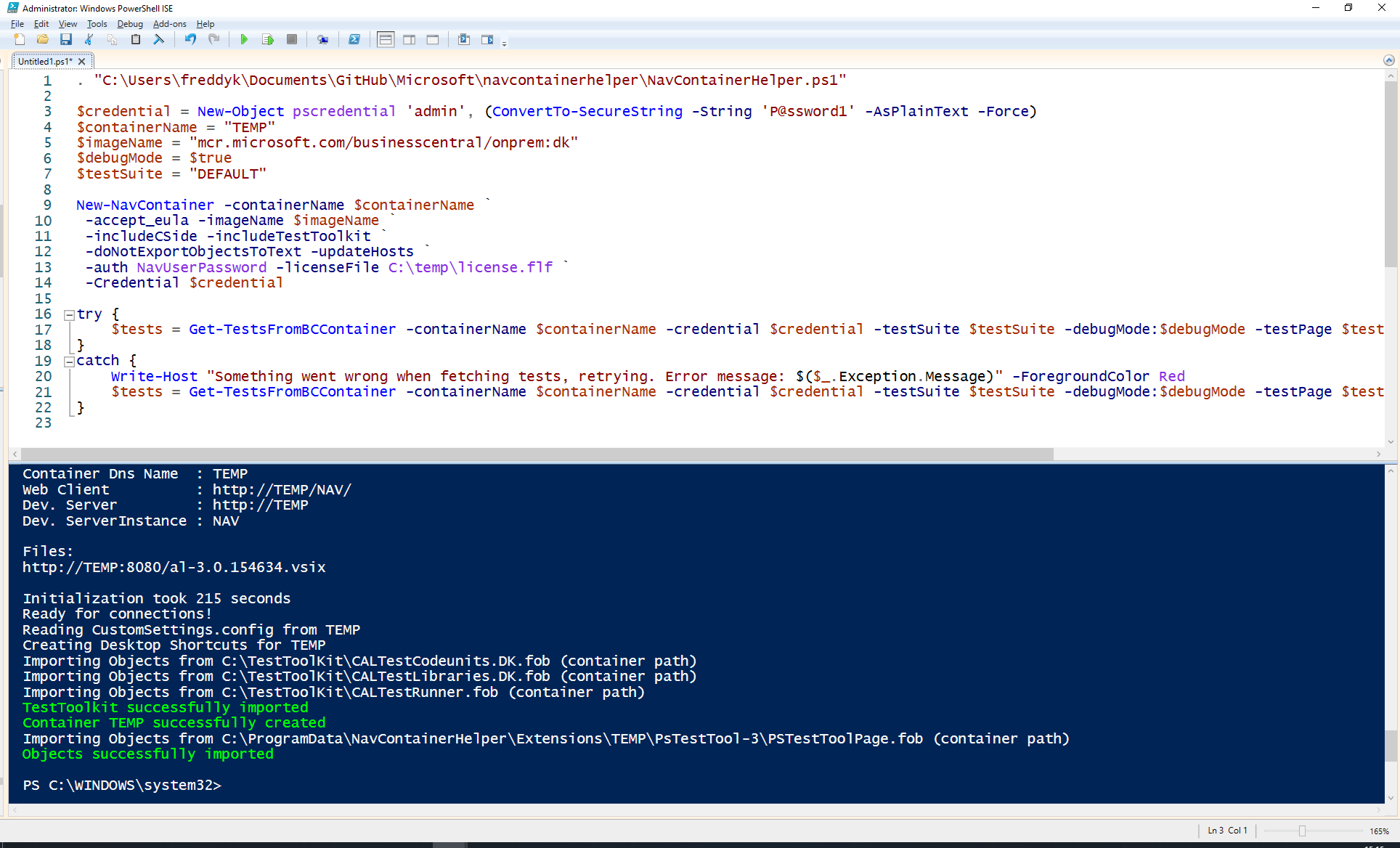
Copy/Paste - it works.
I am even running the exact same Windows Version as you.
Just to make sure - try to create a pause of 2 minutes between creating the container and getting tests.
The way it works is, that the container will try to connect to the webclient from within the container.
Seems like something goes wrong there, not sure what.
freddydk
on 25 Sep 2019
Same issue unfortunately. Weird!
kfuglsang
on 25 Sep 2019
Could you try to disable antivirus and other things?
Does the error appear immediately - or after some time?
freddydk
on 25 Sep 2019
Good news - I seem to have a machine where I can repro the problem
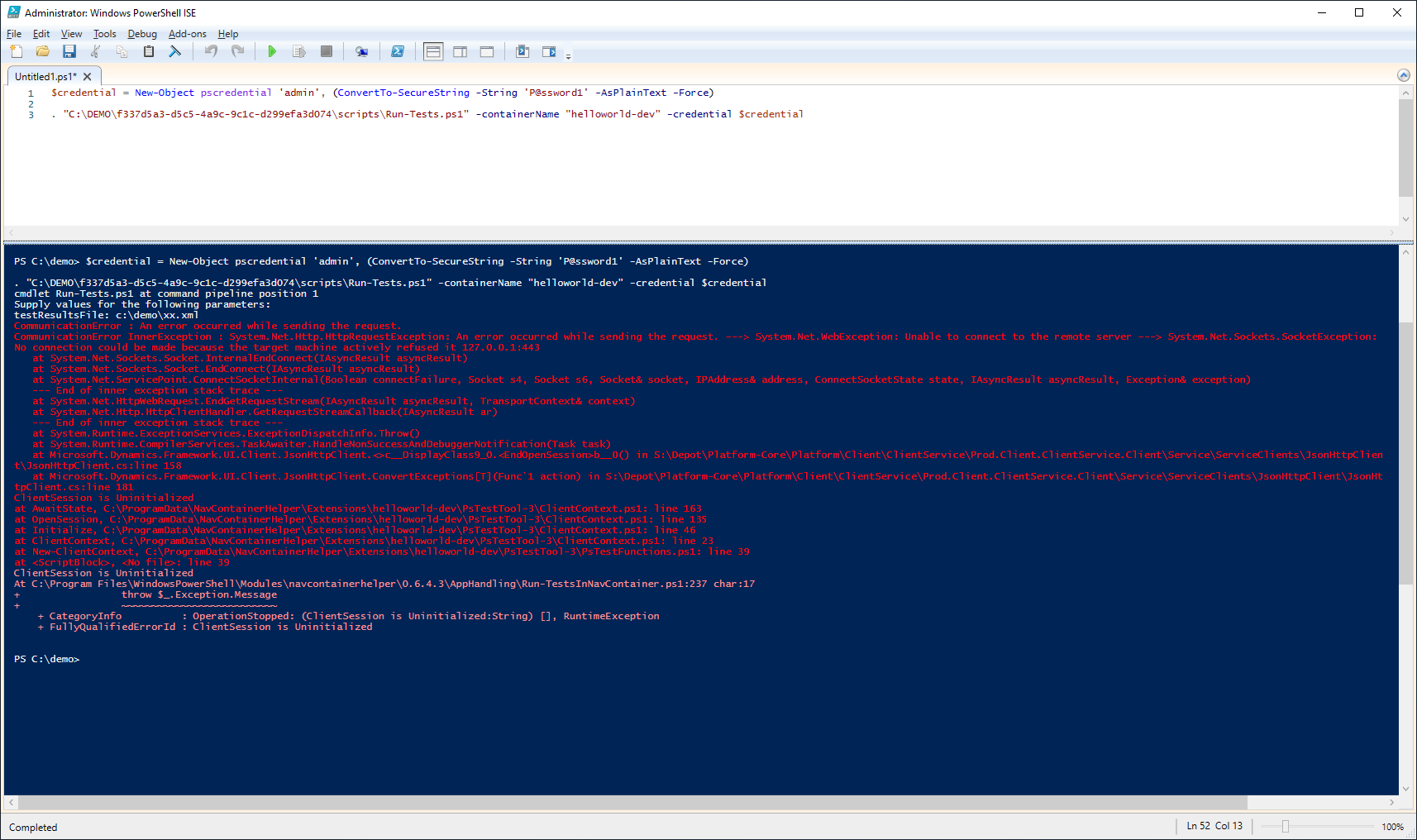
will investigate further...
freddydk
on 25 Sep 2019
Good news - I seem to have a machine where I can repro the problem
will investigate further...
Unfortunately I don't think that's the same problem...
We saw the error "CommunicationError : Error while copying content to a stream."
What you see now looks more like the issues I had in #617 (https://github.com/microsoft/navcontainerhelper/issues/617#issuecomment-531288471)
jwikman
on 25 Sep 2019
Yeah - just discovered that...:-(
freddydk
on 25 Sep 2019
My problem here was that I was trying to run tests in a container on a VM using Traefik - I will have to make a fix or two to support that.
freddydk
on 25 Sep 2019
I have the same problem.
I reproduced it on BC14 CU4. In my case it only happens when I run tests (any test at all) for the very first time on a new container. It fails with the above error. When I immediately run the same identical command it passes correctly.
I solved it (for now) by allowing my build script to attempt tests 3 times in case the above error pops out. That script is now live for about a week or so and It always fails at attempt 1 and always works on attempt 2.
 hemisphera
on 2 Oct 2019
hemisphera
on 2 Oct 2019
@hemisphera - you also have the CommunicationError problem?
I hope that I will be able to have a consistent repro in order to locate the issue - would be good to know if this is a timing issue?
Like if you put in a wait for a minute or 2 before the first attempt - will it then succeed?
freddydk
on 4 Oct 2019
@freddydk exactly. My suspect is the import of the TestPage .FOB file that somehow causes the client session to become unresponsive and therefore die out for some reason.
I've tried with adding a delay. It's something you need - IMHO - to add inside the cmdlet itself between the import of the .FOB and the execution of the tests. Waiting before or after Run-TestsInNavContainer doesn't help, me thinks.
I've tried fiddling with that cmdlet and added 5sec. That did not change anything. I have just modified it again and incremented that delay to 2min but I get the same results: attempt 1 fails, attempt 2 passes.
I added a Start-Sleep -Seconds 120 right between the two parenthesis here:
https://github.com/microsoft/navcontainerhelper/blob/5d0416973977504a1abd4de011b49d2698260165/AppHandling/Run-TestsInNavContainer.ps1#L146-L147
I suppose that's the right line where to add it, as it correctly waits 2min on attempt 1 and does not wait at all on attempt 2.
hemisphera
on 4 Oct 2019
Having systematically the same issue with 14.x (14.1.32615.0-fr-ltsc2019) or 15.x containers (15.0.36560.0-fr-ltsc2019), Windows or UserPassword authentication, even with NavContainerHelper 0.6.4.11
Containers under Windows 10 1903 Docker Desktop 2.1.0.3
Doesn't have the issue for my DevOps builds with 14.x containers (14.1.32615.0-fr-ltsc2016) under Windows Server 2016 and Docker Enterprise, Windows authentication. Didn't already test others configurations.
Frustration for developers local environment automation and testing adoption...
Exception:
CommunicationError InnerException : System.Net.Http.HttpRequestException: Error while copying content to a stream. ---> System.IO.IOException: Unable to read data
from the transport connection: An existing connection was forcibly closed by the remote host. ---> System.Net.Sockets.SocketException: An existing connection was f
orcibly closed by the remote host
at System.Net.Sockets.Socket.EndReceive(IAsyncResult asyncResult)
at System.Net.Sockets.NetworkStream.EndRead(IAsyncResult asyncResult)
--- End of inner exception stack trace ---
at System.Net.ConnectStream.EndRead(IAsyncResult asyncResult)
at System.Net.Http.HttpClientHandler.WebExceptionWrapperStream.EndRead(IAsyncResult asyncResult)
at System.Net.Http.StreamToStreamCopy.BufferReadCallback(IAsyncResult ar)
--- End of inner exception stack trace ---
at System.Runtime.ExceptionServices.ExceptionDispatchInfo.Throw()
at System.Runtime.CompilerServices.TaskAwaiter.HandleNonSuccessAndDebuggerNotification(Task task)
at Microsoft.Dynamics.Framework.UI.Client.JsonHttpClient.<>c__DisplayClass15_0.
lient.ClientService.Client\Service\ServiceClients\JsonHttpClient\JsonHttpClient.cs:line 299
at Microsoft.Dynamics.Framework.UI.Client.JsonHttpClient.ConvertExceptionsT in s:\repo\src\Platform\Client\ClientService\Prod.Client.ClientServ
ice.Client\Service\ServiceClients\JsonHttpClient\JsonHttpClient.cs:line 182
ClientSession in Error
at AwaitState, C:\ProgramData\NavContainerHelper\Extensions\FAL-BC15-E-Dev\PsTestTool-4\ClientContext.ps1: line 157
at InvokeInteraction, C:\ProgramData\NavContainerHelper\Extensions\FAL-BC15-E-Dev\PsTestTool-4\ClientContext.ps1: line 170
at InvokeInteractionAndCatchForm, C:\ProgramData\NavContainerHelper\Extensions\FAL-BC15-E-Dev\PsTestTool-4\ClientContext.ps1: line 179
at OpenForm, C:\ProgramData\NavContainerHelper\Extensions\FAL-BC15-E-Dev\PsTestTool-4\ClientContext.ps1: line 194
at Run-Tests, C:\ProgramData\NavContainerHelper\Extensions\FAL-BC15-E-Dev\PsTestTool-4\PsTestFunctions.ps1: line 262
Container event log :
Microsoft.AspNetCore.Server.Kestrel
Connection id "0HLQKNPQJA7MQ", Request id "0HLQKNPQJA7MQ:00000005": An unhandled exception was thrown by the application.
System.NullReferenceException: Object reference not set to an instance of an object.
at Microsoft.Dynamics.Framework.UI.LogicalForm.get_InboundCommunicationChannels() in s:\repo\src\platform\client\Shared\Prod.ClientFwkForms\LogicalForm.cs:line 1155
at Microsoft.Dynamics.Framework.UI.LogicalForm.get_PendingMessagesCount() in s:\repo\src\platform\client\Shared\Prod.ClientFwkForms\LogicalForm.cs:line 1174
at Microsoft.Dynamics.Framework.UI.Client.LogicalFormSerializer.WriteControl(LogicalControlSerializerContext context, IObjectWriter writer, LogicalForm logicalControl) in s:\repo\src\platform\client\Shared\Prod.ClientFwk\Client\Serialization\LogicalControlSerializers\LogicalFormSerializer.cs:line 49
at Microsoft.Dynamics.Framework.UI.Client.LogicalControlSerializer2.WriteCore(ObjectSerializerContext context, IObjectWriter writer, LogicalControl value) in s:\repo\src\platform\client\Shared\Prod.ClientFwk\Client\Serialization\LogicalControlSerializers\LogicalControlSerializer.cs:line 481
at Microsoft.Dynamics.Framework.UI.Client.LogicalChangeSetSerializer.Write(LogicalControlSerializerContext context, IObjectWriter writer, UISessionDialogToShowEventRaisedChange eventChange, IObjectSerializerFactory1 clientLogicalControlBuilderFactory) in s:\repo\src\platform\client\Shared\Prod.ClientFwk\Client\Interactions\Changes\LogicalChangeSetSerializer.cs:line 477
at Microsoft.Dynamics.Framework.UI.Client.LogicalChangeSetSerializer.Write(LogicalControlSerializerContext context, IObjectWriter writer, IEnumerable1 changes, IObjectSerializerFactory1 serializerFactory) in s:\repo\src\platform\client\Shared\Prod.ClientFwk\Client\Interactions\Changes\LogicalChangeSetSerializer.cs:line 58
at Microsoft.Dynamics.Framework.UI.Client.LogicalChangeSetSerializer.Write(LogicalControlSerializerContext context, IObjectWriter writer, LogicalChangeSet logicalControlSet, IObjectSerializerFactory1 serializerFactory) in s:\repo\src\platform\client\Shared\Prod.ClientFwk\Client\Interactions\Changes\LogicalChangeSetSerializer.cs:line 36
at Microsoft.Dynamics.Nav.WebClient.Controllers.ClientServiceController.SerializeInteractionResult(JsonObjectWriter objectWriter, ClientServiceSession session, IInteractionResult interactionResult) in s:\repo\src\platform\client\web\Prod.Client.WebCoreApp\Controllers\Services\ClientServiceController.cs:line 147
at Microsoft.Dynamics.Nav.WebClient.Controllers.SerializeToJsonResult.ExecuteResultAsync(ActionContext context) in s:\repo\src\platform\client\web\Prod.Client.WebCoreApp\Controllers\Services\JsonRpc\SerializeToJsonResult.cs:line 53
at Microsoft.AspNetCore.Mvc.Internal.ResourceInvoker.<InvokeResultAsync>d__20.MoveNext()
--- End of stack trace from previous location where exception was thrown ---
at System.Runtime.ExceptionServices.ExceptionDispatchInfo.Throw()
at System.Runtime.CompilerServices.TaskAwaiter.HandleNonSuccessAndDebuggerNotification(Task task)
at Microsoft.AspNetCore.Mvc.Internal.ResourceInvoker.<InvokeNextResultFilterAsync>d__282.MoveNext()
--- End of stack trace from previous location where exception was thrown ---
at System.Runtime.ExceptionServices.ExceptionDispatchInfo.Throw()
at Microsoft.AspNetCore.Mvc.Internal.ResourceInvoker.Rethrow(ResultExecutedContext context)
at Microsoft.AspNetCore.Mvc.Internal.ResourceInvoker.ResultNextTFilter,TFilterAsync
at Microsoft.AspNetCore.Mvc.Internal.ResourceInvoker.
--- End of stack trace from previous location where exception was thrown ---
at System.Runtime.ExceptionServices.ExceptionDispatchInfo.Throw()
at System.Runtime.CompilerServices.TaskAwaiter.HandleNonSuccessAndDebuggerNotification(Task task)
at Microsoft.AspNetCore.Mvc.Internal.ResourceInvoker.
--- End of stack trace from previous location where exception was thrown ---
at System.Runtime.ExceptionServices.ExceptionDispatchInfo.Throw()
at Microsoft.AspNetCore.Mvc.Internal.ResourceInvoker.Rethrow(ResourceExecutedContext context)
at Microsoft.AspNetCore.Mvc.Internal.ResourceInvoker.Next(State& next, Scope& scope, Object& state, Boolean& isCompleted)
at Microsoft.AspNetCore.Mvc.Internal.ResourceInvoker.
--- End of stack trace from previous location where exception was thrown ---
at System.Runtime.ExceptionServices.ExceptionDispatchInfo.Throw()
at System.Runtime.CompilerServices.TaskAwaiter.HandleNonSuccessAndDebuggerNotification(Task task)
at Microsoft.AspNetCore.Mvc.Internal.ResourceInvoker.
--- End of stack trace from previous location where exception was thrown ---
at System.Runtime.ExceptionServices.ExceptionDispatchInfo.Throw()
at System.Runtime.CompilerServices.TaskAwaiter.HandleNonSuccessAndDebuggerNotification(Task task)
at Microsoft.AspNetCore.Builder.RouterMiddleware.
--- End of stack trace from previous location where exception was thrown ---
at System.Runtime.ExceptionServices.ExceptionDispatchInfo.Throw()
at System.Runtime.CompilerServices.TaskAwaiter.HandleNonSuccessAndDebuggerNotification(Task task)
at Microsoft.AspNetCore.Builder.RouterMiddleware.
--- End of stack trace from previous location where exception was thrown ---
at System.Runtime.ExceptionServices.ExceptionDispatchInfo.Throw()
at System.Runtime.CompilerServices.TaskAwaiter.HandleNonSuccessAndDebuggerNotification(Task task)
at Microsoft.Dynamics.Nav.WebClient.ClientServiceSessionManagerMiddleware.
--- End of stack trace from previous location where exception was thrown ---
at System.Runtime.ExceptionServices.ExceptionDispatchInfo.Throw()
at System.Runtime.CompilerServices.TaskAwaiter.HandleNonSuccessAndDebuggerNotification(Task task)
at Microsoft.AspNetCore.Authentication.AuthenticationMiddleware.
--- End of stack trace from previous location where exception was thrown ---
at System.Runtime.ExceptionServices.ExceptionDispatchInfo.Throw()
at System.Runtime.CompilerServices.TaskAwaiter.HandleNonSuccessAndDebuggerNotification(Task task)
at Microsoft.AspNetCore.StaticFiles.StaticFileMiddleware.
--- End of stack trace from previous location where exception was thrown ---
at System.Runtime.ExceptionServices.ExceptionDispatchInfo.Throw()
at System.Runtime.CompilerServices.TaskAwaiter.HandleNonSuccessAndDebuggerNotification(Task task)
at Microsoft.Dynamics.Nav.WebClient.XXSSProtectionMiddleware.
--- End of stack trace from previous location where exception was thrown ---
at System.Runtime.ExceptionServices.ExceptionDispatchInfo.Throw()
at System.Runtime.CompilerServices.TaskAwaiter.HandleNonSuccessAndDebuggerNotification(Task task)
at Microsoft.Dynamics.Nav.WebClient.NoSniffMiddleware.
--- End of stack trace from previous location where exception was thrown ---
at System.Runtime.ExceptionServices.ExceptionDispatchInfo.Throw()
at System.Runtime.CompilerServices.TaskAwaiter.HandleNonSuccessAndDebuggerNotification(Task task)
at Microsoft.Dynamics.Nav.WebClient.RequestContextMiddlewareExtensions.<>c__DisplayClass0_0.<
--- End of stack trace from previous location where exception was thrown ---
at System.Runtime.ExceptionServices.ExceptionDispatchInfo.Throw()
at System.Runtime.CompilerServices.TaskAwaiter.HandleNonSuccessAndDebuggerNotification(Task task)
at Microsoft.AspNetCore.Cors.Infrastructure.CorsMiddleware.
--- End of stack trace from previous location where exception was thrown ---
at System.Runtime.ExceptionServices.ExceptionDispatchInfo.Throw()
at System.Runtime.CompilerServices.TaskAwaiter.HandleNonSuccessAndDebuggerNotification(Task task)
at Microsoft.Dynamics.Nav.WebClient.ResourceCorsMiddleware.
--- End of stack trace from previous location where exception was thrown ---
at System.Runtime.ExceptionServices.ExceptionDispatchInfo.Throw()
at System.Runtime.CompilerServices.TaskAwaiter.HandleNonSuccessAndDebuggerNotification(Task task)
at Microsoft.AspNetCore.ResponseCompression.ResponseCompressionMiddleware.
--- End of stack trace from previous location where exception was thrown ---
at System.Runtime.ExceptionServices.ExceptionDispatchInfo.Throw()
at System.Runtime.CompilerServices.TaskAwaiter.HandleNonSuccessAndDebuggerNotification(Task task)
at Microsoft.AspNetCore.Diagnostics.StatusCodePagesMiddleware.
--- End of stack trace from previous location where exception was thrown ---
at System.Runtime.ExceptionServices.ExceptionDispatchInfo.Throw()
at System.Runtime.CompilerServices.TaskAwaiter.HandleNonSuccessAndDebuggerNotification(Task task)
at Microsoft.Dynamics.Nav.WebClient.BlankServerHeaderMiddleware.
--- End of stack trace from previous location where exception was thrown ---
at System.Runtime.ExceptionServices.ExceptionDispatchInfo.Throw()
at System.Runtime.CompilerServices.TaskAwaiter.HandleNonSuccessAndDebuggerNotification(Task task)
at Microsoft.AspNetCore.Server.IISIntegration.IISMiddleware.
--- End of stack trace from previous location where exception was thrown ---
at System.Runtime.ExceptionServices.ExceptionDispatchInfo.Throw()
at System.Runtime.CompilerServices.TaskAwaiter.HandleNonSuccessAndDebuggerNotification(Task task)
at Microsoft.AspNetCore.Builder.Extensions.UsePathBaseMiddleware.
--- End of stack trace from previous location where exception was thrown ---
at System.Runtime.ExceptionServices.ExceptionDispatchInfo.Throw()
at System.Runtime.CompilerServices.TaskAwaiter.HandleNonSuccessAndDebuggerNotification(Task task)
at Microsoft.AspNetCore.Server.Kestrel.Core.Internal.Http.HttpProtocol.
 pmatsconsulting
on 19 Oct 2019
pmatsconsulting
on 19 Oct 2019
Have just checked in a few bug fixes, which could be the cause of this error as well.
freddydk
on 20 Oct 2019
Closing this. If there still are problems with running tests, please open a new issue, and include repro steps to repro the scenario on a clean azure VM if possible.
Also the new containerhelper has a parameter called -connectfromhost, which will run the powershell script on the host, which allows you to debug the connection with Fiddler and include that.
freddydk
on 20 Oct 2019
Hi @freddydk,
it is not working with the latest NAV Container Helper and the latest BC Sandbox image. My error producing source code:
$containerName = "TEST"
$imageName = "mcr.microsoft.com/businesscentral/sandbox:ltsc2019"

$username = "user"
$password = "password"
$secpassword = ConvertTo-SecureString $password -AsPlainText -Force
$credentials = New-Object System.Management.Automation.PSCredential($username, $secpassword)

# New-NavContainer
New-NavContainer -accept_eula `
        -accept_outdated `
        -containerName $containerName `
        -imageName $imageName `
        -licenseFile $licensePath `
        -shortcuts None `
        -includeAL `
        -includeTestToolkit `
        -auth NavUserPassword `
        -Credential $credentials `
        -additionalParameters $additionalParameters

# Get-TestsFromBCContainer
Get-TestsFromBCContainer -containerName $containerName -credential $credentials
# Run-TestsInNavContainer
Run-TestsInNavContainer -containerName $containerName -credential $credentials -detailed
I was able to solve the problem with using "-isolation process" and "-useBestContainerOS" at container creation, but that seems more like a workaround than a solution for me
 Sven-Niehus
on 22 Oct 2019
Sven-Niehus
on 22 Oct 2019
Please dont hijack old closed issues. Create a new and please add what doesn’t work? Thanks
Hent Outlook til iOShttps://aka.ms/o0ukef
Fra: Sven Niehus notifications@github.com
Sendt: Tuesday, October 22, 2019 2:56:36 PM
Til: microsoft/navcontainerhelper navcontainerhelper@noreply.github.com
Cc: Freddy Kristiansen Freddy.Kristiansen@microsoft.com; Mention mention@noreply.github.com
Emne: Re: [microsoft/navcontainerhelper] Run-TestsInNavContainer fails (#581)
it is not working with the latest NAV Container Helper and the latest BC Sandbox image. My error producing source code:
$containerName = "TEST"
$imageName = "mcr.microsoft.com/businesscentral/sandbox:ltsc2019"
$username = "user"
$password = "password"
$secpassword = ConvertTo-SecureString $password -AsPlainText -Force
$credentials = New-Object System.Management.Automation.PSCredential($username, $secpassword)
New-NavContainer
New-NavContainer -accept_eula
-accept_outdated
-containerName $containerName
-imageName $imageName
-licenseFile $licensePath
-shortcuts None
-includeAL
-includeTestToolkit
-auth NavUserPassword
-Credential $credentials
-additionalParameters $additionalParameters
Get-TestsFromBCContainer
Get-TestsFromBCContainer -containerName $containerName -credential $credentials
Run-TestsInNavContainer
Run-TestsInNavContainer -containerName $containerName -credential $credentials -detailed
I was able to solve the problem with using "-isolation process" and "-useBestContainerOS" at container creation, but that seems more like a workaround than a solution for me
—
You are receiving this because you were mentioned.
Reply to this email directly, view it on GitHubhttps://nam06.safelinks.protection.outlook.com/?url=https%3A%2F%2Fgithub.com%2Fmicrosoft%2Fnavcontainerhelper%2Fissues%2F581%3Femail_source%3Dnotifications%26email_token%3DACSGUA6A7BRSEGOWPKIA2NLQP32AJA5CNFSM4IRGQINKYY3PNVWWK3TUL52HS4DFVREXG43VMVBW63LNMVXHJKTDN5WW2ZLOORPWSZGOEB5UDAY%23issuecomment-544948611&data=02%7C01%7Cfreddy.kristiansen%40microsoft.com%7C9582dbacd6604873982408d756ef4620%7C72f988bf86f141af91ab2d7cd011db47%7C1%7C0%7C637073457983118853&sdata=uanXHpAVWZ0uYxWP2RuPvyVpmiFYQTUN8J6gHtP%2F7J8%3D&reserved=0, or unsubscribehttps://nam06.safelinks.protection.outlook.com/?url=https%3A%2F%2Fgithub.com%2Fnotifications%2Funsubscribe-auth%2FACSGUA53HZW4LGPU4PWBS2TQP32AJANCNFSM4IRGQINA&data=02%7C01%7Cfreddy.kristiansen%40microsoft.com%7C9582dbacd6604873982408d756ef4620%7C72f988bf86f141af91ab2d7cd011db47%7C1%7C0%7C637073457983118853&sdata=7zIEMEGc1Sj%2FjYs7Mt%2BKA4odR3dOBWaWEYHmeysR15M%3D&reserved=0.
freddydk
on 22 Oct 2019
Reading this (on a computer) - I can see that with hyperv you get a container with 4GB of RAM. Using -useBestContainerOS will enable process isolation and allow the container to use all memory from the host. That is probably what solves the issue. Instead of -useBestContainerOS - you can just specify -memorylimit 8G or like. (Use docker stats to see the memory usage)
and read this: https://freddysblog.com/2019/10/22/running-tests-in-containers-2/ :-)
freddydk
on 22 Oct 2019
Just tested with memorylimit 8G (32 Gb of RAM on host) without -isolation process -useBestContainerOS on WIndows 10 :
Having the same issue (see previous post for error detail)
On Windows 10, Get-TestsFromNavContainer and Run-TestsInNavContainer seem to only work fine with -isolation process (so -useBestContainerOS also) as Sven described.
Sorry for hijack ...
pmatsconsulting
on 22 Oct 2019
The problem is that this thread has been used for a lot of different issues - I cannot see which is what.
I use containers with hyperv constantly and it just works.
So, please try with the latest 0.6.4.14, create a new container and run - and if the issue persists, create a new issue with all the information mentioned in the blog post above.
Thanks
freddydk
on 22 Oct 2019
The found the root cause of this this bug. It has to do with HyperV and 2019 containers. The bug is fixed in ContainerHelper 0.6.4.27.
freddydk
on 21 Feb 2020
Related issues
 ashikivor
·
4Comments
ashikivor
·
4Comments
 Spycoclown
·
4Comments
Spycoclown
·
4Comments
 lvanvugt
·
3Comments
lvanvugt
·
3Comments
 tfenster
·
3Comments
tfenster
·
3Comments
 Rukkulakki
·
5Comments
Rukkulakki
·
5Comments