Navcontainerhelper: -updateHosts fails with process isolation on Win 10
Hi. I'm experiencing some weird bug after I updated my Docker for Windows (Build 29211) to the new Docker Desktop (Build 30090) to test the new process isolation option.
When i use -updateHosts as a flag the container gets created but throws this error
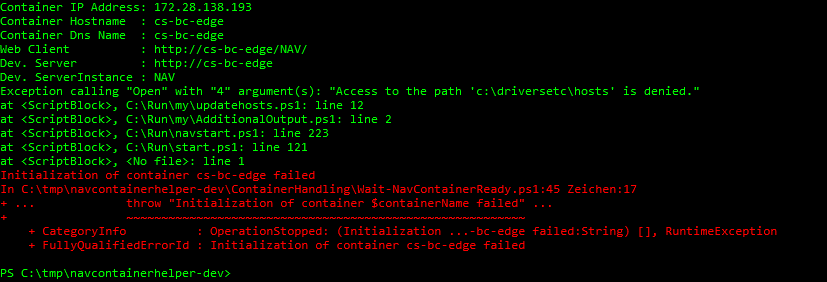
`Exception calling "Open" with "4" argument(s): "Access to the path 'c:\driversetc\hosts' is denied."
at
at
at
at
at
Any idea what may be going on there? My colleague also experiences this behavior and i already tried to use the navcontainerhelper version 0.4.3.0. Any help would be greatly appreciated :)
 staedter
All 19 comments
Are you running PowerShell as administrator or have you assigned permissions to your user to run docker?
 freddydk
on 15 Jan 2019
freddydk
on 15 Jan 2019
I'm running as administrator. I also get problems with -usessl and when trying to create new-navcontainer without removing the old one manually

staedter
on 15 Jan 2019
The removal of the my folder error was reported by AJ Kaufmann earlier - have also started to see that myself - looks like a timing problem. Will fix that soon.
I cannot repro the hosts problem.
What are the permissions of the file c:\windows\system32\drivers\etc\hosts on the host?
Does the file exist?
freddydk
on 15 Jan 2019
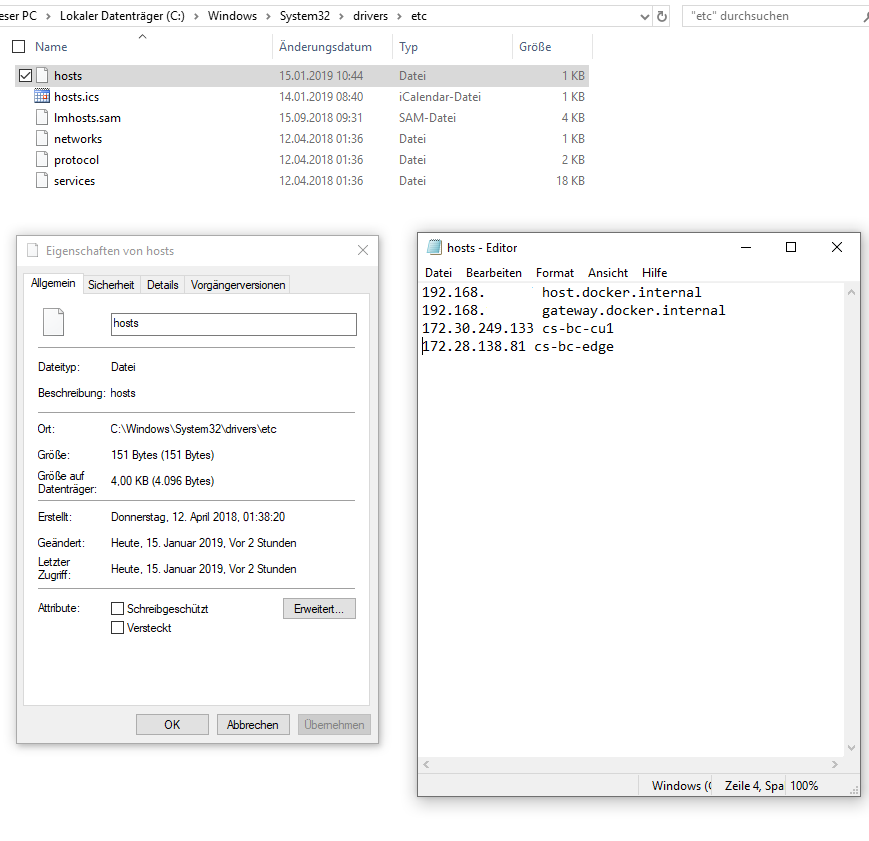
Yes the file exists and I can access/edit it. I'm local admin on the host and the file is not protected. Administrators have full access and I even changed it so that Users now als have full access but i still get this error:
staedter
on 15 Jan 2019
I had the same issue in my BCinaB tool and solved it by running as ContainerAdministrator. Not sure though when and how this broke
 tfenster
on 15 Jan 2019
tfenster
on 15 Jan 2019
I've got the same problem. Here is a stacktrace of the error:
Exception calling "Open" with "4" argument(s): "Access to the path 'c:\driversetc\hosts' is denied."
at <ScriptBlock>, C:\Run\my\updatehosts.ps1: line 12
at <ScriptBlock>, C:\Run\my\AdditionalOutput.ps1: line 2
at <ScriptBlock>, C:\Run\navstart.ps1: line 223
at <ScriptBlock>, C:\Run\start.ps1: line 121
at <ScriptBlock>, <No file>: line 1
Initialization of container test failed
In C:\Program Files\WindowsPowerShell\Modules\navcontainerhelper\0.4.2.6\ContainerHandling\Wait-NavContainerReady.ps1:45 Zeichen:17
+ ...             throw "Initialization of container $containerName failed" ...
+                 ~~~~~~~~~~~~~~~~~~~~~~~~~~~~~~~~~~~~~~~~~~~~~~~~~~~~~~~~~
    + CategoryInfo          : OperationStopped: (Initialization of container test failed:String) [], RuntimeException
    + FullyQualifiedErrorId : Initialization of container test failed
The file c:\driversetc\hosts exists on the container and has the following permissions:
(get-acl C:\driversetc\hosts).access


FileSystemRights  : FullControl
AccessControlType : Allow
IdentityReference : NT AUTHORITY\SYSTEM
IsInherited       : True
InheritanceFlags  : None
PropagationFlags  : None

FileSystemRights  : FullControl
AccessControlType : Allow
IdentityReference : BUILTIN\Administrators
IsInherited       : True
InheritanceFlags  : None
PropagationFlags  : None

FileSystemRights  : ReadAndExecute, Synchronize
AccessControlType : Allow
IdentityReference : BUILTIN\Users
IsInherited       : True
InheritanceFlags  : None
PropagationFlags  : None

FileSystemRights  : ReadAndExecute, Synchronize
AccessControlType : Allow
IdentityReference : APPLICATION PACKAGE AUTHORITY\ALL APPLICATION PACKAGES
IsInherited       : True
InheritanceFlags  : None
PropagationFlags  : None

FileSystemRights  : ReadAndExecute, Synchronize
AccessControlType : Allow
IdentityReference : APPLICATION PACKAGE AUTHORITY\ALL RESTRICTED APPLICATION
                    PACKAGES
IsInherited       : True
InheritanceFlags  : None
PropagationFlags  : None
And the path c:\driversetc\ has the following permissions:
(get-acl C:\driversetc\).access


FileSystemRights  : 268435456
AccessControlType : Allow
IdentityReference : CREATOR OWNER
IsInherited       : False
InheritanceFlags  : ContainerInherit, ObjectInherit
PropagationFlags  : InheritOnly

FileSystemRights  : 268435456
AccessControlType : Allow
IdentityReference : NT AUTHORITY\SYSTEM
IsInherited       : False
InheritanceFlags  : ContainerInherit, ObjectInherit
PropagationFlags  : InheritOnly

FileSystemRights  : Modify, Synchronize
AccessControlType : Allow
IdentityReference : NT AUTHORITY\SYSTEM
IsInherited       : False
InheritanceFlags  : None
PropagationFlags  : None

FileSystemRights  : 268435456
AccessControlType : Allow
IdentityReference : BUILTIN\Administrators
IsInherited       : False
InheritanceFlags  : ContainerInherit, ObjectInherit
PropagationFlags  : InheritOnly

FileSystemRights  : Modify, Synchronize
AccessControlType : Allow
IdentityReference : BUILTIN\Administrators
IsInherited       : False
InheritanceFlags  : None
PropagationFlags  : None

FileSystemRights  : -1610612736
AccessControlType : Allow
IdentityReference : BUILTIN\Users
IsInherited       : False
InheritanceFlags  : ContainerInherit, ObjectInherit
PropagationFlags  : InheritOnly

FileSystemRights  : ReadAndExecute, Synchronize
AccessControlType : Allow
IdentityReference : BUILTIN\Users
IsInherited       : False
InheritanceFlags  : None
PropagationFlags  : None

FileSystemRights  : 268435456
AccessControlType : Allow
IdentityReference : NT SERVICE\TrustedInstaller
IsInherited       : False
InheritanceFlags  : ContainerInherit
PropagationFlags  : InheritOnly

FileSystemRights  : FullControl
AccessControlType : Allow
IdentityReference : NT SERVICE\TrustedInstaller
IsInherited       : False
InheritanceFlags  : None
PropagationFlags  : None

FileSystemRights  : ReadAndExecute, Synchronize
AccessControlType : Allow
IdentityReference : APPLICATION PACKAGE AUTHORITY\ALL APPLICATION PACKAGES
IsInherited       : False
InheritanceFlags  : None
PropagationFlags  : None

FileSystemRights  : -1610612736
AccessControlType : Allow
IdentityReference : APPLICATION PACKAGE AUTHORITY\ALL APPLICATION PACKAGES
IsInherited       : False
InheritanceFlags  : ContainerInherit, ObjectInherit
PropagationFlags  : InheritOnly

FileSystemRights  : ReadAndExecute, Synchronize
AccessControlType : Allow
IdentityReference : APPLICATION PACKAGE AUTHORITY\ALL RESTRICTED APPLICATION
                    PACKAGES
IsInherited       : False
InheritanceFlags  : None
PropagationFlags  : None

FileSystemRights  : -1610612736
AccessControlType : Allow
IdentityReference : APPLICATION PACKAGE AUTHORITY\ALL RESTRICTED APPLICATION
                    PACKAGES
IsInherited       : False
InheritanceFlags  : ContainerInherit, ObjectInherit
PropagationFlags  : InheritOnly
My local etc folder has the following permissions (and it's working if I don't use process isolation):
(get-acl C:\Windows\System32\drivers\etc).access

FileSystemRights  : 268435456
AccessControlType : Allow
IdentityReference : ERSTELLER-BESITZER
IsInherited       : False
InheritanceFlags  : ContainerInherit, ObjectInherit
PropagationFlags  : InheritOnly

FileSystemRights  : 268435456
AccessControlType : Allow
IdentityReference : NT-AUTORITÄT\SYSTEM
IsInherited       : False
InheritanceFlags  : ContainerInherit, ObjectInherit
PropagationFlags  : InheritOnly

FileSystemRights  : Modify, Synchronize
AccessControlType : Allow
IdentityReference : NT-AUTORITÄT\SYSTEM
IsInherited       : False
InheritanceFlags  : None
PropagationFlags  : None

FileSystemRights  : 268435456
AccessControlType : Allow
IdentityReference : VORDEFINIERT\Administratoren
IsInherited       : False
InheritanceFlags  : ContainerInherit, ObjectInherit
PropagationFlags  : InheritOnly

FileSystemRights  : Modify, Synchronize
AccessControlType : Allow
IdentityReference : VORDEFINIERT\Administratoren
IsInherited       : False
InheritanceFlags  : None
PropagationFlags  : None

FileSystemRights  : -1610612736
AccessControlType : Allow
IdentityReference : VORDEFINIERT\Benutzer
IsInherited       : False
InheritanceFlags  : ContainerInherit, ObjectInherit
PropagationFlags  : InheritOnly

FileSystemRights  : ReadAndExecute, Synchronize
AccessControlType : Allow
IdentityReference : VORDEFINIERT\Benutzer
IsInherited       : False
InheritanceFlags  : None
PropagationFlags  : None

FileSystemRights  : 268435456
AccessControlType : Allow
IdentityReference : NT SERVICE\TrustedInstaller
IsInherited       : False
InheritanceFlags  : ContainerInherit
PropagationFlags  : InheritOnly

FileSystemRights  : FullControl
AccessControlType : Allow
IdentityReference : NT SERVICE\TrustedInstaller
IsInherited       : False
InheritanceFlags  : None
PropagationFlags  : None

FileSystemRights  : ReadAndExecute, Synchronize
AccessControlType : Allow
IdentityReference : ZERTIFIZIERUNGSSTELLE FÜR ANWENDUNGSPAKETE\ALLE ANWENDUNGSPAKETE
IsInherited       : False
InheritanceFlags  : None
PropagationFlags  : None

FileSystemRights  : -1610612736
AccessControlType : Allow
IdentityReference : ZERTIFIZIERUNGSSTELLE FÜR ANWENDUNGSPAKETE\ALLE ANWENDUNGSPAKETE
IsInherited       : False
InheritanceFlags  : ContainerInherit, ObjectInherit
PropagationFlags  : InheritOnly

FileSystemRights  : ReadAndExecute, Synchronize
AccessControlType : Allow
IdentityReference : ZERTIFIZIERUNGSSTELLE FÜR ANWENDUNGSPAKETE\ALLE EINGESCHRÄNKTEN ANWENDUNGSPAKETE
IsInherited       : False
InheritanceFlags  : None
PropagationFlags  : None

FileSystemRights  : -1610612736
AccessControlType : Allow
IdentityReference : ZERTIFIZIERUNGSSTELLE FÜR ANWENDUNGSPAKETE\ALLE EINGESCHRÄNKTEN ANWENDUNGSPAKETE
IsInherited       : False
InheritanceFlags  : ContainerInherit, ObjectInherit
PropagationFlags  : InheritOnly
And my local hosts file has the following permissions:
(get-acl C:\Windows\System32\drivers\etc\hosts).access


FileSystemRights  : FullControl
AccessControlType : Allow
IdentityReference : NT-AUTORITÄT\SYSTEM
IsInherited       : True
InheritanceFlags  : None
PropagationFlags  : None

FileSystemRights  : FullControl
AccessControlType : Allow
IdentityReference : VORDEFINIERT\Administratoren
IsInherited       : True
InheritanceFlags  : None
PropagationFlags  : None

FileSystemRights  : ReadAndExecute, Synchronize
AccessControlType : Allow
IdentityReference : VORDEFINIERT\Benutzer
IsInherited       : True
InheritanceFlags  : None
PropagationFlags  : None

FileSystemRights  : ReadAndExecute, Synchronize
AccessControlType : Allow
IdentityReference : ZERTIFIZIERUNGSSTELLE FÜR ANWENDUNGSPAKETE\ALLE ANWENDUNGSPAKETE
IsInherited       : True
InheritanceFlags  : None
PropagationFlags  : None

FileSystemRights  : ReadAndExecute, Synchronize
AccessControlType : Allow
IdentityReference : ZERTIFIZIERUNGSSTELLE FÜR ANWENDUNGSPAKETE\ALLE EINGESCHRÄNKTEN ANWENDUNGSPAKETE
IsInherited       : True
InheritanceFlags  : None
PropagationFlags  : None
 Sven-Niehus
on 15 Jan 2019
Sven-Niehus
on 15 Jan 2019
Ok, we found the problem. After I disabled Antivirus Endpoint Protection (Kaspersky Endpoint Security 11.0.1.90) I did not get this error and the container was created without any further problems.
Also FYI without the AV the whole process took only 57 seconds as opposed to over 100 seconds...
Is there anything you could do to make it possible to use process isolation without the need to disable AV or is this something Kaspersky resp. Docker has to work on?
Anyway thanks again for the help :)
staedter
on 15 Jan 2019
Ahhhh - I will stop pulling my hairs out... - thanks a lot for continuing to investigate…
I don't think there is much I can do - but I will keep this issue open until we have a solution/mitigation.
Thanks
freddydk
on 15 Jan 2019
I'm trying now to whitelist the process in Kaspersky that is updating the hosts file on my machine, but using procmon I guess it is just powershell.exe executing updatehosts.ps1 which we really couldn't whitelist per se.
I don't know it helps but I included the procmon capture of my container which I created without AV and restarted with AV enabled which gave me the "Access denied" error again.
staedter
on 16 Jan 2019
You could try something real quick.
the updatehosts.ps1 is in the ContainerHandling folder in NavContainerHelper.
If you replace the catch of these lines:
        try {
            $file = [System.IO.File]::Open($hostsFile, [System.IO.FileMode]::Open, [System.IO.FileAccess]::ReadWrite, [System.IO.FileShare]::Read)
        } catch [SYstem.IO.IOException]  {
            Start-Sleep -Seconds 1
        }
with a catch all:
} catch {
Then we will know whether this is a timing issue.
Maybe Kaspersky releases the file afterwards.
Thanks
freddydk
on 16 Jan 2019
Unfortunately it is not working. New-NavContainer now hangs at
Creating SUPER user
Container IP Address: 172.28.134.47
Container Hostname : cs-bc-edge
Container Dns Name : cs-bc-edge
Web Client : http://cs-bc-edge/NAV/
Dev. Server : http://cs-bc-edge
Dev. ServerInstance : NAV

Thanks for trying anyways... I guess we just can't use process isolation right now, or we have to update our hosts manually :)
staedter
on 16 Jan 2019
Thanks.
Searching online, I see a lot of people having issues with Kaspersky and docker.
Actually not sure what Kaspersky adds that the built in Windows Defender doesn't do just as good?
freddydk
on 16 Jan 2019
It's what we use and the decision is above my paygrade ¯_(ツ)_/¯
Currently trying to built my own script for updating the hosts file maybe I can get a workaround going for us.
But again thanks for all the help and I guess for me the issue is resolved as far as you can do anything about it :)
staedter
on 16 Jan 2019
Ok - and you cannot exclude the scanning of that file?
Note, that the reason why it is doing this inside the container is, that when the container restarts, it might get a new IP number and it needs to refresh the hosts file. I couldn't find a way to do that outside the container.
Let me know what you discover:-)
freddydk
on 16 Jan 2019
Have you tried a PS file locally like this:
if (!([Security.Principal.WindowsPrincipal][Security.Principal.WindowsIdentity]::GetCurrent()).IsInRole([Security.Principal.WindowsBuiltInRole] "Administrator")) { Start-Process powershell.exe "-NoProfile -ExecutionPolicy Bypass -File "$PSCommandPath"" -Verb RunAs; exit }
Remove existing line
Set-Content -Path "$env:windir\System32\Drivers\etc\hosts" -Value (get-content -Path "$env:windir\System32\Drivers\etc\hosts" | Select-String -Pattern 'cs-bc-edge' -NotMatch)
add ip:host mapping to host file
$ipadd = docker inspect -f '{{range .NetworkSettings.Networks}}{{.IPAddress}}{{end}}' cs-bc-edge
Add-Content -Value "${ipadd} cs-bc-edge" -Path "$env:windir\System32\Drivers\etc\hosts"
 NAVspecialist
on 16 Jan 2019
NAVspecialist
on 16 Jan 2019
Sure, will do. I guess we could stop scanning hosts but that IS a reasonable thing for a AV to do.
WOW thanks NAVspecialist. I was just trying to figure out how to do that in PS and here you come with the solution...
Thanks yes, this seems to work just fine when I use this script after I Start-NavContainer cs-bc-edge
staedter
on 16 Jan 2019
I have had a similar problemt with IP-address changes when running Portainer. And portainer does not have a switch for updating the hosts-file.
/Palle aka NAVspecialist
NAVspecialist
on 16 Jan 2019
Ok so this is what I have come up with. Big thanks again to Palle aka NAVspecialist. As a workaround I will just use this script manually after I create New-Navcontainer without the -updatehosts flag and if I restart a container. Maybe someone else will find this also useful :)
Selecting hostname of the container that was last started
$containers = docker ps -aq
$lastcontainerid = $containers.Item(0)
$hostname = docker inspect -f '{{ .Config.Hostname}}' $lastcontainerid
elevating PS if necessary
if (!([Security.Principal.WindowsPrincipal][Security.Principal.WindowsIdentity]::GetCurrent()).IsInRole([Security.Principal.WindowsBuiltInRole] "Administrator")) { Start-Process powershell.exe "-NoProfile -ExecutionPolicy Bypass -File "$PSCommandPath"" -Verb RunAs; exit }
Remove existing line
Set-Content -Path "$env:windir\System32\Drivers\etc\hosts" -Value (get-content -Path "$env:windir\System32\Drivers\etc\hosts" | Select-String -Pattern $hostname -NotMatch)
add ip:host mapping to host file
$ipadd = docker inspect -f '{{range .NetworkSettings.Networks}}{{.IPAddress}}{{end}}' $hostname
Add-Content -Value "${ipadd} $hostname" -Path "$env:windir\System32\Drivers\etc\hosts"
staedter
on 16 Jan 2019
Thanks all, I will close this issue as it has been resolved and even includes a workaround if using Kaspersky.
freddydk
on 18 Jan 2019
Related issues
 dkorinets
·
3Comments
dkorinets
·
3Comments
 kine
·
3Comments
kine
·
3Comments
 Rukkulakki
·
5Comments
tfenster
·
3Comments
Rukkulakki
·
5Comments
tfenster
·
3Comments
 lvanvugt
·
5Comments
lvanvugt
·
5Comments
Most helpful comment
Ok so this is what I have come up with. Big thanks again to Palle aka NAVspecialist. As a workaround I will just use this script manually after I create New-Navcontainer without the -updatehosts flag and if I restart a container. Maybe someone else will find this also useful :)
Selecting hostname of the container that was last started
$containers = docker ps -aq
$lastcontainerid = $containers.Item(0)
$hostname = docker inspect -f '{{ .Config.Hostname}}' $lastcontainerid
elevating PS if necessary
if (!([Security.Principal.WindowsPrincipal][Security.Principal.WindowsIdentity]::GetCurrent()).IsInRole([Security.Principal.WindowsBuiltInRole] "Administrator")) { Start-Process powershell.exe "-NoProfile -ExecutionPolicy Bypass -File "$PSCommandPath"" -Verb RunAs; exit }
Remove existing line
Set-Content -Path "$env:windir\System32\Drivers\etc\hosts" -Value (get-content -Path "$env:windir\System32\Drivers\etc\hosts" | Select-String -Pattern $hostname -NotMatch)
add ip:host mapping to host file
$ipadd = docker inspect -f '{{range .NetworkSettings.Networks}}{{.IPAddress}}{{end}}' $hostname
Add-Content -Value "${ipadd} $hostname" -Path "$env:windir\System32\Drivers\etc\hosts"