Navcontainerhelper: The time zone with ID was not recognized on the server
I WANT CREATE DYNAMICS cENTRAL SANDBOX CONTAINER... AND I CAN'T...
WITH:
install-module navcontainerhelper -force
set accept_eula to $true to accept the eula found here: https://go.microsoft.com/fwlink/?linkid=861843
$accept_eula = $True
$containername = 'MyDynamic365'
$navdockerimage = 'microsoft/bcsandbox#:12.0.21405.22470-es'
$appbacpacuri = ''
$tenantbacpacuri = ''
$additionalParameters = @()
if ($appbacpacuri -ne '' -and $tenantbacpacuri -ne '') {
$additionalParameters = @("--env appbacpac=""$appbacpacuri""","--env tenantBacpac=""$tenantbacpacuri""")
}
$credential = get-credential -UserName $env:USERNAME -Message "Using Windows Authentication. Please enter your Windows credentials."
New-NavContainer -accept_eula:$accept_eula
-containername $containername
-auth Windows
-Credential $credential
-includeCSide
-alwaysPull
-doNotExportObjectsToText
-usessl:$false
-updateHosts
-assignPremiumPlan
-shortcuts Desktop
-imageName $navdockerimage
-additionalParameters $additionalParameters
Setup-NavContainerTestUsers -containerName $containername -password $credential.Password
TERMINAL:
PS D:\Downloads> d:\Downloads\CreateBCSandbox.ps1
Solicitud de credenciales para Windows PowerShell.
Using Windows Authentication. Please enter your Windows credentials.
Password for user Esteban: ***
Pulling docker Image microsoft/bcsandbox:12.0.21405.22470-es
12.0.21405.22470-es: Pulling from microsoft/bcsandbox
Digest: sha256:7ed84de3ae51551dd05d97d736853b5c11e86916188cf6344bd8e1b30083daeb
Status: Image is up to date for microsoft/bcsandbox:12.0.21405.22470-es
Creating Nav container MyDynamic365
Using image microsoft/bcsandbox:12.0.21405.22470-es
NAV Version: 12.0.21405.22470-ES
Generic Tag: 0.0.5.6
Removing container MyDynamic365
Removing MyDynamic365 from hosts
Removing C:\ProgramData\NavContainerHelper\Extensions\MyDynamic365
Creating container MyDynamic365 from image microsoft/bcsandbox:12.0.21405.22470-es
Waiting for container MyDynamic365 to be ready
Initializing...
Starting Container
Hostname is MyDynamic365
PublicDnsName is MyDynamic365
Using Windows Authentication
Starting Local SQL Server
Starting Internet Information Server
Modifying Service Tier Config File with Instance Specific Settings
Starting NAV Service Tier
Creating DotNetCore Web Server Instance
Enabling Financials User Experience
Creating http download site
Creating Windows user Esteban
Setting SA Password and enabling SA
Creating SUPER user
Assign Premium plan for MYDYNAMIC365\ESTEBAN
Container IP Address: 172.31.178.16
Container Hostname : MyDynamic365
Container Dns Name : MyDynamic365
Web Client : http://MyDynamic365/NAV/
Dev. Server : http://MyDynamic365
Dev. ServerInstance : NAV
Files:
http://MyDynamic365:8080/al-0.15.18771.vsix
You are running a container which is 77 days old.
Microsoft recommends that you always run the latest version of our containers.
Initialization took 92 seconds
Ready for connections!
Reading CustomSettings.config from MyDynamic365
Creating Desktop Shortcuts for MyDynamic365
Nav container MyDynamic365 successfully created
Downloading C:\Users\Esteban\AppData\Local\Temp\CreateTestUsers.fob
Copy C:\Users\Esteban\AppData\Local\Temp\CreateTestUsers.fob to container MyDynamic365 (c:\run\CreateTestUsers.fob)
Importing Objects from c:\run\CreateTestUsers.fob (container path)
Objects successfully imported
**The time zone with ID 'Romance Standard Time' was not recognized on the server. Update your computer's time zone definitions.
En C:\Program Files\WindowsPowerShell\Modules\navcontainerhelper\0.2.9.6\ObjectHandling\Invoke-NavContainerCodeunit.ps1: 41 Carácter: 5
Invoke-Command -Session $session -ScriptBlock { Param($tenant, $C ...

~~~~~~~~~~~~~~~~~~~~~~~~~~~~~~~
~~~~~~~~~~
    CategoryInfo : NotSpecified: (0:Int32) [Invoke-NAVCodeunit], FaultException`1
    FullyQualifiedErrorId : MicrosoftDynamicsNavServer$NAV/default,Microsoft.Dynamics.Nav.Management.Cmdlets.InvokeNavCodeunit**
 Madest25
All 11 comments
It looks like everything completed successfully, but creating test users failed - due to a time zone issue.
What Windows Version are you running?
In PowerShell on the host, please run Get-TimeZone and tell me what that returns?
On the desktop you should have a shortcut for MyDynamics365 PowerShell Prompt, open that and run Get-TimeZone and tell me what that returns?
Thanks
 freddydk
on 24 Jun 2018
freddydk
on 24 Jun 2018
Hi, thanks for answering.
I have Windows 10, updated until version 1709.
Yes, apparently everything is fine but the user does not work and I can not access Nav.
I would like to know the reason.
This returns:
Windows PowerShell:
PS C:\Users\Esteban> Get-TimeZone
Id : Romance Standard Time
DisplayName : (UTC+01:00) Bruselas, Copenhague, Madrid, París
StandardName : Hora estándar romance
DaylightName : Hora de verano romance
BaseUtcOffset : 01:00:00
SupportsDaylightSavingTime : True
Dynamics PowerShell:
Welcome to the NAV Container PowerShell prompt
PS C:\run> get-timezone
Id : Hora est?ndar romance
DisplayName : Hora est?ndar romance
StandardName : Hora est?ndar romance
DaylightName : Hora de verano romance
BaseUtcOffset : 01:00:00
SupportsDaylightSavingTime : True

Thanks
Madest25
on 24 Jun 2018
It looks like the timezone ID inside the container is translated???
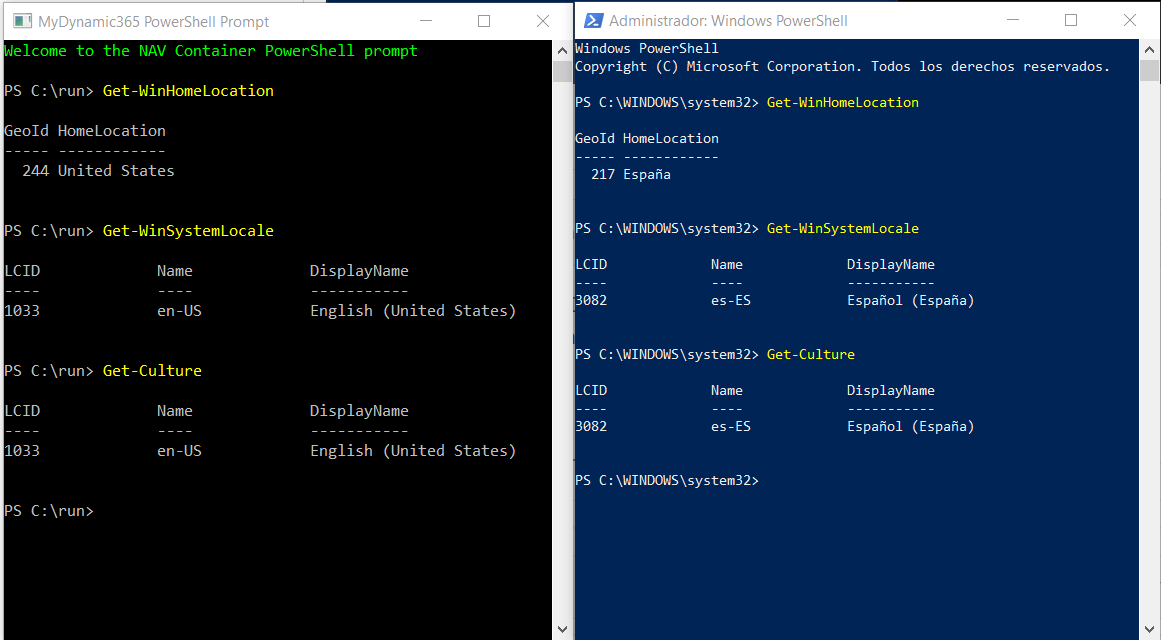
Could you run these 3 commands on the host and in the container
Get-WinHomeLocation
Get-WinSystemLocale
Get-Culture
Is your Windows 10 machine a physical machine with windows 10 or is it a Virtual machine?
freddydk
on 25 Jun 2018
It's a physical machine.
NAV PowerShell
PS C:\run> Get-WinHomeLocation
GeoId HomeLocation
244 United States
PS C:\run> Get-WinSystemLocale
LCID Name DisplayName
1033 en-US English (United States)
PS C:\run> Get-Culture
LCID Name DisplayName
1033 en-US English (United States)
Windows PowerShell
PS C:\WINDOWS\system32> Get-WinHomeLocation
GeoId HomeLocation
217 España
PS C:\WINDOWS\system32> Get-WinSystemLocale
LCID Name DisplayName
3082 es-ES Español (España)
PS C:\WINDOWS\system32> Get-Culture
LCID Name DisplayName
3082 es-ES Español (España)
Thanks
Madest25
on 25 Jun 2018
@freddydk happens to me too in an italian version of windows 10 (host, physical) and the Id is not translated.
Get-Timezone output:
Id : W. Europe Standard Time
DisplayName : (UTC+01:00) Amsterdam, Berlino, Berna, Roma, Stoccolma, Vienna
StandardName : ora solare Europa occidentale
DaylightName : ora legale Europa occidentale
BaseUtcOffset : 01:00:00
SupportsDaylightSavingTime : True
It seems that the scripts looks for the timezone by StandardName instead of Id.
 alterbang
on 27 Jul 2018
alterbang
on 27 Jul 2018
I think this is a bug in Docker.
But as a workaround, after you have created your container (and before running Setup-NavContainerTestUsers), please try this:
$TimeZoneId = (Get-TimeZone).Id
docker exec $containerName powershell "Set-TimeZone '$TimeZoneId'"
where $containerName is your containername.
That should do the trick.
freddydk
on 26 Aug 2018
Included in version 0.3.1.0
freddydk
on 3 Sep 2018
I still get this error with the newest version of navcontainerhelper.
When creating the container i get this message
WARNING: Container starts with TimeZone = Mitteleuropäische Zeit, which is not recognized in the list of TimeZones.
Executing the Set-TimeZone Cmdlet does not fix the problem
I use bcsandbox:ch as image tag
 marknitek
on 19 Feb 2019
marknitek
on 19 Feb 2019
Ok it looks like when i explicitly set the time zone in the container with
Set-TimeZone 'W. Europe Standard Time'
It works...
That makes no sense since the docker exec script does the exact same thing?
marknitek
on 19 Feb 2019
Ok it looks like when i explicitly set the time zone in the container with
Set-TimeZone 'W. Europe Standard Time'It works...
That makes no sense since the docker exec script does the exact same thing?
We've got the same problem but cannot update the timezone inside the container due to a permission error:
PS C:\run> Set-TimeZone 'W. Europe Standard Time'
Set-TimeZone : Access is denied
We used the default powershell shortcut which is running the shell with admin rights...
 MicAlter31
on 23 Oct 2019
MicAlter31
on 23 Oct 2019
Windows Server core 2019 doesn't allow time zone changes.
If you run with process isolation (-usebestcontaineros) I think it should work.
Please create a new issue instead of adding to a closed issue - it might be a different issue than the main one (or rather it is a different issue)
freddydk
on 23 Oct 2019
Related issues
 Spycoclown
·
4Comments
Spycoclown
·
4Comments
 chavansachin20
·
4Comments
chavansachin20
·
4Comments
 Rukkulakki
·
5Comments
Rukkulakki
·
5Comments
 ashikivor
·
4Comments
ashikivor
·
4Comments
 dkorinets
·
3Comments
dkorinets
·
3Comments
Most helpful comment
I think this is a bug in Docker.
But as a workaround, after you have created your container (and before running Setup-NavContainerTestUsers), please try this:
where $containerName is your containername.
That should do the trick.